
Aiglare
FreeNot checkedFinds every spot where LLM output reaches a user or triggers a side-effect — and flags the unguarded ones. CLI + MCP.

About
Finds every spot where LLM output reaches a user or triggers a side-effect — and flags the unguarded ones. CLI + MCP.
README
Lint your AI features for governance guardrails — where can the model do something you can't undo?
Live site: nugehs.github.io/aiglare-web
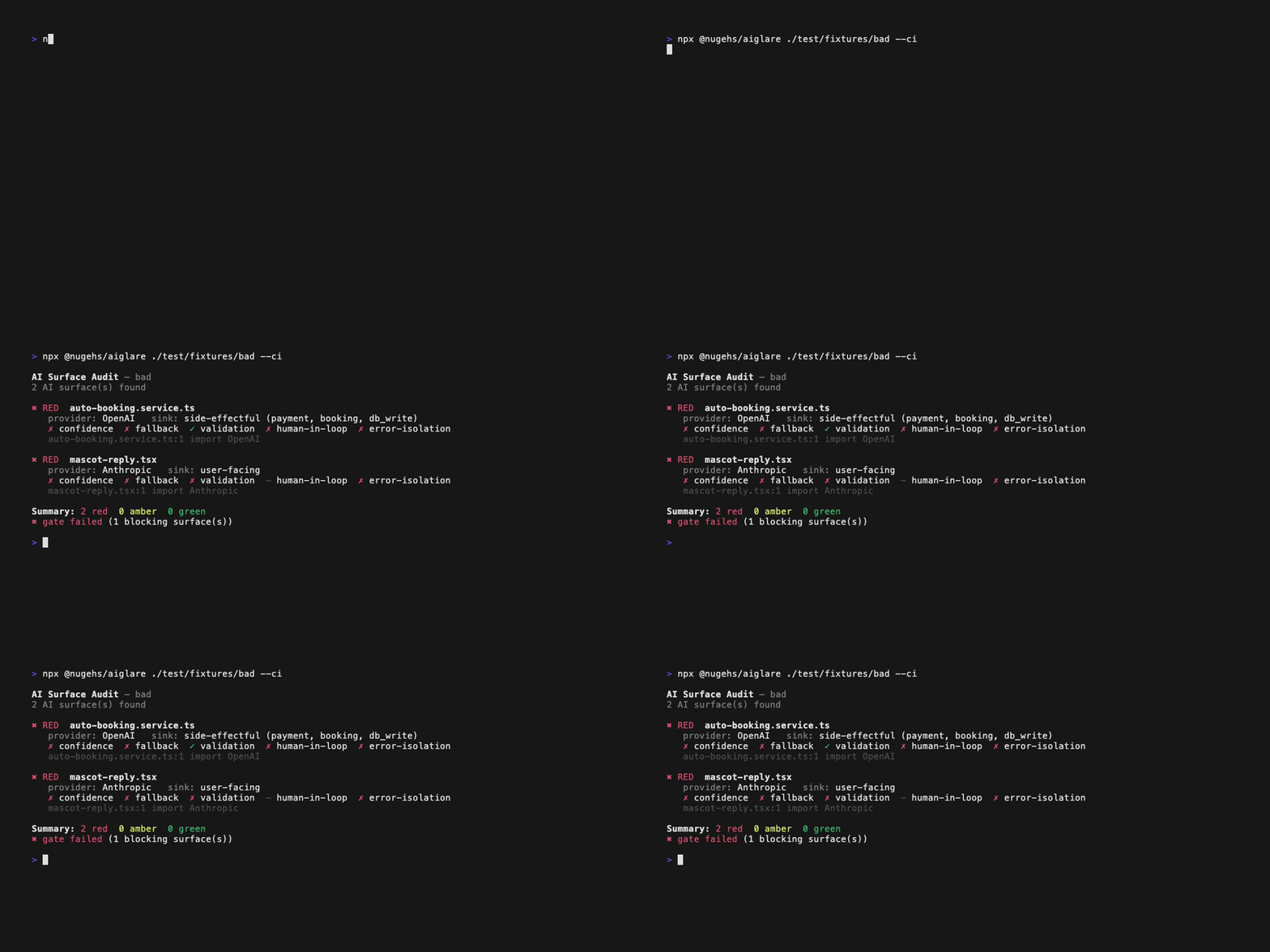
Point it at any JS/TS repo and it finds every place an LLM/AI output reaches a user or triggers a side-effect (payment, booking, email, database write) — then flags which of those have no confidence handling, no fallback, no output validation, and no human-in-the-loop.
Most AI incidents aren't model failures. They're governance failures: the model output flowed straight to a user or an irreversible action with nothing in between. This tool makes those paths visible, and lets you block them in CI.
npx @nugehs/aiglare                                        # audit current repo
npx @nugehs/aiglare ./src --ci                             # fail the build on a red side-effectful surface
npx @nugehs/aiglare --compliance all --format html         # HTML evidence report for auditors
npx @nugehs/aiglare --compliance soc2,eu-ai-act --format lint --ci  # compliance linter in CI
What it reports
Each AI surface is classified by sink — where the output goes:
user-facing— returned from a route/controller, or rendered in a componentside-effectful— feeds a payment, booking, email, db/file write, or shellinternal— logged or cached only
…and scored on five guardrail dimensions: confidence handling, fallback/uncertain path, output validation, human-in-the-loop (for side-effects), and error isolation.
| Severity | Meaning |
|---|---|
| 🔴 red | model output hits a user or a side-effect with no guardrails — review now |
| 🟡 amber | partial coverage |
| 🟢 green | guardrails present |
The CI gate (--ci) fails only on red + side-effectful surfaces — the "AI auto-triggers an irreversible action with no confirmation" case — so it's safe to adopt without drowning a team in warnings.
Compliance reports
Pass --compliance to map every finding to specific regulatory controls, then pick your output format:
# HTML evidence report — branded, collapsible per-framework sections, guardrail matrix
aiglare --compliance all --format html > report.html

# ESLint-style linter — pipe into CI, editors, or reviewers
aiglare --compliance soc2,eu-ai-act --format lint

# Markdown evidence doc — ready to hand to an auditor
aiglare --compliance all --format markdown > AUDIT.md

# Guardrail linter (no framework) — rule IDs like guardrail/human-in-loop
aiglare --format lint
Supported frameworks:
| Framework | Controls mapped |
|---|---|
soc2 |
SOC 2 Trust Services Criteria — CC7.2, CC7.4, CC9.1, A1.2, PI1.2, PI1.3 |
eu-ai-act |
EU AI Act — Art. 9, 13, 14, 17 |
nist |
NIST AI RMF — GOVERN-1.2, MAP-2.3, MEASURE-2.5/2.6, MANAGE-1.3/2.2 |
owasp |
OWASP LLM Top 10 — LLM02, LLM04, LLM08, LLM09 |
Use all to include every framework. Each surface in --json output gains a violations[] array with the framework, control ID, description, and error/warning level.
Multi-repo: pass multiple paths for a single combined report:
aiglare ./api ./web --compliance all --format html > report.html
Provider-agnostic
Detection is driven by a provider registry covering OpenAI, Anthropic, Google, Cohere, Mistral, Replicate, the Vercel AI SDK, LangChain/LangGraph, Ollama, AWS Bedrock, Cloudflare Workers AI, and Hugging Face — plus raw fetch/axios calls to known inference hosts. Adding a provider is a one-line PR.
Optional: repoctx acceleration
If a repoctx index (.dev-context/index.json) is present, the tool uses it automatically to prioritize likely AI files and sharpen sink classification via repoctx's kind/domain data (e.g. a file repoctx marks as a controller route is correctly treated as user-facing even when the native scanner can't see the call graph). Without it, a built-in TypeScript-compiler scanner does the same job at lower fidelity. Same tool, two fidelity levels — standalone for everyone, richer for repoctx users.
MCP server
aiglare ships a built-in Model Context Protocol server so agents can run audits directly:
aiglare mcp # stdio JSON-RPC server (no SDK dependency)
It exposes three tools:
| Tool | What it does |
|---|---|
ai_surface_audit |
Full audit of a repo (path, optional sinks, severity) → the same structured report as --json |
ai_surface_gate |
CI-gate verdict for a repo: passed + count of blocking red side-effectful surfaces |
list_providers |
The provider registry the scanner detects |
Register it with an MCP host (Claude Desktop, Cursor, VS Code, …):
{
  "mcpServers": {
    "aiglare": {
      "command": "npx",
      "args": ["-y", "@nugehs/aiglare", "mcp"]
    }
  }
}
aiglare vs alternatives
| Approach | What it does | Where aiglare differs |
|---|---|---|
| guardrails-ai / NeMo Guardrails / runtime validators | Validate or correct each model output at runtime, per call | aiglare is static analysis: it finds the AI surfaces that have no guardrail at all, before anything runs — then you add a runtime validator there |
| semgrep / custom lint rules | General-purpose static rules you write and maintain yourself | aiglare ships the AI-specific knowledge out of the box: a provider registry, sink classification, and five guardrail dimensions — zero rule-writing |
| Manual AI-feature review | Catches nuance a scanner cannot | aiglare gives reviewers the complete inventory of AI surfaces and a severity triage, so review time goes where the risk is |
These are complementary: aiglare tells you where a guardrail is missing; runtime validators are how you add one.
Run a 1-week pilot
Want to evaluate aiglare on a real codebase before adopting the CI gate? PILOT.md is a step-by-step one-week runbook: install, first audit on a backend and a frontend repo, reading the report, tuning --severity/--sinks, and deciding whether to turn on --ci.
Honest limitations
This is static, advisory analysis — a linter, not a verifier. It produces false positives (a guardrail two call-hops away can be missed) and false negatives (a confidence variable that doesn't actually gate anything reads as present). Treat output as surfaces to review, not violations. The single-file native scanner cannot follow the call graph; the repoctx adapter exists precisely to close that gap.
Options
aiglare [path...] [options]
  --compliance <fw>   Map findings to compliance controls.
                      Comma-separated: soc2, eu-ai-act, nist, owasp, or "all"
  --format <fmt>      Output format: terminal (default), json, lint, markdown, html
  --json              JSON output (alias for --format json)
  --ci                Exit non-zero on a red side-effectful surface
  --severity <lvl>    Show only red, or amber-and-worse
  --sinks <list>      Filter: user-facing,side-effectful,internal

aiglare mcp           Start the MCP server (stdio)
The MCP tool ai_surface_audit accepts an optional compliance array — each surface in the response includes a violations[] array when set.
License
MIT
Part of the toolchain
aiglare is one of four tools that form a deterministic trust layer for AI-assisted development. Each answers a question people keep handing to an LLM — with static analysis instead.
- repoctx — context: what does this change actually touch?
- tieline — contracts: did the front end and back end quietly stop agreeing?
- bouncer — compliance: could you defend this to Ofcom?
- aiglare (this tool) — governance: where can the model do something you can't undo?
More at segunolumbe.com. static analysis, never the model.
Installing Aiglare
This server has no published package — it is built from source. Open the repository and follow its README.
▸ github.com/nugehs/aiglareFAQ
Is Aiglare MCP free?
Yes, Aiglare MCP is free — one-click install via Unyly at no cost.
Does Aiglare need an API key?
No, Aiglare runs without API keys or environment variables.
Is Aiglare hosted or self-hosted?
Self-hosted: the server runs locally on your machine via the install command above.
How do I install Aiglare in Claude Desktop, Claude Code or Cursor?
Open Aiglare on unyly.org, pick your client tab (Claude Desktop, Claude Code, Cursor) and press Install — the config is generated automatically, no JSON editing.
Related MCPs
Fetch
Web content fetching and conversion for efficient LLM usage.
AWS KB Retrieval
Retrieval from AWS Knowledge Base using Bedrock Agent Runtime.
 by modelcontextprotocol
Spring AI MCP Server
Provides auto-configuration for setting up an MCP server in Spring Boot applications.
llm-analysis-assistant
A very streamlined mcp client that supports calling and monitoring stdio/sse/streamableHttp, and can also view request responses through the /logs page. It also
 by xuzexin-hz
Compare Aiglare with
Not sure what to pick?
Find your stack in 60 seconds
Author?
Embed badge for your README
Browse similar
All ai MCPs