
Apache Flink
FreeNot checkedApache Flink MCP Server is a Model Context Protocol (MCP) implementation that empowers AI assistants and large language models to interact directly with Apache

About
Apache Flink MCP Server is a Model Context Protocol (MCP) implementation that empowers AI assistants and large language models to interact directly with Apache Flink clusters through natural language. It enables intelligent monitoring, management, and analysis of real-time streaming applications—making stream processing more intuitive, accessible.
README
A Model Context Protocol (MCP) server implementation for Apache Flink that enables AI assistants and large language models to interact with Flink clusters through natural language interfaces. This server provides comprehensive tools for monitoring, managing, and analyzing Apache Flink streaming applications.
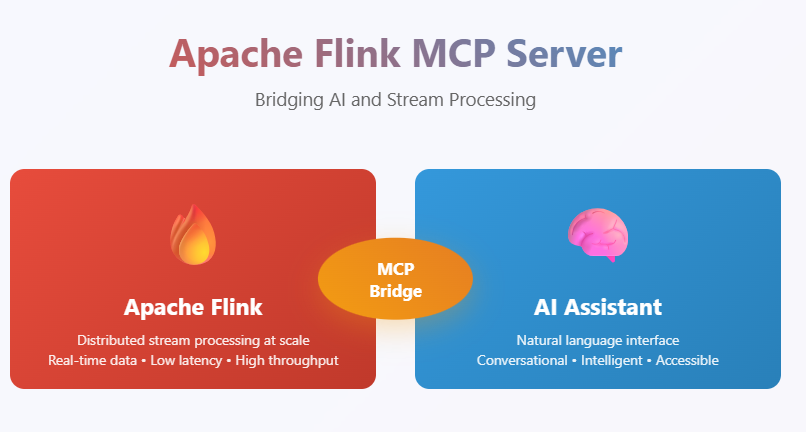
Overview
The Apache Flink MCP Server bridges the gap between AI assistants and Apache Flink clusters by providing a standardized MCP interface. It allows users to perform complex Flink operations through conversational AI, making stream processing management more accessible and intuitive.
Features
🎯 Core Capabilities
- Cluster Monitoring: Get real-time cluster information including jobs, slots, and TaskManagers
- Job Management: List, monitor, and analyze Flink job details and metrics
- Exception Tracking: Retrieve and analyze job exceptions for debugging
- Resource Management: Monitor TaskManager resources and JAR file deployments
- Metrics Collection: Access comprehensive job and cluster metrics
🔧 Available Tools:
initialize_flink_connection– Connect to Flink REST APIget_connection_status– Check connection statusget_cluster_info– Overview of the Flink clusterlist_jobs– List all Flink jobs with statusget_job_details– Comprehensive job details by IDget_job_exceptions– Fetch job-level exceptionsget_job_metrics– Fetch metrics for a joblist_taskmanagers– List TaskManagers with resourceslist_jar_files– List uploaded JAR filessend mail– (Send an email notification)
🚀 Benefits
- Natural Language Interface: Interact with Flink using conversational AI
- Real-time Monitoring: Get instant insights into cluster and job status
- Debugging Support: Easily access exception logs and metrics
- Resource Optimization: Monitor resource usage across TaskManagers
- Developer Productivity: Reduce time spent navigating Flink Web UI
Installation
Prerequisites
- Apache Flink cluster (running and accessible)
- Python 3.8 or higher
- MCP-compatible client (Claude Desktop, Continue etc.)
Client Configuration
Continue.dev
Add to your Continue configuration (Flink-mcp-server.yaml):
name: Sample MCP
version: 0.0.1
schema: v1
mcpServers:
  - name: Flink MCP Server
    type: streamable-http
    url:   http://127.0.0.1:9090/mcp/
Usage Examples
Basic Cluster Monitoring
Human: What's the status of my Flink cluster?
AI: I'll check your Flink cluster status for you.
[Uses get_cluster_info tool to fetch cluster overview]
Job Analysis
Human: Show me all running jobs and their performance metrics
AI: Let me get the current jobs and their metrics.
[Uses list_jobs and get_job_metrics tools]
Troubleshooting
Human: My job with ID abc123 is failing. Can you help me debug it?
AI: I'll check the job details and any exceptions for job abc123.
[Uses get_job_details and get_job_exceptions tools]
Resource Management
Human: How are my TaskManager resources being utilized?
AI: Let me check your TaskManager status and resource allocation.
[Uses list_taskmanagers tool]
API Reference
Available MCP Tools
get_cluster_info
Description: Fetch an overview of the Flink cluster including jobs, slots, and TaskManagers. Parameters: None Returns: Cluster overview with resource information
list_jobs
Description: List all current and recent Flink jobs with their status. Parameters: None Returns: List of jobs with status, start time, and duration
get_job_details
Description: Get detailed information about a specific Flink job. Parameters:
job_id(string, required): The unique identifier of the Flink job
list_taskmanagers
Description: List all registered TaskManagers in the cluster. Parameters: None Returns: List of TaskManagers with resource information
get_job_exceptions
Description: Fetch exceptions that occurred in the specified job. Parameters:
job_id(string, required): The unique identifier of the Flink job
list_jar_files
Description: List all uploaded JAR files in the Flink cluster. Parameters: None Returns: List of available JAR files
get_job_metrics
Description: Fetch selected useful metrics for a running Flink job. Parameters:
job_id(string, required): The unique identifier of the Flink job
send_mail
Description: Send an email notification, such as alerts, status updates, or reports from the Flink MCP server.
Troubleshooting
Common Issues
Connection Failed
- Verify Flink cluster is running and accessible
- Ensure network connectivity to Flink JobManager
Permission Errors
- Verify Flink REST API is enabled
- Check if authentication is required for your Flink setup
Debug Mode
Enable detailed logging:
export LOG_LEVEL=DEBUG
python mcp_server.py
Contributing
We welcome contributions! Please follow these steps:
- Fork the repository
- Create a feature branch:
git checkout -b feature-name - Make your changes and add tests
- Commit your changes:
git commit -m "Add feature" - Push to your fork:
git push origin feature-name - Create a Pull Request
Development Guidelines
- Follow PEP 8 style guidelines
- Update documentation as needed
- Ensure backward compatibility
License
This project is licensed under the MIT License.
Related Projects
- Model Context Protocol - The MCP specification
- Apache Flink - Apache Flink stream processing framework
- MCP Kafka - MCP server for Confluent/Kafka
- MCP Container - MCP server forContainer's
Support
Issues: GitHub Issues
Documentation: Project Wiki
Discussions: Project Discussions
Acknowledgments
- Apache Flink community for the excellent stream processing framework
- Model Context Protocol team for the standardized interface
- Contributors and users of this project
Note: This MCP server provides read-only access to Flink cluster information by default. For write operations, additional configuration and security considerations may be required.
Installing Apache Flink
This server has no published package — it is built from source. Open the repository and follow its README.
▸ github.com/Ashfaqbs/apache-flink-mcp-serverFAQ
Is Apache Flink MCP free?
Yes, Apache Flink MCP is free — one-click install via Unyly at no cost.
Does Apache Flink need an API key?
No, Apache Flink runs without API keys or environment variables.
Is Apache Flink hosted or self-hosted?
Self-hosted: the server runs locally on your machine via the install command above.
How do I install Apache Flink in Claude Desktop, Claude Code or Cursor?
Open Apache Flink on unyly.org, pick your client tab (Claude Desktop, Claude Code, Cursor) and press Install — the config is generated automatically, no JSON editing.
Related MCPs
Fetch
Web content fetching and conversion for efficient LLM usage.
AWS KB Retrieval
Retrieval from AWS Knowledge Base using Bedrock Agent Runtime.
 by modelcontextprotocol
Spring AI MCP Server
Provides auto-configuration for setting up an MCP server in Spring Boot applications.
llm-analysis-assistant
A very streamlined mcp client that supports calling and monitoring stdio/sse/streamableHttp, and can also view request responses through the /logs page. It also
 by xuzexin-hz
Compare Apache Flink with
Not sure what to pick?
Find your stack in 60 seconds
Author?
Embed badge for your README
Browse similar
All ai MCPs