

About
MCP Server with ArcGIS Pro Add-In
README
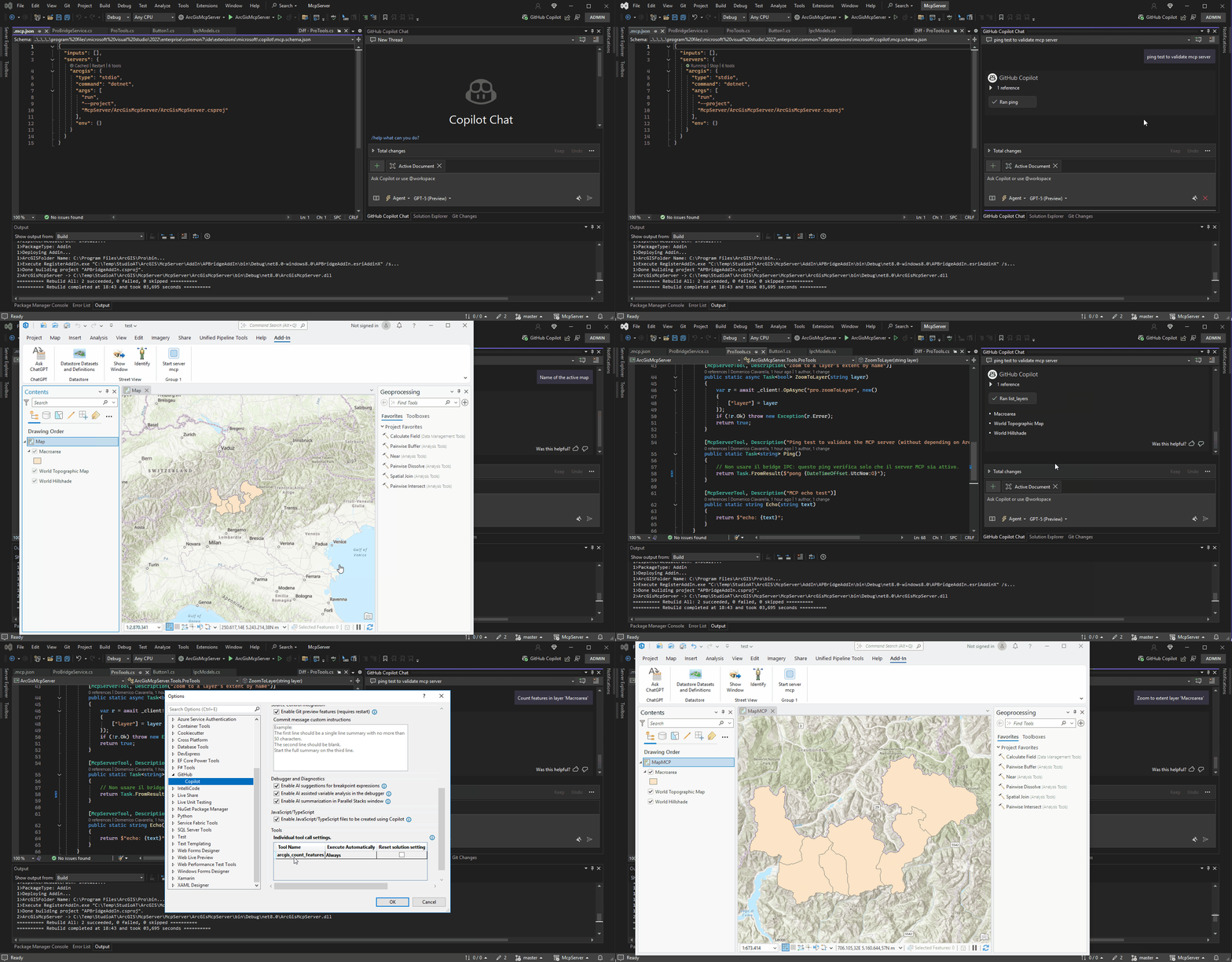
This repository demonstrates how to integrate a Model Context Protocol (MCP) server with an ArcGIS Pro Add-In. The goal is to expose ArcGIS Pro functionality as MCP tools so that GitHub Copilot (in Agent mode) or any MCP client can interact with your GIS environment.
Overview
- ArcGIS Pro Add-In (C# with ArcGIS Pro SDK): runs in-process with ArcGIS Pro and exposes GIS operations through a local IPC channel (Named Pipes).
- MCP Server (.NET 8 console app): defines MCP tools, communicates with the Add-In via Named Pipes, and is configured as an MCP server in Visual Studio through
.mcp.json.
This can allow Copilot (Agent Mode) to query maps, list layers, count features, zoom to layers, and more — directly in ArcGIS Pro.
Prerequisites
- Visual Studio 2022 17.14 or later (for MCP Agent Mode support)
- ArcGIS Pro SDK for .NET
- ArcGIS Pro installed (same machine)
- .NET 8 SDK
Solution Structure
ArcGisProMcpSample/
+- ArcGisProBridgeAddIn/           # ArcGIS Pro Add-In project (in-process)
¦  +- Config.daml
¦  +- Module.cs
¦  +- ProBridgeService.cs          # Named Pipe server + command handler
¦  +- IpcModels.cs                 # IPC request/response DTOs
+- ArcGisMcpServer/                # MCP server project (.NET 8)
¦  +- Program.cs
¦  +- Tools/ProTools.cs            # MCP tool definitions (bridge client)
¦  +- Ipc/BridgeClient.cs          # Named Pipe client
¦  +- Ipc/IpcModels.cs             # Shared IPC DTOs
+- .mcp.json                       # MCP server manifest for VS Copilot
ArcGIS Pro Add-In
The Add-In starts a Named Pipe server on ArcGIS Pro launch. It handles operations like:
pro.getActiveMapNamepro.listLayerspro.countFeaturespro.zoomToLayer
Example: Module.cs (in sample is in a button)
protected override bool Initialize()
{
    _service = new ProBridgeService("ArcGisProBridgePipe");
    _service.Start();
    return true; // initialization successful
}

protected override bool CanUnload()
{
    _service?.Dispose();
    return true;
}
Example: ProBridgeService handler
case "pro.countFeatures":
{
    if (req.Args == null ||
        !req.Args.TryGetValue("layer", out string? layerName) ||
        string.IsNullOrWhiteSpace(layerName))
        return new(false, "arg 'layer' required", null);

    int count = await QueuedTask.Run(() =>
    {
        var fl = MapView.Active?.Map?.Layers
            .OfType<FeatureLayer>()
            .FirstOrDefault(l => l.Name.Equals(layerName, StringComparison.OrdinalIgnoreCase));
        if (fl == null) return 0;
        using var fc = fl.GetFeatureClass();
        return (int)fc.GetCount();
    });

    return new(true, null, new { count });
}
MCP Server (.NET 8)
The MCP server uses the official ModelContextProtocol NuGet package.
Program.cs
await Host.CreateDefaultBuilder(args)
    .ConfigureServices(services =>
    {
        services.AddSingleton(new BridgeClient("ArcGisProBridgePipe"));
        services.AddMcpServer()
            .WithStdioServerTransport()
            .WithToolsFromAssembly(typeof(ProTools).Assembly);
    })
    .RunConsoleAsync();
Example tool
[McpServerToolType]
public static class ProTools
{
    private static BridgeClient _client;
    public static void Configure(BridgeClient client) => _client = client;

    [McpServerTool(Title = "Count features in a layer", Name = "pro.countFeatures")]
    public static async Task<object> CountFeatures(string layer)
    {
        var r = await _client.OpAsync("pro.countFeatures", new() { ["layer"] = layer });
        if (!r.Ok) throw new Exception(r.Error);
        var count = ((System.Text.Json.JsonElement)r.Data).GetProperty("count").GetInt32();
        return new { layer, count };
    }
}
.mcp.json Manifest
Place in solution root (.mcp.json):
{
  "servers": {
    "arcgis": {
      "type": "stdio",
      "command": "dotnet",
      "args": [
        "run",
        "--project",
        "McpServer/ArcGisMcpServer/ArcGisMcpServer.csproj"
      ]
    }
  }
}
Running in Visual Studio
- Open the solution in Visual Studio 2022 (=17.14).
- Ensure ArcGIS Pro is running with the Add-In loaded (so the Named Pipe exists).
- In VS, open Copilot Chat Agent Mode.
- Copilot reads
.mcp.jsonand starts the MCP server. - Type in chat:
pro.listLayers? returns the layers in the active mappro.countFeatures layer=Buildings? returns the feature count
Next Steps
- Extend tools with operations like
pro.selectByAttribute,pro.getCurrentExtent,pro.exportLayer. - Add retry/timeout logic for IPC communication.
- Containerize the MCP server for deployment. ...
Installing ArcGIS Pro AddIn
This server has no published package — it is built from source. Open the repository and follow its README.
▸ github.com/nicogis/MCP-Server-ArcGIS-Pro-AddInFAQ
Is ArcGIS Pro AddIn MCP free?
Yes, ArcGIS Pro AddIn MCP is free — one-click install via Unyly at no cost.
Does ArcGIS Pro AddIn need an API key?
No, ArcGIS Pro AddIn runs without API keys or environment variables.
Is ArcGIS Pro AddIn hosted or self-hosted?
Self-hosted: the server runs locally on your machine via the install command above.
How do I install ArcGIS Pro AddIn in Claude Desktop, Claude Code or Cursor?
Open ArcGIS Pro AddIn on unyly.org, pick your client tab (Claude Desktop, Claude Code, Cursor) and press Install — the config is generated automatically, no JSON editing.
Related MCPs
Fetch
Web content fetching and conversion for efficient LLM usage.
AWS KB Retrieval
Retrieval from AWS Knowledge Base using Bedrock Agent Runtime.
 by modelcontextprotocol
Spring AI MCP Server
Provides auto-configuration for setting up an MCP server in Spring Boot applications.
llm-analysis-assistant
A very streamlined mcp client that supports calling and monitoring stdio/sse/streamableHttp, and can also view request responses through the /logs page. It also
 by xuzexin-hz
Compare ArcGIS Pro AddIn with
Not sure what to pick?
Find your stack in 60 seconds
Author?
Embed badge for your README
Browse similar
All ai MCPs