
Arduino Llm Agent
FreeNot checkedAn intelligent backend server that uses Large Language Models (LLMs) to generate, compile, and upload Arduino, ESP8266, and ESP32 firmware automatically — power

About
An intelligent backend server that uses Large Language Models (LLMs) to generate, compile, and upload Arduino, ESP8266, and ESP32 firmware automatically — powered by Ollama and Arduino CLI
README
llm-arduino-mcp
An intelligent backend server that uses Large Language Models (LLMs) to generate, compile, and upload Arduino, ESP8266, and ESP32 firmware automatically — powered by Ollama and Arduino CLI.
LLM + MCP inspired flow
Generate, compile, and upload Arduino sketches automatically using natural language prompts and local Ollama LLM models.
Features
- Ollama local LLM API for private codegen
- Automated compile & upload using Arduino CLI
- Supports multiple boards: Arduino Uno, ESP8266, ESP32 — extend easily
- Simple Express API — plug into your own frontend
Quick Start
- Install and run Ollama (
ollama serve)ollama run llama3.2
- Install and configure
arduino-cli - Clone this repo and
npm run start(orbun runversion) - Send POST request with your prompt:
curl -X POST http://localhost:3000/generate-arduino \
  -H "Content-Type: application/json" \
  -d '{"prompt": "Write Arduino code to blink LED on pin 2 using ESP32."}'
MCP (Model Context Protocol) Status
This project partially follows MCP (Model Context Protocol) principles:
- Uses structured system + user roles.
- Passes prompt context in a clear format.
- Automates an external tool (Arduino CLI) based on generated context.
Planned Improvements for MCP Compliance
- Add a versioned Context Registry for reusable system instructions.
- Support custom context creation and switching via REST.
- Standardize request/response payloads to fully align with OpenAI’s Chat API format.
- Add tool/plugin calls as structured operations.
- Store complete chain-of-thought and compile/upload logs.
- Add role-based API auth for context control.
The goal is to evolve this project into a reusable, standards-friendly MCP backend for embedded LLM workflows.
Prerequisites
- Install arduino-cli
curl -fsSL https://raw.githubusercontent.com/arduino/arduino-cli/master/install.sh | sh
Or download a copy of the Arduino CLI, place it in a directory of your choice, and make sure to add it to your system’s PATH according to your operating system.
arduino-cli core update-index
arduino-cli core install arduino:avr
arduino-cli core install esp8266:esp8266
arduino-cli core install esp32:esp32
- Add arduino-cli to the system path
- Ensure Ollama is setup on your machine
- Refer: https://ollama.com/download
To install dependencies:
bun install
Update the server.js
- Update Ollama model as per your Ollama setup
- Tested with llama3.2:latest
- Update Port for you board
const OLLAMA_URL = 'http://localhost:11434/api/chat'; // Change if your Ollama server is running on a different port
const SERIAL_PORT = 'COM5';        // Change as per your board
const OLLAMA_MODEL = 'llama3.2:latest'; // Change as per your Ollama setup
To run:
bun run start
Usage
- Make sure the Arduino Board is attached to the com port
- Run following from the terminal
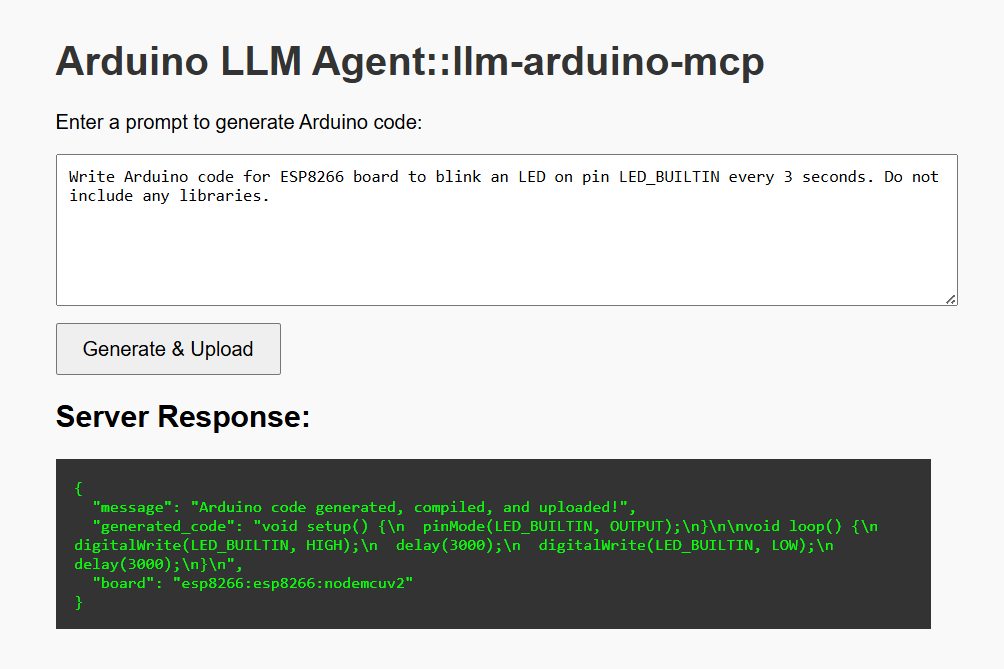
curl --location 'http://localhost:3000/generate-arduino' \
--header 'Content-Type: application/json' \
--data '{
    "prompt": "Write Arduino code for ESP8266 board to blink an LED on pin LED_BUILTIN every 3 seconds. Do not include any libraries."
}'
Roadmap & Future Improvements
This project is a strong starting point for combining LLMs with embedded automation. Here are planned ideas to take it further:
Web UI Enhancements
- Add a proper web frontend with code syntax highlighting (e.g., Ace Editor or Monaco).
- Display generated code nicely with download or copy buttons.
- Show compilation logs and upload status in real-time.
Board Management
- Add a dropdown in the UI to select supported boards manually.
- Fetch board list dynamically from a config file (
boards.json). - Auto-detect connected boards and available serial ports.
User Prompts & Templates
- Offer ready-made prompt templates for common tasks (blink LED, read sensor, etc.).
- Add prompt history and re-run support.
Project Files
- Allow multiple sketches and auto-archive generated code.
- Provide an option to download the
.inoas a zip.
Security & Permissions
- Add basic API authentication or API keys.
- Validate generated code before compile/upload for safety.
Docker & Deployment
- Add a Dockerfile to package Ollama, Arduino CLI, and the server together.
- Provide instructions for deployment on local networks or edge devices.
CI/CD Integration
- Use GitHub Actions to lint, test, and deploy the backend.
- Add unit tests for code block & board parsing.
Extensibility
- Support other microcontroller families (RP2040, STM32, etc.).
- Modular plugin system for new boards or new codegen models.
Monitoring
- Add basic logging & metrics for LLM usage, compile stats, success/failure rates.
Want to contribute?
Feel free to open an Issue or PR for any of these improvements! Do start the project if you like it.
Installing Arduino Llm Agent
This server has no published package — it is built from source. Open the repository and follow its README.
▸ github.com/bkrajendra/arduino-llm-agentFAQ
Is Arduino Llm Agent MCP free?
Yes, Arduino Llm Agent MCP is free — one-click install via Unyly at no cost.
Does Arduino Llm Agent need an API key?
No, Arduino Llm Agent runs without API keys or environment variables.
Is Arduino Llm Agent hosted or self-hosted?
Self-hosted: the server runs locally on your machine via the install command above.
How do I install Arduino Llm Agent in Claude Desktop, Claude Code or Cursor?
Open Arduino Llm Agent on unyly.org, pick your client tab (Claude Desktop, Claude Code, Cursor) and press Install — the config is generated automatically, no JSON editing.
Related MCPs
Fetch
Web content fetching and conversion for efficient LLM usage.
AWS KB Retrieval
Retrieval from AWS Knowledge Base using Bedrock Agent Runtime.
 by modelcontextprotocol
Spring AI MCP Server
Provides auto-configuration for setting up an MCP server in Spring Boot applications.
llm-analysis-assistant
A very streamlined mcp client that supports calling and monitoring stdio/sse/streamableHttp, and can also view request responses through the /logs page. It also
 by xuzexin-hz
Compare Arduino Llm Agent with
Not sure what to pick?
Find your stack in 60 seconds
Author?
Embed badge for your README
Browse similar
All ai MCPs