
Arthas Server
FreeNot checkedJava diagnostics MCP server for LLM integration with Alibaba Arthas, enabling analysis and diagnosis of Java applications.

About
Java diagnostics MCP server for LLM integration with Alibaba Arthas, enabling analysis and diagnosis of Java applications.
README
Java diagnostics MCP server
Overview
Arthas MCP Server is an MCP-based diagnostic toolkit for Java applications, designed for LLM integration. It integrates with Alibaba Arthas so AI assistants can analyze and diagnose Java apps.
Features
- Intelligent diagnostics via LLM-friendly tools
- Real-time monitoring: JVM, threads, memory
- Performance analysis: CPU usage, call tracing, bottlenecks
- Runtime operations: dynamic class/method tools
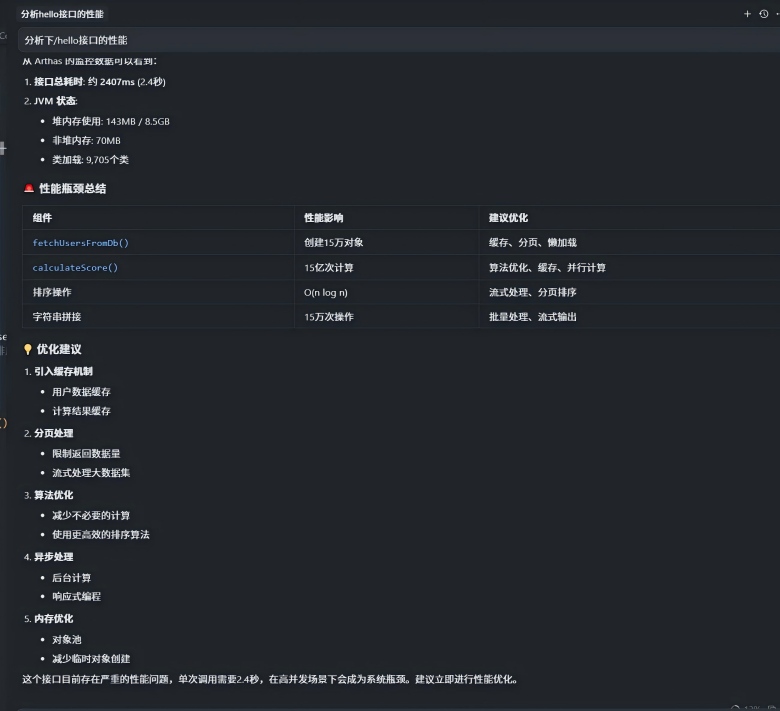
- exmaple
Quick Start
Install
uv sync
Run
python main.py
MCP Tools
- connect_arthas: connect to Arthas WebConsole
- get_connection_status: get current status
- disconnect_arthas: disconnect
- get_jvm_info: JVM info
- get_thread_info: thread status and performance
- get_memory_info: memory usage and GC
- execute_arthas_command: run custom Arthas command
- analyze_performance: performance analysis
- trace_method_calls: method call tracing
Config
Add to Cursor / Claude Code
macOS: ~/.cursor/mcp.json
Windows: C:\Users\{username}\.cursor\mcp.json
{
  "mcpServers": {
    "arthas": {
      "command": "uv",
      "args": ["--directory", "F:\\path\\to\\arthas_mcp_server", "run", "python", "main.py"],
      "env": { "ARTHAS_URL": "http://localhost:8563" }
    }
  }
}
Start Arthas
There are multiple deployment methods: either attach mode or agent mode. Both approaches ultimately result in listening for HTTP requests (Arthas commands) on port 8563.
Project Structure
arthas_mcp_server/
├── src/
│   ├── __init__.py
│   ├── models.py
│   ├── server.py
│   └── client.py
├── main.py
├── pyproject.toml
└── README.md
Development
uv sync --extra dev
Install Arthas Server in Claude Desktop, Claude Code & Cursor
unyly install arthas-mcp-serverInstalls into Claude Desktop, Claude Code, Cursor & VS Code — handles npx, uvx and build-from-source repos for you.
First time? Get the CLI: curl -fsSL https://unyly.org/install | sh
Or configure manually
Run in your terminal:
claude mcp add arthas-mcp-server -- uvx arthas-mcp-serverFAQ
Is Arthas Server MCP free?
Yes, Arthas Server MCP is free — one-click install via Unyly at no cost.
Does Arthas Server need an API key?
No, Arthas Server runs without API keys or environment variables.
Is Arthas Server hosted or self-hosted?
Self-hosted: the server runs locally on your machine via the install command above.
How do I install Arthas Server in Claude Desktop, Claude Code or Cursor?
Open Arthas Server on unyly.org, pick your client tab (Claude Desktop, Claude Code, Cursor) and press Install — the config is generated automatically, no JSON editing.
Related MCPs
Fetch
Web content fetching and conversion for efficient LLM usage.
AWS KB Retrieval
Retrieval from AWS Knowledge Base using Bedrock Agent Runtime.
 by modelcontextprotocol
Spring AI MCP Server
Provides auto-configuration for setting up an MCP server in Spring Boot applications.
llm-analysis-assistant
A very streamlined mcp client that supports calling and monitoring stdio/sse/streamableHttp, and can also view request responses through the /logs page. It also
 by xuzexin-hz
Compare Arthas Server with
Not sure what to pick?
Find your stack in 60 seconds
Author?
Embed badge for your README
Browse similar
All ai MCPs