
Axiom Advanced Math
FreeMaintainedExact symbolic math for LLMs: integrals, equations, matrices, and claim verification via Giac/Xcas. MCP server + CLI.

About
Exact symbolic math for LLMs: integrals, equations, matrices, and claim verification via Giac/Xcas. MCP server + CLI.
README
npm License: GPL v3+ Node.js >=20 MCP CI codecov
Exact symbolic and numerical mathematics for LLMs — a real computer algebra
system (Giac/Xcas) behind the Model Context Protocol, and behind a shell
command. Published as axiom-math.
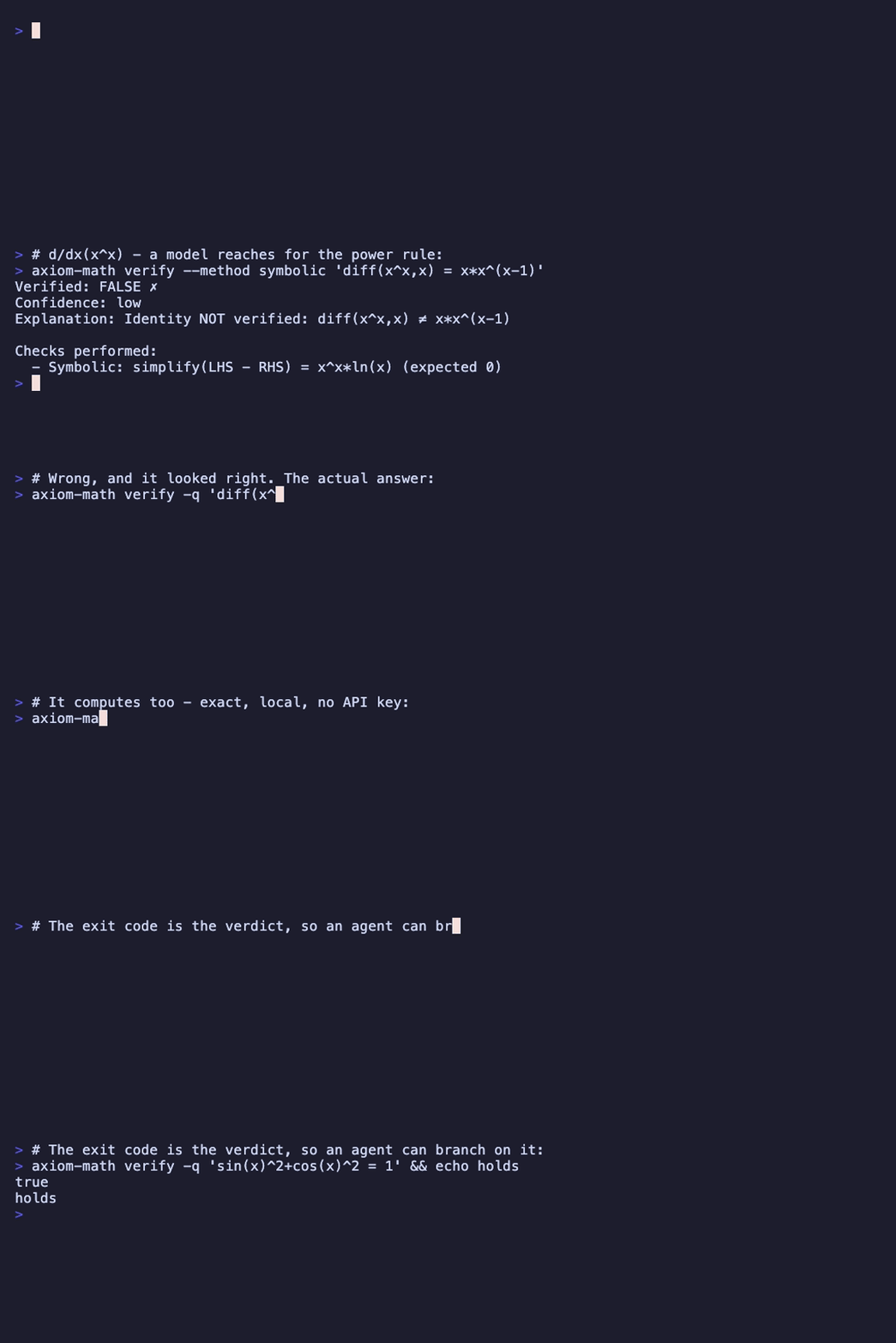
Quick start
As a CLI, straight away:
npx -y axiom-math compute 'integrate(sin(x)^3,x)'   # -cos(x)+cos(x)^3/3
npx -y axiom-math verify 'diff(x^3,x) = 3*x^2'      # exit 0 — it holds
As an MCP server, in any client's config:
{ "command": "npx", "args": ["-y", "axiom-math"] }
As an agent skill — drop in skills/axiom-math/SKILL.md, which teaches an agent the three commands and their exit codes.
Why Axiom?
LLMs often make calculation errors, especially with symbolic math, exact fractions, and multi-step problems. Axiom provides verified, exact results through two layers:
- math.js — Fast numerical evaluation (arithmetic, trigonometry, matrices)
- Giac/Xcas WASM — Symbolic computation (calculus, algebra, equation solving)
Benchmark Results (GLM-5.1, May 2026)
| Dataset | Baseline | +MCP | Delta |
|---|---|---|---|
| GSM8K (100) | 96.0% | 98.0% | +2.0% |
| MATH L3 (50) | 70.0% | 80.0% | +10.0% |
| MATH L4 (50) | 50.0% | 62.0% | +12.0% |
| MATH L5 (50) | 38.0% | 52.0% | +14.0% |
| CAS-quick (60) | 55.0% | 70.0% | +15.0% |
| Omni-MATH ≥7 (50) | 0.0% | 0–4% | (ceiling) |
Key insights:
- Phase 0 grader (LaTeX/Unicode normalization + symbolic equivalence) is the dominant value driver across all datasets
- CAS-quick lifted from 26.7% (April pre-grader) to 70% (post-grader) — the biggest single jump
- Omni-MATH ≥7 is at ceiling for current LLM+CAS setups; needs fundamentally different approaches (Lean/Coq, fine-tuning, RAG)
Full results: benchmark/results/ and docs/superpowers/specs/ (per-phase analysis)
Features
Axiom exposes 3 MCP tools. Almost everything flows through compute, a single gateway that parses a CAS-style problem string and routes it to the right internal engine — so callers learn one tool, not dozens.
| Tool | Purpose |
|---|---|
compute |
Solve any math problem. Pass a CAS-style string (solve(...), diff(...), det([[...]]), C(10,3), 2+3*sin(pi/4)) or any Giac/Xcas expression. |
verify |
Independently check a mathematical claim (identity, solution, or computation) via symbolic and/or numeric methods. |
plot |
Render a 2D function graph as an SVG image. |
What compute covers
compute recognizes CAS-style verbs and dispatches across these domains. Anything it doesn't recognize falls through to raw Giac/Xcas evaluation.
| Domain | Verbs / examples |
|---|---|
| Arithmetic & units | 2+3*sin(pi/4), 100 km/h to m/s |
| Equation solving | solve(x^2-4=0, x), csolve(...) (complex), solve_system([x+y=5, x-y=1], [x,y]) |
| Calculus | diff, int, limit, taylor, desolve (ODE) |
| Multivariable calculus | gradient, hessian, jacobian, divergence, curl, partial, iint/iiint (multiple integrals), critical_points, lagrange, tangent_plane, directional_derivative |
| Algebra | factor, simplify, expand, partfrac |
| Linear algebra | det, inv, eigenvals, eigenvects, rref, rank, tran, ker, qr, lu, cholesky, svd, norm, cond |
| Number theory | ifactor, isprime, euler, analyze |
| Combinatorics | C(n,k), P(n,k), stirling, bell, catalan, derangements, multinomial |
| Probability | binomial, normal, poisson, geometric, hypergeometric, chi_square, student_t, f_distribution, beta, exponential |
| Hypothesis testing | t_test (one/two/paired), anova, chi_square_test |
| Numerical methods | newton, bisection, secant, romberg, simpson |
| 2D geometry | distance, midpoint, slope, area_*, perimeter, circumference, line_intersection, point_line_distance, angle_between_lines |
| 3D geometry | distance3d, midpoint3d, dot, cross, vector_norm, angle_vectors, plane_from_points, point_plane_distance, line_plane_intersection, plane_plane_angle, line_line_distance, volume_tetrahedron, volume_sphere, volume_parallelepiped |
| Transforms & series | laplace, ilaplace, fourier/fft/ifft, sum, product |
| Exact values | to_exact, to_decimal, simplify_fraction |
| Regression & sequences | linear_regression/fit, polynomial_regression, sequence (pattern identification) |
Installation
The package is axiom-math on npm.
Nothing to install for normal use — npx fetches and caches it:
npx -y axiom-math compute '2+2'
Or install it so the axiom-math command is on your PATH:
npm install -g axiom-math
Node.js >= 20 required. The first run downloads about 3.8 MB (the CAS engine compiled to WebAssembly) and takes a few seconds; later runs come from the npx cache.
From source
For contributors, or to run a modified build:
git clone https://github.com/tufantunc/axiom-advanced-math-mcp.git
cd axiom-advanced-math-mcp
npm install
npm run build
Docker
# Build and run
docker-compose -f docker/docker-compose.yml up -d

# Check logs
docker-compose -f docker/docker-compose.yml logs -f

# Stop
docker-compose -f docker/docker-compose.yml down
Usage
CLI (STDIO Transport)
# Run with stdio transport (default)
npm start

# Development mode
npm run dev
Claude Desktop integration:
// ~/Library/Application Support/Claude/claude_desktop_config.json
{
  "mcpServers": [
    {
      "name": "axiom-math",
      "command": "npx",
      "args": ["-y", "axiom-math"]
    }
  ]
}
Running from a local checkout instead of npm — point args at the built entry
point:
"args": ["/path/to/axiom-advanced-math-mcp/dist/cli.js"]
Command line
The same binary works as a one-shot CLI, so agents can use it as a skill with no MCP configuration. With no arguments it is the MCP server; with a subcommand it runs one computation and exits.
npx -y axiom-math compute 'integrate(sin(x)^3,x)'
npx -y axiom-math compute -q 'solve(x^2-4=0,x)'     # {-2, 2}
npx -y axiom-math verify 'sin(x)^2+cos(x)^2 = 1'    # exit 0 if true
npx -y axiom-math plot 'sin(x)' -o wave.svg
echo 'diff(x^3,x)' | npx -y axiom-math compute -q   # 3*x^2
| Flag | Meaning |
|---|---|
-q |
print one value only, for scripting |
--json |
structured output |
--latex |
LaTeX-focused text (compute only) |
-h, --help |
usage, or usage for a subcommand |
Exit codes: 0 success · 1 tool or usage error · 2 verify checked the
claim and it is false.
2 is a mathematical verdict, so a claim that never got checked does not use
it: one that fails to parse, or that the CAS cannot evaluate, exits 1 with
nothing on stdout. axiom-math verify '...' && ... therefore never reads a
syntax error as a disproof.
A ready-to-use agent skill is in skills/axiom-math/SKILL.md.
HTTP Transport
# Start HTTP server (default: http://127.0.0.1:3000)
npm run start:http

# Development HTTP
npm run dev:http
The HTTP transport is stateless: every POST /mcp is handled independently,
no Mcp-Session-Id is issued, and no session state is kept between requests.
This server sends no server-initiated notifications, so nothing is lost — and it
scales horizontally with no shared state.
| Method | Path | Behaviour |
|---|---|---|
| POST | /mcp |
Handles a JSON-RPC message |
| GET | /mcp |
405 — no SSE stream is offered |
| DELETE | /mcp |
405 — there are no sessions to terminate |
| GET | /health |
200 when ready, 503 when the CAS engine is not |
Security: there is no authentication and no rate limiting. The default bind address is
127.0.0.1, butdocker/docker-compose.ymlsetsMCP_HOST=0.0.0.0. If you expose the port, put it behind a reverse proxy that authenticates and rate-limits — docker/reverse-proxy/ is a working, tested one (nginx + basic auth + per-client concurrency cap, with the app publishing no port of its own). SECURITY.md documents the full posture — what is protected, what is not, and how to report a vulnerability.
POST /mcpalso validates theHostheader against an allowlist (localhost,127.0.0.1,[::1]by default) to block DNS rebinding — a malicious page can make a victim's browser resolve an attacker domain to127.0.0.1and reach this server through it. If you reach the server by a LAN address, hostname, or reverse-proxy domain other than loopback, setMCP_ALLOWED_HOSTSor everyPOST /mcprequest will get a403. This check is not authentication — it only constrains which host names may reach the endpoint, nothing about who is asking.
Environment variables:
| Variable | Default | Description |
|---|---|---|
MCP_PORT |
3000 |
HTTP server port |
MCP_HOST |
127.0.0.1 |
HTTP server host |
MCP_ALLOWED_HOSTS |
loopback only (localhost, 127.0.0.1, [::1]) |
Comma-separated Host header allowlist for POST /mcp (DNS-rebinding protection). An explicit value replaces the default rather than extending it. |
AXIOM_EVAL_TIMEOUT_MS |
10000 |
Per-evaluation CAS timeout, in milliseconds |
AXIOM_COMPUTE_HYGIENE |
unset | Set to 1 to enable compute output post-processing |
MCP Inspector
npm run inspect
Tool Reference
compute
The single gateway for all math. Pass a CAS-style problem string; the router parses it and dispatches to the right engine.
| Parameter | Type | Description |
|---|---|---|
problem |
string (required) | CAS-style problem, e.g. solve(x^2-4=0, x), diff(x^3, x), det([[1,2],[3,4]]), gradient(x^2+y^2, [x,y]). |
domain |
real | complex | numeric | exact |
Domain hint (default real). complex → complex solutions; numeric → force numerical methods; exact → exact symbolic form. |
precision |
integer 1–50 | Decimal places (default 10). |
format |
text | latex | json |
Output format (default text). json returns a structured envelope. |
Examples:
{ "problem": "solve(x^2 - 5*x + 6 = 0, x)" }
{ "problem": "int(x^2*sin(x), x)", "format": "latex" }
{ "problem": "lagrange(x*y, x+y, 1, [x, y])" }
{ "problem": "volume_tetrahedron([0,0,0],[1,0,0],[0,1,0],[0,0,1])" }
{ "problem": "binomial cdf n=10 k=3 p=0.5", "format": "json" }
verify
Independently check a mathematical claim. Useful as a second, tool-grounded opinion on a result the model produced.
| Parameter | Type | Description |
|---|---|---|
claim |
string (required) | The claim, e.g. "sin(x)^2 + cos(x)^2 = 1" (identity), "x=2 satisfies x^2-4=0" (solution), "diff(x^3, x) = 3*x^2" (computation). |
method |
numeric | symbolic | both |
Verification method (default both). |
Returns four fields: verified, evaluated, confidence, and checks_performed.
evaluated is the one to read first. It is false when no check produced a
usable answer — the claim did not parse, or the CAS could not evaluate it — in
which case verified: false means "unknown", not "refuted". Treating the two as
the same turns a syntax error into a disproof.
plot
Render a 2D function as an SVG image.
| Parameter | Type | Description |
|---|---|---|
expression |
string (required) | Function to plot, e.g. "sin(x)", "x^2 - 3*x + 1". |
variable |
string | Variable name (default x). |
x_min, x_max |
number | X range (default −10 … 10). |
y_min, y_max |
number | Y range (auto-detected if omitted). |
width, height |
number | Image size in px (default 600 × 400). |
title |
string | Optional chart title. |
Returns a base64-encoded SVG image (axes, grid, labels, asymptote detection) plus a text caption.
Prompts
The server also registers guided MCP prompts that chain compute/verify for multi-step workflows: solve-step-by-step, analyze-function, verify-identity, convert-units, analyze-dataset, solve-ode-system, and regression-workflow.
Run Benchmarks
Default production recipe (grader-v2 included automatically):
cd benchmark
npm install

# Set provider API key (one of):
export ZAI_API_KEY=...
export ANTHROPIC_API_KEY=...
export OPENROUTER_API_KEY=...

# Run benchmarks (provider defaults from --zai/--anthropic/--openrouter flags)
npm run cas:quick:zai      # CAS-quick (60 problems, ~30 min)
npm run gsm8k:quick:zai    # GSM8K-quick (100 problems, ~30 min)
npm run math:quick:zai     # MATH L3-L5 quick (150 problems, ~75 min)
Optional ablation features (off by default)
--features=output-hygiene— tool output post-processing (Unicode normalize, optional simplify, silent-failure warning). Marginal +1pp on CAS in live measurement.--features=grader-v3— equation-RHS extraction + bare-comma-list set match. Marginal +1pp on CAS.--features=self-consistency— N=3 majority voting (variance reduction; 3× cost; no accuracy gain on CAS).
Example:
npm run cas:quick:zai -- --features=output-hygiene,grader-v3
See docs/superpowers/specs/2026-05-*-results.md for live ablation analysis of every flag.
What we tried that didn't work
This project went through extensive ablation across five phases (Phase 0–4). The following experimental approaches were tested live and rejected:
- Phase 1: Structured JSON output with
\boxed{}trailers — model paraphrased boxed content into LaTeX style, breaking answer extraction. Net regression on CAS. - Phase 2: 8K token budget (
tokens-8k) — gave the model more room to wander rather than recovering from truncation. Net regression −6.7pp on CAS. - Phase 3: Self-consistency for accuracy — N=3 voting did not lift accuracy (Wang et al. literature gain not reproducible on CAS); kept as a methodology tool for variance reduction only.
- Phase 4: Olympiad-specific scaffolding prompt — engagement improved (no-tool-call rate 84% → 74%) but accuracy stayed at 0%. Olympiad-tier problems are out of scope for prompt-engineering interventions.
Each phase's per-problem analysis is in docs/superpowers/specs/2026-05-*-results.md. The honest documentation of failures is preserved as a project archive.
Architecture
Compute gateway → router → domain handlers
┌─────────────────────────────────────────────────────────────┐
│              MCP Protocol Layer (stdio / HTTP)               │
└─────────────────────────────────────────────────────────────┘
                              │
        ┌─────────────────────┼─────────────────────┐
        ▼                     ▼                     ▼
   ┌─────────┐          ┌──────────┐          ┌─────────┐
   │ compute │          │  verify  │          │  plot   │
   └────┬────┘          └──────────┘          └─────────┘
        │  route() → extract args → dispatch
        ▼
┌─────────────────────────────────────────────────────────────┐
│  Domain handlers: calculus, algebra, matrix, multivariable,  │
│  geometry / geometry3d, combinatorics, probability,          │
│  hypothesis testing, number theory, numerical methods, …     │
└─────────────────────────────────────────────────────────────┘
        │                     │                     │
        ▼                     ▼                     ▼
┌──────────────┐     ┌──────────────┐     ┌──────────────┐
│   math.js    │     │  Giac/Xcas   │     │ Exact engine │
│ (numerical)  │     │  (symbolic)  │     │ (fractions)  │
└──────────────┘     └──────────────┘     └──────────────┘
compute never asks the caller to pick a handler. The router matches the problem string against ordered rules, the matching extractor parses arguments, and the dispatcher calls the corresponding domain handler. Unmatched input falls through to raw Giac/Xcas.
Response Format
Text-format responses are line-structured so LLMs (and the benchmark grader) can extract answers reliably:
{
  "content": [
    { "type": "text", "text": "Result: 400/11" },
    { "type": "text", "text": "Decimal: 36.3636363636" },
    { "type": "text", "text": "LaTeX: \\frac{400}{11}" },
    { "type": "text", "text": "" },
    { "type": "text", "text": "The answer is 400/11 (≈ 36.36)" }
  ],
  "isError": false
}
Benchmark Results
Datasets
| Dataset | Problems | Difficulty |
|---|---|---|
| GSM8K | 100 | Grade school math (arithmetic) |
| MATH L3 | 50 | High school math |
| MATH L4 | 50 | Advanced high school math |
| MATH L5 | 50 | Olympiad-level math |
| Omni-MATH ≥7 | 50 | Expert-level math |
How to Run
See Run Benchmarks above for the commands. In short, from the repository root:
npm run benchmark:zai         # quick sample, GLM-5.1
npm run benchmark:full:zai    # all datasets
npm run benchmark:l5:zai      # one difficulty tier
Swap :zai for :openrouter to change provider. The benchmark/ directory is
a separate npm project with finer-grained scripts (cas:quick:zai,
gsm8k:quick:zai, …); npm run benchmark:* from the root delegates to them.
Environment variables:
| Variable | Required for | Description |
|---|---|---|
ZAI_API_KEY |
zai provider | Your z.ai API key |
OPENROUTER_API_KEY |
openrouter provider | Your OpenRouter API key |
Development
Scripts
| Command | Description |
|---|---|
npm run build |
Compile TypeScript to dist/ and copy the WASM asset |
npm start |
Run STDIO server |
npm run dev |
Run in development mode (tsx) |
npm run start:http |
Run HTTP server |
npm run dev:http |
Run HTTP server in dev mode |
npm test |
Unit tests — no build required |
npm run test:integration |
Integration tests — builds first, exercises dist/ |
npm run test:watch |
Unit tests in watch mode |
npm run test:coverage |
Unit tests with coverage report |
npm run typecheck |
Type-check without emitting |
npm run lint |
Lint with oxlint |
npm run lint:fix |
Auto-fix linting issues |
npm run format |
Format with Prettier |
npm run format:check |
Check formatting without writing |
npm run inspect |
Open the MCP Inspector against the stdio server |
Testing
The suites are split. npm test runs the unit tests and needs no build;
npm run test:integration builds first and exercises the packaged dist/
output, so it catches things the unit suite cannot — the shipped binary's
argument dispatch, the MCP handshake, exit codes.
npm test                  # unit
npm run test:integration  # integration (runs npm run build first)
npm run test:watch        # unit, watch mode
npm run test:coverage     # unit, with coverage
Test coverage: unit + integration suite, 100% pass rate. Run npm test for the current count — it changes too often to keep a number here in sync.
WASM Build (Giac)
npm run build:giac:wasm

# Build a specific upstream ref instead of master
GIAC_REF=v1.9.x npm run build:giac:wasm
This runs scripts/build-giac-wasm.sh, which builds
docker/build-giac-wasm/Dockerfile with docker build (no Compose file
involved) and writes giac.wasm.js straight into src/server/giac/ — no
manual copy step needed. Requires Docker Desktop (or another Docker daemon)
running locally. Per-task build logs land under logs/giac-build/.
Contributing
Bug reports and pull requests are welcome — see CONTRIBUTING.md for the setup, the checks CI runs, and the few things about this codebase that are not obvious from reading it.
License
GNU General Public License v3.0 or later — see LICENSE.
Axiom embeds Giac/Xcas, which is GPL-3.0-or-later, so the combined work carries the same license. Details and attribution: THIRD-PARTY-NOTICES.md.
Does the GPL affect my agent?
No. Your agent talks to Axiom over the Model Context Protocol — a separate process, over stdio or HTTP. Separate programs communicating at arm's length are not a combined work, so running Axiom alongside your own agent puts no license obligation on your code, whatever license it uses. Running the software is unrestricted under the GPL, including running it as a service.
The copyleft terms apply when you redistribute Axiom itself — shipping it (modified or not) inside a product you hand to someone else. In that case, pass along the source under GPL-3.0 and keep the notices intact.
Install Axiom Advanced Math in Claude Desktop, Claude Code & Cursor
unyly install axiom-advanced-mathInstalls into Claude Desktop, Claude Code, Cursor & VS Code — handles npx, uvx and build-from-source repos for you.
First time? Get the CLI: curl -fsSL https://unyly.org/install | sh
Or configure manually
Run in your terminal:
claude mcp add axiom-advanced-math --env ANTHROPIC_API_KEY="" --env GIAC_REF="" --env OPENROUTER_API_KEY="" --env ZAI_API_KEY="" -- npx -y axiom-mathStep-by-step: how to install Axiom Advanced Math
FAQ
Is Axiom Advanced Math MCP free?
Yes, Axiom Advanced Math MCP is free — one-click install via Unyly at no cost.
Does Axiom Advanced Math need an API key?
Yes, it requires environment variables: ANTHROPIC_API_KEY, GIAC_REF, OPENROUTER_API_KEY, ZAI_API_KEY. Unyly injects them into the config during install.
Is Axiom Advanced Math hosted or self-hosted?
Self-hosted: the server runs locally on your machine via the install command above.
How do I install Axiom Advanced Math in Claude Desktop, Claude Code or Cursor?
Open Axiom Advanced Math on unyly.org, pick your client tab (Claude Desktop, Claude Code, Cursor) and press Install — the config is generated automatically, no JSON editing.
Related MCPs
Fetch
Web content fetching and conversion for efficient LLM usage.
AWS KB Retrieval
Retrieval from AWS Knowledge Base using Bedrock Agent Runtime.
 by modelcontextprotocol
Spring AI MCP Server
Provides auto-configuration for setting up an MCP server in Spring Boot applications.
llm-analysis-assistant
A very streamlined mcp client that supports calling and monitoring stdio/sse/streamableHttp, and can also view request responses through the /logs page. It also
 by xuzexin-hz
MCP-Agent
A simple, composable framework to build agents using Model Context Protocol by [LastMile AI](https://www.lastmileai.dev)
 by lastmile-ai
Spring AI MCP Client
Provides auto-configuration for MCP client functionality in Spring Boot applications.
mcp.natoma.ai
A Hosted MCP Platform to discover, install, manage and deploy MCP servers by [Natoma Labs](https://www.natoma.ai)
MCPHub
Website to list high quality MCP servers and reviews by real users. Also provide online chatbot for popular LLM models with MCP server support.
MCP Servers Rating and User Reviews
Website to rate MCP servers, write authentic user reviews, and [search engine for agent & mcp](http://www.deepnlp.org/search/agent)
mkinf
An Open Source registry of hosted MCP Servers to accelerate AI agent workflows.
Compare Axiom Advanced Math with
Not sure what to pick?
Find your stack in 60 seconds
Author?
Embed badge for your README
Browse similar
All ai MCPs