

About
Model Context Protocol Servers for Azure AI Search
README
A Model Context Protocol (MCP) server that enables Claude Desktop to search your content using Azure AI services. Choose between Azure AI Agent Service (with both document search and web search) or direct Azure AI Search integration.
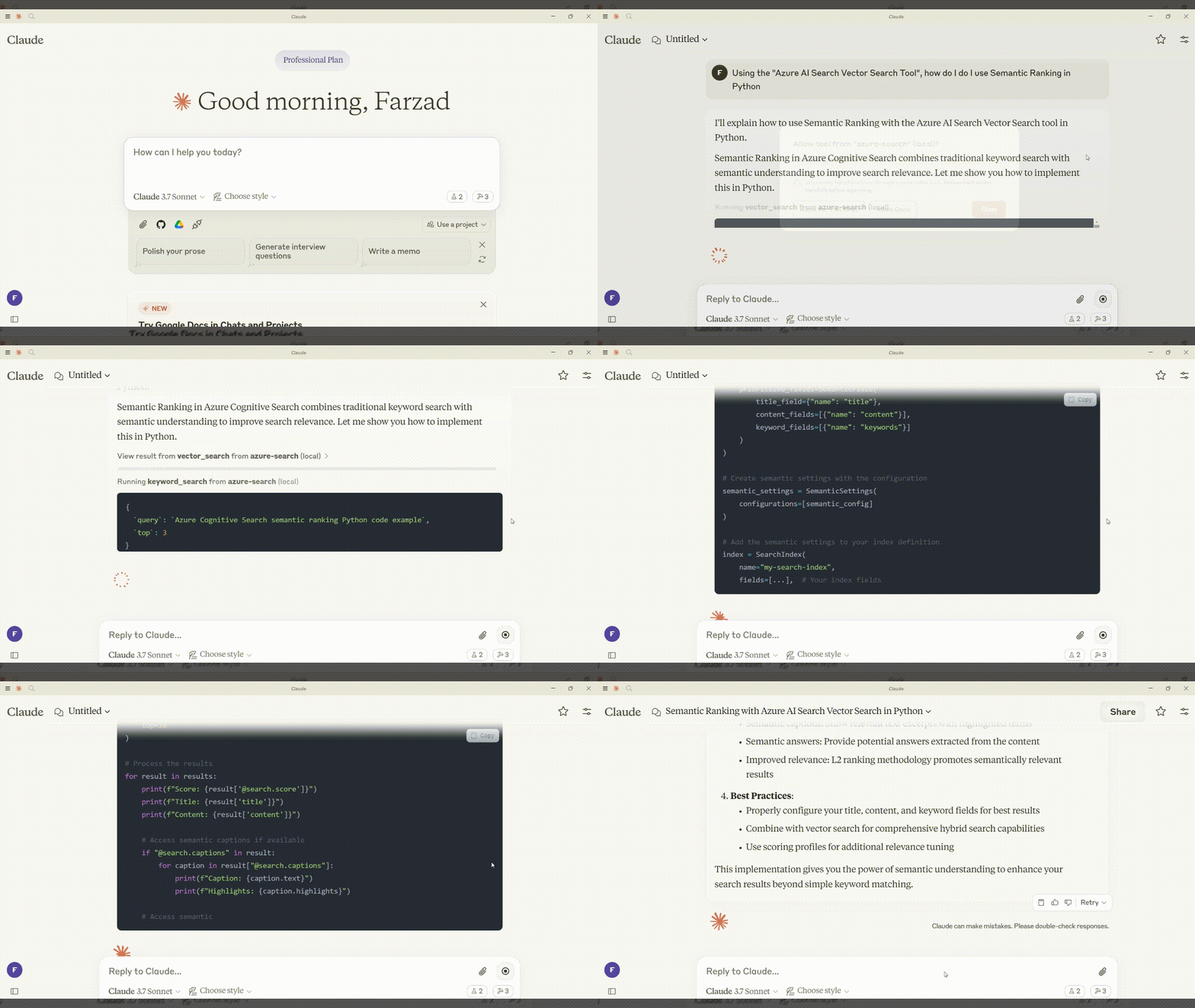
Overview
This project provides two MCP server implementations to connect Claude Desktop with Azure search capabilities:
Azure AI Agent Service Implementation (Recommended) - Uses the powerful Azure AI Agent Service to provide:
- Azure AI Search Tool - Search your indexed documents with AI-enhanced results
- Bing Web Grounding Tool - Search the web with source citations
Direct Azure AI Search Implementation - Connects directly to Azure AI Search with three methods:
- Keyword Search - Exact lexical matches
- Vector Search - Semantic similarity using embeddings
- Hybrid Search - Combination of keyword and vector searches
Features
- AI-Enhanced Search - Azure AI Agent Service optimizes search results with intelligent processing
- Multiple Data Sources - Search both your private documents and the public web
- Source Citations - Web search results include citations to original sources
- Flexible Implementation - Choose between Azure AI Agent Service or direct Azure AI Search integration
- Seamless Claude Integration - All search capabilities accessible through Claude Desktop's interface
- Customizable - Easy to extend or modify search behavior
Quick Links
Requirements
- Python: Version 3.10 or higher
- Claude Desktop: Latest version
- Azure Resources:
- Azure AI Search service with an index containing vectorized text data
- For Agent Service: Azure AI Project with Azure AI Search and Bing connections
- Operating System: Windows or macOS (instructions provided for Windows, but adaptable)
Azure AI Agent Service Implementation (Recommended)
Setup Guide
Project Directory:
mkdir mcp-server-azure-ai-search
cd mcp-server-azure-ai-search
Create a
.envFile:echo "PROJECT_CONNECTION_STRING=your-project-connection-string" > .env echo "MODEL_DEPLOYMENT_NAME=your-model-deployment-name" >> .env echo "AI_SEARCH_CONNECTION_NAME=your-search-connection-name" >> .env echo "BING_CONNECTION_NAME=your-bing-connection-name" >> .env echo "AI_SEARCH_INDEX_NAME=your-index-name" >> .envSet Up Virtual Environment:
uv venv
.venv\Scripts\activate
uv pip install "mcp[cli]" azure-identity python-dotenv azure-ai-projects
Use the
azure_ai_agent_service_server.pyscript for integration with Azure AI Agent Service.
Azure AI Agent Service Setup
Before using the implementation, you need to:
Create an Azure AI Project:
- Go to the Azure Portal and create a new Azure AI Project
- Note the project connection string and model deployment name
Create an Azure AI Search Connection:
- In your Azure AI Project, add a connection to your Azure AI Search service
- Note the connection name and index name
Create a Bing Web Search Connection:
- In your Azure AI Project, add a connection to Bing Search service
- Note the connection name
Authenticate with Azure:
az login
Configuring Claude Desktop
{
  "mcpServers": {
    "azure-ai-agent": {
      "command": "C:\\path\\to\\.venv\\Scripts\\python.exe",
      "args": ["C:\\path\\to\\azure_ai_agent_service_server.py"],
      "env": {
        "PROJECT_CONNECTION_STRING": "your-project-connection-string",
        "MODEL_DEPLOYMENT_NAME": "your-model-deployment-name",
        "AI_SEARCH_CONNECTION_NAME": "your-search-connection-name",
        "BING_CONNECTION_NAME": "your-bing-connection-name",
        "AI_SEARCH_INDEX_NAME": "your-index-name"
      }
    }
  }
}
Note: Replace path placeholders with your actual project paths.
Direct Azure AI Search Implementation
For those who prefer direct Azure AI Search integration without the Agent Service:
Create a different
.envFile:echo "AZURE_SEARCH_SERVICE_ENDPOINT=https://your-service-name.search.windows.net" > .env echo "AZURE_SEARCH_INDEX_NAME=your-index-name" >> .env echo "AZURE_SEARCH_API_KEY=your-api-key" >> .envInstall Dependencies:
uv pip install "mcp[cli]" azure-search-documents==11.5.2 azure-identity python-dotenvUse the
azure_search_server.pyscript for direct integration with Azure AI Search.Configure Claude Desktop:
{
  "mcpServers": {
    "azure-search": {
      "command": "C:\\path\\to\\.venv\\Scripts\\python.exe",
      "args": ["C:\\path\\to\\azure_search_server.py"],
      "env": {
        "AZURE_SEARCH_SERVICE_ENDPOINT": "https://your-service-name.search.windows.net",
        "AZURE_SEARCH_INDEX_NAME": "your-index-name",
        "AZURE_SEARCH_API_KEY": "your-api-key"
      }
    }
  }
}
Testing the Server
- Restart Claude Desktop to load the new configuration
- Look for the MCP tools icon (hammer icon) in the bottom-right of the input field
- Try queries such as:
- "Search for information about AI in my Azure Search index"
- "Search the web for the latest developments in LLMs"
- "Find information about neural networks using hybrid search"
Troubleshooting
Server Not Appearing:
- Check Claude Desktop logs (located at
%APPDATA%\Claude\logs\mcp*.logon Windows) - Verify file paths and environment variables in the configuration
- Test running the server directly:
python azure_ai_agent_service_server.pyoruv run python azure_ai_agent_service_server.py
- Check Claude Desktop logs (located at
Azure AI Agent Service Issues:
- Ensure your Azure AI Project is correctly configured
- Verify that connections exist and are properly configured
- Check your Azure authentication status
Customizing Your Server
- Modify Tool Instructions: Adjust the instructions provided to each agent to change how they process queries
- Add New Tools: Use the
@mcp.tool()decorator to integrate additional tools - Customize Response Formatting: Edit how responses are formatted and returned to Claude Desktop
- Adjust Web Search Parameters: Modify the web search tool to focus on specific domains
License
This project is licensed under the MIT License.
Installing Azure Ai Agents
This server has no published package — it is built from source. Open the repository and follow its README.
▸ github.com/farzad528/mcp-server-azure-ai-agentsFAQ
Is Azure Ai Agents MCP free?
Yes, Azure Ai Agents MCP is free — one-click install via Unyly at no cost.
Does Azure Ai Agents need an API key?
No, Azure Ai Agents runs without API keys or environment variables.
Is Azure Ai Agents hosted or self-hosted?
Self-hosted: the server runs locally on your machine via the install command above.
How do I install Azure Ai Agents in Claude Desktop, Claude Code or Cursor?
Open Azure Ai Agents on unyly.org, pick your client tab (Claude Desktop, Claude Code, Cursor) and press Install — the config is generated automatically, no JSON editing.
Related MCPs
Fetch
Web content fetching and conversion for efficient LLM usage.
AWS KB Retrieval
Retrieval from AWS Knowledge Base using Bedrock Agent Runtime.
 by modelcontextprotocol
Spring AI MCP Server
Provides auto-configuration for setting up an MCP server in Spring Boot applications.
llm-analysis-assistant
A very streamlined mcp client that supports calling and monitoring stdio/sse/streamableHttp, and can also view request responses through the /logs page. It also
 by xuzexin-hz
Compare Azure Ai Agents with
Not sure what to pick?
Find your stack in 60 seconds
Author?
Embed badge for your README
Browse similar
All ai MCPs