
Blog Publisher
FreeNot checkedEnables AI assistants to publish blog content to external platforms through a Python-based server with standard and local execution modes for automated content

About
Enables AI assistants to publish blog content to external platforms through a Python-based server with standard and local execution modes for automated content publishing workflows.
README
需求
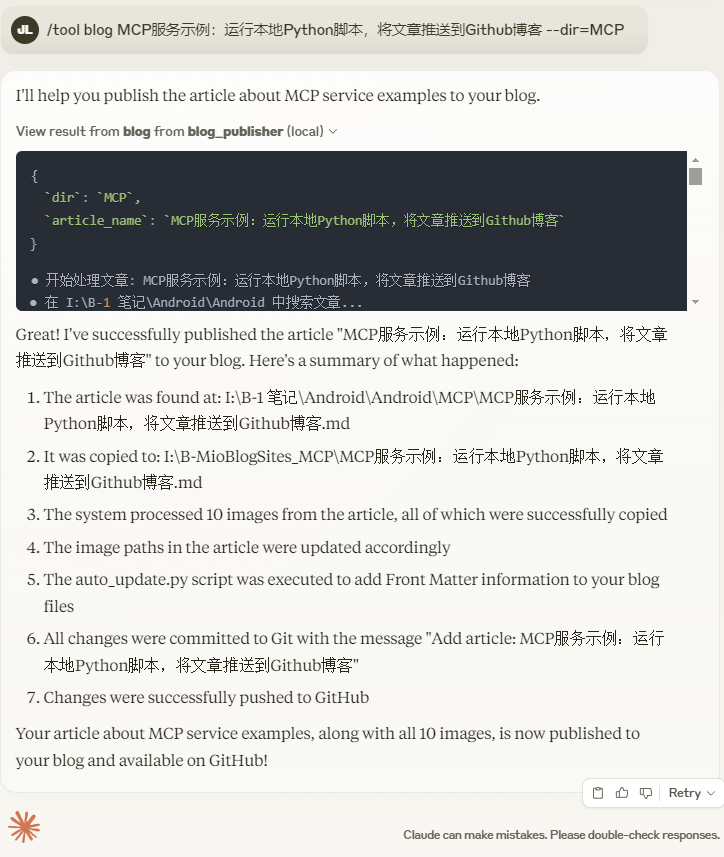
在用户输入 "blog+文章名" 时,自动将 Obsidian 本地目录下的指定 Markdown 文件复制到指定目录,处理图片链接并复制图片到目标文件夹,然后将更改推送到 GitHub。
功能
创建一个 MCP(Model Context Protocol)博客上传服务,具体功能如下:
- 触发条件:用户输入 "blog+文章名"。
- 文件复制:将 Obsidian 本地目录下的某个 Markdown 文件(*.md,例如 "文章名.md")复制到 I:\B-MioBlogSites 下的指定目录(默认 I:\B-MioBlogSites_Android)。
- 图片处理:检测 Markdown 文件中的图片链接,将图片从 I:\B-1 笔记\Android\Android\z. attachments 复制到 I:\B-MioBlogSites\assets\images,并更新 Markdown 文件中的图片路径。
- GitHub 推送:将更改提交并推送到 GitHub。
返回结果
Installing Blog Publisher
This server has no published package — it is built from source. Open the repository and follow its README.
▸ github.com/carrie-l/blog_publisher_mcp_serverFAQ
Is Blog Publisher MCP free?
Yes, Blog Publisher MCP is free — one-click install via Unyly at no cost.
Does Blog Publisher need an API key?
No, Blog Publisher runs without API keys or environment variables.
Is Blog Publisher hosted or self-hosted?
Self-hosted: the server runs locally on your machine via the install command above.
How do I install Blog Publisher in Claude Desktop, Claude Code or Cursor?
Open Blog Publisher on unyly.org, pick your client tab (Claude Desktop, Claude Code, Cursor) and press Install — the config is generated automatically, no JSON editing.
Related MCPs
Fetch
Web content fetching and conversion for efficient LLM usage.
AWS KB Retrieval
Retrieval from AWS Knowledge Base using Bedrock Agent Runtime.
 by modelcontextprotocol
Spring AI MCP Server
Provides auto-configuration for setting up an MCP server in Spring Boot applications.
llm-analysis-assistant
A very streamlined mcp client that supports calling and monitoring stdio/sse/streamableHttp, and can also view request responses through the /logs page. It also
 by xuzexin-hz
Compare Blog Publisher with
Not sure what to pick?
Find your stack in 60 seconds
Author?
Embed badge for your README
Browse similar
All ai MCPs