
bmbrick Mosaic
FreeNot checkedConvert local images into LEGO-style brick mosaic previews with AI-powered color quantization.

About
Convert local images into LEGO-style brick mosaic previews with AI-powered color quantization.
README
Convert any local photo into a LEGO-style brick mosaic preview — directly from your AI agent.
@bmbrick/photo-to-lego-mosaic-skill is an MCP server that lets Claude, Cursor, Windsurf, and other AI agents transform local images into high-fidelity 3D brick mosaics using the same canonical engine as bmbrick.com.
Renamed from
@bmbrick/agent-mosaic-skill(the old name still works but is deprecated — please migrate to the new name for future updates).
Visual Previews
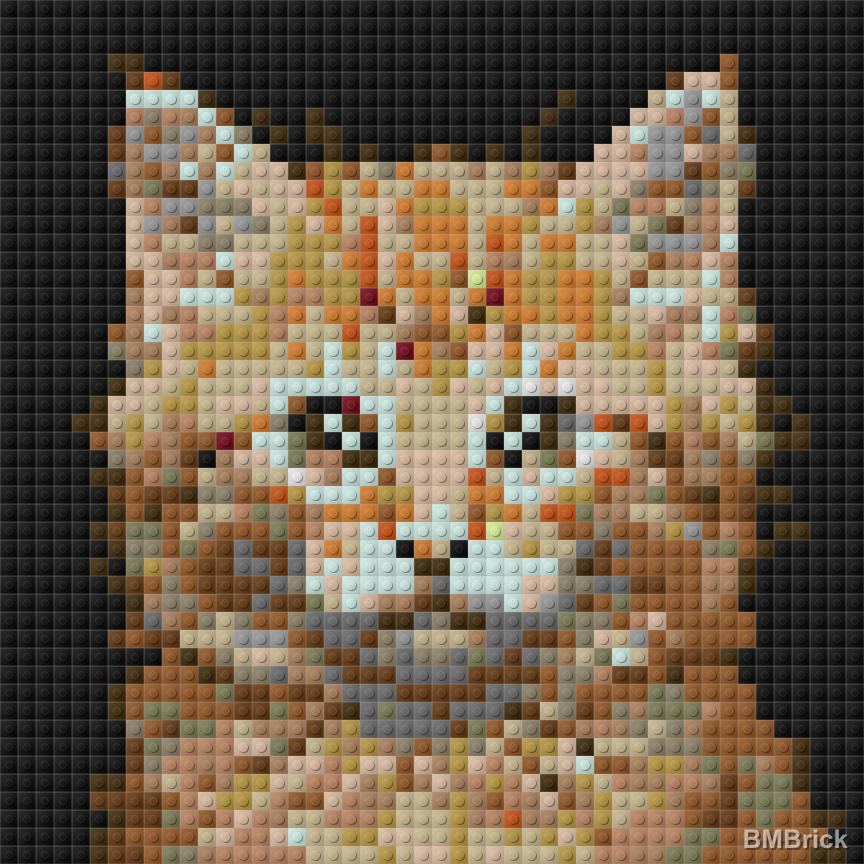
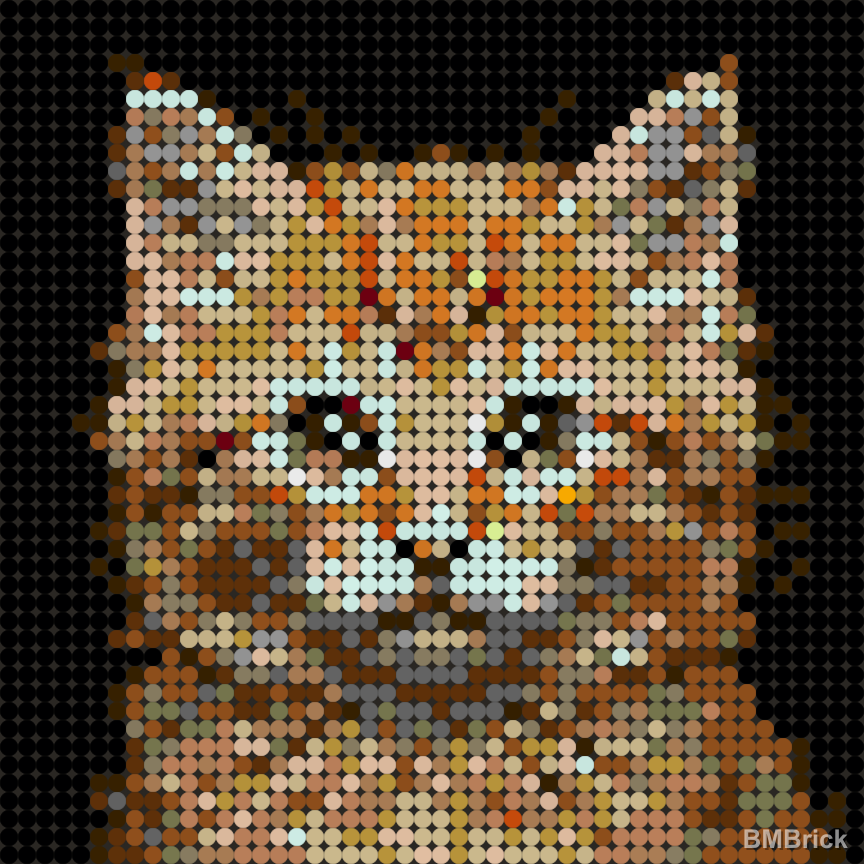
Generated with the generate_lego_mosaic tool (3D render mode):
Square Tiles (square_1x1)
| Original Photo | 48x48 Preview | 64x64 Preview |
|---|---|---|
 |
 |
 |
Round Tiles (round_1x1)
| Original Photo | 48x48 Preview | 64x64 Preview |
|---|---|---|
|
 |
 |
For more case studies and mosaic examples, check out our Pinterest Showcase.
Quick Start
npx -y @bmbrick/photo-to-lego-mosaic-skill
MCP Client Configuration
Claude Desktop (claude_desktop_config.json):
{
  "mcpServers": {
    "lego-mosaic": {
      "command": "npx",
      "args": ["-y", "@bmbrick/photo-to-lego-mosaic-skill"]
    }
  }
}
Cursor (.cursor/mcp.json):
{
  "mcpServers": {
    "lego-mosaic": {
      "command": "npx",
      "args": ["-y", "@bmbrick/photo-to-lego-mosaic-skill"]
    }
  }
}
Tool: generate_lego_mosaic
| Parameter | Type | Required | Default | Description |
|---|---|---|---|---|
imagePath |
string | Yes | — | Absolute path to a local image |
columns |
number | No | 48 | Preview width in studs (max 64) |
rows |
number | No | 48 | Preview height in studs (max 64) |
materialMode |
string | No | square_1x1 |
square_1x1 or round_1x1 |
renderMode |
string | No | 3D |
Render style |
removeBackground |
boolean | No | false | Clean up white/transparent backgrounds |
Returns: a local watermarked PNG preview + a link to unlock the full project at bmbrick.com.
Unlock Full Project
The preview is watermarked and intended for creative exploration. To get the complete deliverables — HD unwatermarked mosaic, brick-by-brick PDF instructions, parts list with ordering links, and CSV/XML placement matrices — visit bmbrick.com.
Features
- Same Engine as bmbrick.com — canonical color science, quantization, and 3D rendering pipeline
- Local & Private — all processing happens on your machine via Node.js
- Agent-Ready — ships with a
SKILL.mdfor seamless agent workflow integration - 3D Render Mode — InstancedMesh PBR rendering with realistic brick studs
Engineering Docs
Deep technical reference for the color quantization pipeline that powers this skill and bmbrick.com:
- Color quantization pipeline: principles, history, and lessons — current architecture, architectural decisions, verified principles, failed experiments from 25+ versions of iteration, and parameter sensitivity reference.
Migrating from @bmbrick/agent-mosaic-skill
If you were using the old name, the migration is one search/replace:
- Package name:
@bmbrick/agent-mosaic-skill→@bmbrick/photo-to-lego-mosaic-skill - MCP tool name (in your agent's tool list):
generate_bmbrick_mosaic→generate_lego_mosaic - Binary name (rare):
agent-mosaic-skill→photo-to-lego-mosaic-skill
The tool parameters (imagePath, columns, rows, etc.) and return shape are unchanged.
Development
License
Dual-licensed:
- MIT — MCP wrapper,
skill/directory, agent integration surface - Restricted —
dist/engine files: free to use and distribute as-is, but no de-obfuscation, reverse engineering, or redistribution of modified versions
See LICENSE for full terms.
Installing bmbrick Mosaic
This server has no published package — it is built from source. Open the repository and follow its README.
▸ github.com/able-rip/bmbrick-photo-to-lego-mosaic-skillFAQ
Is bmbrick Mosaic MCP free?
Yes, bmbrick Mosaic MCP is free — one-click install via Unyly at no cost.
Does bmbrick Mosaic need an API key?
No, bmbrick Mosaic runs without API keys or environment variables.
Is bmbrick Mosaic hosted or self-hosted?
Self-hosted: the server runs locally on your machine via the install command above.
How do I install bmbrick Mosaic in Claude Desktop, Claude Code or Cursor?
Open bmbrick Mosaic on unyly.org, pick your client tab (Claude Desktop, Claude Code, Cursor) and press Install — the config is generated automatically, no JSON editing.
Related MCPs
Fetch
Web content fetching and conversion for efficient LLM usage.
AWS KB Retrieval
Retrieval from AWS Knowledge Base using Bedrock Agent Runtime.
 by modelcontextprotocol
Spring AI MCP Server
Provides auto-configuration for setting up an MCP server in Spring Boot applications.
llm-analysis-assistant
A very streamlined mcp client that supports calling and monitoring stdio/sse/streamableHttp, and can also view request responses through the /logs page. It also
 by xuzexin-hz
Compare bmbrick Mosaic with
Not sure what to pick?
Find your stack in 60 seconds
Author?
Embed badge for your README
Browse similar
All ai MCPs