
Cbn
FreeNot checkedA Model Context Protocol (MCP) server for accessing Central Bank of Nigeria (CBN) data and circulars. Connect this server to Cursor, Claude Desktop, or any MCP-

About
A Model Context Protocol (MCP) server for accessing Central Bank of Nigeria (CBN) data and circulars. Connect this server to Cursor, Claude Desktop, or any MCP-compatible application to access CBN regulatory information directly in your AI conversations. 🚀
README
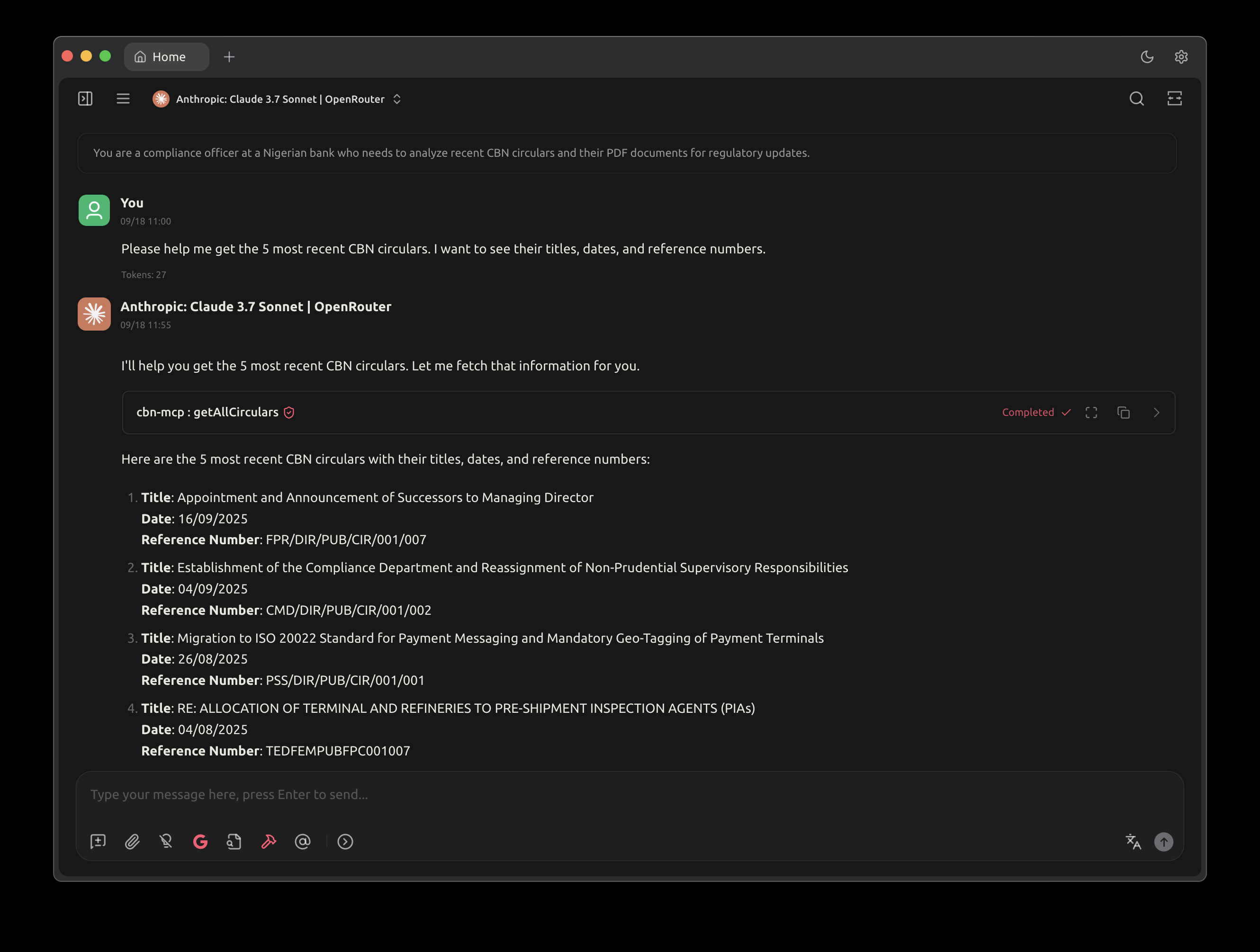
A Model Context Protocol (MCP) server for accessing Central Bank of Nigeria (CBN) data and circulars. Connect this server to Cursor, Claude Desktop, or any MCP-compatible application to access CBN regulatory information directly in your AI conversations. 🚀
Built with mcp_server_dart - A developer-friendly MCP framework for Dart with annotations and code generation that I created. 💪
Features ✨
MCP Tools 🛠️
Circulars Tools 📋
- getAllCirculars: Fetch all CBN circulars with optional filtering by date range and category 📋
- getCircularById: Get a specific CBN circular by its ID 🔍
- searchCirculars: Search CBN circulars by title or description keywords 🔎
- fetchCircularPdf: Download and read PDF content of CBN circulars 📄
- fetchCircularPdfById: Download PDF content by circular ID 📥
- getCircularPdfUrl: Get the direct download URL for a CBN circular PDF by its ID 🔗
- getCircularsForLLMAnalysis: Get recent CBN circulars with PDF URLs formatted for LLM analysis 🤖
Exchange Rates Tools 💱
- getAllExchangeRates: Fetch all CBN exchange rates with optional filtering by date range and currency 💱
- getExchangeRateById: Get a specific CBN exchange rate by its ID 🔍
Financial Data Tools 📊
- getAllFinancialData: Fetch all CBN financial data with optional filtering by date range and financial metrics 📊
- getFinancialDataById: Get a specific CBN financial data by its ID 🔍
MCP Resources 📚
- cbnApiStatus: Current status and health of the CBN API connection 💚
- serverInfo: Information about this CBN MCP server ℹ️
- availableCircularPdfs: List of available circular PDFs with their URIs 📄
- randomFact: A random fact about the CBN 🎲
MCP Prompts 💬
- circularSummary: Generate a summary prompt for CBN circulars analysis 📊
- regulatoryAnalysis: Generate prompts for regulatory compliance analysis of CBN circulars ⚖️
Quick Start 🚀
Option 1: Download Pre-built Binary (Easiest) ⚡
- Go to Releases 📦
- Download the
cbn_mcpexecutable ⬇️ - Make it executable:
chmod +x cbn_mcp🔧 - Use path:
/path/to/cbn_mcp📁
Option 2: Run with Dart (If you have Dart installed) 🎯
- Clone this repository:
git clone https://github.com/chiziaruhoma/cbn_mcp.git📂 - Navigate to directory:
cd cbn_mcp📍 - Install dependencies:
dart pub get📦 - Use command:
dart run bin/main.dart▶️
Option 3: Build from Source 🔨
- Follow Option 2 steps 1-3 ⬆️
- Build executable:
dart compile exe bin/main.dart -o cbn_mcp🏗️ - Use path:
/path/to/cbn_mcp📁
Integration with AI Applications 🤖
Cursor IDE 💻
Open Cursor settings (Cmd/Ctrl + ,) ⚙️
Go to "Features" → "Model Context Protocol" 🔧
Add a new MCP server with one of these configurations: 📝
Using pre-built binary: ⚡
{
  "name": "cbn-mcp",
  "command": "/path/to/cbn_mcp"
}
Using Dart (if you have Dart installed): 🎯
{
  "name": "cbn-mcp",
  "command": "dart",
  "args": ["run", "bin/main.dart"],
  "cwd": "/path/to/cbn_mcp"
}
Restart Cursor 🔄
Now you can ask questions like: "What are the latest CBN circulars?" or "Find CBN regulations about forex trading" 💬
Claude Desktop 🖥️
Open Claude Desktop settings ⚙️
Navigate to the MCP servers configuration 🔧
Add the CBN MCP server with one of these configurations: 📝
Using pre-built binary: ⚡
{
  "mcpServers": {
    "cbn-mcp": {
      "command": "/path/to/cbn_mcp"
    }
  }
}
Using Dart (if you have Dart installed): 🎯
{
  "mcpServers": {
    "cbn-mcp": {
      "command": "dart",
      "args": ["run", "bin/main.dart"],
      "cwd": "/path/to/cbn_mcp"
    }
  }
}
Restart Claude Desktop 🔄
The CBN tools will be available in your conversations 🎉
Other MCP-Compatible Applications 🌐
For any application that supports MCP: 🔌
- Add the server configuration pointing to the
cbn_mcpexecutable 📝 - The server will expose CBN data access tools to your AI assistant 🤖
Usage Examples 💡
Once integrated, you can ask your AI assistant: 🗣️
Circulars Examples 📋
- "What are the latest CBN circulars from this month?" 📅
- "Find all CBN regulations related to cryptocurrency" 💰
- "Get me the details of CBN circular BSD/DIR/GEN/LAB/11/020" 🔍
- "Summarize the key points from recent CBN monetary policy circulars" 📊
- "What are the compliance requirements for banks based on recent CBN circulars?" ⚖️
Exchange Rates Examples 💱
- "What is the current USD/NGN exchange rate?" 💵
- "Show me the exchange rates for the past week" 📈
- "Get the official CBN rate for EUR to NGN" 💶
Financial Data Examples 📊
- "What are the current CBN monetary policy parameters?" 🏛️
- "Show me the repo rates for the last month" 📊
- "What is the current cash reserve ratio?" 💰
- "Get the opening balance data for this quarter" 📅
Development 👨💻
Prerequisites 📋
- Dart SDK ^3.9.2
- Git
Setup 🛠️
Clone the repository:
git clone https://github.com/chiziaruhoma/cbn_mcp.git
cd cbn_mcp
Install dependencies:
dart pub getGenerate mappable classes (if needed):
dart run build_runner build
Running the Server ▶️
# Run directly with Dart
dart run bin/main.dart

# Or build and run executable
dart compile exe bin/main.dart -o cbn_mcp
./cbn_mcp
Testing 🧪
dart test
Building for Distribution 📦
# Build executable
dart compile exe bin/main.dart -o cbn_mcp

# The executable can be distributed and run on any compatible system
Project Structure 📁
lib/
├── cbn.dart              # Main MCP server class
├── cbn.mcp.dart          # Generated MCP annotations
├── core/
│   ├── api/
│   │   └── api_client.dart    # HTTP client for CBN API
│   └── utils/
│       └── logger.dart        # Logging utilities
├── models/               # Data models with mappable annotations
│   ├── circular.dart     # Circular data models
│   ├── financials.dart   # Financial data models
│   ├── rates.dart        # Exchange rates models
│   ├── random.dart       # Random fact models
│   └── models.dart       # Base model classes
└── services/             # Business logic services
    ├── circulars.dart    # Circulars API service
    ├── financials.dart   # Financial data service
    ├── rates.dart        # Exchange rates service
    ├── prompt.dart       # MCP prompt service
    ├── status.dart       # Status and info service
    └── services.dart     # Base service classes
Contributing 🤝
- Fork the repository
- Create a feature branch (
git checkout -b feature/amazing-feature) - Commit your changes (
git commit -m 'Add some amazing feature') - Push to the branch (
git push origin feature/amazing-feature) - Open a Pull Request
API Documentation 📖
This project integrates with the Central Bank of Nigeria's public API. For more information about the available endpoints, visit the CBN Developer Portal.
License 📄
This project is licensed under the MIT License - see the LICENSE file for details.
Acknowledgments 🙏
- Central Bank of Nigeria for providing the public API
- The MCP community for the protocol specification
- mcp_server_dart for the Dart MCP framework
Installing Cbn
This server has no published package — it is built from source. Open the repository and follow its README.
▸ github.com/Zfinix/cbn_mcpFAQ
Is Cbn MCP free?
Yes, Cbn MCP is free — one-click install via Unyly at no cost.
Does Cbn need an API key?
No, Cbn runs without API keys or environment variables.
Is Cbn hosted or self-hosted?
Self-hosted: the server runs locally on your machine via the install command above.
How do I install Cbn in Claude Desktop, Claude Code or Cursor?
Open Cbn on unyly.org, pick your client tab (Claude Desktop, Claude Code, Cursor) and press Install — the config is generated automatically, no JSON editing.
Related MCPs
Fetch
Web content fetching and conversion for efficient LLM usage.
AWS KB Retrieval
Retrieval from AWS Knowledge Base using Bedrock Agent Runtime.
 by modelcontextprotocol
Spring AI MCP Server
Provides auto-configuration for setting up an MCP server in Spring Boot applications.
llm-analysis-assistant
A very streamlined mcp client that supports calling and monitoring stdio/sse/streamableHttp, and can also view request responses through the /logs page. It also
 by xuzexin-hz
Compare Cbn with
Not sure what to pick?
Find your stack in 60 seconds
Author?
Embed badge for your README
Browse similar
All ai MCPs