

About
Chainlit Demo — Model Context Protocol server
README
¡Hola developer 👋🏻! En este repo puedes encontrar un entorno donde probar MCP Servers usando Chainlit. Lo único que debes hacer es añadir las credenciales de tu modelo en Azure Open AI en el archivo .azure.env:
Este repo funciona con Dev Containers así que no necesitas instalar nada en tu máquina local. Solo abre el repo en VSCode y selecciona la opción de abrir en contenedor.
Una vez que ya lo tengas ejecutandose, añade las credenciales de tu modelo en Azure Open AI en el archivo .azure.env:
AZURE_OPENAI_API_KEY=
AZURE_OPENAI_ENDPOINT=
OPENAI_API_VERSION=
AZURE_OPENAI_MODEL=
y ejecuta el siguiente comando para lanzar tu aplicación con Chainlit:
chainlit run app.py -w
Ahora verás que como parte del chat tienes un icono que te permite añadir servidores MCP:

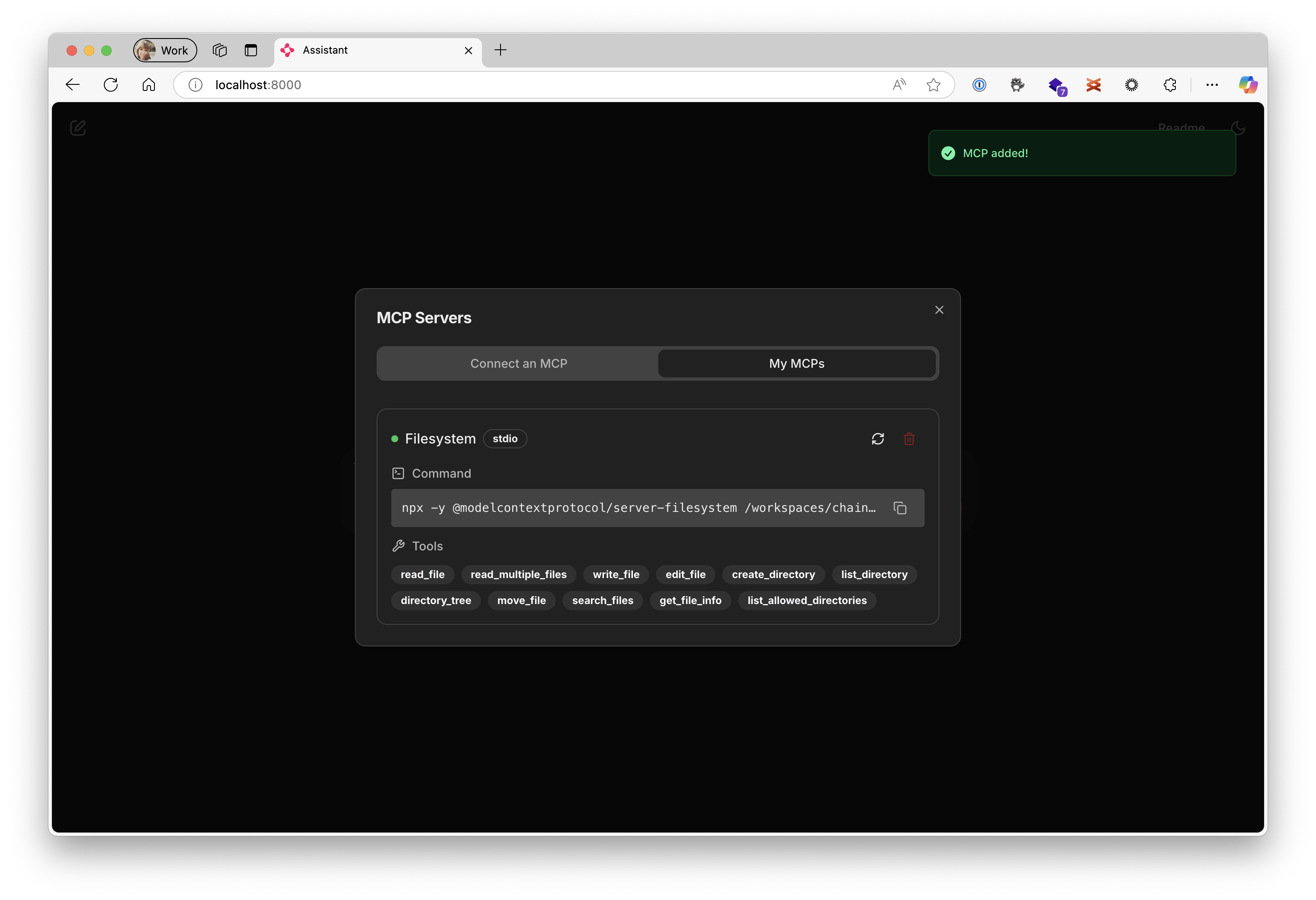
Y puedes añadir algunos ejemplos, como el de filesystem;

Con el nombre Filesystem y este es el comando a ejecutar:
npx -y @modelcontextprotocol/server-filesystem /workspaces/chainlit-demo
Y la configuración quedaría algo así:
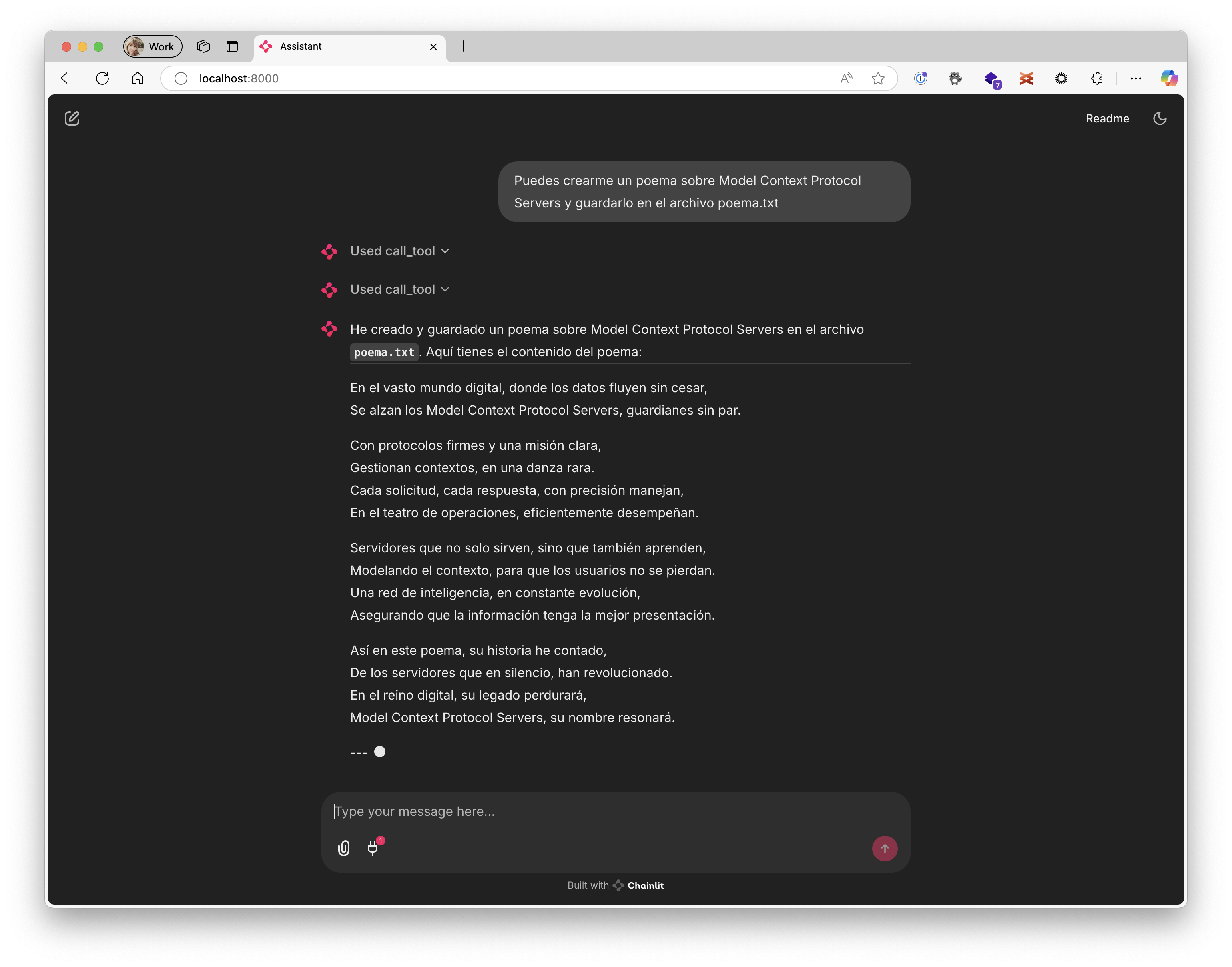
Preguntarle algo as:
Puedes crearme un poema sobre Model Context Protocol Servers y guardarlo en el archivo poema.txt
Y el resultado sería como el siguiente:
¡Nos vemos 👋🏻!
Installing Chainlit Demo
This server has no published package — it is built from source. Open the repository and follow its README.
▸ github.com/0GiS0/chainlit-demoFAQ
Is Chainlit Demo MCP free?
Yes, Chainlit Demo MCP is free — one-click install via Unyly at no cost.
Does Chainlit Demo need an API key?
No, Chainlit Demo runs without API keys or environment variables.
Is Chainlit Demo hosted or self-hosted?
Self-hosted: the server runs locally on your machine via the install command above.
How do I install Chainlit Demo in Claude Desktop, Claude Code or Cursor?
Open Chainlit Demo on unyly.org, pick your client tab (Claude Desktop, Claude Code, Cursor) and press Install — the config is generated automatically, no JSON editing.
Related MCPs
Fetch
Web content fetching and conversion for efficient LLM usage.
AWS KB Retrieval
Retrieval from AWS Knowledge Base using Bedrock Agent Runtime.
 by modelcontextprotocol
Spring AI MCP Server
Provides auto-configuration for setting up an MCP server in Spring Boot applications.
llm-analysis-assistant
A very streamlined mcp client that supports calling and monitoring stdio/sse/streamableHttp, and can also view request responses through the /logs page. It also
 by xuzexin-hz
MCP-Agent
A simple, composable framework to build agents using Model Context Protocol by [LastMile AI](https://www.lastmileai.dev)
 by lastmile-ai
Spring AI MCP Client
Provides auto-configuration for MCP client functionality in Spring Boot applications.
mcp.natoma.ai
A Hosted MCP Platform to discover, install, manage and deploy MCP servers by [Natoma Labs](https://www.natoma.ai)
MCPHub
Website to list high quality MCP servers and reviews by real users. Also provide online chatbot for popular LLM models with MCP server support.
MCP Servers Rating and User Reviews
Website to rate MCP servers, write authentic user reviews, and [search engine for agent & mcp](http://www.deepnlp.org/search/agent)
mkinf
An Open Source registry of hosted MCP Servers to accelerate AI agent workflows.
Compare Chainlit Demo with
Not sure what to pick?
Find your stack in 60 seconds
Author?
Embed badge for your README
Browse similar
All ai MCPs