
Chinese History
FreeNot checkedA traceable Chinese-history MCP server: 4 tools over 9 classical texts, every result cited (book→chapter→paragraph). Zero runtime dependencies.

About
A traceable Chinese-history MCP server: 4 tools over 9 classical texts, every result cited (book→chapter→paragraph). Zero runtime dependencies.
README
CI PyPI License: MIT Data: CC BY 4.0 Python 3.9+ Dependencies: zero MCP Release
A traceable Chinese-history MCP server. Four Model Context
Protocol tools over 9 classical Chinese
texts (pre-Qin to Wei-Jin — 史记 / 汉书 / 后汉书 / 三国志 / 左传 / 论语 / 孟子 /
吕氏春秋 / 资治通鉴). Every result carries a 【book → chapter → paragraph】
citation, and honestly reports its review_status — the server never claims
per-item human review it doesn't have.
一个可溯源的中国历史故事 MCP server:按事件 / 人物 / 今地名 / 品质四轴查询 先秦-汉魏九部正史子书,每条返回都带原文出处,机器生成/机审内容如实标注。
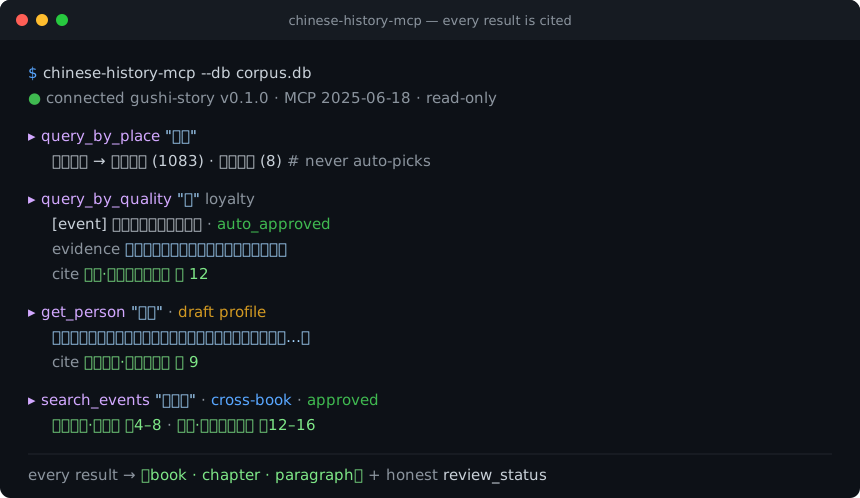
- Zero runtime dependencies — pure Python standard library. No
pip installof a framework, no MCP SDK; the whole server is auditable in a few files. - Read-only — opens the corpus with
mode=ro+PRAGMA query_only; never writes. - Honest by construction — machine-generated punctuation / translation and machine-adjudicated status are labeled in every response (AIGC-compliant).
Why this exists: as of mid-2026 the public MCP ecosystem has no classical Chinese / Chinese-history server. This fills that gap. Income expectation is zero; the goal is a useful public good.
Contents: The four tools · Install & run · The corpus database · Honesty · Data & provenance · Design notes
The four tools
| tool | input | returns |
|---|---|---|
search_events |
keyword / book / person / kind / limit |
Cross-book fused historical events with per-source provenance (book · chapter · paragraph + role: primary/detailed/brief/comment/corroborating). canonical_summary is an LLM-fused machine narrative. Optional kind filter (事件/场景/评价; unset = all, including appraisal events). time_label may be derived from reviewed time anchors — time_label_source says which (manual vs derived; omitted on pre-0.2 data). |
get_person |
name (given name or alias) |
Person profile (LLM-synthesized, draft) + others' appraisals (verbatim source quotes, each cited) + attributed qualities + events mentioning them + person-to-person relations (closed 26-type vocabulary — kinship/ruler-minister/mentorship/alliance/enmity; machine-reviewed, only approved/auto_approved exposed, no temporal bounds; empty on pre-0.2 data). |
query_by_place |
place (today's place name) / limit |
Ancient stories set on the land of a modern place, with citations. Same-name-different-place returns candidates for you to disambiguate — it never silently picks one. Directional/regional generic names are excluded. |
query_by_quality |
quality (from a 55-term controlled vocabulary, e.g. 忠 loyalty, 谋略 strategy) / limit / include_draft |
Representative events, people, and stories for a quality, each with an original-text evidence_quote and rationale. |
Each tool call returns JSON. Multi-source events, person appraisals, and place/quality edges all carry the exact 【book → chapter → paragraph】 they came from — that is the point of the server.
Install & run
Requires Python 3.9+ (standard library only — nothing else is installed). The server speaks MCP over stdio (newline-delimited JSON-RPC 2.0).
pip install chinese-history-mcp
# then (after downloading corpus.db from Releases — see below):
chinese-history-mcp --db /path/to/corpus.db
Or run without installing, straight from a checkout:
PYTHONPATH=src python3 -m storyextractor.mcp.server --db /path/to/corpus.db
Configure in an MCP client
Claude Desktop (claude_desktop_config.json), Cline, Continue, etc. — add one
stdio server. After pip install chinese-history-mcp:
{
  "mcpServers": {
    "chinese-history": {
      "command": "chinese-history-mcp",
      "args": ["--db", "/path/to/corpus.db"]
    }
  }
}
Alternative: run from a checkout (no install), or with uvx
{
  "mcpServers": {
    "chinese-history": {
      "command": "python3",
      "args": ["-m", "storyextractor.mcp.server", "--db", "/path/to/corpus.db"],
      "env": { "PYTHONPATH": "src" },
      "cwd": "/absolute/path/to/chinese-history-mcp"
    }
  }
}
Or zero-install with uv:
uvx chinese-history-mcp --db /path/to/corpus.db.
Try one handshake by hand
printf '%s\n' \
  '{"jsonrpc":"2.0","id":1,"method":"initialize","params":{"protocolVersion":"2025-06-18","capabilities":{}}}' \
  '{"jsonrpc":"2.0","id":2,"method":"tools/list"}' \
  '{"jsonrpc":"2.0","id":3,"method":"tools/call","params":{"name":"query_by_quality","arguments":{"quality":"忠","limit":2}}}' \
  | chinese-history-mcp --db /path/to/corpus.db
Demo + hallucination comparison
python3 scripts/mcp_demo.py --db /path/to/corpus.db runs a scripted tour of
all four tools (also a minimal MCP-client reference). See
docs/MCP_DEMO.md for a side-by-side of a bare LLM
(fabricated / uncitable) vs. this server (cited) on the same questions.
The corpus database
corpus.db is not in this repository (it is a ~90 MB binary). Download it
from this repo's Releases and point --db at it, or set
STORYEXTRACTOR_DB=/path/to/corpus.db.
The database is read-only at runtime. If you host it on a read-only medium,
make sure the release artifact was produced with
sqlite3 corpus.db "VACUUM INTO 'corpus_release.db'" (single file, no
-wal/-shm sidecars).
Honesty (please read)
This server is designed for provenance, not to launder machine output as scholarship. Downstream clients and LLMs must not present its results as "individually human-reviewed." Every response labels what it is:
- Events
review_status='approved'— mostly machine bulk-approved credible inferences, not per-item human review. - Person profiles
review_status='draft'— LLM-synthesized, not human-vetted. - Quality mappings —
auto_approved= multi-LLM machine consensus,draft= pending review;evidence_quoteis a real substring of the source,rationaleis an LLM's reasoning. - Place mappings — mostly multi-LLM machine consensus (
auto_approved), a few human-approved; confidence is bucketed high/medium/doubtful. - Text — original is public-domain 白文 with machine-generated punctuation/segmentation; vernacular translation is fully machine-generated.
The server also does not eliminate downstream hallucination: it gives you citable retrieval facts; an LLM built on top can still confabulate around them. The citations are anchors for human verification.
Scope is the 9 texts above — "not found" means "not in this corpus," not "did not happen."
Data & provenance
- Original text: public-domain classical Chinese 白文 (unpunctuated base text from public-domain editions), with self-produced, machine-generated punctuation and segmentation (not copied from any modern annotated/collated edition).
- Vernacular translation: machine-generated across the whole corpus.
- Annotations (events / entities / places / qualities): machine-assisted, with human review gating on selected layers; status is reported per record.
License
- Code (this repository): MIT — see LICENSE.
- Corpus data (
corpus.db, distributed via Releases): CC BY 4.0.
The text layer is self-produced (punctuation/segmentation) over public-domain base text, so it is distributed freely; machine-generated attributes are labeled throughout for AIGC compliance.
Design notes
- Pure stdlib hand-written stdio JSON-RPC 2.0 (
initialize/tools/list/tools/call+ping/ notifications). No third-party MCP SDK. - Read-only DB access (
src/storyextractor/mcp/db.py):mode=ro+PRAGMA query_only; the migration-runningdb.connectis never used at serve time. - Tests:
python3 tests/test_mcp_server.py(read-only enforcement, protocol shapes/error codes, honestreview_status, alias token-exact matching + disambiguation, LIKE-wildcard escaping) — builds a temporary fixture DB, so it runs withoutcorpus.db.
Contributing & project meta
- CONTRIBUTING.md — how to run tests/lint and the principles this project holds to.
- CHANGELOG.md — release history.
- SECURITY.md — threat surface (read-only, no network) and how to report issues.
Issues and pull requests are welcome. Please keep the constraints in mind:
zero runtime dependencies, read-only, every result cited, honest review_status.
Installing Chinese History
This server has no published package — it is built from source. Open the repository and follow its README.
▸ github.com/lizhuojunx86/chinese-history-mcpFAQ
Is Chinese History MCP free?
Yes, Chinese History MCP is free — one-click install via Unyly at no cost.
Does Chinese History need an API key?
No, Chinese History runs without API keys or environment variables.
Is Chinese History hosted or self-hosted?
Self-hosted: the server runs locally on your machine via the install command above.
How do I install Chinese History in Claude Desktop, Claude Code or Cursor?
Open Chinese History on unyly.org, pick your client tab (Claude Desktop, Claude Code, Cursor) and press Install — the config is generated automatically, no JSON editing.
Related MCPs
Fetch
Web content fetching and conversion for efficient LLM usage.
AWS KB Retrieval
Retrieval from AWS Knowledge Base using Bedrock Agent Runtime.
 by modelcontextprotocol
Spring AI MCP Server
Provides auto-configuration for setting up an MCP server in Spring Boot applications.
llm-analysis-assistant
A very streamlined mcp client that supports calling and monitoring stdio/sse/streamableHttp, and can also view request responses through the /logs page. It also
 by xuzexin-hz
Compare Chinese History with
Not sure what to pick?
Find your stack in 60 seconds
Author?
Embed badge for your README
Browse similar
All ai MCPs