
ConvRadar
FreeNot checkedGA4 conversion analyst inside Claude — funnel drops, traffic anomalies, device gaps, with numbers.

About
GA4 conversion analyst inside Claude — funnel drops, traffic anomalies, device gaps, with numbers.
README

ConvRadar — Conversion Analyst inside Claude
Hosted MCP server that turns your Google Analytics 4 property into a conversation. Ask "where's my biggest funnel drop?" or "did mobile conversion drop last week?" in Claude, ChatGPT, Cursor or Cline — ConvRadar pulls the right slice, runs the diagnostic, and answers with numbers and a recommended action.
- 🌐 Website: https://convradar.com
- 💬 Try without signup (3 free messages): https://convradar.com/chat
- 🔌 MCP endpoint:
https://mcp.convradar.com/mcp - 📧 Contact: https://convradar.com
This repository is the public manifest for the hosted ConvRadar MCP server. The server itself is a managed service — there is no self-hosted binary. Use the configuration below to connect any MCP-compatible client to it.
Screenshots
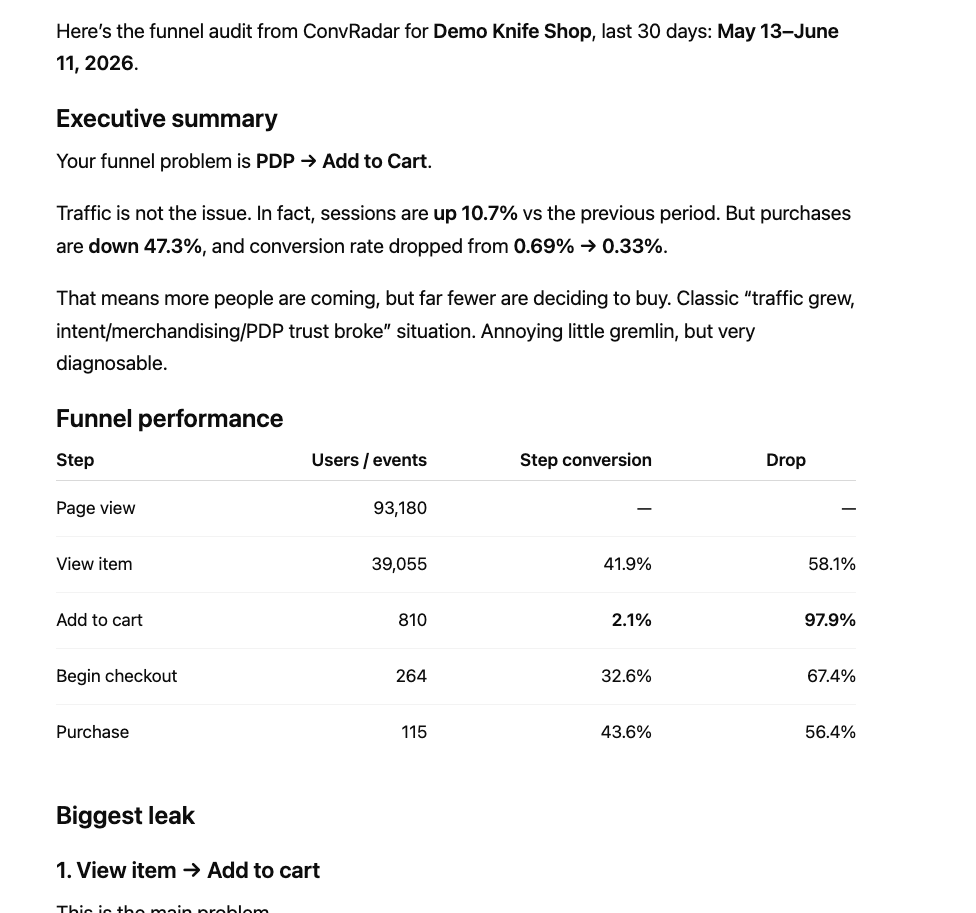
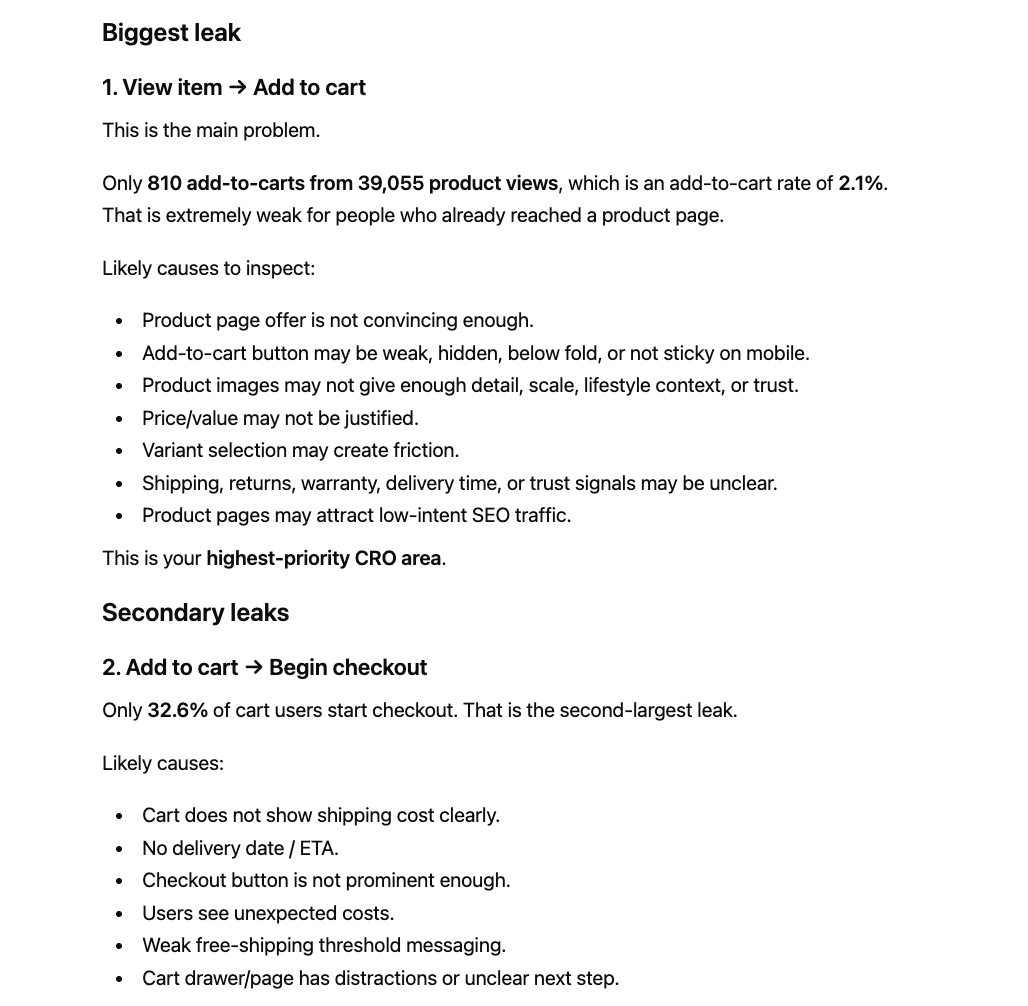
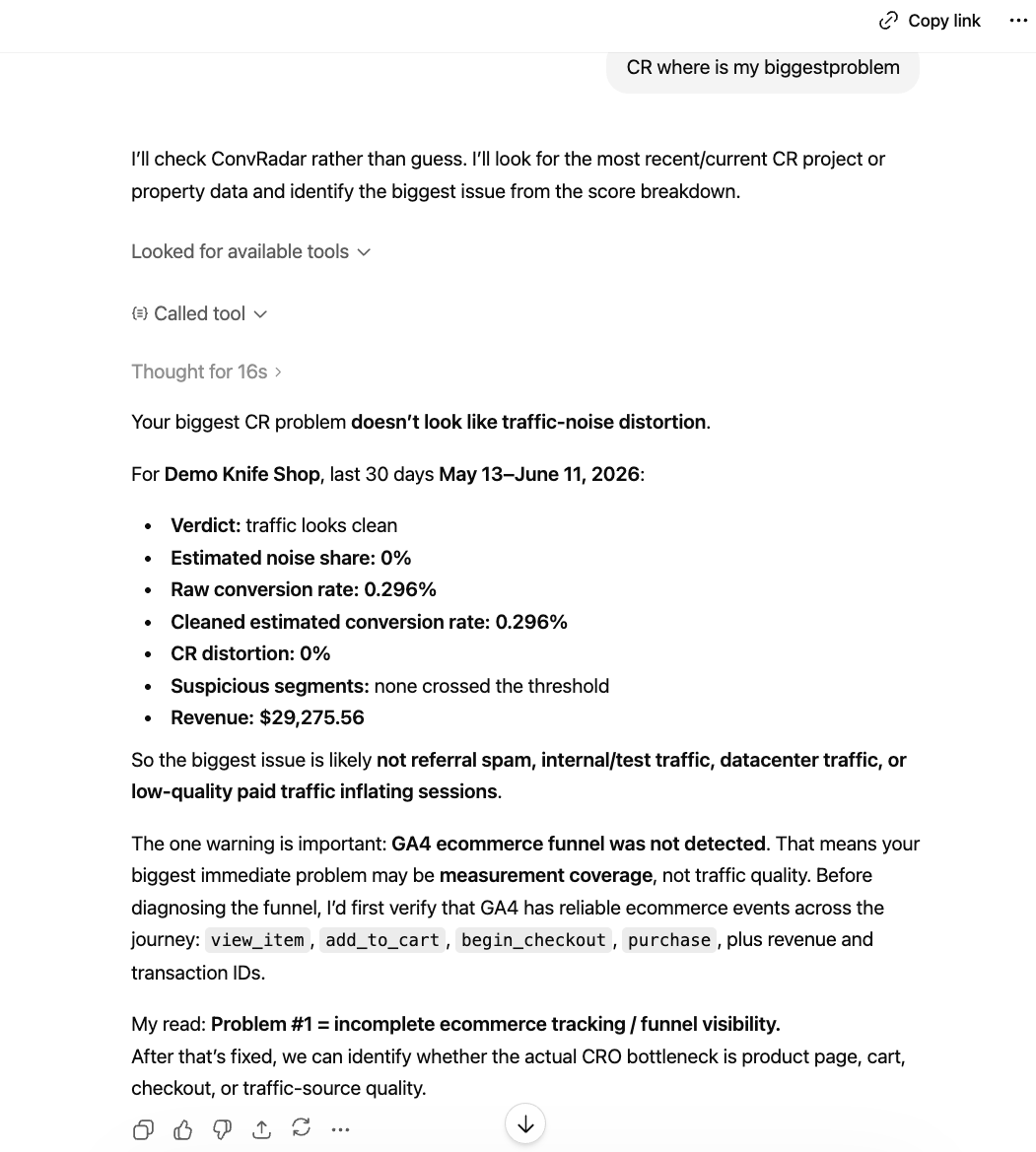
Live output from the connector — funnel audit on the demo tenant in Claude.ai, traffic-quality verdict in ChatGPT. Full set with paired prompts in media/.
What ConvRadar does
ConvRadar is a hosted Model Context Protocol (MCP) server. It connects to your Google Analytics 4 property over OAuth (read-only) and exposes ~20 conversion-diagnostic tools to any MCP client.
- Runs a full audit on demand — funnel drops, traffic-quality regressions, device gaps, landing-page leaks, product/category performance.
- Compares segments, periods and benchmarks. Answers in plain English with GA4 numbers attached.
- Records hypotheses so the next conversation picks up where the last one ended.
Works with any GA4 property
ConvRadar isn't e-commerce-only. On connect it detects what kind of property you have and adapts the metrics, funnel and benchmarks to match — so the numbers make sense whether or not you sell anything on-site.
- E-commerce — product and category performance, the add-to-cart → checkout → purchase funnel, revenue and AOV.
- SaaS — sign-ups, trials and activation as the conversion funnel; engagement where there's no cart.
- Lead generation — form submits, demo requests, contact and quote events mapped into a real lead funnel.
- Mobile & web apps — app engagement, key-event completion and retention-shaped questions.
- Content, media and everything else — engagement, read depth and whatever key events you've defined.
If a property has no e-commerce tracking, ConvRadar won't hand you a misleading 0% conversion rate or $0 revenue. It leads with engagement and the key events you actually fire, and tells you when a metric isn't available instead of reporting a zero as fact.
Try without installing
Open the demo at https://convradar.com/chat — 3 free messages, no signup. The demo runs against a real GA4 property so the answers reflect real data.
Connect your client
ConvRadar is a remote OAuth-protected MCP. Any stdio-only client (Claude Desktop, Cursor, Cline, Continue) can connect via mcp-remote, which handles the OAuth handshake on first run.
Claude Desktop / Cursor / Cline
Add this to your client's MCP config (claude_desktop_config.json, ~/.cursor/mcp.json, etc.):
{
  "mcpServers": {
    "convradar": {
      "command": "npx",
      "args": ["-y", "mcp-remote", "https://mcp.convradar.com/mcp"]
    }
  }
}
Restart the client. On first tool call, a browser window opens for OAuth — sign in with the same Google account that owns your GA4 property.
Claude.ai (web)
Add a Custom Connector in Settings → Connectors:
- URL:
https://mcp.convradar.com/mcp - Auth: OAuth 2.1 (handled automatically)
ChatGPT (Plus / Pro)
Add a Custom MCP Connector in Settings → Connectors with URL https://mcp.convradar.com/mcp.
Tools
ConvRadar exposes the following tools. The MCP client picks the right one for each question; you don't usually call them by name.
| Tool | What it does |
|---|---|
cr_full_audit |
Run a complete conversion audit across funnel, traffic, devices, geos and products. |
cr_get_account_info |
GA4 property metadata for the connected account. |
cr_get_overview_metrics |
Headline metrics (sessions, users, conversions, revenue) for a period. |
cr_get_current_state |
Snapshot of the account's current conversion state. |
cr_get_funnel |
The configured funnel with step-by-step drop-off. |
cr_diagnose_funnel_drop |
Identify the biggest funnel-step regression and likely cause. |
cr_get_traffic_breakdown |
Split traffic by source, medium and campaign. |
cr_assess_traffic_quality |
Score traffic sources by engagement and conversion quality. |
cr_detect_traffic_quality_change |
Step-changes in traffic quality over a window. |
cr_get_device_breakdown |
Sessions and conversions by device category. |
cr_get_geo_breakdown |
Sessions and conversions by country and region. |
cr_get_landing_pages |
Top landing pages with engagement and conversion. |
cr_get_product_analysis |
Product-level revenue and funnel drop-off. |
cr_get_product_performance |
Per-product views / add-to-cart / purchases. |
cr_query_metrics |
Ad-hoc metric and dimension query against GA4. |
cr_describe_data |
Plain-English summary of a dataset slice. |
cr_compare_segments |
Compare two GA4 segments side by side. |
cr_compare_to_benchmark |
Compare a metric to industry or cohort benchmark. |
cr_find_conversion_anomalies |
Statistically significant conversion anomalies. |
cr_capture_via_web_fetch |
Capture supporting evidence from a public URL. |
cr_list_hypotheses |
List stored hypotheses for the account. |
cr_get_hypothesis |
Read a stored hypothesis by ID. |
First prompts to try
After connecting, try:
- Run a full audit of my account.
- Where's my biggest funnel drop?
- Did mobile conversion drop last week?
- Compare desktop and mobile checkout conversion for the last 30 days.
- What should I A/B test next?
Auth
- Protocol: OAuth 2.1, Bearer token in
Authorizationheader. - Scopes:
read:metrics,write:hypotheses. - Discovery (RFC 9728):
GET https://mcp.convradar.com/.well-known/oauth-protected-resource. - No per-user URLs —
mcp-remote(or the client's built-in OAuth flow) handles the login on first run.
The OAuth flow only requests read-only GA4 access — ConvRadar can never modify your analytics data.
Pricing
Free right now — ConvRadar is in open beta. No card, no trial countdown, no usage caps. Connect GA4 and use every tool.
When the beta ends it becomes $9.99 / month flat (7-day free trial, cancel anytime, no usage caps). Beta users get advance notice before that kicks in.
Stack
GA4 Data API (read-only) · Claude/ChatGPT MCP · Stripe billing · OAuth 2.1.
Status
- MCP endpoint: production at
https://mcp.convradar.com/mcp - Source: closed. This repository contains the public manifest, install instructions and tool catalogue only.
Support
Visit https://convradar.com to get in touch.
License
The contents of this repository (README, manifest, configuration snippets) are released under the MIT License. The hosted ConvRadar service itself is proprietary.
Installing ConvRadar
This server has no published package — it is built from source. Open the repository and follow its README.
▸ github.com/Pikaivan/convradar-mcpFAQ
Is ConvRadar MCP free?
Yes, ConvRadar MCP is free — one-click install via Unyly at no cost.
Does ConvRadar need an API key?
No, ConvRadar runs without API keys or environment variables.
Is ConvRadar hosted or self-hosted?
A hosted option is available: Unyly runs the server in the cloud, no local setup required.
How do I install ConvRadar in Claude Desktop, Claude Code or Cursor?
Open ConvRadar on unyly.org, pick your client tab (Claude Desktop, Claude Code, Cursor) and press Install — the config is generated automatically, no JSON editing.
Related MCPs
Fetch
Web content fetching and conversion for efficient LLM usage.
AWS KB Retrieval
Retrieval from AWS Knowledge Base using Bedrock Agent Runtime.
 by modelcontextprotocol
Spring AI MCP Server
Provides auto-configuration for setting up an MCP server in Spring Boot applications.
llm-analysis-assistant
A very streamlined mcp client that supports calling and monitoring stdio/sse/streamableHttp, and can also view request responses through the /logs page. It also
 by xuzexin-hz
Compare ConvRadar with
Not sure what to pick?
Find your stack in 60 seconds
Author?
Embed badge for your README
Browse similar
All ai MCPs