
DataCenter AI Monitor
FreeNot checkedAI-powered infrastructure monitoring system for data centers. Combines n8n automation, OpenAI GPT-4 for root cause analysis, and PostgreSQL for incident trackin

About
AI-powered infrastructure monitoring system for data centers. Combines n8n automation, OpenAI GPT-4 for root cause analysis, and PostgreSQL for incident tracking. Reduces MTTR by 60% through intelligent alert correlation and automated remediation recommendations.
README

License: MIT n8n OpenAI PostgreSQL Python Streamlit Docker
An autonomous infrastructure health-monitoring and diagnostic system powered by AI Agents and n8n.
🚀 The Business Problem
- Situation: Modern Data Centers generate millions of telemetry points, leading to extreme alert fatigue. Critical infrastructure failures were often buried under thousands of low-priority logs, delaying response times and increasing operational risks.
- Task: To architect an autonomous system capable of filtering telemetry noise, performing real-time Root Cause Analysis (RCA), and dispatching actionable intelligence to on-site engineers—all while ensuring the environment is portable and scalable.
- Action: I orchestrated a multi-layered AIOps solution containerized with Docker for seamless deployment. I used n8n as the central engine, integrated PostgreSQL for time-series data, and leveraged OpenAI's GPT-4o to serve as an "AI Diagnostic Engineer" that contextually analyzes alerts and generates remediation plans.
- Result: Developed a production-ready framework that reduces initial diagnostic time from minutes to seconds, providing high-fidelity incident reports with 100% automated RCA coverage for critical failures.
🏗️ System Architecture
The system operates in three distinct layers to ensure reliability and intelligence:
- Ingestion Layer: Real-time metrics (CPU, Temp, Disk, UPS) are streamed into a PostgreSQL database.
- Intelligence Layer (n8n + AI):
- Monitor Workflow: Polls for critical thresholds and triggers the AI Agent.
- AI Diagnostic: GPT-4o receives the full context of the alert and performs a Root Cause Analysis (RCA).
- Action Layer: Results are pushed to an Executive Dashboard and dispatched via high-priority Gmail alerts with actionable remediation steps.
graph TD
    A[Telemetry Sources] -->|Streaming| B[(PostgreSQL DB)]
    B -->|Check Thresholds| C{n8n Orchestrator}
    C -->|Query Context| B
    C -->|RCA Request| D[OpenAI GPT-4o Agent]
    D -->|Analysis & Steps| C
    C -->|Store Incident| B
    C -->|Alert| E[Email/Slack Notification]
    B -->|Live Feed| F[Streamlit Dashboard]
⚙️ How it Works: Workflow Deep Dive
1. The Monitor & Analyzer (01-monitor.json)
This is the heart of the system. Every 5 minutes, n8n queries the database for any device reporting a critical status.
- The Prompt: The AI isn't just chatting; it's primed with a specific persona: Senior Data Center Engineer.
- The Output: It generates a structured 3-point report: Root Cause, Business Impact, and a 3-step Remediation Plan.
2. The Alert Dispatcher (02-Gmail-Alert-Dispatcher.json)
Once an incident is analyzed, this workflow ensures the right people know immediately.
- Smart Filtering: Only alerts with a severity of 4/5 or higher trigger the emergency email.
- Data Sanitization: Uses custom JavaScript nodes to clean the AI output, formatting it into a beautiful, readable HTML email for mobile and desktop.
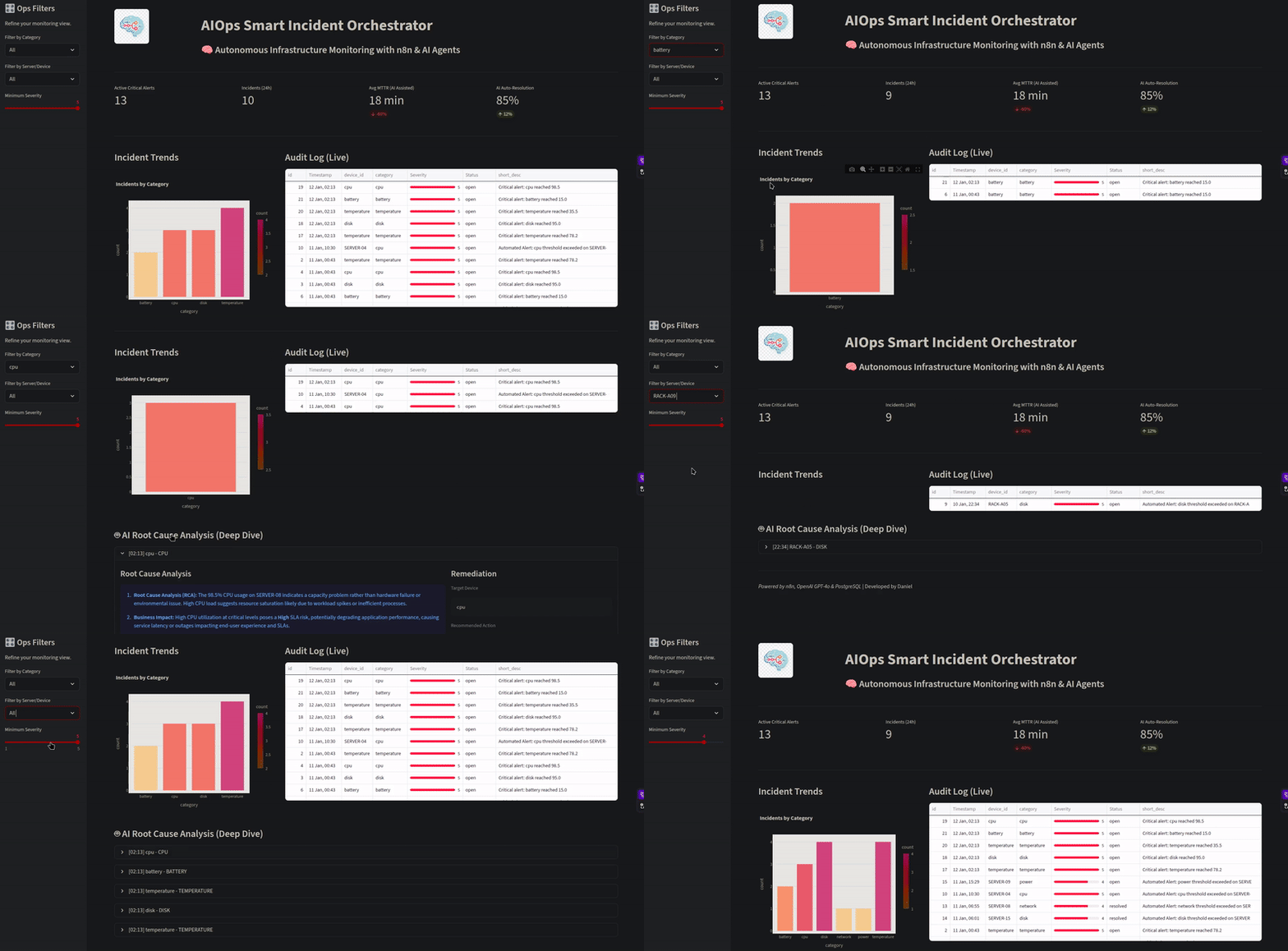
🖥️ Executive Dashboard
System Demo
🚀 Despliegue Local
Inicio Rápido (3 pasos)
Configura tu API Key de OpenAI
# Edita el archivo .env
OPENAI_API_KEY=sk-tu-clave-aqui
Inicia el proyecto
./start.shAccede a n8n: http://localhost:5678 (admin / admin123)
URLs de Acceso
| Servicio | URL | Credenciales |
|---|---|---|
| n8n | http://localhost:5678 | admin / admin123 |
| Dashboard | http://localhost:8501 | - |
| PostgreSQL | localhost:5432 | datacenter_user / datacenter_pass_2024 |
📖 Documentación completa: DEPLOYMENT.md | QUICKSTART.md
🛠️ Technology Stack
- Orchestration: n8n (Low-code workflow automation)
- Infrastructure: Docker (Containerization for portable deployment)
- Artificial Intelligence: OpenAI GPT-4o (LLMs for RCA)
- Database: PostgreSQL (Structured incident logging)
- Frontend: Streamlit (Real-time monitoring UI)
- Scripting: Python 3.11 & JavaScript (Node.js)
📩 Contact & Collaboration
- LinkedIn: daniel-garcía-belman-99a298aa
- Portfolio: danieljcvv-portfolio.vercel.app
- Email: [email protected]
Developed by Daniel-jcVv | Powered by n8n, OpenAI & PostgreSQL
Soli Deo Gloria.
Installing DataCenter AI Monitor
This server has no published package — it is built from source. Open the repository and follow its README.
▸ github.com/Daniel-jcVv/DataCenter-AI-MonitorFAQ
Is DataCenter AI Monitor MCP free?
Yes, DataCenter AI Monitor MCP is free — one-click install via Unyly at no cost.
Does DataCenter AI Monitor need an API key?
No, DataCenter AI Monitor runs without API keys or environment variables.
Is DataCenter AI Monitor hosted or self-hosted?
Self-hosted: the server runs locally on your machine via the install command above.
How do I install DataCenter AI Monitor in Claude Desktop, Claude Code or Cursor?
Open DataCenter AI Monitor on unyly.org, pick your client tab (Claude Desktop, Claude Code, Cursor) and press Install — the config is generated automatically, no JSON editing.
Related MCPs
Fetch
Web content fetching and conversion for efficient LLM usage.
AWS KB Retrieval
Retrieval from AWS Knowledge Base using Bedrock Agent Runtime.
 by modelcontextprotocol
Spring AI MCP Server
Provides auto-configuration for setting up an MCP server in Spring Boot applications.
llm-analysis-assistant
A very streamlined mcp client that supports calling and monitoring stdio/sse/streamableHttp, and can also view request responses through the /logs page. It also
 by xuzexin-hz
Compare DataCenter AI Monitor with
Not sure what to pick?
Find your stack in 60 seconds
Author?
Embed badge for your README
Browse similar
All ai MCPs