
DeepMyst Server
FreeNot checkedEnables intelligent LLM optimization and routing for Claude Desktop and HTTP clients, reducing token usage and automatically selecting the best model for each q

About
Enables intelligent LLM optimization and routing for Claude Desktop and HTTP clients, reducing token usage and automatically selecting the best model for each query.
README
Intelligent LLM Optimization & Routing for Claude Desktop and HTTP Clients
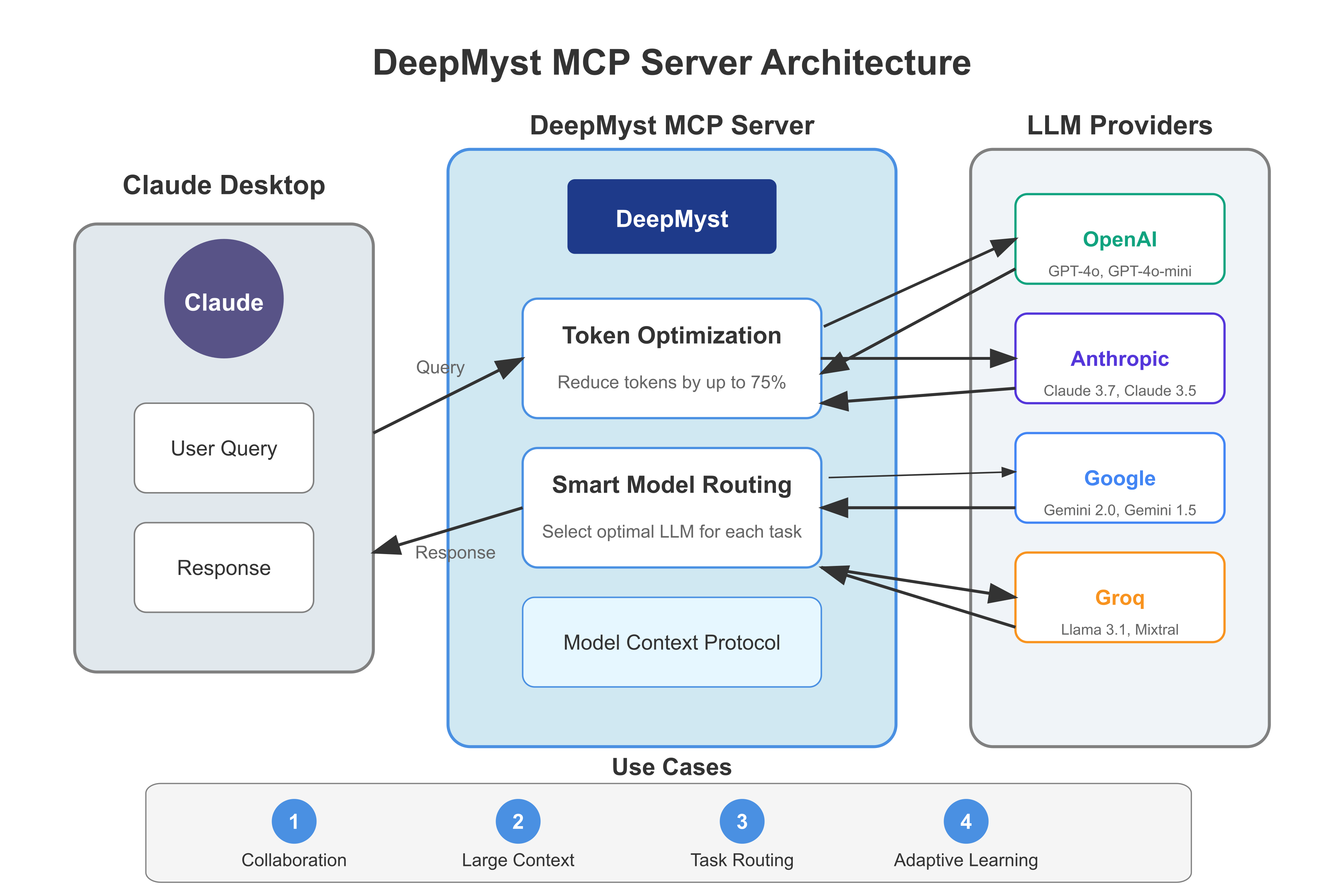
Overview
DeepMyst MCP Server creates a seamless bridge between DeepMyst and Claude Desktop or any client through the Model Context Protocol (MCP). This integration allows Claude and other clients to harness DeepMyst's powerful optimization and routing capabilities while maintaining your familiar workflows.
Key Features
- Token Optimization - Reduce token usage by up to 75% while preserving response quality, directly lowering your API costs
- Smart Model Routing - Automatically select the optimal LLM for each specific query based on task requirements
- Combined Capabilities - Use both optimization and routing together for maximum efficiency
- Multiple Transport Support - Connect via STDIO (for Claude Desktop) or SSE (for HTTP clients)
- Client-provided API Keys - No need to store your DeepMyst API key on the server
How It Works
Token Optimization: DeepMyst identifies redundancies in prompts, intelligently compresses content, preserves key information, and maintains contextual meaning—all while significantly reducing token usage without sacrificing quality.
Smart Routing: The system analyzes each query's category, complexity level, and required capabilities. It evaluates available models based on performance benchmarks, token cost, response latency, and capability support through a weighted scoring system.
Installation
Prerequisites
- Python 3.8 or higher
- UV - Fast Python package installer
- Claude Desktop - Latest version (or another MCP client)
- DeepMyst API key (get one from platform.deepmyst.com)
Installation Steps
- Clone or download the DeepMyst MCP Server code:
# Create a directory for the server
mkdir DeepMyst-MCP
cd DeepMyst-MCP

# Download the server code
# (Or copy the code from the provided deepmyst_mcp.py file)
- Install dependencies with UV:
# Create and activate a virtual environment (optional but recommended)
uv venv
source .venv/bin/activate  # On macOS/Linux
# OR
.venv\Scripts\activate     # On Windows

# Install dependencies
uv pip install mcp openai aiohttp uvicorn starlette
Running the Server
Local Deployment
For Claude Desktop (STDIO Transport):
python deepmyst_mcp.py --stdio
# OR
uv run deepmyst_mcp.py --stdio
For HTTP Clients (SSE Transport):
python deepmyst_mcp.py --sse
# OR with custom host and port
python deepmyst_mcp.py --sse --host 127.0.0.1 --port 3000
The server now supports explicit command-line arguments:
--stdio- Run with STDIO transport (for Claude Desktop)--sse- Run with SSE transport (for HTTP clients)--host HOST- Specify host address (default: 0.0.0.0)--port PORT- Specify port number (default: 8000)--debug- Enable debug logging
You can also use environment variables:
export HOST=127.0.0.1  # Change the host
export PORT=3000       # Change the port
python deepmyst_mcp.py --sse
Public Server
The DeepMyst MCP Server is publicly available at: https://mcp.deepmyst.com
Available endpoints:
- SSE endpoint:
https://mcp.deepmyst.com/sse - Message endpoint:
https://mcp.deepmyst.com/messages
Configuring Claude Desktop
Open your Claude Desktop configuration file:
- macOS:
~/Library/Application Support/Claude/claude_desktop_config.json - Windows:
%APPDATA%\Claude\claude_desktop_config.json
- macOS:
Add the DeepMyst MCP server configuration:
{
  "mcpServers": {
    "deepmyst": {
      "command": "python",
      "args": [
        "/path/to/deepmyst_mcp.py",
        "--stdio"
      ]
    }
  }
}
- Save the file and restart Claude Desktop
Tools and Capabilities
The DeepMyst MCP server provides several powerful tools:
Get Best Model for Query
Analyzes your query and recommends the optimal model.Prompt: What's the best model for writing a poem about quantum physics? Parameters: - api_key: your-deepmyst-api-keyOptimized Completion
Generates a response with token optimization to reduce costs.Prompt: Use optimized_completion to explain quantum entanglement, with these parameters: - api_key: your-deepmyst-api-key - model: gpt-4o - temperature: 0.7Auto-Routed Completion
Generates a response using the DeepMyst router to select the best model.Prompt: Use auto_routed_completion to generate a Python function with these parameters: - api_key: your-deepmyst-api-key - base_model: gpt-4o-miniSmart Completion
Combines routing and optimization - first determines the best model for your query, then optionally applies token optimization.Prompt: Use smart_completion to explain how blockchain works, with these parameters: - api_key: your-deepmyst-api-key - optimize: trueDeepMyst Completion
The most flexible tool with all options configurable.Prompt: Use deepmyst_completion to summarize this article, with these parameters: - api_key: your-deepmyst-api-key - base_model: gpt-4o - optimize: true - auto_route: false
Advanced Use Cases
Collaborative Multi-LLM Problem Solving
DeepMyst enables complex problems to be broken down and distributed across multiple specialized LLMs:
- Parallel Processing: Divide complex tasks into subtasks that different LLMs can solve simultaneously
- Expert Ensembles: Assign different aspects of a problem to models with specific strengths (e.g., GPT-4o for creative writing, Claude for logical reasoning, Gemini for mathematical analysis)
- Consensus Building: Route the same question to multiple models and synthesize their responses for more reliable answers
- Chain-of-Thought Enhancement: Use one model to generate a reasoning path, then have another model verify or improve it
Example: For a complex business strategy analysis, DeepMyst could route market research to data-focused models, creative ideation to generative specialists, and risk assessment to models with better reasoning capabilities.
Handling Large Context Windows
Efficiently manage and process large documents or complex conversations:
- Context Chunking: Break large documents into manageable segments, route each to the appropriate model, then synthesize the results
- Progressive Summarization: Use models with smaller context windows to summarize sections, then feed those summaries to models with broader context capabilities
- Priority Filtering: Intelligently identify and preserve the most relevant context while compressing less important information
- Context Management: Maintain conversation history effectively without exceeding token limits by dynamically compressing older turns
Example: When analyzing a 500-page legal document, DeepMyst can chunk the document, route sections to specialized legal analysis models, and progressively build a comprehensive analysis without hitting context limits.
Intelligent Task Routing
Match tasks to the most suitable models based on their specific capabilities:
- Capability Matching: Automatically identify task requirements and match them with models that excel in those areas
- Cost Optimization: Route simple queries to efficient, lower-cost models while reserving premium models for complex tasks
- Latency Management: Select models based on response time requirements for time-sensitive applications
- Specialization Routing: Direct domain-specific questions to models with the best performance in those fields
Example: A financial analysis workflow could route data processing to fast, efficient models, numerical analysis to math-specialized models, and final report generation to models with better writing capabilities.
Web Integration with SSE Transport
With SSE transport support, you can integrate DeepMyst MCP into web applications:
- Remote Access: Access your DeepMyst MCP server from any client over HTTP
- Web Applications: Integrate with web frontends and backends
- Multiple Clients: Connect multiple clients simultaneously to the same server
- API Gateway: Use as a gateway for your own applications
Example: Build a web interface that connects to the DeepMyst MCP server, allowing users to interact with multiple LLMs through a unified UI.
Supported LLM Providers
DeepMyst supports multiple LLM providers including:
- OpenAI: GPT-4o, GPT-4o-mini, etc.
- Anthropic: Claude 3.7 Sonnet, Claude 3.5 Sonnet, etc.
- Google: Gemini 2.0 Flash, Gemini 1.5 Pro, etc.
- Groq: Llama 3.1, Mixtral, etc.
Security Considerations
API Key Handling
The server now requires clients to provide their DeepMyst API key with each tool call. This has several security implications:
Advantages:
- No API keys stored on the server
- Each user can use their own API key
- Server operator doesn't need access to API keys
Considerations:
- API keys will be visible in conversation history
- Keys are passed with each tool call
- May appear in logs if not properly configured
For enhanced security in production environments:
- Always use HTTPS for server communication
- Consider implementing a token-based authentication system
- Implement key masking in logs
- Use environment-specific security measures based on your deployment platform
Resources
- Sign Up: platform.deepmyst.com - Create a DeepMyst account and get your API key
- Try DeepMyst: ask.deepmyst.com - Interactive demo to experience DeepMyst's capabilities
- Documentation: docs.deepmyst.com - Comprehensive guides and API documentation
- Public MCP Server: mcp.deepmyst.com - Use the public DeepMyst MCP server
Troubleshooting
Common Issues
Claude doesn't show the hammer icon:
- Make sure Claude Desktop is up to date
- Check your configuration file for syntax errors
- Restart Claude Desktop
API Key errors:
- Verify your DeepMyst API key is correct
- Ensure you're providing the API key with each tool call
- Check for typos in the API key parameter name
Server connection issues:
- Check that all dependencies are installed
- Verify the path to deepmyst_mcp.py is correct
- Look for error messages in the terminal running the server
SSE transport issues:
- Check that the port is not in use by another application
- Verify network connectivity between client and server
- Look for firewall or network restrictions that might block the connection
MCP Inspector connectivity:
- Use proper format for connecting:
npx @modelcontextprotocol/inspector dev http://localhost:8000 - Avoid using
--envparameter which may cause parsing issues
Logs
Check the DeepMyst MCP server logs for more detailed troubleshooting information. Logs are written to deepmyst.log in the same directory as the server script.
You can enable debug logging with the --debug flag:
python deepmyst_mcp.py --stdio --debug
Health Check
For SSE deployments, you can check server health by accessing the deepmyst://health resource:
Prompt: Check the health status of the DeepMyst MCP server.
Using the Public Server
To connect to the public DeepMyst MCP server:
For Web Clients
Connect to the public server using the SSE endpoints:
const mcpClient = new McpClient({
  sseEndpoint: "https://mcp.deepmyst.com/sse",
  messageEndpoint: "https://mcp.deepmyst.com/messages"
});
For Command Line Clients
Use the MCP CLI with the SSE transport:
mcp connect sse --url https://mcp.deepmyst.com
Using MCP Inspector
To connect the MCP Inspector to the public server:
npx @modelcontextprotocol/inspector dev https://mcp.deepmyst.com
DeepMyst MCP Server is licensed under the MIT License
Installing DeepMyst Server
This server has no published package — it is built from source. Open the repository and follow its README.
▸ github.com/DeepMyst/DeepMyst-MCPFAQ
Is DeepMyst Server MCP free?
Yes, DeepMyst Server MCP is free — one-click install via Unyly at no cost.
Does DeepMyst Server need an API key?
No, DeepMyst Server runs without API keys or environment variables.
Is DeepMyst Server hosted or self-hosted?
Self-hosted: the server runs locally on your machine via the install command above.
How do I install DeepMyst Server in Claude Desktop, Claude Code or Cursor?
Open DeepMyst Server on unyly.org, pick your client tab (Claude Desktop, Claude Code, Cursor) and press Install — the config is generated automatically, no JSON editing.
Related MCPs
Fetch
Web content fetching and conversion for efficient LLM usage.
AWS KB Retrieval
Retrieval from AWS Knowledge Base using Bedrock Agent Runtime.
 by modelcontextprotocol
Spring AI MCP Server
Provides auto-configuration for setting up an MCP server in Spring Boot applications.
llm-analysis-assistant
A very streamlined mcp client that supports calling and monitoring stdio/sse/streamableHttp, and can also view request responses through the /logs page. It also
 by xuzexin-hz
Compare DeepMyst Server with
Not sure what to pick?
Find your stack in 60 seconds
Author?
Embed badge for your README
Browse similar
All ai MCPs