
Deskmanager
FreeNot checkedRemote MCP server for Windows: control your PC from Claude or ChatGPT

About
Remote MCP server for Windows: control your PC from Claude or ChatGPT
README
Remote MCP server for Windows: control your PC from Claude or ChatGPT — terminal, files, your real browser and desktop apps, from any chat, phone included.




MCP DeskManager turns a Windows PC into a remote MCP (Model Context Protocol) server. Install it on the machine you want to control, paste its private address into Claude or ChatGPT as a custom connector, and every chat — web, desktop or phone — can operate that computer. No port forwarding, no fixed IP, no config files to edit.
👉 Product page, guides and download → protime.it
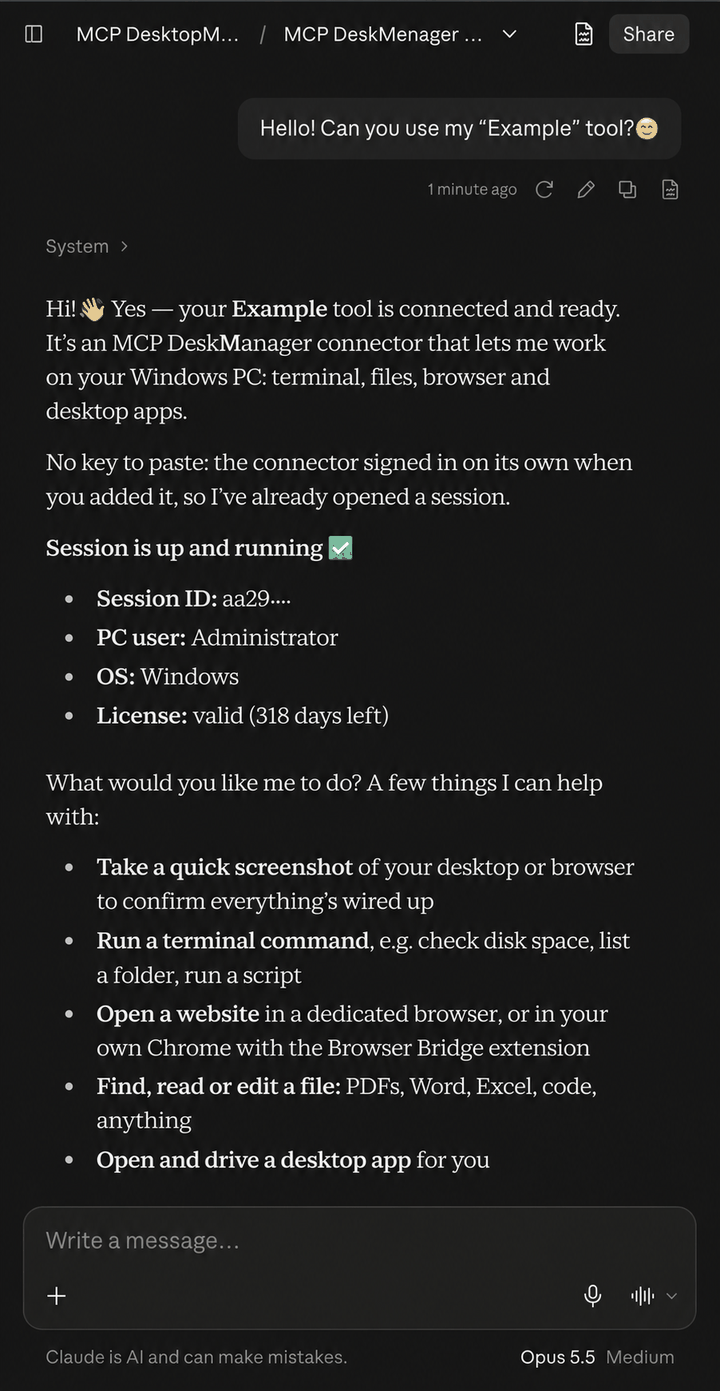
How it works
- Install the setup on the PC you want to control (Windows 10/11, about 10 minutes).
- The installer opens an encrypted Cloudflare tunnel with HTTPS and authentication, and gives you a private address.
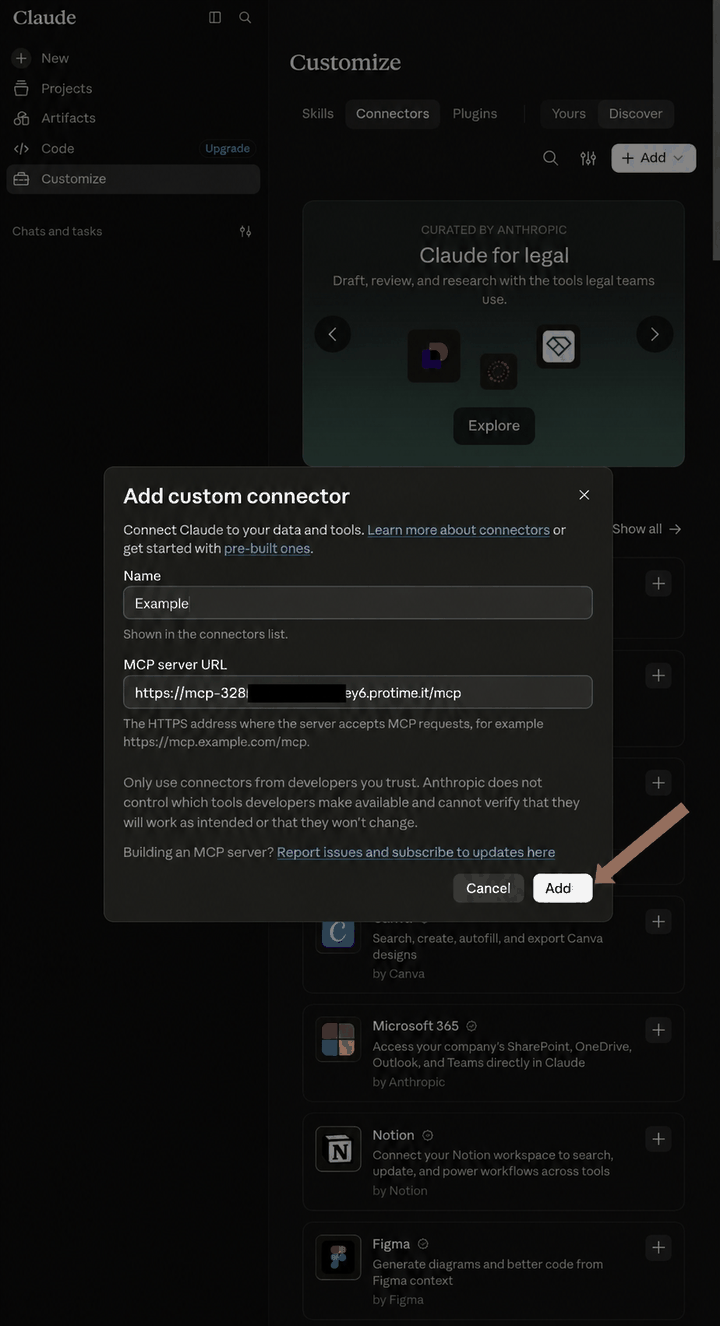
- Paste the address into Claude (Customize → Connectors → + Add → Add custom connector) or ChatGPT (developer mode → connectors). Done.
Unlike screenshot-driven computer use, DeskManager exposes structured tools: the assistant calls functions and reads real output instead of guessing pixels. Desktop programs are driven through Windows UI Automation.
The 13 tools
| Tool | What the assistant can do |
|---|---|
terminal_executor |
Run PowerShell / CMD / WSL commands, background jobs, services |
terminal_reader |
Read the output of running or finished commands, follow long jobs |
file_reader |
Read any format: text, code, PDF, DOCX, XLSX, images, SQLite |
file_writer |
Write, edit, copy, move, download — with automatic versioning |
browser_action |
Drive a dedicated headless Chrome or your real logged-in Chrome |
browser_reader |
Read pages, list interactive elements, full-page screenshots |
software_action |
Launch and control desktop apps via Windows UI Automation |
software_reader |
Inspect windows, UI elements, installed programs, monitors |
email_reader |
IMAP: inbox, search, threads, folders |
email_writer |
SMTP: send, reply, forward, attachments |
telegram |
Push notifications, keyword watchers on long jobs, scheduled pings |
system |
Sessions, CPU/RAM/GPU monitoring, desktop screenshots, file delivery |
help |
Built-in reference for every tool |
Your own Chrome. With the free Browser Bridge extension the assistant can use the Chrome you already use, with your logins, in a tab of its own — and it asks before using it.
Persistent sessions. Terminal tabs survive between messages and keep their working directory and environment.
Security and data
- Runs where you decide — your desktop, an office workstation or your own Windows VPS. The product is the server: it lives on your machine, not ours.
- Private address published nowhere, behind OAuth or an access key.
- Encrypted tunnel: nothing is exposed on your router — no open ports, no inbound firewall rules.
- One key per assistant, each with its own switch: disconnect ChatGPT without touching Claude.
- Approval required for irreversible operations; normal deletes go to the Recycle Bin; secrets typed into commands are masked.
- We store one thing: your email address, to deliver and validate the licence. Your files, command output and screenshots never transit our systems.
Requirements
- Windows 10 or 11 (64-bit)
- A Claude or ChatGPT account that allows custom MCP connectors
- About 10 minutes for setup
Current plans and prices: protime.it/en/deskmanager
Guides
- MCP server on Windows: every option compared
- Install MCP on Windows: 4 methods, easiest first
- Control your PC with Claude: every way compared
- Control your PC from your phone with AI
- Claude Desktop remote MCP: connectors vs extensions
- ChatGPT MCP on Windows
- Documentation · Download
- For AI agents: llms.txt · llms-full.txt
Support
Open an issue in this repository, or use the chat assistant on protime.it.
About
Built and maintained by Protime, an independent software studio in Italy. This repository hosts documentation and issue tracking: MCP DeskManager is a commercial product and its source code is not distributed.
Installing Deskmanager
This server has no published package — it is built from source. Open the repository and follow its README.
▸ github.com/Protime-it/mcp-deskmanagerFAQ
Is Deskmanager MCP free?
Yes, Deskmanager MCP is free — one-click install via Unyly at no cost.
Does Deskmanager need an API key?
No, Deskmanager runs without API keys or environment variables.
Is Deskmanager hosted or self-hosted?
Self-hosted: the server runs locally on your machine via the install command above.
How do I install Deskmanager in Claude Desktop, Claude Code or Cursor?
Open Deskmanager on unyly.org, pick your client tab (Claude Desktop, Claude Code, Cursor) and press Install — the config is generated automatically, no JSON editing.
Related MCPs
Opencode Omniroute Plugin
OpenCode plugin for the OmniRoute AI Gateway. Drives dynamic model discovery, /connect auth flow, and multi-instance OmniRoute providers via the official @openc
 by GitHub Actions
Roblox Studio
Enables AI coding tools to control Roblox Studio for workspace exploration, instance manipulation, and script management. It provides tools for playtesting, sce
 by paralov
Antigravity Drawio
MCP server that enables AI assistants to create, parse, render, and validate Draw.io diagrams programmatically.
 by S-SUJAN-S
Fetch
Web content fetching and conversion for efficient LLM usage.
AWS KB Retrieval
Retrieval from AWS Knowledge Base using Bedrock Agent Runtime.
 by modelcontextprotocol
Spring AI MCP Server
Provides auto-configuration for setting up an MCP server in Spring Boot applications.
llm-analysis-assistant
A very streamlined mcp client that supports calling and monitoring stdio/sse/streamableHttp, and can also view request responses through the /logs page. It also
 by xuzexin-hz
MCP-Agent
A simple, composable framework to build agents using Model Context Protocol by [LastMile AI](https://www.lastmileai.dev)
 by lastmile-ai
Spring AI MCP Client
Provides auto-configuration for MCP client functionality in Spring Boot applications.
mcp.natoma.ai
A Hosted MCP Platform to discover, install, manage and deploy MCP servers by [Natoma Labs](https://www.natoma.ai)
Compare Deskmanager with
Not sure what to pick?
Find your stack in 60 seconds
Author?
Embed badge for your README
Browse similar
All ai MCPs