
Developer Day Llama Stack
FreeNot checkedDeploys Llama 3.2-3B on vLLM with Llama Stack and MCP servers in OpenShift AI.

About
Deploys Llama 3.2-3B on vLLM with Llama Stack and MCP servers in OpenShift AI.
README
Welcome to the Llama Stack with MCP Server Kickstart!
Use this to quickly deploy Llama 3.2-3B on vLLM with Llama Stack and MCP servers in your OpenShift AI environment.
To see how it's done, jump straight to installation.
Table of Contents
- Description
- Custom MCP Server
- How MCP Servers Work with Llama Stack
- Architecture diagrams
- References
- Prerequisites
- Install
- Test
- Cleanup
Description
This kickstart provides a complete setup for deploying:
- Llama 3.2-3B model using vLLM on OpenShift AI
- Llama Stack for agent-based interactions
- Sample HR application providing restful services to HR data e.g. vacation booking
- MCP Weather Server for real-time weather data access
- Custom MCP server providing access to the sample HR application
Custom MCP Server
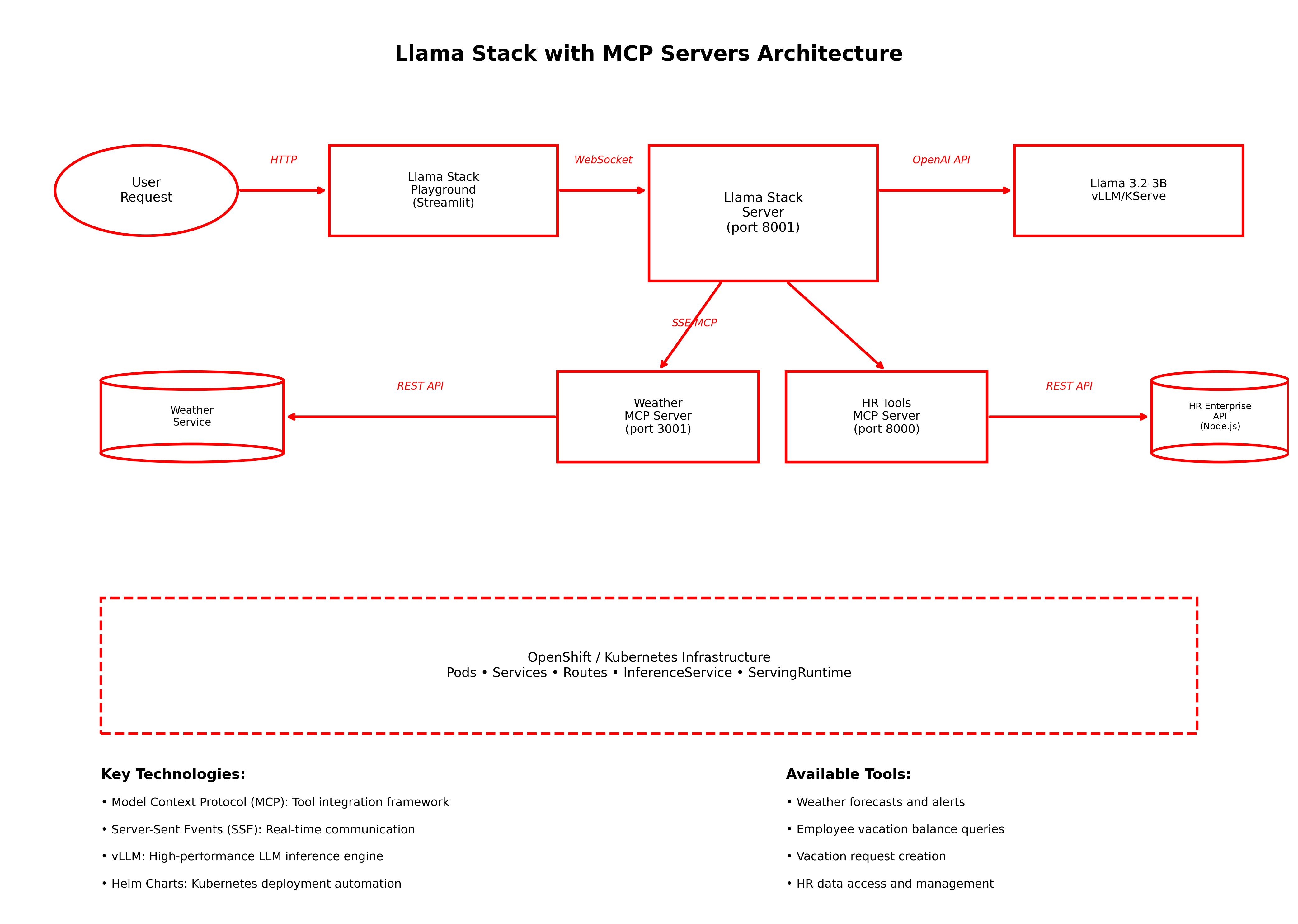
The custom MCP server (custom-mcp-server/) demonstrates how to build a Model Context Protocol server that integrates with enterprise APIs. This server provides the following tools to the LLM:
- Vacation Management: Check vacation balances and create vacation requests
The MCP server acts as a bridge between the Llama Stack and the HR Enterprise API, translating LLM tool calls into REST API requests.
Source Code & Build Instructions: If you want to modify the custom MCP server, see the complete source code and build instructions in the custom-mcp-server/ directory. The server is built using Python and can be customized to integrate with your own enterprise APIs.
How MCP Servers Work with Llama Stack
MCP Server Registration
MCP servers are registered with Llama Stack through configuration. The Llama Stack server automatically discovers and connects to configured MCP servers at startup. Here's an example of how MCP servers are configured:
# Llama Stack MCP server configuration
mcpServers:
  - name: "mcp-weather"
    uri: "http://mcp-weather:3001"
    description: "Weather data MCP server"
  - name: "hr-api-tools"
    uri: "http://custom-mcp-server:8000/sse"
    description: "HR API MCP server with employee, vacation, job, and performance tools"
In this example, this configuration is maintained in the llama-stack-config config map, part of the llama-stack helm chart.
When Llama Stack starts, it:
- Connects to each MCP server via Server-Sent Events (SSE) or WebSocket
- Discovers available tools by querying each server's capabilities
- Registers tool schemas that describe what each tool does and its parameters
- Makes tools available to the LLM for use in conversations
Tool Execution Flow
When a user requests to use a tool, here's the complete flow:
User Request: User asks a question in the Llama Stack Playground (e.g., "What's the weather in New York?")
LLM Context: Llama Stack includes the available tool definitions in the system message sent to the LLM
LLM Response: The LLM decides to use a tool and responds with a structured tool call (e.g.,
getforecastwith location parameter)Tool Execution: Llama Stack intercepts the tool call and routes it to the appropriate MCP server
MCP Processing: The MCP server executes the tool (e.g., calls the weather API or HR database)
Result Return: The MCP server returns structured results back to Llama Stack
LLM Integration: Llama Stack provides the tool results to the LLM as context
Final Response: The LLM incorporates the tool results into a natural language response for the user
This seamless integration allows the LLM to access real-time data and perform actions while maintaining a natural conversational interface.
Architecture diagrams
References
- Llama Stack Documentation
- Model Context Protocol (MCP) Quick Start
- vLLM Documentation
- Red Hat OpenShift AI Documentation
Prerequisites
Minimum hardware requirements
- 1 GPU required (NVIDIA L40, A10, or similar)
- 8+ vCPUs
- 24+ GiB RAM
Required software
- Red Hat OpenShift
- Red Hat OpenShift AI 2.16+
- OpenShift CLI (
oc) - Download here - Helm CLI (
helm) - Download here
Required permissions
- Standard user. No elevated cluster permissions required
Install
Please note before you start
This example was tested on Red Hat OpenShift 4.17.30 & Red Hat OpenShift AI v2.19.0.
All components are deployed using Helm charts located in the helm/ directory:
helm/llama3.2-3b/- Llama 3.2-3B model on vLLMhelm/llama-stack/- Llama Stack serverhelm/mcp-weather/- Weather MCP serverhelm/llama-stack-playground/- Playground UIhelm/custom-mcp-server/- Custom HR API MCP serverhelm/hr-api/- HR Enterprise APIhelm/llama-stack-mcp/- Umbrella chart for single-command deployment
Clone the repository
git clone https://github.com/redhat-italy/developer-day-llama-stack-mcp-server.git && \
    cd llama-stack-mcp-server/
Create the project
oc new-project llama-stack-mcp-demo
Build and deploy the helm chart
Deploy the complete Llama Stack with MCP servers using the umbrella chart:
# Build dependencies (downloads and packages all required charts)
helm dependency build ./helm/llama-stack-mcp

# Deploy everything with a single command
helm install llama-stack-mcp ./helm/llama-stack-mcp
Note: The llama-stack pod will be in CrashLoopBackOff status until the Llama model is fully loaded and being served. This is normal behavior as the Llama Stack server requires the model endpoint to be available before it can start successfully.
This will deploy all components including:
- Llama 3.2-3B model on vLLM
- Llama Stack server with automatic configuration
- MCP Weather Server
- HR Enterprise API
- HR MCP Server
- Llama Stack Playground
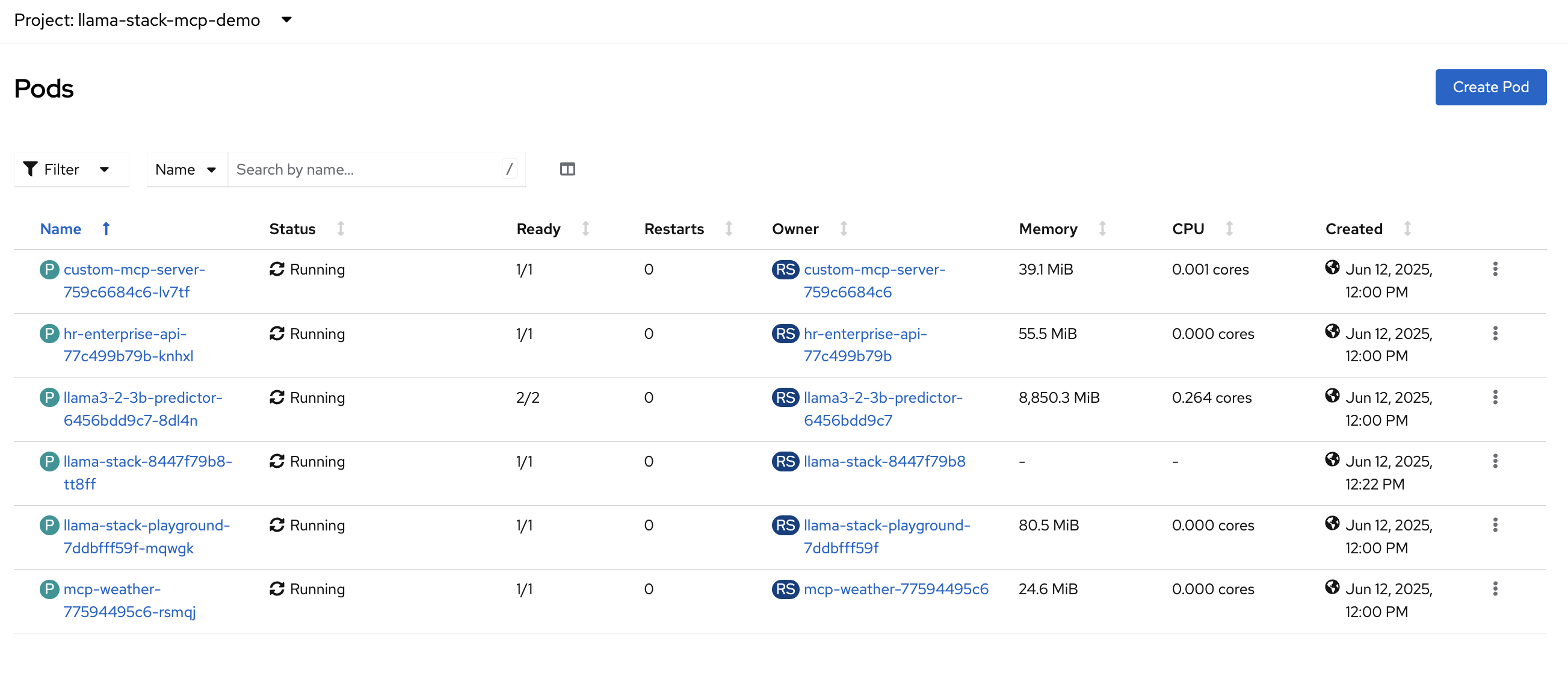
Once the deployment is complete, you should see:
To get the playground URL:
  export PLAYGROUND_URL=$(oc get route llama-stack-playground -o jsonpath='{.spec.host}' 2>/dev/null || echo "Route not found")
  echo "Playground: https://$PLAYGROUND_URL"
To check the status of all components:
  helm status llama-stack-mcp
  oc get pods
For troubleshooting:
  oc get pods
  oc logs -l app.kubernetes.io/name=llama-stack
  oc logs -l app.kubernetes.io/name=llama3-2-3b
  oc logs -l app.kubernetes.io/name=custom-mcp-server
  oc logs -l app.kubernetes.io/name=hr-enterprise-api
  oc logs -l app.kubernetes.io/name=mcp-weather
When the deployment is complete, you should see all pods running in your OpenShift console:
Test
- Get the Llama Stack playground route:
oc get route llama-stack-playground -n llama-stack-mcp-demo
Open the playground URL in your browser (it will look something like
https://llama-stack-playground-llama-stack-mcp-demo.apps.openshift-cluster.company.com)In the playground:
- Click on the "Tools" tab
- Select "Weather" MCP Server from the available tools
- In the chat interface, type: "What's the weather in New York?"
You should receive a response similar to:
🛠 Using "getforecast" tool:

The current weather in New York is mostly sunny with a temperature of 75°F and a gentle breeze coming from the southwest at 7 mph. There is a chance of showers and thunderstorms this afternoon. Tonight, the temperature will drop to 66°F with a wind coming from the west at 9 mph. The forecast for the rest of the week is mostly sunny with temperatures ranging from 69°F to 85°F. There is a slight chance of showers and thunderstorms on Thursday and Friday nights.
This confirms that the Llama Stack is successfully communicating with the MCP Weather Server and can process weather-related queries.
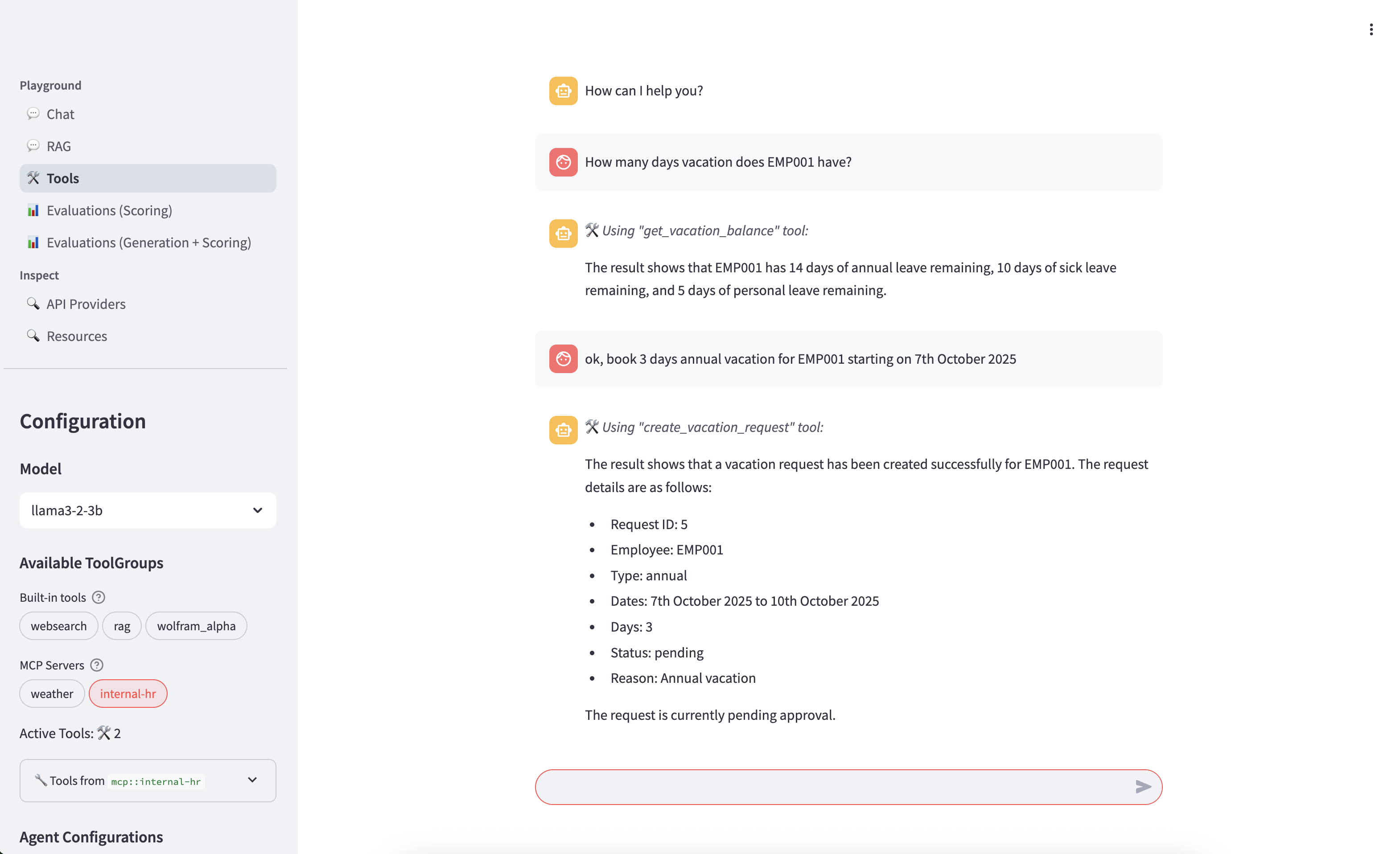
- Test HR API MCP server tools:
In the playground interface:
- Navigate to Tools: Click on the "Tools" tab
- Verify availability: Look for your Internal HR tools:
get_vacation_balance- Check employee vacation balancescreate_vacation_request- Submit new vacation requests
Select the "internal-hr" MCP Server
- Test with sample queries:
Test vacation balance:
What is the vacation balance for employee EMP001?
Test vacation request:
book some annual vacation time off for EMP001 for June 8th and 9th
Verification
Verify that your custom MCP server is working correctly:
# Check all pods are running
oc get pods

# Check the custom MCP server logs
oc logs -l app.kubernetes.io/name=custom-mcp-server

# Test the service connectivity
oc exec -it deployment/llama-stack -- curl http://custom-mcp-server/health

## Cleanup

To remove all components from OpenShift:

### Option 1: Remove umbrella chart (if using single command installation)
```bash
# Remove the complete deployment
helm uninstall llama-stack-mcp
Option 2: Delete the entire project
# Delete the project and all its resources
oc delete project llama-stack-mcp-demo
This will remove:
- Llama 3.2-3B vLLM deployment
- Llama Stack services and playground
- MCP Weather Server
- Custom MCP Server (if deployed)
- HR Enterprise API (if deployed)
- All associated ConfigMaps, Services, Routes, and Secrets
Developer day Customization:
A Mcp tool written in quarkus has been added. It is in quarkus-openshift-mcp folder.
You have to insert the tavily api key in the configmap in helm/llamastack/templates/configmap.yaml You have to add in the configmap also the configuration for the new mcp server, like this:
- toolgroup_id: mcp::quarkus-openshift-mcp provider_id: model-context-protocol mcp_endpoint: uri: http://quarkus-openshift-mcp/mcp/sse
As you are querying openshift you need to create a service account and give to him some special rights.
oc adm policy add-role-to-user view -z quarkus-openshift-mcp-sa -n llama-stack-mcp-demo
oc set serviceaccount deployments/quarkus-openshift-mcp quarkus-openshift-mcp-sa -n llama-stack-mcp-demo
oc adm policy add-cluster-role-to-user cluster-admin -z quarkus-openshift-mcp-sa (maybe this could be done with some more fine grained permission)
from github.com/redhat-italy/developer-day-llama-stack-mcp-server
Installing Developer Day Llama Stack
This server has no published package — it is built from source. Open the repository and follow its README.
▸ github.com/redhat-italy/developer-day-llama-stack-mcp-serverFAQ
Is Developer Day Llama Stack MCP free?
Yes, Developer Day Llama Stack MCP is free — one-click install via Unyly at no cost.
Does Developer Day Llama Stack need an API key?
No, Developer Day Llama Stack runs without API keys or environment variables.
Is Developer Day Llama Stack hosted or self-hosted?
Self-hosted: the server runs locally on your machine via the install command above.
How do I install Developer Day Llama Stack in Claude Desktop, Claude Code or Cursor?
Open Developer Day Llama Stack on unyly.org, pick your client tab (Claude Desktop, Claude Code, Cursor) and press Install — the config is generated automatically, no JSON editing.
Related MCPs
Fetch
Web content fetching and conversion for efficient LLM usage.
AWS KB Retrieval
Retrieval from AWS Knowledge Base using Bedrock Agent Runtime.
 by modelcontextprotocol
Spring AI MCP Server
Provides auto-configuration for setting up an MCP server in Spring Boot applications.
llm-analysis-assistant
A very streamlined mcp client that supports calling and monitoring stdio/sse/streamableHttp, and can also view request responses through the /logs page. It also
 by xuzexin-hz
Compare Developer Day Llama Stack with
Not sure what to pick?
Find your stack in 60 seconds
Author?
Embed badge for your README
Browse similar
All ai MCPs