
Fancy Api
FreeNot checkedMCP server that enables AI agents to read and write records in a live REST API generated from pasted data, with tools for listing, querying, inserting, updating

About
MCP server that enables AI agents to read and write records in a live REST API generated from pasted data, with tools for listing, querying, inserting, updating, and deleting records.
README
Paste data. Get a fancy API.
Fancy turns a table you paste, a CSV you drop, or a declarative YAML/JSON
file into a live, queryable REST API in minutes — filtering, sorting,
pagination, and full-text search included, with an OpenAPI doc generated for
free. It started from a simple problem: an app with nowhere to store its
data shouldn't need a backend project to get one. Every API also gets an
MCP endpoint, so an AI agent can read and
write records the same way a person edits a spreadsheet — no custom
integration code required. Self-hostable with one docker compose up.



Repo: github.com/carmelosantana/fancy-api
Screenshots
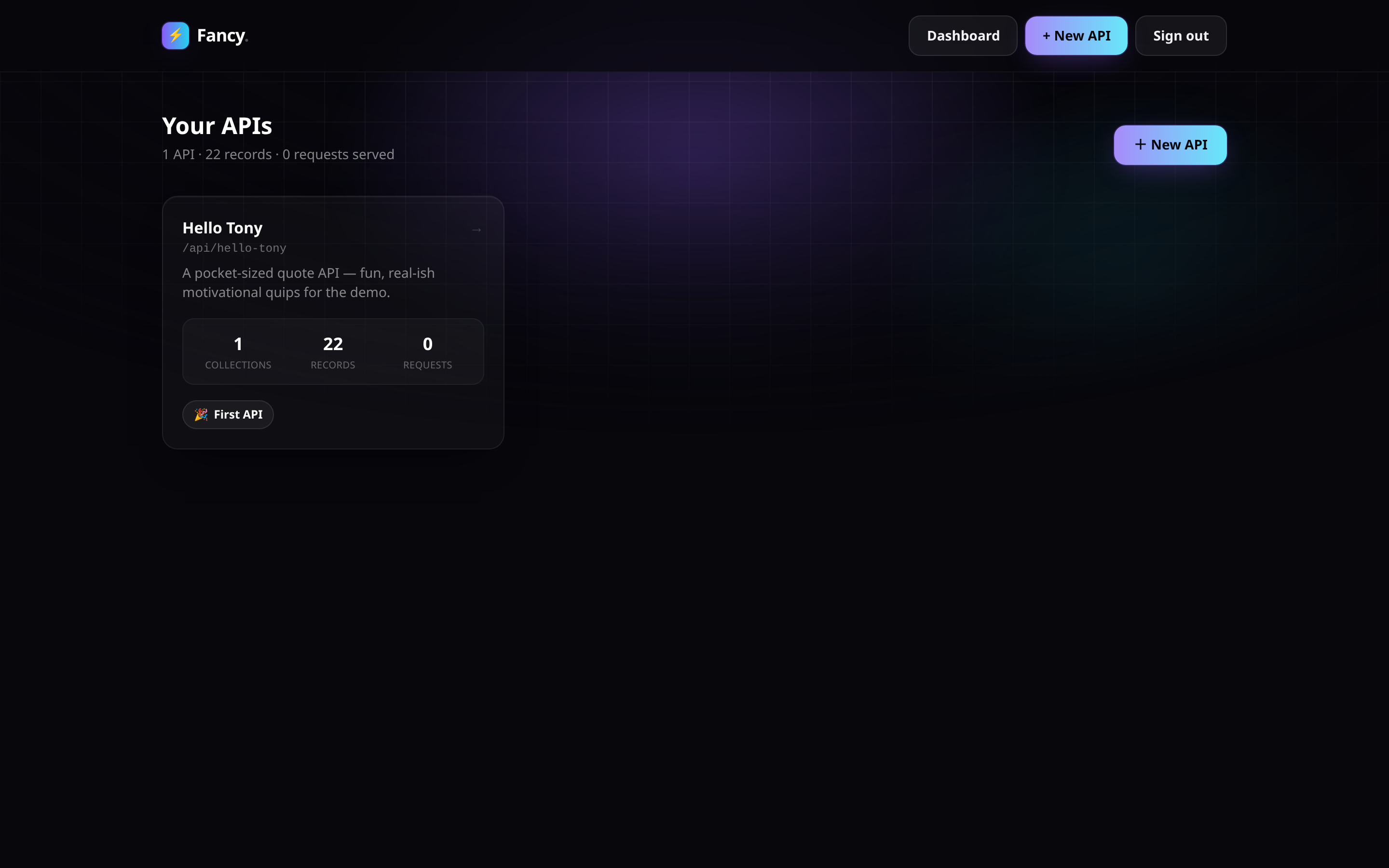
Dashboard — your APIs, at a glance.
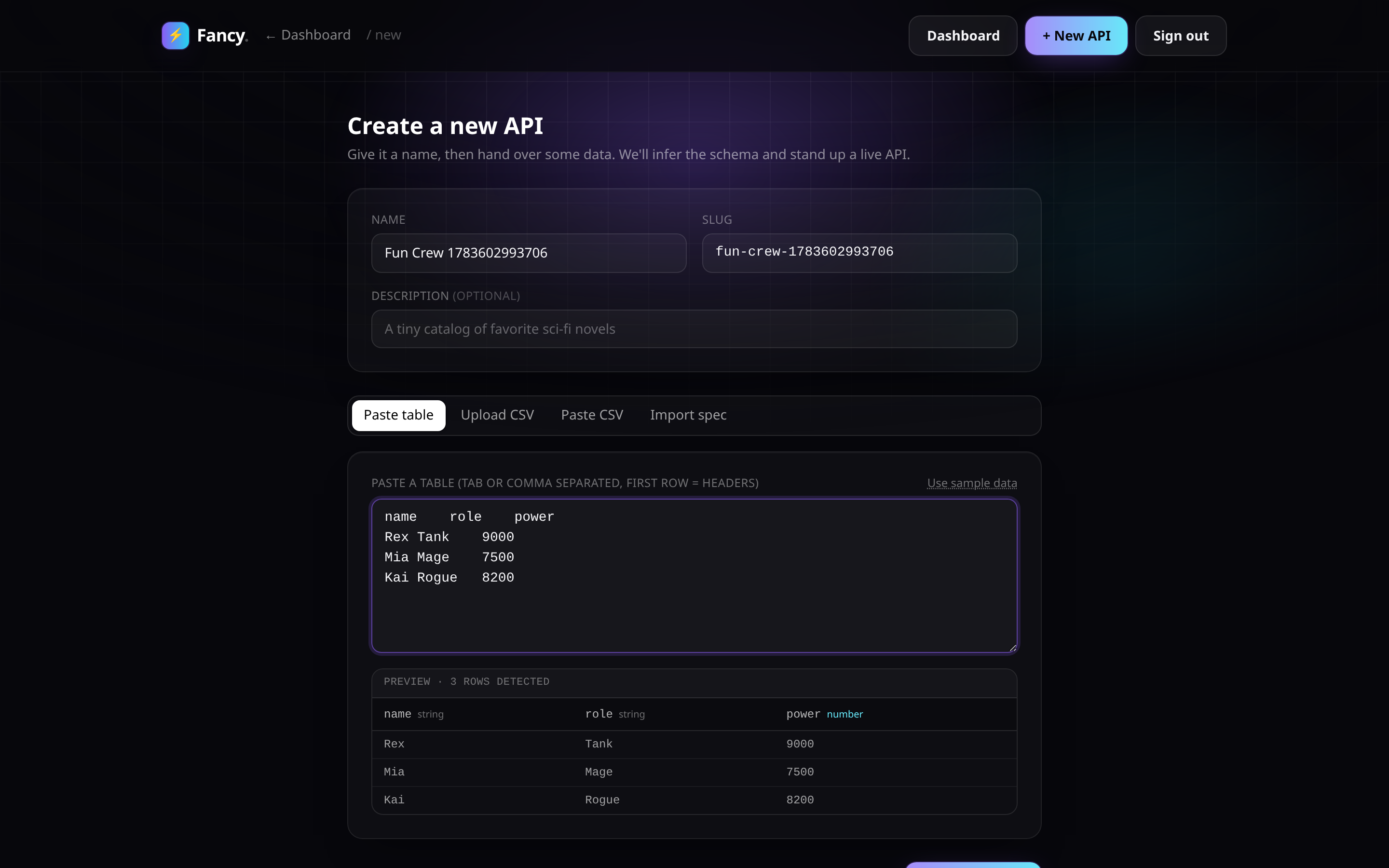
Create an API — paste a table, get a schema.
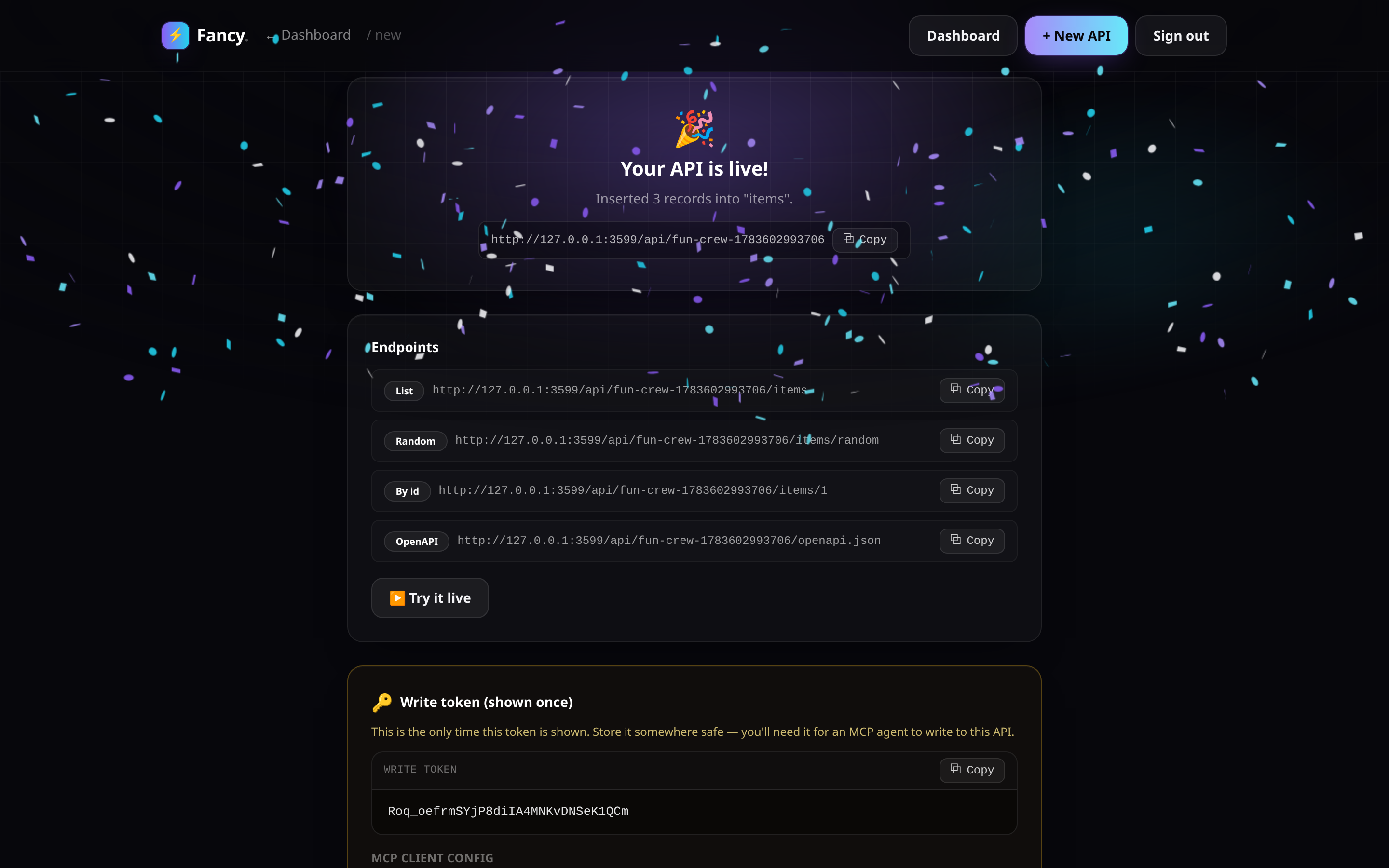
Instant success — live endpoints, a write token, ready to use.
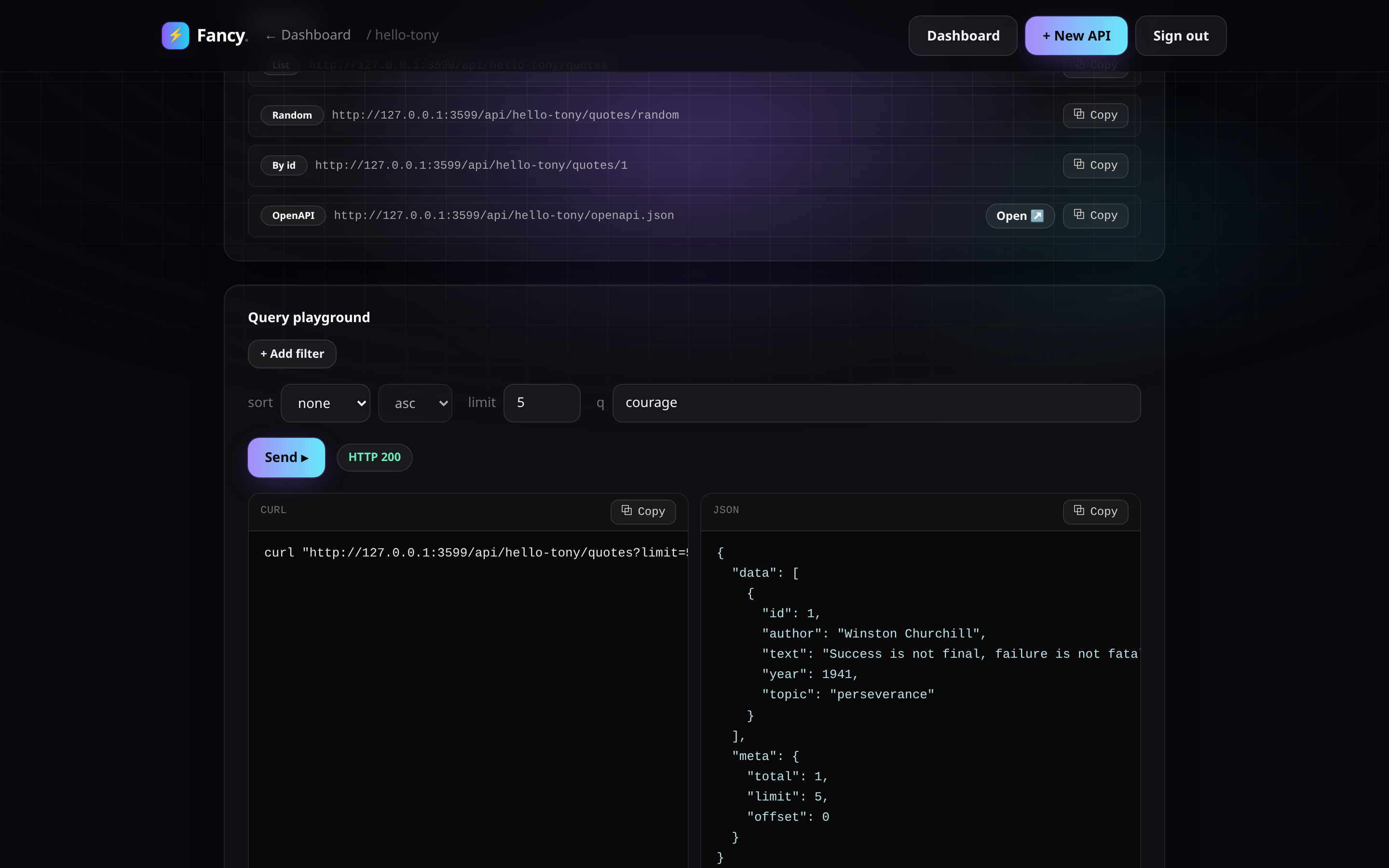
Query playground — build a filtered request and see the response.
Install
Docker (recommended)
cp .env.example .env
make up
Open http://localhost:3000 and log in with the
ADMIN_PASSWORD from your .env (defaults to change-me — change it before
exposing this beyond your own machine).
The container seeds a demo API, hello-tony, on first start. Try it:
curl http://localhost:3000/api/hello-tony/quotes/random
make logs   # follow the web service
make down   # stop the stack (data persists in the fancy-data volume)
Local dev
make install   # pnpm install
make seed      # populate the hello-tony demo against ./data/app.db
make dev       # next dev on http://localhost:3000
Deploying somewhere else
Running Dokploy or Coolify (or anything Docker-based)? See Deploy on Dokploy / Coolify below.
The four ways to create an API
From /admin/new, pick one:
- Paste table — paste tab- or comma-separated rows (e.g. straight out of a spreadsheet); Fancy infers column names and types.
- Upload CSV — drop a
.csvfile. - Paste CSV — paste raw CSV text.
- Import declarative file — paste a YAML or JSON spec that fully describes the api, its collection(s), and their schema + records.
A minimal declarative file looks like this:
slug: hello-tony
name: Hello Tony Quotes
collections:
  - slug: quotes
    name: Quotes
    schema:
      - { name: author, type: string }
      - { name: text, type: string }
      - { name: year, type: number }
      - { name: topic, type: string }
    records:
      - author: Winston Churchill
        text: "Success is not final, failure is not fatal: it is the courage to continue that counts."
        year: 1941
        topic: perseverance
schema[].type is one of string, number, boolean, date. Any api can
be exported back to this same shape from its detail page — the declarative
file is a portable import/export format, not the runtime store (see
Architecture).
Query syntax
Every collection gets a read API at /api/{api}/{collection}, plus
/{id}, /random, and an OpenAPI document at /api/{api}/openapi.json.
Responses are shaped { data, meta: { total, limit, offset } } (a single
object, no meta, for /{id} and /random).
| Syntax | Meaning |
|---|---|
field=value |
Equals |
field_gt=value / field_gte=value |
Greater than / or equal |
field_lt=value / field_lte=value |
Less than / or equal |
field_ne=value |
Not equal |
field_contains=value |
Substring match |
field_in=a,b,c |
In a set |
sort=field,-other |
Sort ascending by field, then descending by other |
limit=n |
Page size (default 25, max 100) |
offset=n |
Page offset |
q=text |
Free-text search across the collection's string columns |
Examples against the seeded hello-tony demo:
# List, filtered and sorted
curl "http://localhost:3000/api/hello-tony/quotes?topic=perseverance&sort=-year"

# Pagination
curl "http://localhost:3000/api/hello-tony/quotes?limit=5&offset=10"

# Free-text search
curl "http://localhost:3000/api/hello-tony/quotes?q=courage"

# One random record — handy for a "quote of the day" widget
curl "http://localhost:3000/api/hello-tony/quotes/random"

# A single record by id
curl "http://localhost:3000/api/hello-tony/quotes/1"

# OpenAPI document for the whole api
curl "http://localhost:3000/api/hello-tony/openapi.json"
Writing data with AI agents (MCP)
Every api gets a write-capable MCP
endpoint at /api/mcp/{api}, served over Streamable HTTP. Read-only tools
work without a token; the four mutating tools require the api's write token,
sent as Authorization: Bearer <writeToken>. The token is shown once when
the api is created and can be rotated from its detail page in /admin at
any time.
{
  "mcpServers": {
    "hello-tony": {
      "url": "http://localhost:3000/api/mcp/hello-tony",
      "headers": {
        "Authorization": "Bearer <writeToken>"
      }
    }
  }
}
Tools exposed:
| Tool | Requires token | Description |
|---|---|---|
list_records |
No | Paginated list of a collection's records |
get_record |
No | Fetch one record by id |
query_records |
No | Filter, sort, and free-text search |
insert_record |
Yes | Insert a single record |
insert_records |
Yes | Insert multiple records at once |
update_record |
Yes | Shallow-merge a patch into a record by id |
delete_record |
Yes | Delete a record by id |
Self-hosting
- Persistence — the sqlite database lives at
DATABASE_PATHinside the container (default/data/app.db), backed by the namedfancy-dataDocker volume.make downstops the stack without touching it;make cleandeletes it (with a confirmation prompt). - Admin password — set
ADMIN_PASSWORDin.envbefore first start. Fancy has a single admin credential, no multi-user accounts (v1). - Ports — the container listens on
3000; the compose file maps it to3000on the host. Change the left side of theports:mapping indocker-compose.ymlto use a different host port. - Seeding —
SEED_ON_START=1(the default) seeds thehello-tonydemo on every start; it's idempotent, so this is safe to leave on. Set it to0for a blank instance.
Deploy on Dokploy / Coolify
Fancy is a single Docker container plus one sqlite file, which maps cleanly onto either platform. Two supported paths:
Option A — Dockerfile app (recommended)
Point the platform at this repo (or a fork) and let it build Dockerfile
directly — no compose file needed.
- App type: "Dockerfile" / "Application from Git", build context = repo
root, dockerfile path =
Dockerfile. - Port: the container listens on
3000— tell the platform to route to that port. - Volume — required: attach a persistent volume mounted at
/data. The sqlite database lives at/data/app.db; without a persistent mount at that path, every redeploy starts from an empty database. This is the single most important setting for either platform. - Environment: set the variables from the table below.
- Domain: add a domain and enable HTTPS (see the HTTPS note below).
Option B — Docker Compose
Point the platform at docker-compose.yml and let it deploy the web
service as-is.
- Set the same environment variables (below) on the
webservice. - Map your domain to service
web, container port3000. - The
ports:mapping indocker-compose.yml(${WEB_PORT:-3000}:3000) is there for localdocker compose upconvenience — on a PaaS the platform's reverse proxy talks to the container directly over its internal network, so publishing a host port is usually unnecessary and can conflict with other stacks. The domain/proxy feature is what actually exposes the app publicly; thefancy-datanamed volume still provides the persistent/datamount either way.
Required environment
| Variable | Required | Notes |
|---|---|---|
ADMIN_PASSWORD |
Yes | The single admin login for /admin and the management API. |
SESSION_SECRET |
Yes, for anything beyond a demo | HMAC key signing the admin session cookie. Without it the app generates a random secret per process, so every redeploy logs everyone out. Generate one with: node -e "console.log(require('crypto').randomBytes(32).toString('hex'))" |
SEED_ON_START |
No | 1 (default) seeds the hello-tony demo API on start, idempotently. Set 0 for a blank instance. |
DATABASE_PATH |
No | Defaults to /data/app.db. Only change this if you also change where the persistent volume is mounted — it must always point inside that volume. |
HTTPS note
Session cookies are marked Secure in production, so the app must be served
over HTTPS — the browser will silently drop the cookie otherwise and login
won't persist. Both Dokploy and Coolify default to a Traefik + Let's Encrypt
domain setup that handles this for you; if you instead hit the app over
plain HTTP by bare IP, expect to be logged out on every navigation.
Scaling note
Fancy's storage is a single sqlite file (via libsql), not a networked
database — run one instance only. Multiple replicas pointed at the same
/data volume will corrupt or race on writes.
Deploy on Vercel (with self-hosted libsql)
Vercel's filesystem is ephemeral (no persistent /data volume), so the
Docker/local-file mode above doesn't apply there. Instead, Fancy can connect
to a remote libsql database — the same SQLite engine, just reached over
HTTP(S) instead of a local file. The query builder, repo, ingest, and MCP
layers don't change at all; only the connection does.
1. Run a libsql server somewhere reachable over HTTPS
sqld (the libsql server) is a single lightweight process — self-host it on
any small always-on VPS (or use a hosted libsql provider like Turso). This
repo includes docker-compose.sqld.yml for the self-hosted route:
docker compose -f docker-compose.sqld.yml up -d
By default it listens with no auth (fine for a private network or while
wiring things up) on the host port 8899. For a production deploy, put it
behind a TLS-terminating reverse proxy and enable JWT auth — see the
commented SQLD_AUTH_JWT_KEY guidance in that compose file — so you can
connect with a libsql:// URL + bearer token instead of plain http://.
2. Configure the Vercel project
This is a pnpm monorepo (apps/web + packages/core). The simplest setup:
- In the Vercel project's Settings → General → Root Directory, set it to
apps/web. Vercel auto-detects Next.js there and installs the pnpm workspace from the repo root on its own (it walks up to findpnpm-workspace.yaml), sopackages/coreis resolved correctly without any extra build-command overrides. - If you'd rather not use the Root Directory setting (e.g. you want to keep
deploying from the repo root for some other reason), a minimal
vercel.jsonat the repo root with"buildCommand": "pnpm --filter web build"and"outputDirectory": "apps/web/.next"(plus"installCommand": "pnpm install") achieves the same thing — but Root Directory is less to maintain, so this repo doesn't ship one.
3. Required environment variables
| Variable | Notes |
|---|---|
DATABASE_URL |
The remote libsql URL, e.g. libsql://your-host (or http://your-host:8899 for the no-auth dev setup above). |
DATABASE_AUTH_TOKEN |
The JWT/token for that database. Leave unset for the no-auth dev setup. |
ADMIN_PASSWORD |
Same as the Docker deploy — the single admin login. |
SESSION_SECRET |
Same as the Docker deploy — set this or every redeploy invalidates sessions. |
Vercel serves everything over HTTPS by default, so the Secure session
cookie (see AGENTS.md) works out of the box — no HTTPS caveat to manage here
like the bare-IP case in the Dokploy/Coolify section above.
4. Seed once
Unlike the Docker image (which can seed on every container start), a Vercel deployment has no "on start" hook against a remote DB. Seed it once from your machine, pointed at the same database:
DATABASE_URL=libsql://your-host DATABASE_AUTH_TOKEN=your-token pnpm seed
Honesty check / things to confirm on your own deploy
- The local-file mode is completely unaffected by any of this — nothing
above changes
DATABASE_PATHbehavior, Docker, ormake up. next.config.ts'soutput: "standalone"is harmless on Vercel — Vercel builds Next.js natively and ignoresstandaloneoutput, so no config change is needed there.middleware.tsruns on the Node.js runtime (runtime: "nodejs") becauselib/auth.tsusesnode:crypto, which the default Edge middleware runtime doesn't support. This should work unmodified on Vercel, but Node-runtime middleware has had a narrower rollout than Edge middleware — this hasn't been verified against an actual Vercel deployment, so confirm/adminand/api/_manage/*auth still gate correctly on your first deploy.- No Vercel deploy was performed as part of this change — the config above is written correct-by-construction from Vercel's documented monorepo behavior, not verified against a live deployment.
Architecture
Monorepo, two packages:
packages/core— the engine: ingest (CSV/paste/declarative-file parsing + type inference), the generic JSON-column record store, the query builder, the declarative import/export spec, and the MCP tool definitions. Framework-agnostic and meant to be reusable outside this Next.js app.apps/web— the Next.js (App Router) binding: the admin builder UI, the public read API, the management API, and the MCP HTTP route.
Storage today is SQLite (via drizzle-orm/libsql + @libsql/client) —
the query layer is built directly on SQLite's json_extract. It runs either
as a local file (DATABASE_PATH, the Docker/localhost default) or
against a remote libsql database (DATABASE_URL + DATABASE_AUTH_TOKEN
— a self-hosted sqld or Turso, for ephemeral-FS hosts like Vercel; see
Deploy on Vercel above) — it's
the same engine and protocol either way, so nothing downstream changes.
Postgres is a roadmap item, not a working option yet (see
docker-compose.yml's commented-out db service and the design spec
below); switching backends will need query-layer changes, not just a
connection string.
The declarative file (YAML/JSON) is a portable import/export format for moving an api's shape + data in and out of Fancy. The database is the runtime source of truth — the file is a snapshot, not something Fancy reads from at request time.
Development
| Target | Does |
|---|---|
make install |
pnpm install |
make dev |
Seed the local DB, then run next dev |
make build |
Production build (next build) |
make test |
Unit tests (Vitest) |
make e2e |
Playwright end-to-end suite |
make seed |
Populate the hello-tony demo against the local DB |
make typecheck |
Typecheck every workspace package |
make up |
Build (if needed) and start the Docker stack |
make down |
Stop the stack (keeps data) |
make logs |
Follow the web service's logs |
make restart |
Restart the web service |
make clean |
Stop the stack and delete the data volume (confirms first) |
make nuke |
clean, plus prune this project's build caches/images |
Run make (or make help) to print this from the terminal.
Testing
- Unit (
make test/pnpm test) — 99 Vitest tests overpackages/coreandapps/web: ingest/type-inference, the query builder, the record repo, spec import/export, auth token handling, and the MCP tool definitions. - End-to-end (
make e2e/pnpm e2e) — 8 Playwright specs driving the real app: creating an api from a pasted table, the query playground, MCP round-trips, and more.
Contributing
Design constraints and the decisions behind them live in AGENTS.md —
read it before making changes (human or agent).
License
AGPL-3.0. If you run a modified version of Fancy as a network service, the AGPL requires you to make your modified source available to users of that service.
Installing Fancy Api
This server has no published package — it is built from source. Open the repository and follow its README.
▸ github.com/carmelosantana/fancy-apiFAQ
Is Fancy Api MCP free?
Yes, Fancy Api MCP is free — one-click install via Unyly at no cost.
Does Fancy Api need an API key?
No, Fancy Api runs without API keys or environment variables.
Is Fancy Api hosted or self-hosted?
A hosted option is available: Unyly runs the server in the cloud, no local setup required.
How do I install Fancy Api in Claude Desktop, Claude Code or Cursor?
Open Fancy Api on unyly.org, pick your client tab (Claude Desktop, Claude Code, Cursor) and press Install — the config is generated automatically, no JSON editing.
Related MCPs
Fetch
Web content fetching and conversion for efficient LLM usage.
AWS KB Retrieval
Retrieval from AWS Knowledge Base using Bedrock Agent Runtime.
 by modelcontextprotocol
Spring AI MCP Server
Provides auto-configuration for setting up an MCP server in Spring Boot applications.
llm-analysis-assistant
A very streamlined mcp client that supports calling and monitoring stdio/sse/streamableHttp, and can also view request responses through the /logs page. It also
 by xuzexin-hz
Compare Fancy Api with
Not sure what to pick?
Find your stack in 60 seconds
Author?
Embed badge for your README
Browse similar
All ai MCPs