
FitNotes Server
FreeNot checkedEnables analysis of FitNotes workout data through an LLM, providing insights on progress, muscle groups, and personalized recommendations.

About
Enables analysis of FitNotes workout data through an LLM, providing insights on progress, muscle groups, and personalized recommendations.
README
An MCP server for analyzing your FitNotes (Android & iOS) workout data. Connect with an LLM to get context-aware insights, uncover training patterns, track progress, and receive personalized recommendations based on your own fitness history.
Data
There are multiple ways to export your FitNotes data, such as exporting to CSV or using the "Android DB" option. Based on my experience, the "Android DB" export is better because it provides your workout data as a standard SQLite database with a decent schema out of the box. This makes it easy to explore and analyze and therefore the MCP server is designed to work directly with this database export.
Quick Start
1. Setup Environment
# Navigate to the project directory
cd /path/to/fitnotes_mcp

# Create virtual environment
python3 -m venv venv
source venv/bin/activate

# Install dependencies
pip install -e .
2. Add Your FitNotes Data
Export your FitNotes data (Android DB export) and place the .fitnotes file in the project directory. The server will use the FITNOTES_DB_PATH environment variable to locate your database file.
3. Configure Claude Desktop
You can use any LLM that supports MCP. We'll use Claude Desktop. Add the following to Claude desktop config.
Check this to know the location for the OS you are using.
{
  "mcpServers": {
    "fitnotes-server": {
      "command": "/path/to/your/venv/bin/python",
      "args": ["/path/to/mcp_fitnotes/run_server.py"],
      "cwd": "/path/to/mcp_fitnotes",
      "env": {
        "PYTHONPATH": "/path/to/mcp_fitnotes/src",
        "FITNOTES_DB_PATH": "/path/to/your/fitnotes.fitnotes"
      }
    }
  }
}
Important: Replace /path/to/your/venv/bin/python with your actual virtual environment Python path, /path/to/mcp_fitnotes/ with your actual project directory, and /path/to/your/fitnotes.fitnotes with the actual path to your FitNotes database file.
4. Start Chatting!
Open Claude Desktop and start asking about your workouts:
- "How's my bench press progressing?"
- "What muscle groups am I neglecting?"
- "Show me my workout summary for the last month"
- "Find my personal records"
Available MCP Tools
Core Analysis Tools
get_database_schema- View complete database structureget_database_metadata- Get workout statistics and overviewexecute_select_query- Run custom SELECT queries safelyget_sample_data- Explore table contentsget_workout_summary- Recent workout analysis with muscle group breakdownanalyze_exercise_progress- Detailed progress tracking for specific exercisesget_muscle_group_analysis- Training frequency and volume by muscle group
As you can see, the LLM does have a tool to execute queries but all database access is strictly read-only, with robust query validation to allow only safe SELECT statements. SQL injection protection is there and resource limits are enforced via query timeouts and result size caps.
Example Conversations
"How am I doing with my workouts lately?"
Uses get_workout_summary to show recent activity, PRs, and muscle group balance
"Analyze my squat progress"
Uses analyze_exercise_progress to show weight progression, volume trends, and recent PRs
"What exercises did I do yesterday?"
Uses execute_select_query with a custom date filter
"Am I training my back enough?"
Uses get_muscle_group_analysis to compare back training with other muscle groups
"What exercises do I have available?"
Uses execute_select_query to get a list of all exercises from the database
"Show me all my bicep exercises"
Uses execute_select_query with custom filtering to find exercises by muscle group
Example Analysis
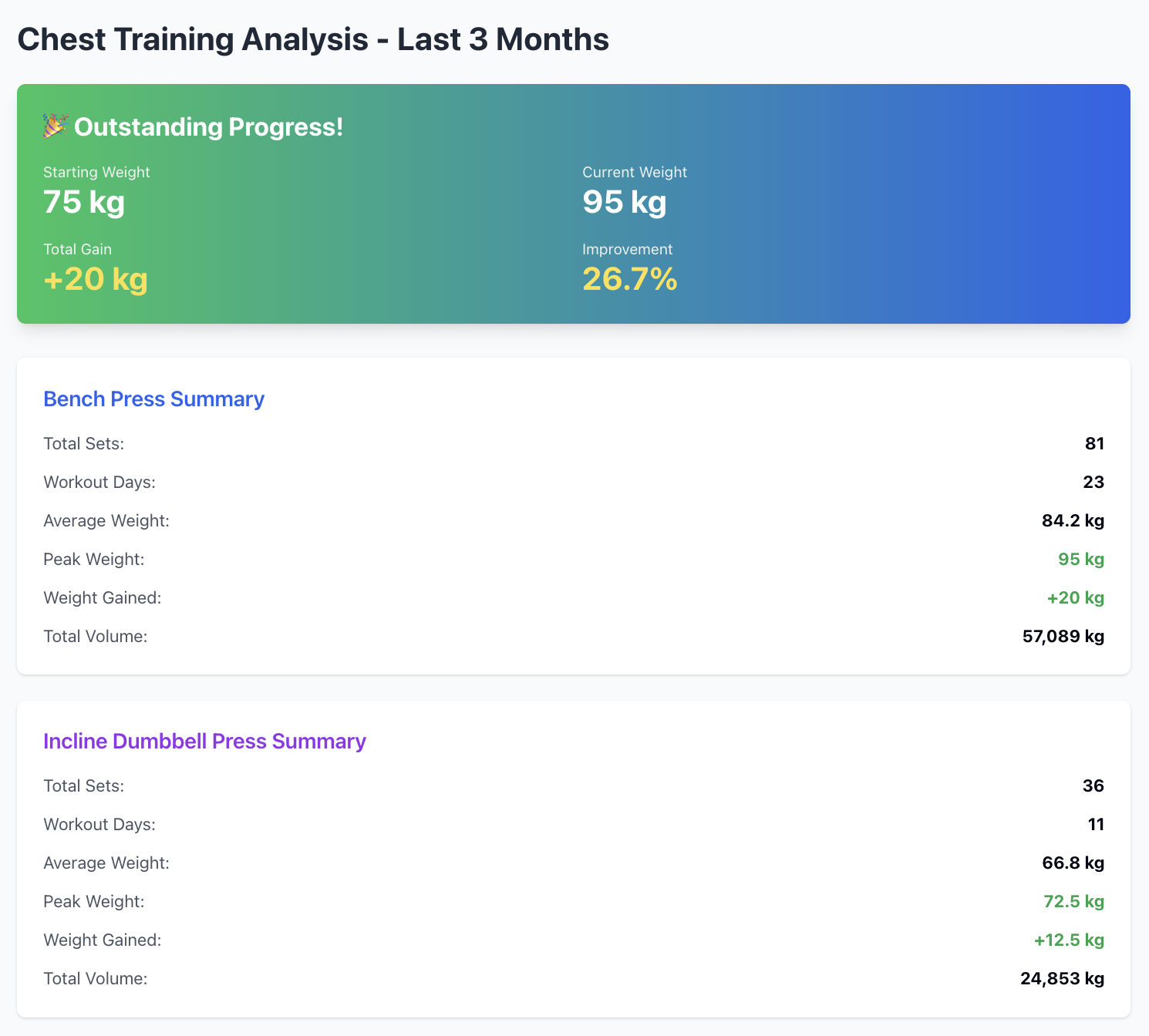
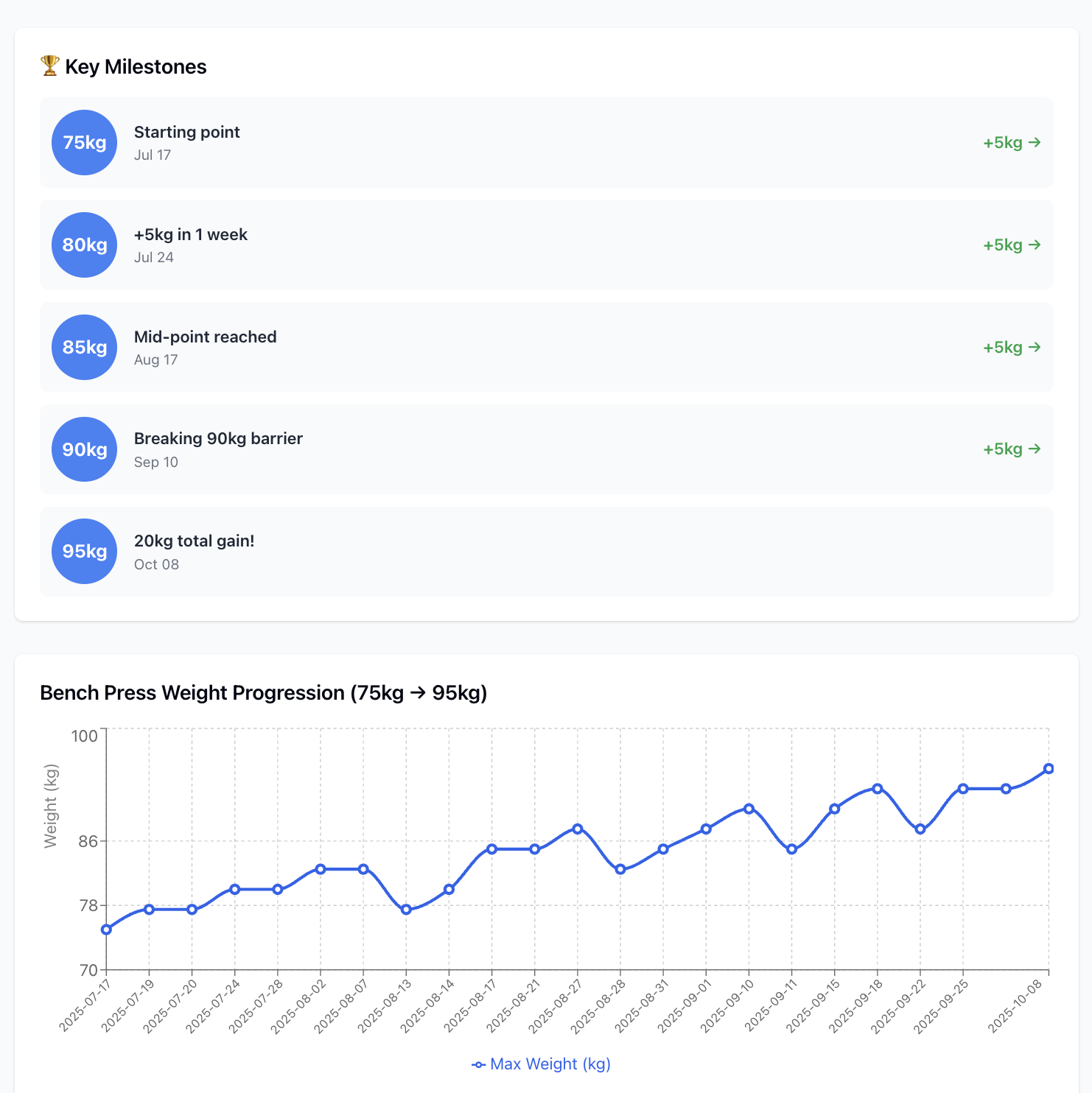
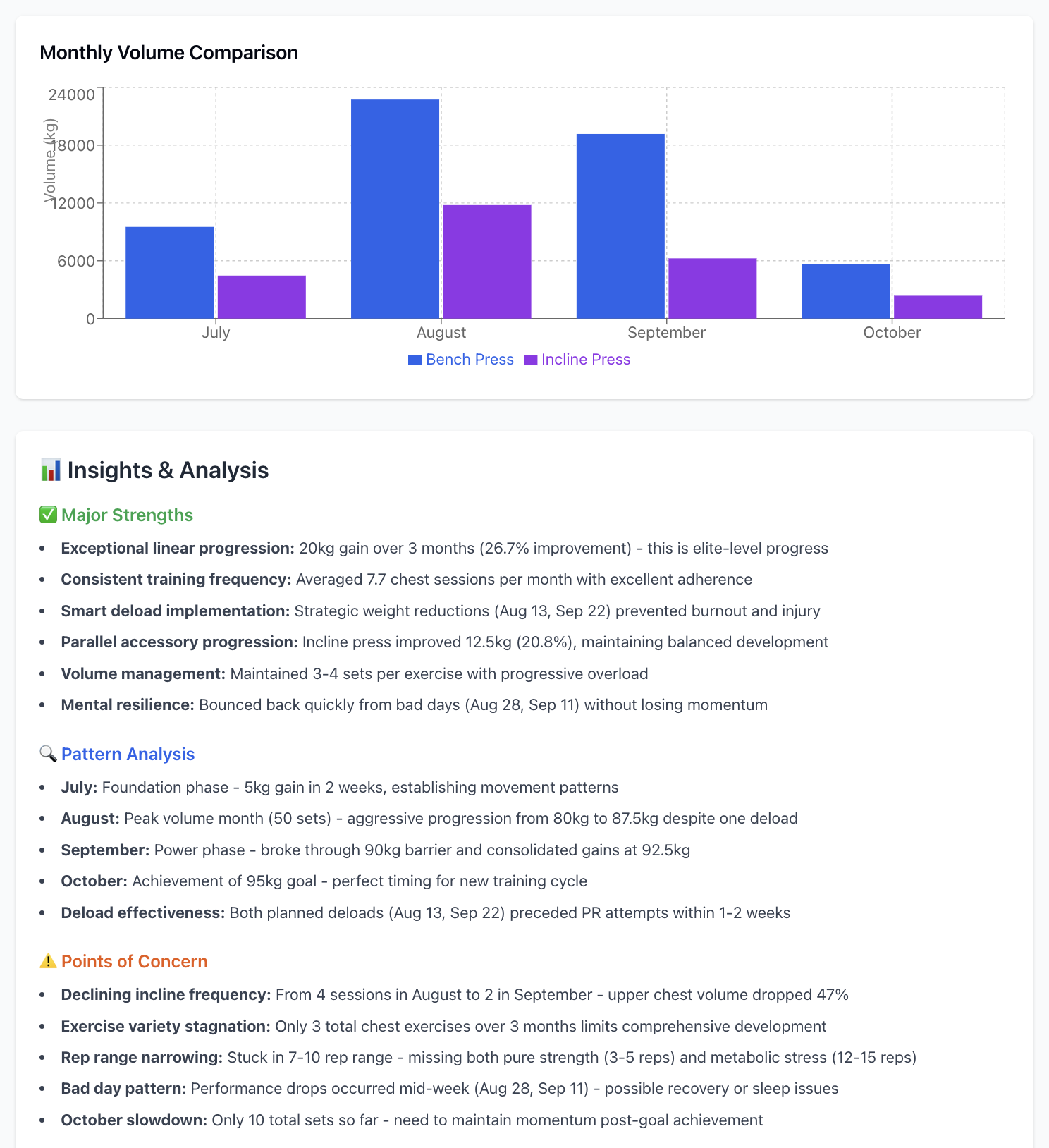
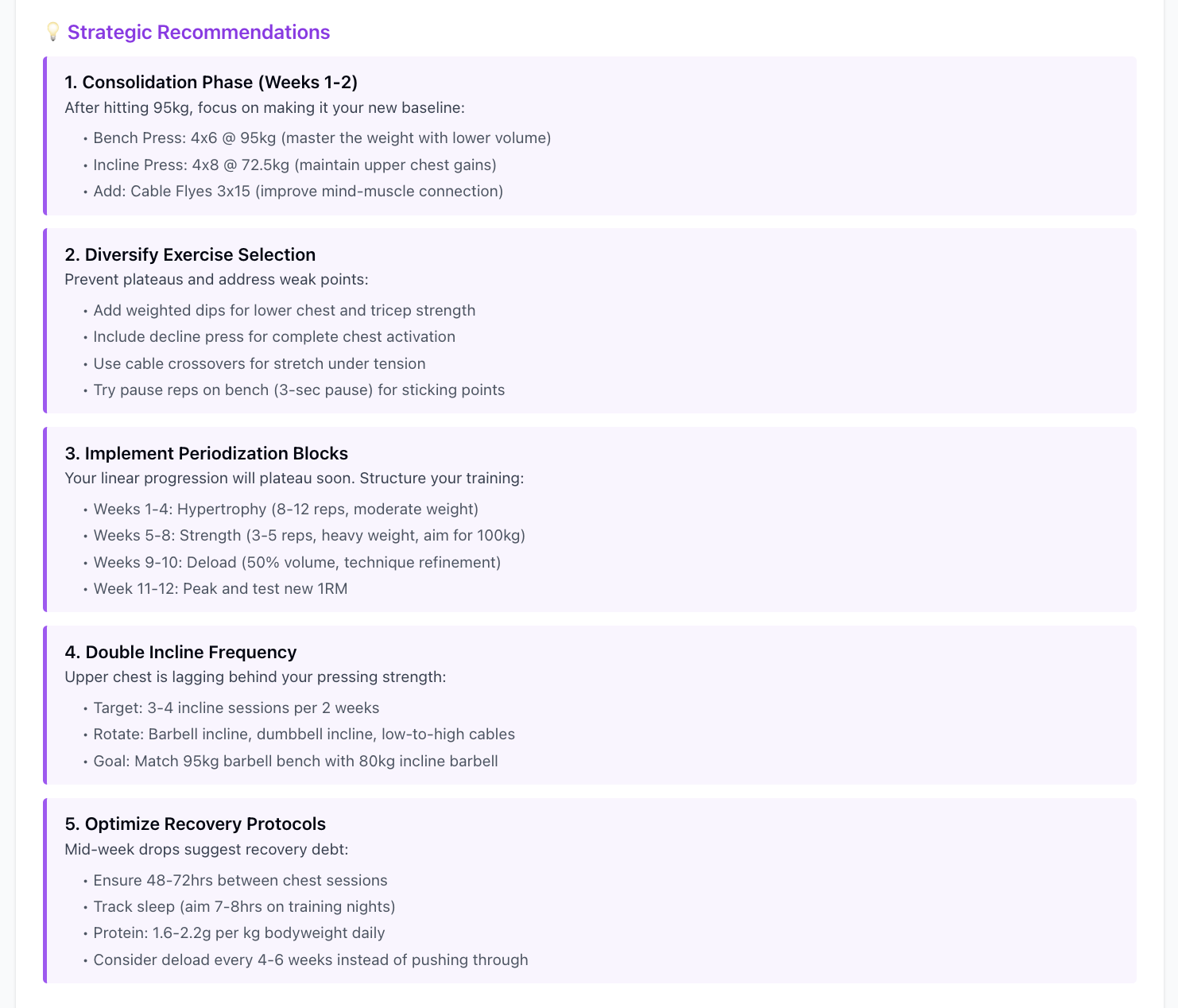
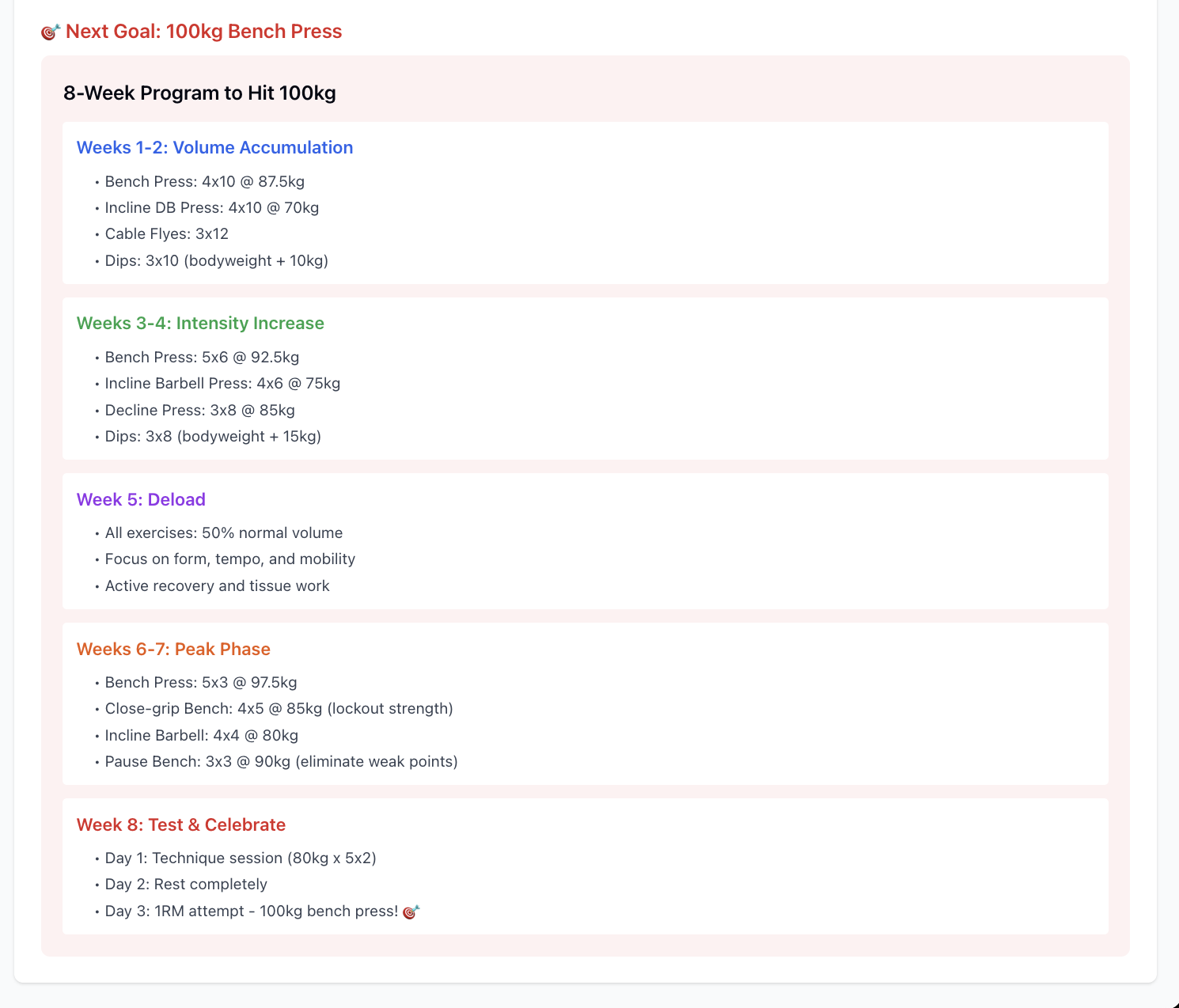
Here's a real example of the kind of analysis you can get:
Show my chest training progress of the last 3 months. Also give me insights and improvement areas.
Troubleshooting
Server won't start? Check that FITNOTES_DB_PATH environment variable points to your .fitnotes file and virtual environment is activated.
Database file not found? Verify the FITNOTES_DB_PATH variable points to the correct .fitnotes file path.
Claude can't connect? Verify MCP configuration paths in claude_desktop_config.json and restart Claude Desktop.
Installing FitNotes Server
This server has no published package — it is built from source. Open the repository and follow its README.
▸ github.com/makkoncept/fitnotes_mcpFAQ
Is FitNotes Server MCP free?
Yes, FitNotes Server MCP is free — one-click install via Unyly at no cost.
Does FitNotes Server need an API key?
No, FitNotes Server runs without API keys or environment variables.
Is FitNotes Server hosted or self-hosted?
Self-hosted: the server runs locally on your machine via the install command above.
How do I install FitNotes Server in Claude Desktop, Claude Code or Cursor?
Open FitNotes Server on unyly.org, pick your client tab (Claude Desktop, Claude Code, Cursor) and press Install — the config is generated automatically, no JSON editing.
Related MCPs
Fetch
Web content fetching and conversion for efficient LLM usage.
AWS KB Retrieval
Retrieval from AWS Knowledge Base using Bedrock Agent Runtime.
 by modelcontextprotocol
Spring AI MCP Server
Provides auto-configuration for setting up an MCP server in Spring Boot applications.
llm-analysis-assistant
A very streamlined mcp client that supports calling and monitoring stdio/sse/streamableHttp, and can also view request responses through the /logs page. It also
 by xuzexin-hz
Compare FitNotes Server with
Not sure what to pick?
Find your stack in 60 seconds
Author?
Embed badge for your README
Browse similar
All ai MCPs