
Fsi
FreeNot checkedA wrapper around F# interactive (fsi) that exposes an MCP server endpoint for AI agents allowing for fsi IO.

About
A wrapper around F# interactive (fsi) that exposes an MCP server endpoint for AI agents allowing for fsi IO.
README
A drop-in replacement for fsi.exe that adds MCP capabilities to F# Interactive sessions. Perfect for AI-assisted development workflows where you need programmatic access to F# Interactive.
Disclaimer
This is a technical proof-of-concept and not yet ready for production/enterprise use.
Table of Contents
- Why FSI MCP Server?
- Overview
- Quick Start
- JetBrains Rider Integration
- Typical Programming Session Workflow
- Configuration
- Requirements
- License
Why FSI MCP Server?
It's the F# Interactive REPL we know and love, but your AI assistant is sitting right next to you, both of you coding together in the same REPL session.
Demo
Imagine you're developing a tricky F# algorithm in your fsi REPL. You've loaded your modules, you're exploring data structures, and you're trying to figure out why a function isn't behaving as expected. Now imagine your AI assistant can see what you're typing into F# Interactive, see the output, and execute code snippets to help you - all in the same session you're working in, seamlessly. No more wild growth of several debug.fsx scripts or waiting on new sessions to start, the AI agent just hitches a ride on your active session.
Instead of copy-pasting F# code between your AI chat and F# Interactive, your AI assistant becomes a first-class participant in your interactive REPL-driven development workflow:
Replace your F# Interactive executable with fsi-mcp in your tool of choice (vscode, JetBrains Rider, ...), connect your AI assistant (like Claude Code) with mcp, and suddenly your REPL sessions are collaborative. Your AI can run test cases, check edge cases, refactor code, and validate hypotheses, all while you maintain your familiar REPL workflow with the familiar console stdio interface.
Overview
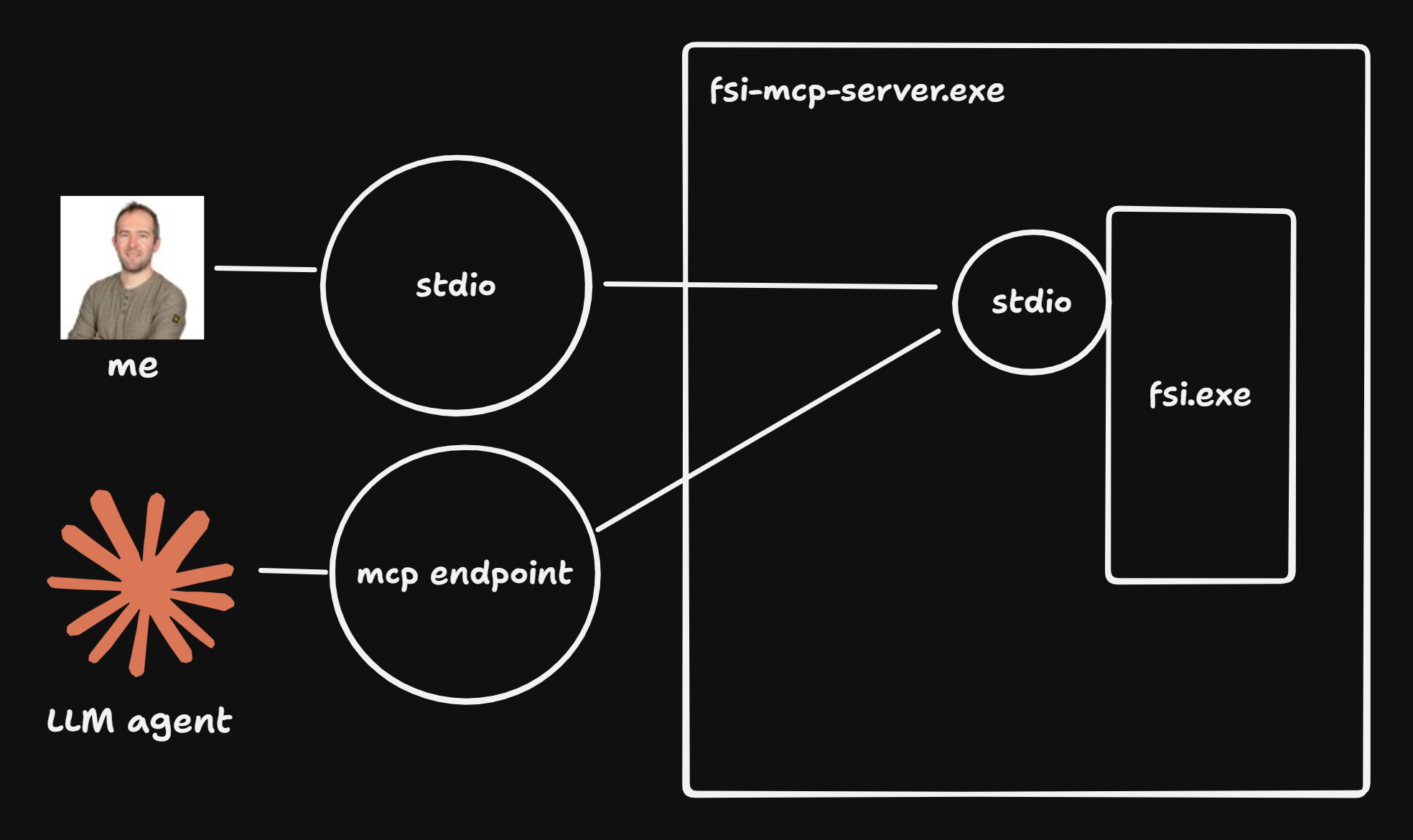
fsi-mcp wraps the standard F# Interactive process while maintaining full CLI compatibility. It intercepts all FSI input/output to provide:
- Hybrid Usage: Mix console input and MCP calls in the same session
- Full CLI Compatibility: Use as a drop-in replacement for
fsi.exe. All arguments not prefixed withfsi-mcp:are passed to the underlying FSI process.
┌───────────────────────────────────────────────────────────┐
│                     External Clients                      │
│  ┌──────────┐  ┌──────────┐  ┌─────────────────┐          │
│  │ Console  │  │   MCP    │  │  IDE            │          │
│  │  Users   │  │ Clients  │  │                 │          │
│  └──────────┘  └──────────┘  └─────────────────┘          │
└───────┬─────────────┬─────────────────┬───────────────────┘
        │             │                 │
        │ stdin/out   │ HTTP/SSE        │ stdin/out
        │             │ :5020           │
        v             v                 v
┌─────────────────────────────────────────────────────────────┐
│         FSI MCP Server (ASP.NET Core)                       │
│                                                             │
│  ┌────────────────────────────────────────────────────┐     │
│  │           MCP Tools (HTTP Transport)               │     │
│  │  • SendFSharpCode                                  │     │
│  │  • LoadFSharpScript                                │     │
│  │  • GetRecentFsiEvents                              │     │
│  │  • GetFsiStatus                                    │     │
│  └────────────────────────────────────────────────────┘     │
│                         │                                   │
│  ┌────────────────────────────────────────────────────┐     │
│  │              FsiService (Core)                     │     │
│  │  • Manages FSI process lifecycle                   │     │
│  │  • Captures I/O streams                            │     │
│  │  • Tracks events from all sources                  │     │
│  └────────────────────────────────────────────────────┘     │
│                         │                                   │
└─────────────────────────┼───────────────────────────────────┘
                          │
                          v stdin
                    ┌───────────┐
                    │  dotnet   │
                    │    fsi    │
                    └───────────┘
                     stdout/stderr
Key Flows:
- Console input → forwarded to FSI + logged as events
- MCP tool calls → forwarded to FSI + logged as events
- FSI output → displayed on console + logged as events
- All logged events → available via MCP tool call GetRecentFsiEvents
Quick Start
Building the Project
# Clone and build
git clone <repository-url>
cd fsi-mcp-server
dotnet build

# Run as FSI replacement
dotnet run -- fsi:--nologo fsi:--load:script.fsx
Basic Usage
# Start FSI Server (runs on http://0.0.0.0:5020)
dotnet run
JetBrains Rider Integration
Replace F# Interactive (Recommended setup)
Replace Rider's built-in F# Interactive with FSI Server for seamless AI integration:
- Open File → Settings → Languages & Frameworks → F# → F# Interactive
- In the F# Interactive executable field, replace the default path with:
C:\path\to\fsi-mcp-server.exe - Click OK to save
Benefits:
- Use Rider's F# Interactive integrations normally (Send to F# Interactive, etc.)
- FSI sessions interactions automatically get AI integration capabilities through an integrated MCP server.
Alternative: Terminal Integration
- Open Rider's integrated terminal
- Navigate to your fsi-server directory
- Run:
dotnet run - FSI Server starts and accepts both console input and API calls
AI Assistant Integration
Setting Up Claude Code Integration
Install the mcp server:
native:
claude mcp add --transport sse fsi-server http://localhost:5020/sse
This creates a seamless experience where you can work with F# interactively while Claude assists by executing code, running tests, and maintaining collaborative scripts.
Setting Up Claude Desktop Integration
{
  "mcpServers": {
    "fsi-mcp": {
      "command": "npx",
      "args": [
        "mcp-remote",
        "http://localhost:5020/sse"
      ]
    }
  }
Setting Up Github Copilot Integration
1. Install the mcp server:
"servers": {
    "fsi-mcp": {
        "url": "http://localhost:5020/sse",
        "type": "http"
    }
}
2. Create a custom agent file, e.g. fsi.agent.md
You can find an example prompt here:
3. Run github copilot with the custom agent
Typical Programming Session Workflow
1. Start FSI Server
cd your-fsharp-project
dotnet run --project path/to/fsi-server
2. Load Your Project Context
// In console or with IDE integration
#r "path/to/your/project.dll";;
#load "YourModule.fs";;
3. Hybrid Development
- Console: Direct F# experimentation and REPL interaction using your regular workflow
- MCP: AI assistant sends code snippets for evaluation and reads fsi.exe output.
Configuration
None yet, even the local ip/ports are hardcoded for now 😂
CLI Pass-through
fsi command-line arguments are forwarded to the underlying fsi.exe process.
Args for the fsi-mcp process itself should be prefixed with fsi-mcp:.
dotnet run -- --nologo --define:DEBUG --load:setup.fsx fsi-mcp:--some-fsi-mcp-specific-arg
Requirements
- .NET 6.0 or later
- F# Interactive (
dotnet fsi) available
License
See LICENSE file for details.
Installing Fsi
This server has no published package — it is built from source. Open the repository and follow its README.
▸ github.com/jovaneyck/fsi-mcp-serverFAQ
Is Fsi MCP free?
Yes, Fsi MCP is free — one-click install via Unyly at no cost.
Does Fsi need an API key?
No, Fsi runs without API keys or environment variables.
Is Fsi hosted or self-hosted?
Self-hosted: the server runs locally on your machine via the install command above.
How do I install Fsi in Claude Desktop, Claude Code or Cursor?
Open Fsi on unyly.org, pick your client tab (Claude Desktop, Claude Code, Cursor) and press Install — the config is generated automatically, no JSON editing.
Related MCPs
Fetch
Web content fetching and conversion for efficient LLM usage.
AWS KB Retrieval
Retrieval from AWS Knowledge Base using Bedrock Agent Runtime.
 by modelcontextprotocol
Spring AI MCP Server
Provides auto-configuration for setting up an MCP server in Spring Boot applications.
llm-analysis-assistant
A very streamlined mcp client that supports calling and monitoring stdio/sse/streamableHttp, and can also view request responses through the /logs page. It also
 by xuzexin-hz
Compare Fsi with
Not sure what to pick?
Find your stack in 60 seconds
Author?
Embed badge for your README
Browse similar
All ai MCPs