
Genai Multi Agent Support
FreeNot checkedArchitecting a Secure, Multi-Agent GenAI Support System

About
Architecting a Secure, Multi-Agent GenAI Support System
README






A Generative AI–powered Multi-Agent System that enables customer support teams to query structured databases and unstructured documents using natural language.
Built with LangChain, LangGraph, and Streamlit with flexible support for Google Gemini, OpenAI, Anthropic, and local LLMs (via LM Studio).
🎥 Demo Video
🏗️ Architecture
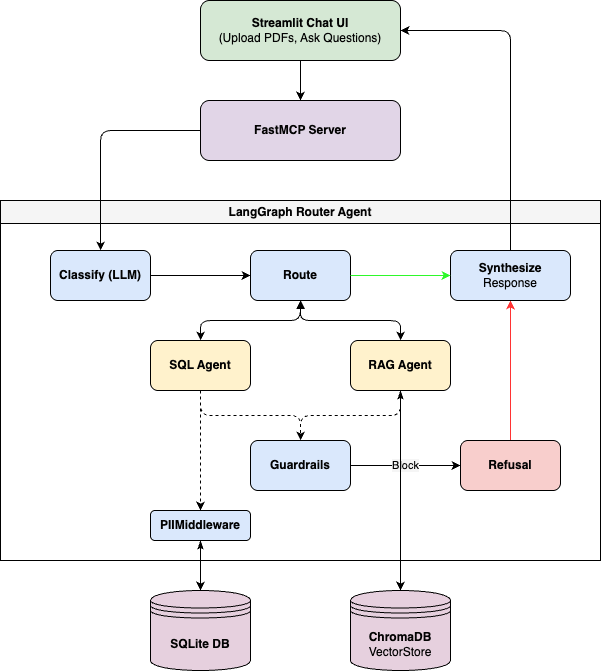
Agent Roles
| Agent | Purpose | Data Source |
|---|---|---|
| Router | Classifies queries and routes to specialist agents | LLM (Configurable) |
| SQL Agent | Queries structured customer data via natural language | SQLite database |
| RAG Agent | Searches uploaded policy documents | ChromaDB vector store |
🔒 Security Architecture
The GenAI Customer Assistant implements a multi-layered security architecture designed to prevent prompt injection, data exfiltration, and unauthorized actions. This is achieved using LangChain Middleware to establish firm execution guardrails.
- Middleware Intent Classification (
@before_agent):- Before the
sql_agentorrag_agentprocess any request, a custom@before_agenthook evaluates the user's intent. - If malicious intent is detected (e.g., prompt injection, requests to bypass rules, requests to drop tables), the middleware intercepts the execution, skips the LLM tool call entirely, and immediately returns a safe refusal template.
- Before the
- Tool-Level SQL Execution Guardrails:
- Raw SQL execution via the LLM is wrapped in a custom validation function.
- Checks are performed before database execution to block
SELECT *, ensure aLIMITclause is present, and entirely prohibit DML (Data Manipulation Language) statements likeINSERT,UPDATE,DELETE, andDROP.
- PII Middleware Sanitization (
PIIMiddleware):- Even if a query legitimately retrieves data, the output is passed through LangChain's built-in
PIIMiddlewarebefore returning to the LLM or user. - Emails are redacted (e.g.,
e***@email.com). - Phone numbers are masked (e.g.,
+1-***-****).
- Even if a query legitimately retrieves data, the output is passed through LangChain's built-in
- Strict System Instructions:
- All agents are prepended with a non-negotiable
SYSTEM RULES (HIGHEST PRIORITY)block that dictates behavior boundaries that cannot be overridden by user input.
- All agents are prepended with a non-negotiable
- Red-Team Tested: Includes an automated test suite (
test_security.py) to continually verify defenses against prompt overrides, mass data dumps, and SQL injections.
🚀 Quick Start
Prerequisites
- Python 3.10+
- LLM API Key (Google Gemini, OpenAI, or Anthropic)
1. Clone & Setup
cd genai-multi-agent-support
python -m venv venv
source venv/bin/activate  # On Windows: venv\Scripts\activate
pip install -r requirements.txt
2. Configure Environment
Create a .env file in the project root to configure your LLM provider. The default provider is Google Gemini, but you can also use OpenAI or Anthropic.
# Set your preferred provider: gemini (default), openai, anthropic, or lmstudio
LLM_PROVIDER=gemini

# For Google Gemini (Default)
GEMINI_API_KEY=your-gemini-api-key-here

# For OpenAI
OPENAI_API_KEY=your-openai-api-key-here
# OPENAI_MODEL=gpt-4o

# For Anthropic
ANTHROPIC_API_KEY=your-anthropic-api-key-here
# ANTHROPIC_MODEL=claude-3-7-sonnet-20250219
Or copy from the example:
cp .env.example .env
# Edit .env and add your API key
3. Initialize Database
python setup_database.py
This creates customer_support.db with:
- 15 customers with realistic profiles
- 10 products across Software and Hardware categories
- 25+ support tickets with various statuses
4. Run the Application
streamlit run app.py
The app will open at http://localhost:8501
5. Load Sample Policies
In the Streamlit sidebar, click "📥 Load Sample Policies" to index the built-in Acme Corporation policy document. Or upload your own PDF files using the file uploader.
💬 Usage Examples
Structured Data Queries (SQL Agent)
- "Give me a quick overview of customer Ema's profile and past support ticket details."
- "Show me all open support tickets with high priority."
- "List all premium plan customers."
- "Which support tickets have been escalated and why?"
Policy Document Queries (RAG Agent)
- "What is the current refund policy?"
- "What is the warranty period for hardware products?"
- "What are the support tiers and response times?"
- "What is the data privacy policy for customer information?"
Combined Queries (Both Agents)
- "Does customer Ema qualify for a refund based on our policy?"
- "What is the SLA uptime guarantee for premium customers?"
🛠️ Technology Stack
| Component | Technology |
|---|---|
| LLM | Configurable (Gemini, OpenAI, Anthropic, or LM Studio) |
| Embeddings | Configurable (Gemini, OpenAI, or local via LM Studio) |
| Framework | LangChain + LangGraph |
| SQL Database | SQLite |
| Vector Database | ChromaDB |
| MCP Server | FastMCP |
| UI | Streamlit |
📁 Project Structure
genai-multi-agent-support/
├── README.md                  # This file
├── requirements.txt           # Python dependencies
├── .env.example               # Environment variable template
├── app.py                     # Streamlit UI entry point
├── mcp_server.py              # FastMCP server (MCP tools)
├── setup_database.py          # Database schema & synthetic data
├── create_sample_policy.py    # Sample policy document generator
├── agents/
│   ├── __init__.py
│   ├── router.py              # LangGraph router agent
│   ├── sql_agent.py           # SQL database agent
│   └── rag_agent.py           # RAG policy document agent
├── ui/
│   ├── chat.py                # Chat loop UI component
│   ├── sidebar.py             # Sidebar navigation and stats
│   └── styles.py              # CSS styling
├── tests/                     # Pytest suite
├── data/
│   ├── policies/              # Uploaded PDF documents
│   └── chroma_db/             # ChromaDB persistent storage
└── customer_support.db        # SQLite database (generated)
🔧 MCP Server Integration
The system exposes a Model Context Protocol (MCP) server for integration with MCP-compatible clients like Claude Desktop. This allows you to interact with the support agents as tools directly within other AI applications.
1. Available MCP Tools
| Tool | Description |
|---|---|
ask_support_assistant |
Routes natural language questions to either the SQL or RAG agent automatically. |
upload_policy_document |
Uploads and indexes a PDF document into the knowledge base. |
get_knowledge_base_stats |
Returns statistics about the indexed knowledge base. |
2. Connecting to Claude Desktop
To use these agents as tools directly in Claude Desktop:
Locate your Claude Desktop config file:
- macOS:
~/Library/Application Support/Claude/claude_desktop_config.json - Windows:
%APPDATA%\Claude\claude_desktop_config.json
- macOS:
Add the server configuration: Update the
mcpServersobject with the absolute paths to your project. Use your full system path forcommandandargs.
{
  "mcpServers": {
    "customer-support-agent": {
      "command": "/genai-multi-agent-support/venv/bin/python",
      "args": [
        "/genai-multi-agent-support/mcp_server.py"
      ],
      "env": {
        "LLM_PROVIDER": "gemini",
        "GEMINI_API_KEY": "your-gemini-api-key-here"
      }
    }
  }
}
- Restart Claude Desktop: Once restarted, a 🔌 icon will appear. Claude can now call your local support assistant to query your database or policies.
3. Running Manually (for Debugging)
To run the server in stdio mode for testing or debugging:
source venv/bin/activate
python mcp_server.py

### Available MCP Tools

| Tool | Description |
|------|-------------|
| `ask_support_assistant` | Routes questions to the appropriate agent automatically |
| `upload_policy_document` | Uploads and indexes a PDF into the knowledge base |
| `get_knowledge_base_stats` | Returns knowledge base statistics |

---
Installing Genai Multi Agent Support
This server has no published package — it is built from source. Open the repository and follow its README.
▸ github.com/TheNobody-12/genai-multi-agent-supportFAQ
Is Genai Multi Agent Support MCP free?
Yes, Genai Multi Agent Support MCP is free — one-click install via Unyly at no cost.
Does Genai Multi Agent Support need an API key?
No, Genai Multi Agent Support runs without API keys or environment variables.
Is Genai Multi Agent Support hosted or self-hosted?
Self-hosted: the server runs locally on your machine via the install command above.
How do I install Genai Multi Agent Support in Claude Desktop, Claude Code or Cursor?
Open Genai Multi Agent Support on unyly.org, pick your client tab (Claude Desktop, Claude Code, Cursor) and press Install — the config is generated automatically, no JSON editing.
Related MCPs
Fetch
Web content fetching and conversion for efficient LLM usage.
AWS KB Retrieval
Retrieval from AWS Knowledge Base using Bedrock Agent Runtime.
 by modelcontextprotocol
Spring AI MCP Server
Provides auto-configuration for setting up an MCP server in Spring Boot applications.
llm-analysis-assistant
A very streamlined mcp client that supports calling and monitoring stdio/sse/streamableHttp, and can also view request responses through the /logs page. It also
 by xuzexin-hz
Compare Genai Multi Agent Support with
Not sure what to pick?
Find your stack in 60 seconds
Author?
Embed badge for your README
Browse similar
All ai MCPs