
Gonka
FreeNot checkedCompare LLM inference costs and access OpenAI-compatible API at up to 6800x lower cost than GPT-4o.

About
Compare LLM inference costs and access OpenAI-compatible API at up to 6800x lower cost than GPT-4o.
README
Get a second opinion from independent LLMs — in one call, for a fraction of a cent.
gonka-second-opinion runs your prompt across the independent models live on the
Gonka network and across assigned debate roles
(skeptic / proponent / pragmatist …), in a single MCP call. Your main model stays
in charge — you just get a panel of divergent views to check a decision against,
without switching providers.

Live at: https://mcp.gogonka.com/mcp
One question → three independent opinions
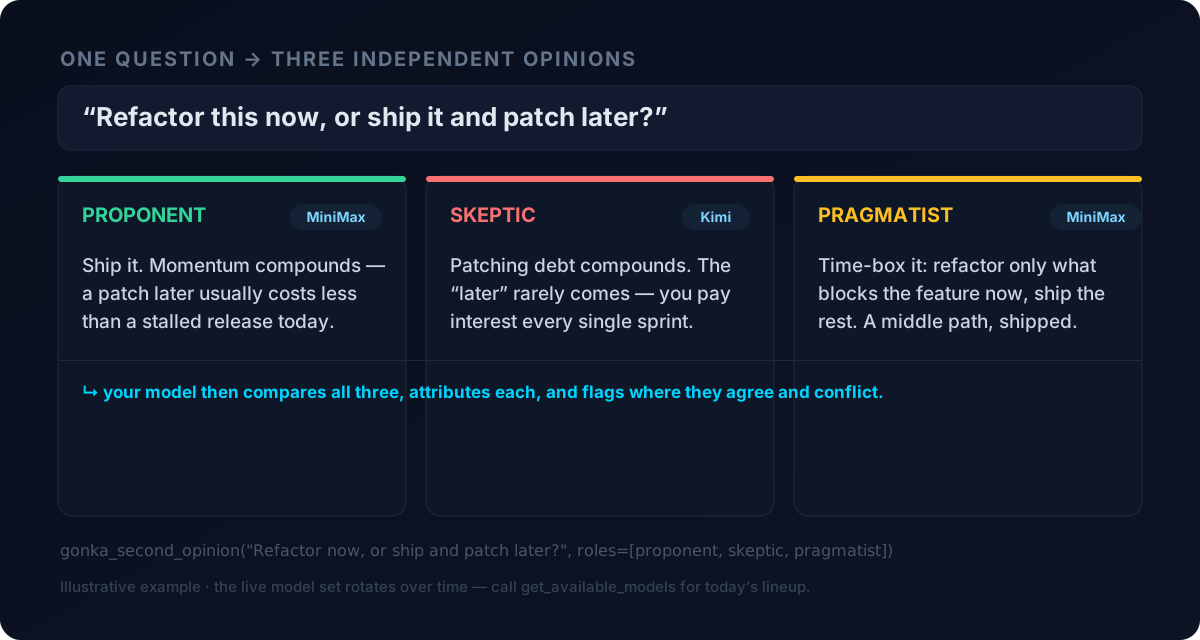
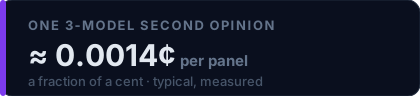
The example is illustrative — the live model set rotates over time; call
get_available_models for today’s lineup. Per-panel cost is typical/measured;
check get_pricing for live rates.
Why this instead of a plain LLM connector
- A panel, not a single answer. Independent models trained by different labs surface non-overlapping failure modes. Assigned roles add behavioral diversity on top. You get disagreement you can act on, not one confident guess.
- Cheap enough to always use. On the big providers a 3-way panel costs real money, so nobody runs one. On Gonka it's a fraction of a cent — a second opinion becomes a default habit, not a luxury.
- Zero setup, works in a sandbox. The server makes the gateway call for you. An agent with no outbound network and no way to edit its own config can still use it over the already-open MCP channel. Free trial by default; paste your own key to run on your balance.
Install (30 seconds)
Add to your MCP client config (Claude Desktop / Cursor / …):
{
  "mcpServers": {
    "gonka-second-opinion": {
      "url": "https://mcp.gogonka.com/mcp"
    }
  }
}
Restart the client — the tools appear automatically. No API key required to start (a free trial key is issued per caller).
Custom clients:
curl -X POST https://mcp.gogonka.com/mcp \
  -H "Content-Type: application/json" \
  -d '{"jsonrpc":"2.0","method":"tools/list","id":1}'
Use your own key (after you register)
Registered on the JoinGonka gateway (gate.joingonka.ai)? Then run every call on your own balance — no trial budget, no per-IP limit. First get your key:
- Sign up at the JoinGonka gateway (welcome bonus: 50M nGNK, no credit card).
- Open your gateway dashboard → API keys → copy your JoinGonka gateway key (starts with
jg-).
Then tell this MCP server to use it — pick the way that matches your client:
A. Client with an API-key / header field (Cursor, Claude Code, LibreChat, most custom clients)
Put the key in the server's Authorization header — it arrives as Bearer … and
every call switches to your balance automatically:
{
  "mcpServers": {
    "gonka-second-opinion": {
      "url": "https://mcp.gogonka.com/mcp",
      "headers": { "Authorization": "Bearer jg-YOUR_KEY_HERE" }
    }
  }
}
If your client shows a plain API key / Bearer token box instead of raw headers,
just paste your jg-… JoinGonka gateway key there.
B. Client with no key/header field (e.g. claude.ai Custom Connectors)
Mint a personal connector URL that carries your key for you:
- Go to https://mcp.gogonka.com/personal
- Paste your
jg-…JoinGonka gateway key → you get a URL likehttps://mcp.gogonka.com/k/<token>/mcp - Add that URL as the MCP connector (in claude.ai: Add custom connector → URL). Nothing else to enter — no key field needed.
Keep the personal URL secret — it stands in for your key. The same key always mints the same URL.
How it's handled: the key (or personal token) is read from the request only,
forwarded to the JoinGonka gateway, and never stored or logged. An unrelated
Authorization header (OAuth, a proxy's own token) is ignored, so it can't break the
free trial path. Remove the header/URL and the server falls back to the free trial.
The flagship tools
gonka_second_opinion(prompt, system?, perspectives?, max_tokens?)
Run one prompt across the live models and/or a set of roles, in parallel.
- Leave
perspectivesempty → one opinion per live model. - Pass
perspectives(short role/stance labels, max 5) → one opinion per role, each answered candidly from that viewpoint, rotated across the live models. Examples:["for","against","neutral"],["security expert","product manager","end user"]. - Returns
{ opinions:[{model, perspective?, response}], synthesis_instructions, trial_budget|cost }. Attribute each opinion to its model + role when you present them.
gonka_chat(prompt, system?, model?, max_tokens?)
One completion through the server — for when you want a single cheap answer, or a
sub-task run without giving the agent its own network/key. model accepts "auto",
a nickname, or an exact id; anything not live right now is routed to a model that is.
Both tools auto-detect trial (free, per-IP budget) vs registered (your own
jg-… key) mode. On trial exhaustion they return a signup link + welcome bonus to
relay to the user — no fabricated keys, no altered numbers.
Also included
Cost intelligence — is Gonka actually cheaper for your workload? (8 tools)

Reflects the last cached render (GitHub proxies images); call get_pricing for the
real-time number. All figures float with the GNK/USD rate — never trust a hardcoded one.
get_pricing— current $/1M tokens, GNK/USD rate, live ratios vs OpenAI/DeepSeek/Anthropiccompare_providers(provider)— side-by-side vs openai / anthropic / deepseek / mistral / geminicalculate_savings(monthly_spend_usd)— exact monthly/annual savings for your spendsuggest_model_for_task(task_description, …)— model + cost recommendationget_available_models— the models live on the network right now, with live pricingget_trial_key— freegc-key instantly (no signup); expires in 2h, first use extends to 24hget_signup_link— permanent account + welcome bonus + copy-paste SDK snippetsregister_on_gonka(…)— personalized cost-analysis pitch (computes savings; does not create an account)
Documentation knowledge graph — search 1000+ Gonka concepts (10 tools)
query_graph(question, …)— topic search over the concept graphsearch_docs(query, …)/read_doc(filename, …)/list_docs()— full-text docsget_node(label)/get_neighbors(label, …)— concept detail and relationsget_god_nodes()/get_community(id)/get_graph_stats()— structure overviewfind_shortest_path(source, target, …)— conceptual path between two ideas
MCP prompts & resources
- Prompt
gonka_start(task)— seed a cost-comparison conversation - Prompt
calculate_my_savings(monthly_spend_usd)— seed a savings estimate - Resource
gonka://pricing-guide— structured live pricing data + decision matrix
Honesty & hygiene
- Live, not hardcoded. Prices float with the market and the model set rotates —
the server quotes both live (
get_pricing,get_available_models), and the badges above are rendered from live data, not typed into this file. - Panel ≠ magic. A second opinion is worth exactly as much as the models are independent. The panel uses the genuinely different models live on the network at the time of the call; it does not claim a bigger fleet than is actually serving.
- OpenAI/Anthropic-compatible. Two config changes, zero code changes:
base_url=https://gate.joingonka.ai/v1(OpenAI) orhttps://gate.joingonka.ai(Anthropic). - Tool hygiene. All tools ship typed input schemas with MCP annotations
(
readOnlyHint,idempotentHint,openWorldHint), enum/range constraints, and clear descriptions. Inference tools are per-IP rate-limited in trial mode. - Privacy. HTTPS/TLS 1.2+. No keys in query strings (flagged by middleware). Anonymized logging (IP, User-Agent, tool name); inference prompts truncated; caller keys never logged or returned.
Live health grade: https://wmcp.sh/mcp/grade/mcp.gogonka.com
Links
- Website: https://gogonka.com
- GitHub: https://github.com/bystray/gonka-mcp-server
- Signup (welcome bonus): https://gate.joingonka.ai/register?ref=cf2bd855-ba1e-4b6e-8e56-9970049eec31
- Live pricing JSON: https://gogonka.com/pricing.json
- Status / grade: https://wmcp.sh/mcp/grade/mcp.gogonka.com
License: MIT · Version: 2.2.0
Installing Gonka
This server has no published package — it is built from source. Open the repository and follow its README.
▸ github.com/bystray/gonka-mcp-serverFAQ
Is Gonka MCP free?
Yes, Gonka MCP is free — one-click install via Unyly at no cost.
Does Gonka need an API key?
No, Gonka runs without API keys or environment variables.
Is Gonka hosted or self-hosted?
Self-hosted: the server runs locally on your machine via the install command above.
How do I install Gonka in Claude Desktop, Claude Code or Cursor?
Open Gonka on unyly.org, pick your client tab (Claude Desktop, Claude Code, Cursor) and press Install — the config is generated automatically, no JSON editing.
Related MCPs
Fetch
Web content fetching and conversion for efficient LLM usage.
AWS KB Retrieval
Retrieval from AWS Knowledge Base using Bedrock Agent Runtime.
 by modelcontextprotocol
Spring AI MCP Server
Provides auto-configuration for setting up an MCP server in Spring Boot applications.
llm-analysis-assistant
A very streamlined mcp client that supports calling and monitoring stdio/sse/streamableHttp, and can also view request responses through the /logs page. It also
 by xuzexin-hz
Compare Gonka with
Not sure what to pick?
Find your stack in 60 seconds
Author?
Embed badge for your README
Browse similar
All ai MCPs