
Iflow Mcp 4r9un Fastmcp Threatintel
FreeNot checked🛡️ MCP AI Powered Threat Intelligence - Revolutionizing Cybersecurity | Built by Arjun Trivedi (4R9UN)

About
🛡️ MCP AI Powered Threat Intelligence - Revolutionizing Cybersecurity | Built by Arjun Trivedi (4R9UN)
README
MseeP.ai Security Assessment Badge
🛡️ FastMCP ThreatIntel - AI-Powered Threat Intelligence
CI/CD Pipeline codecov PyPI version Python 3.10+ License: Apache-2.0 Docker Pulls Verified on MseeP
🚀 MCP AI Powered Threat Intelligence - Revolutionizing Cybersecurity Built by Arjun Trivedi (4R9UN) - Enterprise-Grade Threat Intelligence Platform
A comprehensive Model Context Protocol (MCP) server that provides enterprise-grade threat intelligence capabilities through natural language AI prompts. Analyze IPs, domains, URLs, and file hashes across multiple threat intelligence platforms with advanced APT attribution and interactive reporting.
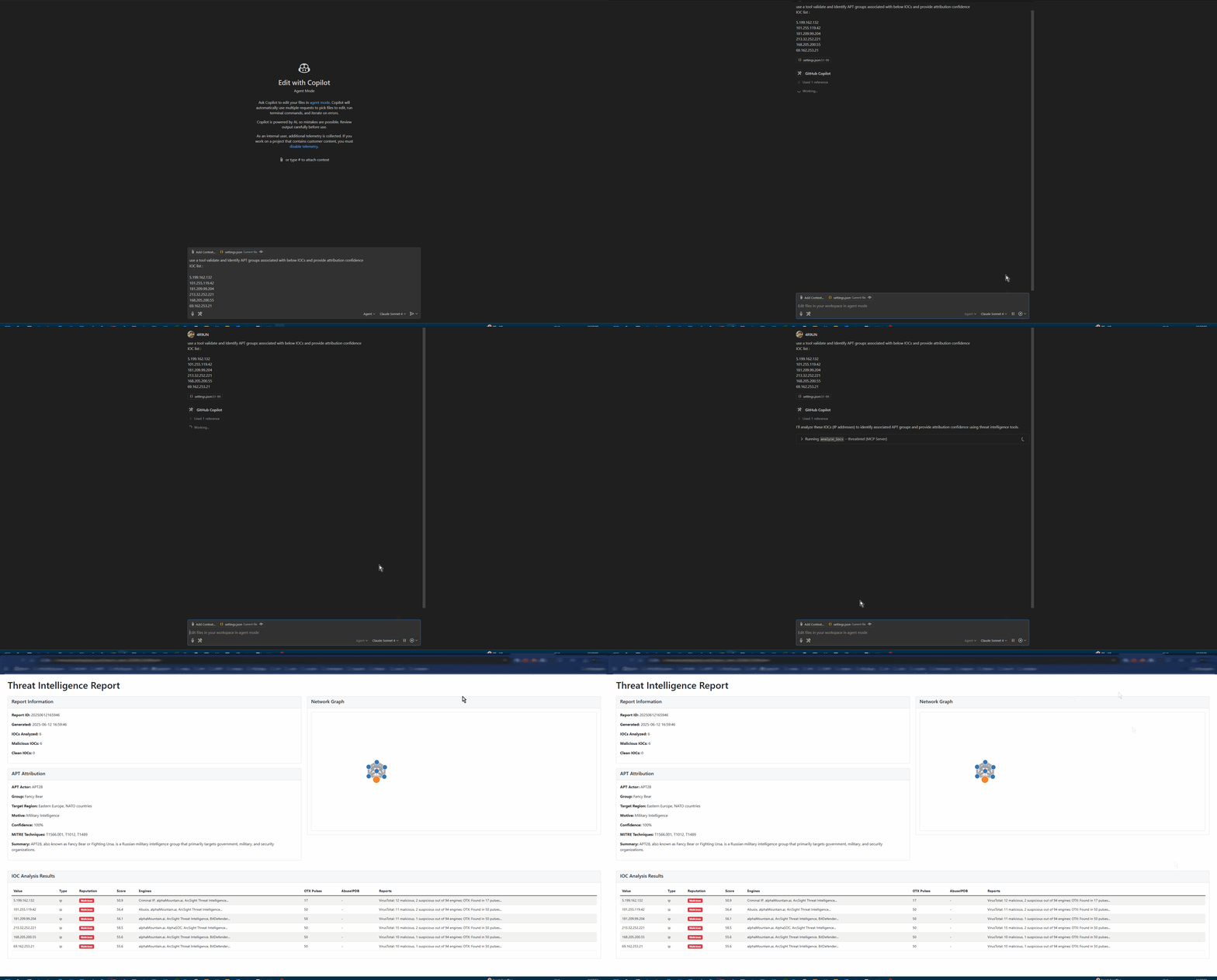
✨ Why FastMCP ThreatIntel?
🎯 Purpose-Built for Modern Security Teams
- 🤖 AI-First Design: Natural language queries with intelligent IOC detection
- 🔗 MCP Integration: Seamless integration with Claude Desktop, VSCode (Roo-Cline), and other AI assistants
- ⚡ Lightning Fast: UV-powered development with optimized async processing
- 🏢 Enterprise Ready: Production-grade Docker containers and Kubernetes support
🔍 Multi-Source Intelligence
- VirusTotal: File and URL reputation analysis with 70+ antivirus engines
- AlienVault OTX: Community-driven threat intelligence and IOC feeds
- AbuseIPDB: IP reputation and geolocation with abuse confidence scoring
- IPinfo: Enhanced geolocation, ASN, and infrastructure data
🤖 AI-Powered Analysis
- Natural Language Interface: Query threats using plain English
- Advanced APT Attribution: Confidence-scored attribution with MITRE ATT&CK mapping
- Intelligent IOC Detection: Auto-detects IP addresses, domains, URLs, and file hashes
- Context-Aware Reporting: Generates comprehensive threat intelligence reports
📊 Rich Reporting & Visualization
- Interactive HTML Reports: Modern, responsive design with dark/light modes
- D3.js Network Graphs: Visual IOC relationship mapping
- Multiple Output Formats: Markdown, JSON, HTML, and STIX-compliant outputs
- Export Capabilities: PDF, CSV, and JSON export for integration
🚀 Flexible Deployment Options
- 🔌 MCP Server: Direct integration with AI assistants
- 💻 Standalone CLI: Interactive and batch processing modes
- 🐳 Docker Container: Production-ready containerization
- 📦 Python Package: Embed in your applications and workflows
🏗️ Architecture
graph TB
    A[AI Assistant] --> B[MCP Protocol]
    C[CLI Interface] --> D[Core Engine]
    B --> D

    D --> E[IOC Processor]
    D --> F[Attribution Engine]
    D --> G[Report Generator]

    E --> H[VirusTotal API]
    E --> I[OTX API]
    E --> J[AbuseIPDB API]
    E --> K[IPinfo API]

    F --> L[APT Patterns]
    F --> M[MITRE ATT&CK]

    G --> N[HTML Reports]
    G --> O[JSON Export]
    G --> P[STIX Output]
🚀 Quick Start
Choose your preferred installation method and get started in minutes:
🐍 pip (Fastest)
# Install from PyPI
pip install fastmcp-threatintel

# Interactive setup wizard
threatintel setup

# Analyze your first IOC
threatintel analyze 8.8.8.8 --output-format table --verbose
🐳 Docker (Production Ready)
# Pull and run with your API keys
docker pull arjuntrivedi/fastmcp-threatintel:latest
docker run -e VIRUSTOTAL_API_KEY=your_key \
           -e OTX_API_KEY=your_key \
           arjuntrivedi/fastmcp-threatintel:latest \
           analyze 192.168.1.1
🔥 UV (Developer Recommended)
# Clone and install with UV
git clone https://github.com/4R9UN/fastmcp-threatintel.git
cd fastmcp-threatintel
uv sync

# Run interactive setup
uv run threatintel setup

# Start analyzing
uv run threatintel interactive
📦 Poetry (Traditional)
# Clone and install with Poetry
git clone https://github.com/4R9UN/fastmcp-threatintel.git
cd fastmcp-threatintel
poetry install

# Activate and run
poetry shell
threatintel analyze example.com --output-format html --open-browser
⚙️ Configuration
🔑 API Keys Setup
Get your free API keys and unlock the full potential:
| Service | Status | Free Tier Limit | Get Your Key |
|---|---|---|---|
| VirusTotal | Required | 1,000 requests/day | Sign Up → |
| OTX | Required | Unlimited | Sign Up → |
| AbuseIPDB | Optional | 1,000 requests/day | Sign Up → |
| IPinfo | Optional | 50,000 requests/month | Sign Up → |
🛠️ Environment Configuration
Create a .env file in your project directory:
# Required API Keys
VIRUSTOTAL_API_KEY=your_virustotal_api_key
OTX_API_KEY=your_alienvault_otx_api_key

# Optional API Keys (for enhanced functionality)
ABUSEIPDB_API_KEY=your_abuseipdb_api_key
IPINFO_API_KEY=your_ipinfo_api_key

# Performance Tuning
CACHE_TTL=3600              # Cache duration (seconds)
MAX_RETRIES=3               # API retry attempts
REQUEST_TIMEOUT=30          # Request timeout (seconds)
💻 Usage Examples
CLI Analysis
# Quick single IOC analysis
threatintel analyze 192.168.1.1 --verbose

# Batch analysis from file
threatintel batch iocs.txt --output-file report.html --output-format html

# Interactive threat hunting session
threatintel interactive

# Start MCP server for AI integration
threatintel server --host 0.0.0.0 --port 8000
🔌 MCP Integration
Integrate with AI assistants for natural language threat intelligence:
VSCode with Roo-Cline
{
  "mcpServers": {
    "threatintel": {
      "command": "threatintel",
      "args": ["server", "--port", "8001"],
      "env": {
        "VIRUSTOTAL_API_KEY": "your_key",
        "OTX_API_KEY": "your_key"
      }
    }
  }
}
Claude Desktop
{
  "mcpServers": {
    "threatintel": {
      "command": "threatintel",
      "args": ["server"],
      "env": {
        "VIRUSTOTAL_API_KEY": "your_key",
        "OTX_API_KEY": "your_key"
      }
    }
  }
}
🔗 Complete MCP Integration Guide →
🎯 AI Prompt Examples
"Analyze IP 8.8.8.8 for security threats and provide geolocation data"
"Check if domain example.com has any malicious associations"
"Perform comprehensive threat analysis on 185.220.101.1 with APT attribution"
"Generate a security incident report for these IOCs: [list]"
📚 Documentation
📖 User Guides
- MCP Integration - Connect with AI assistants
- Python API - Programmatic integration
- Performance Guide - Optimization and scaling
🛠️ Developer Resources
- Development Setup - Contributing and building
- API Reference - Complete API documentation
- Examples Repository - Sample implementations
🌟 What Makes It Special
**🔥 MCP Functionality **
- MCP AI Powered: Cutting-edge threat intelligence automation
- Revolutionizing Cybersecurity: Enterprise-grade AI-powered platform
- Community-Focused: Open source with professional quality
🚀 Production-Ready Features
- Multi-Architecture Docker: ARM64 and AMD64 support
- Kubernetes Ready: Helm charts and deployment manifests
- Comprehensive Testing: 80%+ code coverage with CI/CD pipeline
- Security First: Secure by design with best practices
⚡ Performance Optimized
- Async Everything: Non-blocking I/O for maximum throughput
- Intelligent Caching: Redis-compatible caching layer
- Rate Limiting: Built-in API rate limit management
- Batch Processing: Efficient bulk IOC analysis
🤝 Contributing
We welcome contributions from the cybersecurity community!
Quick Start
# Fork and clone
git clone https://github.com/YOUR_USERNAME/fastmcp-threatintel.git
cd fastmcp-threatintel

# Setup development environment
uv sync --dev
uv run pre-commit install

# Make your changes and test
uv run pytest
uv run ruff format . && uv run ruff check .

# Submit your PR
git push origin feature/your-feature
📖 Complete Contributing Guide →
📜 License
This project is licensed under the Apache License 2.0 - see the LICENSE file for details.
🙏 Acknowledgments
Special thanks to the cybersecurity community and these amazing projects:
- FastMCP - Excellent MCP framework foundation
- VirusTotal - Comprehensive malware analysis platform
- AlienVault OTX - Open threat intelligence sharing
- AbuseIPDB - IP reputation and abuse reporting
- MITRE ATT&CK - Threat intelligence framework
🔗 Links & Resources
🌟 Star this repo if you find it useful! 🌟
📚 Documentation • 🐛 Report Bug • 💡 Request Feature • 💬 Discussions
📦 PyPI Package • 🐳 Docker Hub
Built with ❤️ by Arjun Trivedi (4R9UN) for the cybersecurity community
Install Iflow Mcp 4r9un Fastmcp Threatintel in Claude Desktop, Claude Code & Cursor
unyly install iflow-mcp-4r9un-fastmcp-threatintelInstalls into Claude Desktop, Claude Code, Cursor & VS Code — handles npx, uvx and build-from-source repos for you.
First time? Get the CLI: curl -fsSL https://unyly.org/install | sh
Or configure manually
Run in your terminal:
claude mcp add iflow-mcp-4r9un-fastmcp-threatintel -- uvx fastmcp-threatintelStep-by-step: how to install Iflow Mcp 4r9un Fastmcp Threatintel
FAQ
Is Iflow Mcp 4r9un Fastmcp Threatintel MCP free?
Yes, Iflow Mcp 4r9un Fastmcp Threatintel MCP is free — one-click install via Unyly at no cost.
Does Iflow Mcp 4r9un Fastmcp Threatintel need an API key?
No, Iflow Mcp 4r9un Fastmcp Threatintel runs without API keys or environment variables.
Is Iflow Mcp 4r9un Fastmcp Threatintel hosted or self-hosted?
Self-hosted: the server runs locally on your machine via the install command above.
How do I install Iflow Mcp 4r9un Fastmcp Threatintel in Claude Desktop, Claude Code or Cursor?
Open Iflow Mcp 4r9un Fastmcp Threatintel on unyly.org, pick your client tab (Claude Desktop, Claude Code, Cursor) and press Install — the config is generated automatically, no JSON editing.
Related MCPs
Fetch
Web content fetching and conversion for efficient LLM usage.
AWS KB Retrieval
Retrieval from AWS Knowledge Base using Bedrock Agent Runtime.
 by modelcontextprotocol
Spring AI MCP Server
Provides auto-configuration for setting up an MCP server in Spring Boot applications.
llm-analysis-assistant
A very streamlined mcp client that supports calling and monitoring stdio/sse/streamableHttp, and can also view request responses through the /logs page. It also
 by xuzexin-hz
MCP-Agent
A simple, composable framework to build agents using Model Context Protocol by [LastMile AI](https://www.lastmileai.dev)
 by lastmile-ai
Spring AI MCP Client
Provides auto-configuration for MCP client functionality in Spring Boot applications.
mcp.natoma.ai
A Hosted MCP Platform to discover, install, manage and deploy MCP servers by [Natoma Labs](https://www.natoma.ai)
MCPHub
Website to list high quality MCP servers and reviews by real users. Also provide online chatbot for popular LLM models with MCP server support.
MCP Servers Rating and User Reviews
Website to rate MCP servers, write authentic user reviews, and [search engine for agent & mcp](http://www.deepnlp.org/search/agent)
mkinf
An Open Source registry of hosted MCP Servers to accelerate AI agent workflows.
Compare Iflow Mcp 4r9un Fastmcp Threatintel with
Not sure what to pick?
Find your stack in 60 seconds
Author?
Embed badge for your README
Browse similar
All ai MCPs