

About
Model Context Protocol server for KumoRFM
README

KumoRFM MCP Server
KumoRFM • Notebooks • Blog • Get an API key
PyPI - Python Version PyPI Status Slack
🔬 MCP server to query KumoRFM in your agentic flows
📖 Introduction
KumoRFM is a pre-trained Relational Foundation Model (RFM) that generates training-free predictions on any relational multi-table data by interpreting the data as a (temporal) heterogeneous graph. It can be queried via the Predictive Query Language (PQL).
This repository hosts a full-featured MCP (Model Context Protocol) server that empowers AI assistants with KumoRFM intelligence. This server enables:
- 🕸️ Build, manage, and visualize graphs directly from CSV or Parquet files
- 💬 Convert natural language into PQL queries for seamless interaction
- 🤖 Query, analyze, and evaluate predictions from KumoRFM (missing value imputation, temporal forecasting, etc) all without any training required
🚀 Installation
🐍 Traditional MCP Server
The KumoRFM MCP server is available for Python 3.10 and above. To install, simply run:
pip install kumo-rfm-mcp
Add to your MCP configuration file (e.g., Claude Desktop's mcp_config.json):
{
  "mcpServers": {
    "kumo-rfm": {
      "command": "python",
      "args": ["-m", "kumo_rfm_mcp.server"],
      "env": {
        "KUMO_API_KEY": "your_api_key_here"
      }
    }
  }
}
HTTP Transport
For HTTP-native MCP clients such as a Snowflake Native App, run the server with
streamable-http instead of stdio:
KUMO_API_KEY=<YOUR-KUMO-API-KEY> \
MCP_BEARER_TOKEN=<SHARED-MCP-TOKEN> \
python -m kumo_rfm_mcp.server \
  --transport streamable-http \
  --host 0.0.0.0 \
  --port 8000 \
  --path /mcp
Notes:
- Set
KUMO_API_KEYup front for headless deployments. This avoids the browser-based OAuth flow. - If your MCP client cannot inject environment variables, call the
authenticatetool with anapi_keyargument once at session start. - If
MCP_BEARER_TOKENis set, the HTTP endpoint requiresAuthorization: Bearer <SHARED-MCP-TOKEN>.
⚡ MCP Bundle
We provide a single-click installation via our MCP Bundle (MCPB) (e.g., for integration into Claude Desktop):
- Download the
dxtfile from here - Double click to install
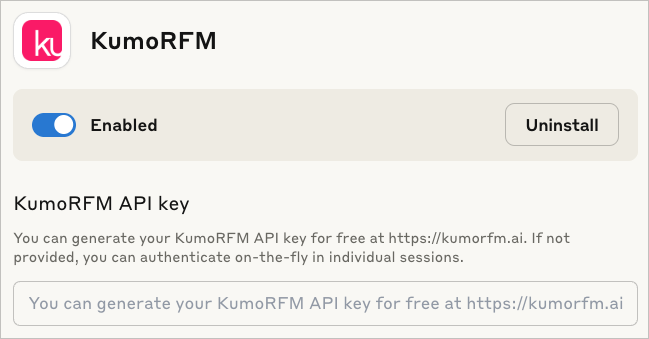
The MCP Bundle supports Linux, macOS and Windows, but requires a Python executable to be found in order to create a separate new virtual environment.
Claude code
To include the server in claude code use:
claude mcp add --transport stdio kumo-rfm-mcp --env KUMO_API_KEY=<YOUR-API-KEY> -- python -m kumo_rfm_mcp.server --port 8000
🎬 Claude Desktop Demo
See here for the transcript.
https://github.com/user-attachments/assets/56192b0b-d9df-425f-9c10-8517c754420f
🔬 Agentic Workflows
You can use the KumoRFM MCP directly in your agentic workflows:
.svg)
[Example] |
|
|---|---|

[Example] |
|
|
[Example] |
|
|
|
|
Browse our examples to get started with agentic workflows powered by KumoRFM.
📚 Available Tools
I/O Operations
- 🔍
find_table_files- Searching for tabular files: Find all table-like files (e.g., CSV, Parquet) in a directory. - 🧐
inspect_table_files- Analyzing table structure: Inspect the first rows of table-like files.
Graph Management
- 🗂️
inspect_graph_metadata- Reviewing graph schema: Inspect the current graph metadata. - 🔄
update_graph_metadata- Updating graph schema: Partially update the current graph metadata. - 🖼️
get_mermaid- Creating graph diagram: Return the graph as a Mermaid entity relationship diagram. - 🕸️
materialize_graph- Assembling graph: Materialize the graph based on the current state of the graph metadata to make it available for inference operations. - 📂
lookup_table_rows- Retrieving table entries: Lookup rows in the raw data frame of a table for a list of primary keys.
Model Execution
- 🤖
predict- Running predictive query: Execute a predictive query and return model predictions. - 📊
evaluate- Evaluating predictive query: Evaluate a predictive query and return performance metrics which compares predictions against known ground-truth labels from historical examples. - 🧠
explain- Explaining prediction: Execute a predictive query and explain the model prediction.
🔧 Configuration
Environment Variables
KUMO_API_KEY: Authentication is needed once before predicting or evaluating with the KumoRFM model. You can generate your KumoRFM API key for free here. If not set, you can also authenticate on-the-fly in individual session via an OAuth2 flow.
We love your feedback! :heart:
As you work with KumoRFM, if you encounter any problems or things that are confusing or don't work quite right, please open a new :octocat:issue. You can also submit general feedback and suggestions here. Join our Slack!
Installing Iflow Mcp Kumo Ai Kumo Rfm
This server has no published package — it is built from source. Open the repository and follow its README.
▸ github.com/kumo-ai/kumo-rfm-mcpFAQ
Is Iflow Mcp Kumo Ai Kumo Rfm MCP free?
Yes, Iflow Mcp Kumo Ai Kumo Rfm MCP is free — one-click install via Unyly at no cost.
Does Iflow Mcp Kumo Ai Kumo Rfm need an API key?
No, Iflow Mcp Kumo Ai Kumo Rfm runs without API keys or environment variables.
Is Iflow Mcp Kumo Ai Kumo Rfm hosted or self-hosted?
Self-hosted: the server runs locally on your machine via the install command above.
How do I install Iflow Mcp Kumo Ai Kumo Rfm in Claude Desktop, Claude Code or Cursor?
Open Iflow Mcp Kumo Ai Kumo Rfm on unyly.org, pick your client tab (Claude Desktop, Claude Code, Cursor) and press Install — the config is generated automatically, no JSON editing.
Related MCPs
Fetch
Web content fetching and conversion for efficient LLM usage.
AWS KB Retrieval
Retrieval from AWS Knowledge Base using Bedrock Agent Runtime.
 by modelcontextprotocol
Spring AI MCP Server
Provides auto-configuration for setting up an MCP server in Spring Boot applications.
llm-analysis-assistant
A very streamlined mcp client that supports calling and monitoring stdio/sse/streamableHttp, and can also view request responses through the /logs page. It also
 by xuzexin-hz
MCP-Agent
A simple, composable framework to build agents using Model Context Protocol by [LastMile AI](https://www.lastmileai.dev)
 by lastmile-ai
Spring AI MCP Client
Provides auto-configuration for MCP client functionality in Spring Boot applications.
mcp.natoma.ai
A Hosted MCP Platform to discover, install, manage and deploy MCP servers by [Natoma Labs](https://www.natoma.ai)
MCPHub
Website to list high quality MCP servers and reviews by real users. Also provide online chatbot for popular LLM models with MCP server support.
MCP Servers Rating and User Reviews
Website to rate MCP servers, write authentic user reviews, and [search engine for agent & mcp](http://www.deepnlp.org/search/agent)
mkinf
An Open Source registry of hosted MCP Servers to accelerate AI agent workflows.
Compare Iflow Mcp Kumo Ai Kumo Rfm with
Not sure what to pick?
Find your stack in 60 seconds
Author?
Embed badge for your README
Browse similar
All ai MCPs