
Interactive Choice
FreeNot checkedEnables AI to present options and launch an interactive web or terminal interface for user selection, then return the results to the AI.

About
Enables AI to present options and launch an interactive web or terminal interface for user selection, then return the results to the AI.
README
An MCP Server that enables AI to provide options and launch an interactive interface for user selection when facing choice problems, then return the results. Inspired by mcp-feedback-enhanced, built with FastMCP.
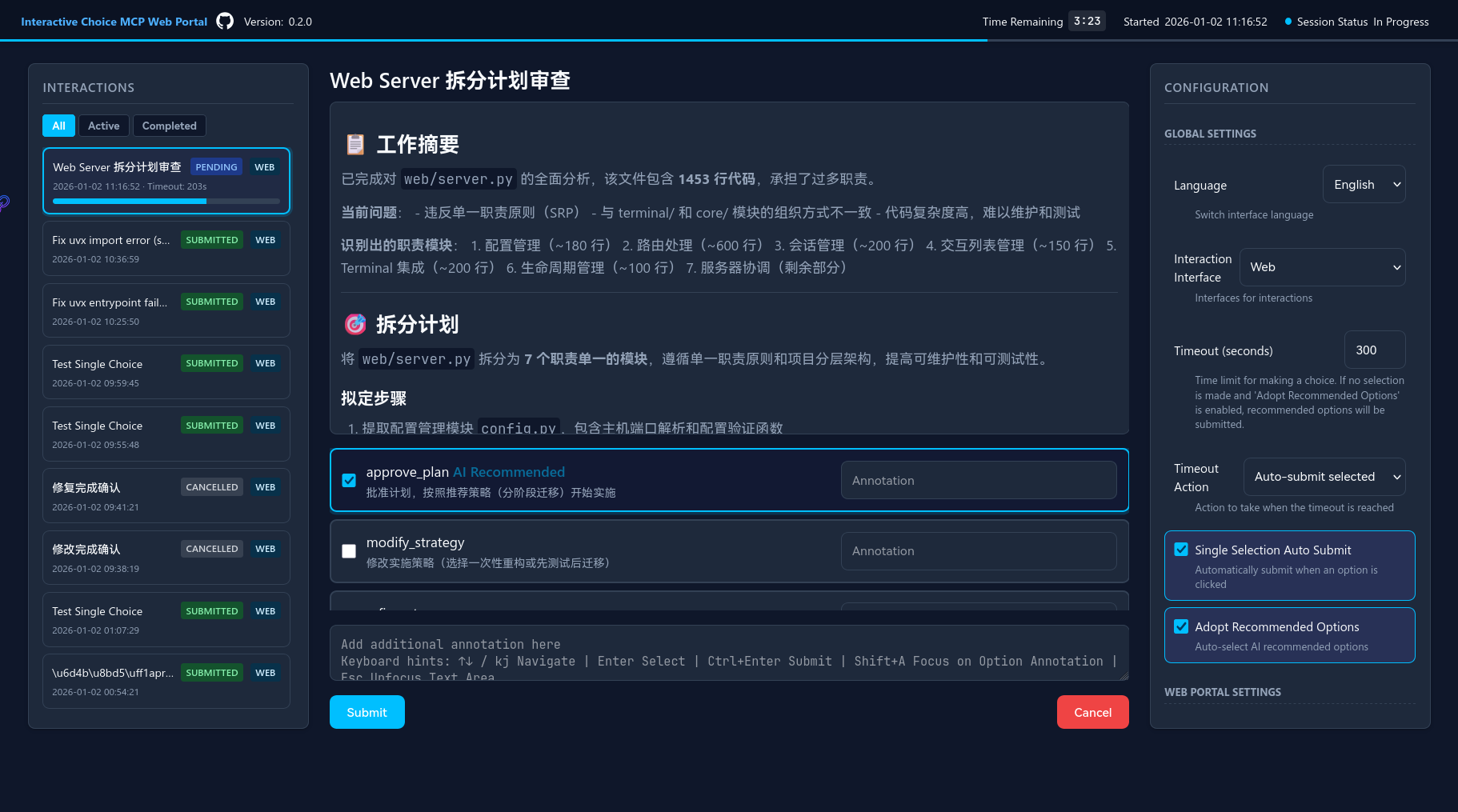
- Showcase:
Similar Projects
imhuso/cunzhi - A Rust + Tauri desktop application that intercepts AI from ending conversations prematurely. Features memory management for project-specific preferences and includes code search capabilities. More comprehensive but heavier than this project.
paulp-o/ask-user-questions-mcp - A lightweight TypeScript + Node.js MCP server focused on CLI-based interaction. Designed for multi-agent parallel coding workflows with question queuing and SSH support. More lightweight but only supports terminal interface.
fhyfhy17/panel-feedback - Panel Feedback brings AI interaction directly into your IDE's sidebar - seamlessly integrated, always accessible, never intrusive.
Differences: This project provides dual interface support (Web + Terminal) with balanced complexity, focusing on interactive selection scenarios.
(I discovered these projects after completing this one. I hope these excellent projects receive more visibility.)
📋 Table of Contents
- ✨ Key Features
- 📦 Installation
- 🤝 Contributing
- 📍 Local Development Environment Setup
- 💖 Acknowledgments
✨ Key Features
🎯 Core Capabilities
- Interactive Choice Interface: AI presents options, users make selections through intuitive interfaces
- Dual Interface Support: Web-based UI and Terminal UI (experimental)
- Selection Modes: Single-select and multi-select modes
- Option Annotations: Users can add annotations to options to provide correct feedback to AI
- Automation Ready: AI can mark recommended options with timeout auto-submit
📦 Installation
Prerequisites
- Python 3.12 or higher
- uv package manager (recommended) or pip
🚀 Quick Start
Add the following configuration:
{
  "mcpServers": {
    "interactive-choice": {
      "command": "uvx",
      "args": [
        "--from",
        "git+https://github.com/Sighthesia/interactive-choice-mcp",
        "interactive-choice-mcp"
      ]
    }
  }
}
This will automatically clone the project repository and install dependencies.
For best results, it is recommended to add the following content to your global prompt (still being adjusted, prompts are from
cunzhi, currently focusing on optimization for pay-per-use AI assistants, suggestions are welcome):- When the requirements are not clear, use `provide_choice` to ask for clarification and provide predefined options. - When there are multiple solutions, use `provide_choice` to ask instead of making assumptions on your own. - When there is a need to update a solution or strategy, use `provide_choice` to ask instead of making assumptions on your own. - Before completing a request, you must call `provide_choice` to request feedback. - Without a clear confirmation through the use of `provide_choice` to ask and receive permission to complete the task or end the conversation, it is prohibited to end the dialogue or request on your own initiative.
Environment Variables (Optional)
You can override saved configurations by adding the following environment variables to the env section in your MCP configuration:
| Environment Variable | Description | Possible Values | Default |
|---|---|---|---|
CHOICE_WEB_HOST |
Web server host | Any valid IP or hostname | 127.0.0.1 |
CHOICE_WEB_PORT |
Web server port | Any available port number | 9999 |
CHOICE_LANG |
Interface language | en, zh |
Auto-detected by system language |
CHOICE_LOG_LEVEL |
Log level | DEBUG, INFO, WARNING, ERROR |
INFO |
CHOICE_LOG_FILE |
Log file path | Any valid file path | Optional |
CHOICE_MCP_DATA_DIR |
Data storage dir | Any valid directory path | .mcp-data/ |
Configuration Example
Here is a complete MCP configuration example with environment variables:
{
  "mcpServers": {
    "interactive-choice": {
      "command": "uvx",
      "args": [
        "--from",
        "git+https://github.com/Sighthesia/interactive-choice-mcp",
        "interactive-choice-mcp"
      ],
      "env": {
        "CHOICE_WEB_HOST": "127.0.0.1",
        "CHOICE_WEB_PORT": "8080",
        "CHOICE_LANG": "en",
        "CHOICE_LOG_LEVEL": "DEBUG",
        "CHOICE_LOG_FILE": "~/.mcp-data/interactive-choice.log",
        "CHOICE_MCP_DATA_DIR": "~/.mcp-data/interactive-choice"
      }
    }
  }
}
🤝 Contributing
Contributions are welcome! Whether it's reporting issues, requesting features, or submitting PRs, it's all greatly appreciated!
For AI-driven development, refer to AGENTS.md and openspec.
📍 Local Development Environment Setup
# Clone the repository
git clone https://github.com/Sighthesia/interactive-choice-mcp.git
cd interactive-choice-mcp

# Install dependencies
uv sync

# Verify installation
uv run pytest
You can configure to use a local development environment to run the MCP Server:
{ "mcpServers": { "interactive-choice": { "command": "uv", "args": [ "--directory", "/path/to/interactive-choice-mcp", "run", "server.py" ] } } }Tip: Replace
/path/to/interactive-choice-mcpwith the actual path, such as~/interactive-choice-mcp.
🧪 Testing
For detailed testing information, please refer to tests/README.md.
The following are common test commands for development and debugging:
Running Interactive Tests
Temporarily run the Web server for interactive testing to verify user-side interaction effects:
- Open Web interaction interface and test the default single-select mode
uv run pytest tests/integration/test_interaction_web.py::TestWebInteractionManual::test_web_e2e_manual_interaction --interactive -v -s
- Open terminal interaction interface and test the default single-select mode
uv run pytest tests/integration/test_interaction_terminal.py::TestTerminalInteractionManual::test_terminal_e2e_manual_interaction --interactive -v -s
Running MCP Server Debugging
Run MCP Inspector to verify MCP Server tool input/output effects:
uv run mcp dev server.py
🏗️ Project Architecture
src/
├── core/                    # Core orchestration and business logic
│   ├── models.py           # Data models and schemas
│   ├── orchestrator.py     # Main orchestration logic
│   ├── validation.py       # Input validation
│   └── response.py         # Response generation
├── mcp/                    # MCP tool bindings
│   ├── tools.py           # MCP tool definitions
│   └── response_formatter.py
├── web/                    # Web interface
│   ├── server.py          # FastAPI web server
│   ├── bundler.py         # Asset bundling
│   └── templates.py       # HTML templates
├── terminal/               # Terminal interface
│   ├── ui.py              # Questionary-based UI
│   └── session.py         # Terminal session management
├── store/                  # Data persistence
│   └── interaction_store.py
└── infra/                  # Infrastructure
    ├── logging.py         # Logging configuration
    ├── i18n.py            # Internationalization
    └── storage.py         # File system operations
Future Considerations
- Since various AI IDEs and CLIs tend to silently run AI commands, the terminal mode interaction experience may be limited and requires further consideration for feasibility
💖 Acknowledgments
- Minidoracat - mcp-feedback-enhanced - Project reference and inspiration source. If you like this project, consider supporting them!
📄 License
Installing Interactive Choice
This server has no published package — it is built from source. Open the repository and follow its README.
▸ github.com/Sighthesia/interactive-choice-mcpFAQ
Is Interactive Choice MCP free?
Yes, Interactive Choice MCP is free — one-click install via Unyly at no cost.
Does Interactive Choice need an API key?
No, Interactive Choice runs without API keys or environment variables.
Is Interactive Choice hosted or self-hosted?
Self-hosted: the server runs locally on your machine via the install command above.
How do I install Interactive Choice in Claude Desktop, Claude Code or Cursor?
Open Interactive Choice on unyly.org, pick your client tab (Claude Desktop, Claude Code, Cursor) and press Install — the config is generated automatically, no JSON editing.
Related MCPs
Opencode Omniroute Plugin
OpenCode plugin for the OmniRoute AI Gateway. Drives dynamic model discovery, /connect auth flow, and multi-instance OmniRoute providers via the official @openc
 by GitHub Actions
Roblox Studio
Enables AI coding tools to control Roblox Studio for workspace exploration, instance manipulation, and script management. It provides tools for playtesting, sce
 by paralov
Antigravity Drawio
MCP server that enables AI assistants to create, parse, render, and validate Draw.io diagrams programmatically.
 by S-SUJAN-S
Fetch
Web content fetching and conversion for efficient LLM usage.
AWS KB Retrieval
Retrieval from AWS Knowledge Base using Bedrock Agent Runtime.
 by modelcontextprotocol
Spring AI MCP Server
Provides auto-configuration for setting up an MCP server in Spring Boot applications.
llm-analysis-assistant
A very streamlined mcp client that supports calling and monitoring stdio/sse/streamableHttp, and can also view request responses through the /logs page. It also
 by xuzexin-hz
MCP-Agent
A simple, composable framework to build agents using Model Context Protocol by [LastMile AI](https://www.lastmileai.dev)
 by lastmile-ai
Spring AI MCP Client
Provides auto-configuration for MCP client functionality in Spring Boot applications.
mcp.natoma.ai
A Hosted MCP Platform to discover, install, manage and deploy MCP servers by [Natoma Labs](https://www.natoma.ai)
Compare Interactive Choice with
Not sure what to pick?
Find your stack in 60 seconds
Author?
Embed badge for your README
Browse similar
All ai MCPs