
IP Fabric Server
FreeNot checkedEnables AI assistants to query IP Fabric network inventory and snapshots through natural language, using tools to fetch devices, interfaces, routing tables, and

About
Enables AI assistants to query IP Fabric network inventory and snapshots through natural language, using tools to fetch devices, interfaces, routing tables, and more.
README
MCP server to interact with IP Fabric via the python SDK, initially inspired by the MCP Server for Obsidian.
⚠️ Disclaimer — Unofficial & Experimental
This is NOT an official IP Fabric product or project.
This MCP server was built as a personal experiment to explore, test, and learn about the Model Context Protocol (MCP) and how it can interact with IP Fabric through its Python SDK. It is not developed, maintained, endorsed, or supported by IP Fabric in any official capacity.
🚀 An official IP Fabric MCP server is currently being developed and tested by the IP Fabric team. If you are looking for an official, production-ready integration, please reach out to your Solution Architect for the latest updates on availability and features.
What this means for you:
- Do not use this in production environments. This project may contain bugs, incomplete features, or breaking changes at any time.
- No guarantees. There is no warranty, SLA, or official support associated with this project.
- No affiliation. This repository is not affiliated with, endorsed by, or connected to IP Fabric's official MCP server efforts.
- Use at your own risk. You are responsible for any consequences of using this code in your environment.
If you have questions about IP Fabric's official MCP server, please contact your Solution Architect or reach out to the IP Fabric team directly.
This project exists purely for educational and experimental purposes. Contributions and feedback are welcome, but please set your expectations accordingly! 🧪
Components
Tools
The server implements multiple tools to interact with IP Fabric:
- ipf_get_filter_help: Provides help information for using filters in queries
- ipf_get_snapshots: Lists all available snapshots in IP Fabric
- ipf_set_snapshot: Sets the active snapshot for subsequent queries
- ipf_get_devices: Gets device inventory data with optional filters
- ipf_get_interfaces: Gets interface inventory data with optional filters
- ipf_get_hosts: Gets host inventory data with optional filters
- ipf_get_sites: Gets site inventory data with optional filters
- ipf_get_vendors: Gets vendor inventory data with optional filters
- ipf_get_routing_table: Gets routing table data with optional filters
- ipf_get_managed_ipv4: Gets managed IPv4 data with optional filters
- ipf_get_vlans: Gets VLAN data with optional filters
- ipf_get_neighbors: Gets neighbor discovery data with optional filters
- ipf_get_available_columns: Gets available columns for specific table types
- ipf_get_connection_info: Gets IP Fabric connection information and status
Example prompts
It's good to first instruct Claude to use IP Fabric. Then it will always call the tools.
Use prompts like this:
- "Show me all available snapshots in IP Fabric"
- "Set the snapshot to the latest one and show me all devices"
- "Get all Cisco devices from the inventory"
- "Show me all interfaces on router 'core-01'"
- "Find all routes to 192.168.1.0/24"
- "Get devices with hostname containing 'switch'"
- "Show me the routing table for devices in site 'headquarters'"
- "What columns are available for the devices table?"
Configuration
Environment Variables
The server uses environment variables for configuration. Copy the .env.sample file to .env and update the values accordingly:
cp .env.sample .env
Required Environment Variables
IP Fabric Configuration
# IP Fabric Configuration
IPF_URL=https://ipfabric-server.domain
IPF_TOKEN=your_api_token_here
AI Model Configuration
Choose one of the following AI providers and set the AI_MODEL and AI_API_KEY variables accordingly.
Here are some examples:
# OpenAI (default)
AI_MODEL="gpt-4o"
AI_API_KEY=sk-proj-xxx

# Anthropic
AI_MODEL="anthropic/claude-sonnet-4-0"
AI_API_KEY=sk-ant-api...

# Google Gemini
AI_MODEL="gemini/gemini-2.5-flash"
AI_API_KEY=xxx
Optional Environment Variables
LangSmith Tracing (Optional)
# Enable tracing with LangSmith
LANGSMITH_TRACING=true
LANGSMITH_ENDPOINT="https://eu.api.smith.langchain.com"
LANGCHAIN_API_KEY=lsv2_xx_123..._123...
LANGSMITH_PROJECT="ipf-mcp-2025-07"
Configuration Methods
Add to server config (preferred)
{
  "mcp-ipf": {
    "command": "/path/to/uv",
    "args": [
      "--directory",
      "<path_to_this_repo>",
      "run",
      "--env-file",
      ".env",
      "src/mcp_ipf/server.py"
    ],
    "env": {
      "IPF_TOKEN": "<your_api_token_here>",
      "IPF_URL": "<your_ip_fabric_host>",
      "AI_MODEL": "<your_ai_model>",
      "AI_API_KEY": "<your_ai_api_key>"
    }
  }
}
Sometimes Claude has issues detecting the location of uv / uvx. You can use
which uvxto find and paste the full path in above config in such cases.Use
.envfile in the working directory with the required variables (copy from.env.sample):cp .env.sample .env # Edit .env with your actual values
Quickstart
Prerequisites
IP Fabric API Access
You need IP Fabric API access with a valid API token. Get this from your IP Fabric instance:
- Log into your IP Fabric instance
- Go to Settings → API tokens
- Create a new API token
- Copy the token for use in configuration
Claude Desktop
On MacOS: ~/Library/Application\ Support/Claude/claude_desktop_config.json
!!! note
it's recommended to use the full path to uv in the configuration, as sometimes Claude has issues detecting the location of uv.
Use which uv to find the full path and paste it in the command field of the configuration.
Development/Unpublished Servers Configuration
  {
    "mcpServers": {
      "mcp-ipf": {
        "command": "/path/to/uv",
        "args": [
          "--directory",
          "<path_to_this_repo>",
          "run",
          "--env-file",
          ".env",
          "src/mcp_ipf/server.py"
        ],
        "env": {
          "IPF_TOKEN": "<your_api_token_here>",
          "IPF_URL": "<your_ip_fabric_host>"
        }
      }
    }
  }
Raycast AI - MCP Servers
Open Raycast, type
mcpand selectInstall Server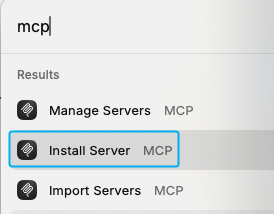
Fill the form with the following details:
command:
/path/to/uvIf unsure, use
which uvto find the full path.arguments:
--directory <path_to_this_repo> run --env-file .env src/mcp_ipf/server.py
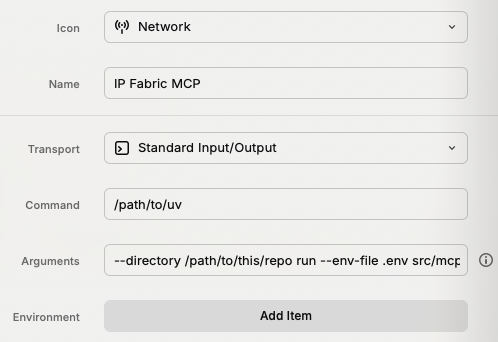
Now you can install the server with
⌘+⏎
Using the CLI
To use the CLI application, after setting up your environment variables:
uv run python cli_app.py
Using Streamlit
...coming soon...
Development
Project Structure
playground-mcp-ipf/
├── src/
│   └── mcp_ipf/
│       ├── __init__.py      # Package entry point
│       ├── server.py        # MCP server implementation
│       ├── tools.py         # Tool handlers
├── .env                      # Environment variables (copy from .env.sample)
├── .env.sample              # Sample environment variables
├── cli_app.py               # CLI application using the MCP server
├── pyproject.toml
└── README.md
Running
Run the server directly during development:
uv run mcp-ipf
Adding New Tools
To add new IP Fabric tools:
- Create a new tool handler class in
tools.py - Add the tool class to the
tool_classeslist inserver.py - The tool will be automatically registered and available
Supported AI Models
The server supports multiple AI providers through LiteLLM:
- OpenAI:
gpt-4o,gpt-4o-mini,gpt-3.5-turbo, etc. - Anthropic:
anthropic/claude-sonnet-4-0,anthropic/claude-haiku-3-5, etc. - Google Gemini:
gemini/gemini-2.5-flash,gemini/gemini-pro, etc.
See the respective provider documentation for full model lists:
Troubleshooting
Common Issues
- Connection errors: Verify your
IPF_URLandIPF_TOKENare correct - SSL certificate issues: Check your IP Fabric server's SSL configuration
- Permission errors: Ensure your API token has sufficient permissions in IP Fabric
- Snapshot issues: Use
ipf_get_snapshotsto see available snapshots, thenipf_set_snapshotto select one - Environment variable issues: Ensure your
.envfile is properly configured and accessible
Getting Help
- Check the server logs:
tail -f ~/Library/Logs/Claude/mcp-server-mcp-ipf.log - Use the MCP Inspector for debugging
- Verify your IP Fabric API token has the necessary permissions
- Ensure your IP Fabric instance is accessible from your machine
Install IP Fabric Server in Claude Desktop, Claude Code & Cursor
unyly install ip-fabric-mcp-serverInstalls into Claude Desktop, Claude Code, Cursor & VS Code — handles npx, uvx and build-from-source repos for you.
First time? Get the CLI: curl -fsSL https://unyly.org/install | sh
Or configure manually
Run in your terminal:
claude mcp add ip-fabric-mcp-server -- uvx --from git+https://github.com/sdargoeuves/ipf-mcp-playground mcp-ipfFAQ
Is IP Fabric Server MCP free?
Yes, IP Fabric Server MCP is free — one-click install via Unyly at no cost.
Does IP Fabric Server need an API key?
No, IP Fabric Server runs without API keys or environment variables.
Is IP Fabric Server hosted or self-hosted?
A hosted option is available: Unyly runs the server in the cloud, no local setup required.
How do I install IP Fabric Server in Claude Desktop, Claude Code or Cursor?
Open IP Fabric Server on unyly.org, pick your client tab (Claude Desktop, Claude Code, Cursor) and press Install — the config is generated automatically, no JSON editing.
Related MCPs
Fetch
Web content fetching and conversion for efficient LLM usage.
AWS KB Retrieval
Retrieval from AWS Knowledge Base using Bedrock Agent Runtime.
 by modelcontextprotocol
Spring AI MCP Server
Provides auto-configuration for setting up an MCP server in Spring Boot applications.
llm-analysis-assistant
A very streamlined mcp client that supports calling and monitoring stdio/sse/streamableHttp, and can also view request responses through the /logs page. It also
 by xuzexin-hz
Compare IP Fabric Server with
Not sure what to pick?
Find your stack in 60 seconds
Author?
Embed badge for your README
Browse similar
All ai MCPs