
Ivre
FreeNot checkedMCP Server for IVRE - Query IVRE network intelligence through your AI agent

About
MCP Server for IVRE - Query IVRE network intelligence through your AI agent
README
IVRE MCP Server
Query IVRE network intelligence through your AI agent
Examples
Ask your LLM agent questions like:
- "How many hosts are running SSH?"
- "Show me the top 10 products on port 443 in Germany"
- "Find all hosts in 192.168.1.0/24 with open port 80"
- "What operating systems are most common in AS13335?"
- "List hosts affected by CVE-2021-44228"
- "Compare SSH servers in France and Germany"
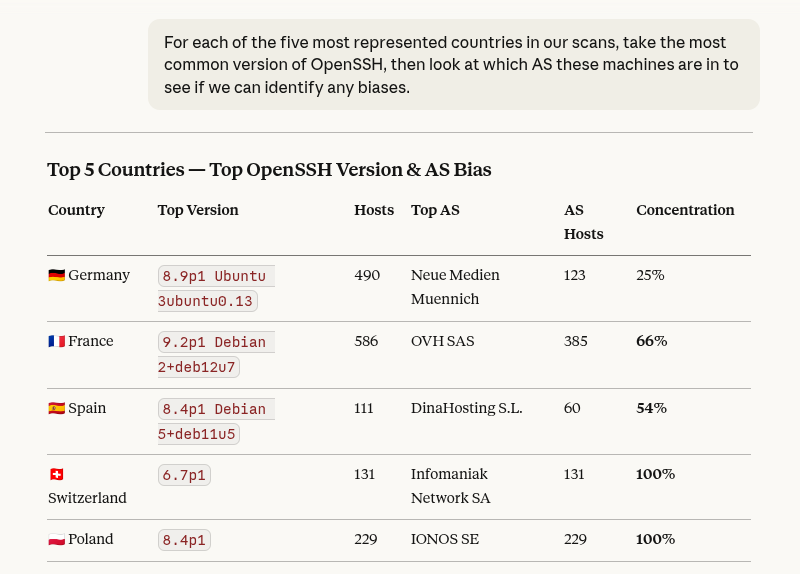
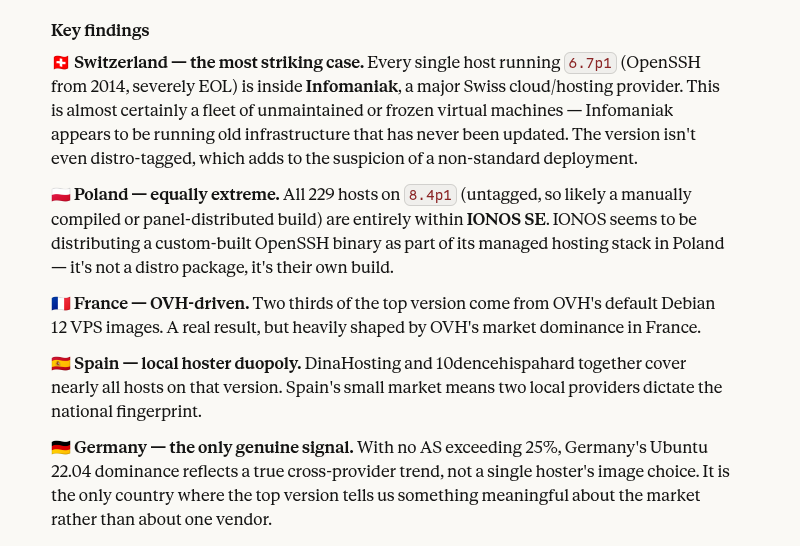
See Getting Started for installation and setup instructions.
Data purposes
Every tool takes a purpose parameter to select the data source:
| Purpose | Description |
|---|---|
view |
Consolidated, deduplicated merge of nmap and passive |
nmap |
Active scan results (Nmap, Masscan, etc.) |
passive |
Passively collected network traffic data |
Default to view. Use nmap or passive only when you need
source-specific data.
Available tools
Filter builders
Filters are opaque tokens. Build them with these tools and combine them
with flt_and / flt_or:
| Tool | Filters by |
|---|---|
searchnet |
Network (CIDR) or host address |
searchhost |
Exact host address |
searchhostname |
Hostname (exact or regex) |
searchdomain |
Domain name |
searchport |
Open port (TCP/UDP) |
searchservice |
Detected service name |
searchproduct |
Detected product name |
searchdevicetype |
Device type |
searchcountry |
Country code (ISO 3166-1 alpha-2) |
searchasnum |
Autonomous System number or name |
searchos |
Detected operating system |
searchscript |
Nmap script name or output |
searchcve |
CVE identifier |
searchcategory |
Category |
searchrecontype |
Passive reconnaissance type |
searchsensor |
Passive sensor name |
Filter combinators
| Tool | Description |
|---|---|
flt_and |
Combine two filters with logical AND |
flt_or |
Combine two filters with logical OR |
flt_empty |
Return the empty filter (matches everything) |
Query tools
| Tool | Description |
|---|---|
count |
Count matching records |
get |
Retrieve matching records (with pagination & sort) |
topvalues |
Most frequent values of a field |
distinct |
Distinct values of a field |
describe_schema |
List available field paths for a given purpose |
License
This project is licensed under the GNU General Public License v3.0 - see the LICENSE file for details.
Installing Ivre
This server has no published package — it is built from source. Open the repository and follow its README.
▸ github.com/ivre/ivre-mcp-serverFAQ
Is Ivre MCP free?
Yes, Ivre MCP is free — one-click install via Unyly at no cost.
Does Ivre need an API key?
No, Ivre runs without API keys or environment variables.
Is Ivre hosted or self-hosted?
Self-hosted: the server runs locally on your machine via the install command above.
How do I install Ivre in Claude Desktop, Claude Code or Cursor?
Open Ivre on unyly.org, pick your client tab (Claude Desktop, Claude Code, Cursor) and press Install — the config is generated automatically, no JSON editing.
Related MCPs
Fetch
Web content fetching and conversion for efficient LLM usage.
AWS KB Retrieval
Retrieval from AWS Knowledge Base using Bedrock Agent Runtime.
 by modelcontextprotocol
Spring AI MCP Server
Provides auto-configuration for setting up an MCP server in Spring Boot applications.
llm-analysis-assistant
A very streamlined mcp client that supports calling and monitoring stdio/sse/streamableHttp, and can also view request responses through the /logs page. It also
 by xuzexin-hz
Compare Ivre with
Not sure what to pick?
Find your stack in 60 seconds
Author?
Embed badge for your README
Browse similar
All ai MCPs