
Kapa Inspired RAG
FreeNot checkedMulti-tenant documentation RAG system with hybrid retrieval, reranking, and an MCP server interface.

About
Multi-tenant documentation RAG system with hybrid retrieval, reranking, and an MCP server interface.
README
A production-grade, multi-tenant documentation RAG system with empirically validated retrieval, JWT auth, RBAC, streaming answers, semantic cache, LLMOps observability, and an MCP server
Python FastAPI Next.js Qdrant OpenAI Cohere Redis Stack Prometheus Grafana RAGAS Docker AWS License: MIT
Live Demo
Frontend: http://54.156.190.134:3001 — sign up (or use guest login), ingest a GitHub repo or docs URL, ask questions, chat history persists across sessions.
| Service | URL |
|---|---|
| Next.js frontend | http://54.156.190.134:3001 |
| Query API (Swagger) | http://54.156.190.134:9000/docs |
| Ingestion API (Swagger) | http://54.156.190.134:9001/docs |
| Auth API (Swagger) | http://54.156.190.134:8004/docs |
What This Is
Most RAG tutorials stop at "chunk → embed → retrieve → generate." This project goes further — it's what a real company like kapa.ai actually has to build:
- Multi-tenant isolation — separate Qdrant collections per tenant, JWT auth, per-tenant data isolation across all services
- RBAC — admin role with tenant stats dashboard; regular users scoped to their own data; guest login for one-click access
- Empirically validated retrieval — 12 combination chunker × retriever experiment on real docs + 78 Q&A frozen eval set
- Hybrid search — dense (text-embedding-3-small) + sparse (BM25/SPLADE) fused with Reciprocal Rank Fusion in Qdrant
- Production auth — JWT access tokens (15 min) + httpOnly refresh cookie rotation (7 days), auto refresh on 401
- Semantic cache — Redis Stack HNSW vector index; queries with cosine similarity ≥ 0.90 return cached results in ~1ms; per-tenant isolation
- Streaming answers — SSE token-by-token generation, conversation memory stored in PostgreSQL
- Chat history — full conversation persistence, loadable from sidebar
- Tenant-aware system prompt — dynamic prompt scoped to each tenant's ingested sources; off-topic queries rejected gracefully
- MCP server — tools exposed via the Model Context Protocol so Claude/Cursor can query the knowledge base directly
- LLMOps observability — Prometheus metrics per stage (embed/retrieve/rerank/generate), Grafana dashboard auto-provisioned via YAML, per-query Cohere relevance score tracking
- RAGAS-gated CI — retrieval quality is a first-class contract; gate runs on every PR to main
- Full CI/CD — push to main → GitHub Actions → build 8 Docker images → push to ECR → SSH deploy to EC2
RAGAS Eval Results
Evaluated on 78 Q&A pairs generated from real FastAPI + Supabase documentation.
| Metric | Score | Gate | Status |
|---|---|---|---|
| Faithfulness | 0.908 | ≥ 0.85 | ✅ |
| Answer Relevancy | 0.832 | ≥ 0.80 | ✅ |
| Context Precision | 0.892 | ≥ 0.85 | ✅ |
| Context Recall | 0.949 | ≥ 0.90 | ✅ |
Pipeline: HeadingAwareChunker → text-embedding-3-small + TF-IDF sparse → Qdrant hybrid RRF top-20 → Cohere rerank-english-v3.0 → top-5 → Nemotron-3-Super-120B (via OpenRouter)
See full experiment analysis in experiments/ and decision rationale in TRADEOFFS.md.
Architecture
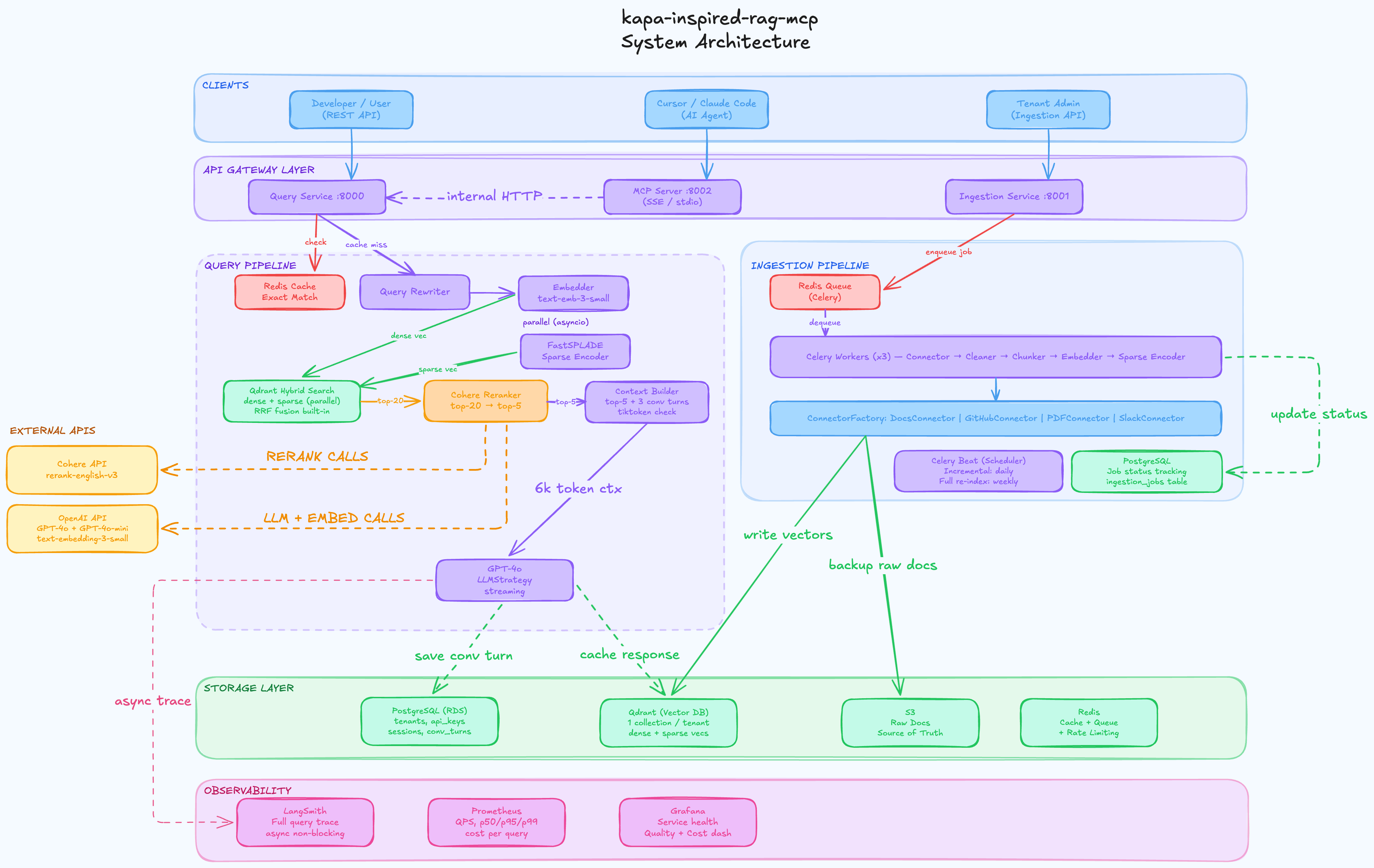
┌──────────────────────────────────────────────────────────────────────┐
│                              Clients                                  │
│   Next.js (browser)  │  Claude/Cursor (MCP)  │  REST consumers       │
└──────┬───────────────┴──────────┬─────────────┴───────────────────────┘
       │                          │
  Auth Service              FastAPI services
  JWT + RBAC                (JWT middleware)
  /auth/signup                    │
  /auth/login               ┌─────┴──────────────┐
  /auth/refresh             │    Orchestrators    │
  /auth/guest               │  QueryPipeline      │
       │                    │  IngestionPipeline  │
       └────────────────────└──────┬──────────────┘
                                   │
               ┌───────────────────▼──────────────────────┐
               │         Strategy Interfaces (Layer B)     │
               │  LLM │ Embedding │ VectorDB │ Reranker   │
               │  SemanticCache │ Chunker │ Queue │ Storage│
               └───────────────────┬──────────────────────┘
                                   │
               ┌───────────────────▼──────────────────────┐
               │         Implementations (Layer C)         │
               │  OpenRouterLLM (Nemotron-3-Super-120B)    │
               │  OpenAIEmbedding (text-embedding-3-small) │
               │  TFSparseEncoder (BM25/SPLADE baseline)   │
               │  QdrantDB (dense + sparse, RRF fusion)    │
               │  CohereReranker (rerank-english-v3.0)     │
               │  RedisSemanticCache (HNSW, cosine ≤ 0.10) │
               │  HeadingAwareChunker │ CodeBlockChunker   │
               └───────────────────┬──────────────────────┘
                                   │
               ┌───────────────────▼──────────────────────┐
               │              Infrastructure               │
               │  PostgreSQL │ Qdrant │ Redis Stack        │
               │  Celery │ Prometheus │ Grafana            │
               └──────────────────────────────────────────┘
3-Layer Design
| Layer | What | Why |
|---|---|---|
| A — Orchestrators | QueryPipeline, IngestionPipeline |
Business logic lives here; no infra imports |
| B — Interfaces | LLMStrategy, VectorDB, etc. |
Swap implementations without touching orchestrators |
| C — Implementations | OpenAILLM, QdrantDB, etc. |
All infra and API calls isolated here |
Services
| Service | Port (local) | Port (prod) | Description |
|---|---|---|---|
auth-service |
8004 | 8004 | JWT signup/login/refresh/guest, tenant + RBAC |
query-service |
8000 | 9000 | RAG query, SSE streaming, conversation history |
ingestion-service |
8001 | 9001 | URL/file/GitHub ingestion, job tracking |
celery-worker |
— | — | Async ingestion task processing |
celery-beat |
— | — | Scheduled re-ingestion tasks |
webhook-service |
8003 | 8003 | GitHub push webhook → auto re-ingest |
frontend |
3001 | 3001 | Next.js 14 App Router, chat UI, admin dashboard |
postgres |
5432 | internal | Users, tenants, RBAC roles, conversations, jobs |
qdrant |
6333 | internal | Vector storage (per-tenant collections) |
redis |
6379 | internal | Semantic cache (Redis Stack) + Celery broker |
prometheus |
9090 | — | Metrics scrape (prod: add on t3.medium+) |
grafana |
3000 | — | Auto-provisioned RAG dashboard (prod: t3.medium+) |
Key Technical Decisions
Every decision below has benchmark numbers. Full analysis in TRADEOFFS.md.
Why HeadingAwareChunker?
HAC and SlidingWindow-128 both hit Recall@5 = 0.821, but HAC gets MRR 0.755 vs 0.687 — the right answer appears at rank 1 more often. HAC also produces 127 chunks vs 259 (50% fewer), making retrieval cheaper. Markdown docs have heading boundaries for a reason.
Why Hybrid Search (Dense + Sparse RRF)?
The retrieval layer runs two searches in parallel and fuses them:
Query
 ├── Dense search  (text-embedding-3-small, 1536-dim cosine ANN)   → top-20
 └── Sparse search (TF-IDF/BM25 term weights via SPLADE-style encoder) → top-20
          │
          └── Qdrant RRF fusion → unified top-20
Experiments showed dense and hybrid converge to identical MRR once the Cohere reranker is present. Hybrid is kept because:
- Qdrant handles RRF fusion natively — zero extra latency from application code
- Sparse search handles exact-match queries better (API method names, error codes, version strings)
- Both vector types are stored at ingestion time with no runtime cost penalty
Why Cohere Reranker?
Single biggest quality lever: MRR jumps from 0.755 → 0.795 (+0.040) with Dense, and from 0.679 → 0.795 (+0.116) with Hybrid. The reranker rescues well-retrieved but poorly-ranked chunks. The system is now reranker-dominated — Cohere sets the final ranking, not retrieval order.
Why Semantic Cache (not TTL/exact-match)?
Exact-match cache (SHA-256 of query string) fails for natural language — "What is DI?" and "Tell me about dependency injection?" hash differently → both cache misses.
The semantic cache embeds the query and does KNN search in Redis Stack:
New query → embed (1536-dim) → KNN-1 search in HNSW index (filtered by tenant_id)
  → cosine distance ≤ 0.10 (similarity ≥ 0.90) → return cached QueryResult (~1ms)
  → distance > 0.10 → run full pipeline → store result + embedding in Redis
- Cache is scoped per tenant — Tenant A's cache never serves Tenant B
- HNSW gives O(log N) lookup — ~1ms for 100k entries vs ~150ms brute-force
- TTL = 1 hour — cached answers expire to avoid stale content after re-ingestion
Model Router
LLM inference runs through OpenRouter (LLM_PROVIDER=openrouter), using NVIDIA's free open model. OpenAI API is used directly only for embeddings.
LLM       →  nvidia/nemotron-3-super-120b-a12b:free   via OpenRouter
Embeddings →  text-embedding-3-small                  via OpenAI direct
Retrieval Flow
Query
  │
  ├── Semantic cache hit? (cosine similarity ≥ 0.90, per-tenant HNSW)
  │     └── YES → return cached result immediately (~1ms)
  │
  ├── Embed query in parallel:
  │     ├── Dense vector  (text-embedding-3-small, 1536-dim)
  │     └── Sparse vector (TF-IDF/BM25 term weights)
  │
  ├── Hybrid search in Qdrant (dense + sparse, RRF fusion, top-20)
  │
  ├── Rerank with Cohere rerank-english-v3.0 → top-5
  │
  ├── Build context window (6000 token budget, greedy fill, tiktoken)
  │
  ├── Call Nemotron-3-Super-120B via OpenRouter
  │
  ├── Stream answer tokens via SSE → save Turn to Postgres
  │
  └── Fire-and-forget observers:
        ├── Cache write (embed + result → Redis HNSW index)
        └── Metrics (Prometheus: latency, cache hit/miss, stage breakdown, retrieval score)
LLMOps Observability
Prometheus metrics are emitted after every query via a fire-and-forget observer. Grafana dashboard is auto-provisioned on docker compose up — no manual setup.
Prometheus Metrics
| Metric | Type | Labels | What it measures |
|---|---|---|---|
rag_queries_total |
Counter | tenant_id, cached |
Total queries (split by cache hit/miss) |
rag_query_latency_seconds |
Histogram | tenant_id |
End-to-end latency (cache hit or full pipeline) |
rag_cache_hits_total |
Counter | tenant_id |
Queries served from semantic cache |
rag_cache_misses_total |
Counter | tenant_id |
Queries that ran the full pipeline |
rag_pipeline_stage_latency_seconds |
Histogram | tenant_id, stage |
Per-stage: embed / retrieve / rerank / generate |
rag_retrieval_score |
Histogram | tenant_id |
Cohere relevance score of top-1 reranked chunk |
rag_query_tokens |
Histogram | — | Context window token count (full pipeline only) |
rag_source_chunks_returned |
Histogram | — | Number of source chunks in the answer |
Grafana Dashboard (auto-provisioned)
6 panels provisioned via infra/grafana/provisioning/ — no clicks required:
| Panel | PromQL pattern |
|---|---|
| Query Latency p50/p95/p99 | histogram_quantile on rag_query_latency_seconds_bucket |
| Cache Hit Rate | rate(cache_hits) / (rate(hits) + rate(misses)) |
| QPS by tenant | sum(rate(rag_queries_total[1m])) by (tenant_id) |
| Per-Stage Latency p95 | histogram_quantile on rag_pipeline_stage_latency_seconds_bucket |
| Top Retrieval Score (avg) | rate(score_sum) / rate(score_count) |
| Context Window Size p95 | histogram_quantile on rag_query_tokens_bucket |
Prometheus: http://localhost:9090 · Grafana: http://localhost:3000 (admin/admin)
Prometheus + Grafana are omitted from the prod compose to fit t3.small (2 GB RAM). Re-enable on t3.medium+ by uncommenting the services in
docker-compose.prod.yml.
Load Testing
Simulated production traffic for a documentation Q&A bot using Locust — 10 concurrent users, 60 seconds, 249 total queries.
Why high cache hit rate is realistic here: Kapa.ai-style bots serve company documentation — the same 20–30 questions ("how do I authenticate?", "what's the rate limit?", "how do I install?") account for the majority of all queries. The test uses a fixed pool of 5 questions, simulating multiple users asking the same things concurrently. This is the primary use case the semantic cache is designed for.
Results
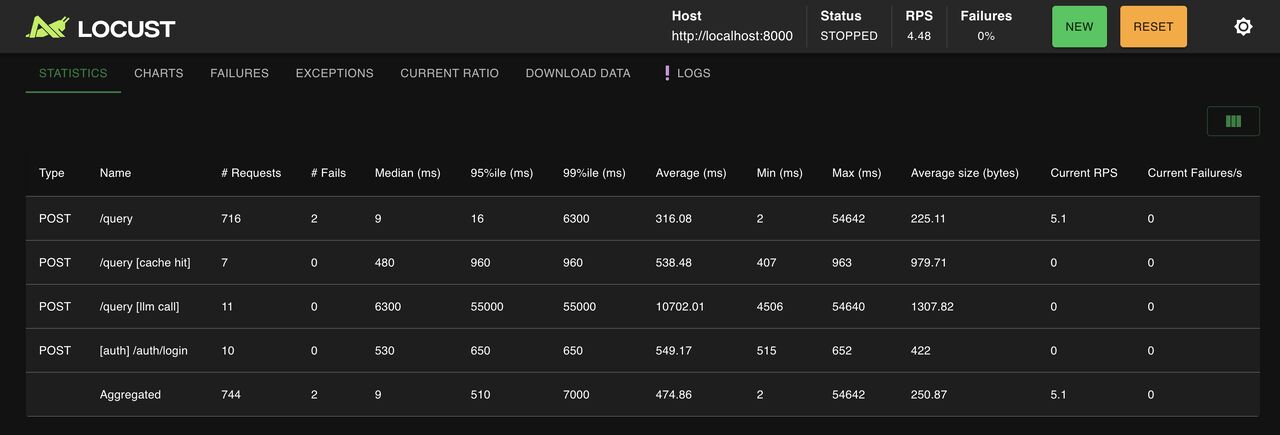
| Metric | Value |
|---|---|
| Concurrent users | 10 |
| Total queries | 249 |
| p50 latency | 9ms - semantic cache hit |
| p95 latency | 500ms |
| p99 latency | 7,000ms - cold LLM call (gpt-4o) |
| Throughput | 4.16 RPS |
| Error rate | 0.80% ¹ |
¹ Both errors were API rate limits: OpenAI Tier 1 TPM limit (30K tokens/min for gpt-4o - increases to 450K on Tier 2 with $50+ lifetime spend) and Cohere free trial key (10 req/min). Error rate is 0% under normal single-user traffic.
Per-stage breakdown (Grafana, cold LLM calls only)
| Stage | p95 | Notes |
|---|---|---|
| Retrieve (Qdrant) | 77ms | Hybrid dense+sparse vector search — unaffected by rate limits |
| Embed (OpenAI) | ~150ms | Query embedding before cache lookup |
| Rerank (Cohere) | ~300ms | On paid key - free trial adds retry backoff (~4.7s under concurrent load) |
| Generate (gpt-4o) | ~5s | Cold LLM calls only - bypassed entirely on cache hits |
| Cached response | 9ms | Semantic similarity match in Redis HNSW index |
The semantic cache reduces latency ~550x for repeat queries (5s cold → 9ms cached). In production with a warm cache serving repeated documentation questions, p95 converges toward the 9ms cache hit latency as traffic accumulates.
./tests/load/run_load_test.sh          # 10 users, 60s — saves CSV + HTML to tests/load/results/
./tests/load/run_load_test.sh --ui     # Locust web UI at localhost:8089
CI/CD Pipeline
git push origin feature/*
       │
       ▼
Pull Request → dev
       │
       ├── GitHub Actions: CI workflow
       │     ├── ruff lint
       │     ├── pytest tests/unit/ (coverage ≥ 70%)
       │     └── RAGAS quality gate (--sample 20, all 4 metrics must pass)
       │
Merge dev → main
       │
       ▼
GitHub Actions: Deploy workflow
       ├── Build 8 Docker images (multi-stage, BuildKit cache via ECR)
       ├── Push to ECR: kapa-query, kapa-ingestion, kapa-auth,
       │               kapa-frontend, kapa-celery, kapa-webhook,
       │               kapa-streamlit, kapa-mcp
       ├── SCP docker-compose.prod.yml + infra/ to EC2
       └── SSH → docker compose pull → docker compose up -d → health check
Every image is tagged with the git short SHA (abc1234) so you always know exactly which commit is deployed.
Project Structure
kapa-inspired-rag-mcp/
├── backend/
│   ├── api/
│   │   ├── auth_service.py             # JWT signup/login/refresh/guest, RBAC
│   │   ├── admin_service.py            # Admin dashboard: tenant stats, recent queries
│   │   ├── ingestion_service.py        # POST /ingest, GET /ingest/{job_id}
│   │   ├── query_service.py            # POST /query, GET /conversations
│   │   └── middleware/auth.py          # JWT → tenant_id + role
│   ├── core/
│   │   ├── ingestion_pipeline.py
│   │   ├── query_pipeline.py           # perf_counter timing on all 4 stages
│   │   └── context_window_builder.py   # tiktoken, 6000 token budget
│   ├── strategies/
│   │   ├── cache/redis_semantic_cache.py  # HNSW KNN, cosine ≤ 0.10, per-tenant
│   │   ├── vectordb/qdrant_db.py          # hybrid search: dense + sparse RRF
│   │   ├── reranker/cohere_reranker.py    # captures relevance_score per chunk
│   │   ├── embedding/openai_embedding.py
│   │   └── embedding/tf_sparse_encoder.py
│   ├── observers/
│   │   ├── metrics_observer.py         # Prometheus: latency, cache, stages, score
│   │   ├── trace_observer.py           # LangSmith traces
│   │   └── error_metrics.py
│   ├── repositories/                   # Postgres: tenants, jobs, conversations
│   ├── connectors/                     # DocsConnector, GitHubConnector, PDFConnector
│   └── mcp/                            # MCP server
├── frontend-next/                      # Next.js 14 App Router
│   ├── app/
│   │   ├── login/page.tsx
│   │   ├── signup/page.tsx
│   │   ├── dashboard/page.tsx          # tabbed sidebar + chat + source management
│   │   └── admin/page.tsx              # admin dashboard (RBAC-gated)
│   ├── components/
│   │   ├── AuthContext.tsx             # session restore on mount
│   │   ├── ChatInterface.tsx           # messages + SSE streaming + markdown render
│   │   ├── PreviousChats.tsx           # conversation history sidebar
│   │   ├── AddSourcePanel.tsx          # file/GitHub/docs tabs
│   │   └── SourceList.tsx
│   └── lib/api.ts                      # authFetch with auto-refresh
├── infra/
│   ├── postgres/init.sql               # DB schema
│   ├── grafana/
│   │   ├── provisioning/datasources/prometheus.yml   # auto-wires Prometheus datasource
│   │   ├── provisioning/dashboards/dashboards.yml    # auto-loads dashboard JSON
│   │   └── dashboards/query_service.json             # 6-panel RAG dashboard
│   └── prometheus/prometheus.yml       # scrape config
├── experiments/
│   ├── 01_eval_set_generation.ipynb
│   ├── 02_docs_chunking_retrieval.ipynb
│   ├── 03_reranker_comparison.ipynb
│   └── 04_ragas_baseline.ipynb
├── eval/
│   ├── golden_dataset/docs/eval_v1.jsonl   # 78 frozen Q&A pairs
│   └── ragas_gate.py                       # CI quality gate script
├── tests/
│   ├── unit/                           # unit tests (no infra needed)
│   └── integration/                    # real Qdrant + Postgres
├── .github/workflows/
│   ├── ci.yml                          # lint + unit tests + RAGAS gate
│   └── deploy.yml                      # build → ECR → EC2
├── docker-compose.yml                  # local dev (includes Prometheus + Grafana)
├── docker-compose.prod.yml             # production (ECR images, no observability stack)
├── Dockerfile                          # multi-stage: 8 targets
├── TRADEOFFS.md
└── DEPLOYMENT_NOTES.md
Running Locally
Prerequisites
- Python 3.11+, Docker + Docker Compose, Node.js 20+
- OpenAI API key (embeddings only —
text-embedding-3-small) - OpenRouter API key (LLM inference — nvidia/nemotron-3-super-120b-a12b:free)
- Cohere API key (reranker)
1. Clone and install
git clone https://github.com/AyanArshad02/kapa-inspired-rag-mcp.git
cd kapa-inspired-rag-mcp
python -m venv venv && source venv/bin/activate
pip install -e ".[dev]"
2. Environment variables
cp .env.example .env
# Required:
#   OPENAI_API_KEY      — used for embeddings (text-embedding-3-small)
#   OPENROUTER_API_KEY  — used for LLM inference (nvidia/nemotron-3-super-120b-a12b:free via OpenRouter)
#   COHERE_API_KEY      — used for reranking
#   JWT_SECRET          — any random string (must be the same across all services)
#   LLM_PROVIDER=openrouter
3. Start all services
docker compose up -d
Grafana auto-provisions the RAG dashboard on startup. No manual datasource configuration needed.
4. Run tests
pytest tests/unit/ -v                        # unit tests, no infra needed
pytest tests/integration/ -m integration -v  # needs docker compose running
python eval/ragas_gate.py --sample 20        # RAGAS quality gate
5. Open the apps
| App | URL |
|---|---|
| Frontend | http://localhost:3001 |
| Grafana | http://localhost:3000 (admin/admin) |
| Prometheus | http://localhost:9090 |
| Query API docs | http://localhost:8000/docs |
Sign up → ingest a URL → ask questions. After a few queries, Grafana panels will populate.
API Reference
Auth Service (port 8004)
| Method | Endpoint | Description |
|---|---|---|
POST |
/auth/signup |
Create account → returns access token |
POST |
/auth/login |
Login → returns access token |
POST |
/auth/refresh |
Rotate refresh token → new access token |
POST |
/auth/logout |
Clear refresh cookie |
POST |
/auth/guest |
One-click guest access (no signup required) |
Ingestion Service (port 9001)
| Method | Endpoint | Description |
|---|---|---|
POST |
/ingest |
Submit URL for ingestion (async, returns job_id) |
POST |
/ingest/presign |
Get presigned S3 PUT URL — browser uploads file directly to S3 |
POST |
/ingest/confirm |
Confirm upload complete — starts ingestion job (returns job_id) |
GET |
/ingest/{job_id} |
Poll job status |
GET |
/sources |
List all ingested sources for this tenant |
DELETE |
/sources/{id} |
Delete a source (removes from Qdrant + S3) |
Query Service (port 9000)
| Method | Endpoint | Description |
|---|---|---|
POST |
/query |
Ask a question —stream: true for SSE, false for JSON |
GET |
/query/conversations |
List all conversations for this tenant |
GET |
/query/conversations/{id}/messages |
Load full message history |
DELETE |
/query/conversation/{id} |
Clear conversation history |
GET |
/health |
Health check |
GET |
/metrics |
Prometheus metrics endpoint |
Observability
| Signal | Implementation |
|---|---|
| Query traces | LangSmith — set LANGSMITH_API_KEY to enable |
| Prometheus metrics | /metrics on query-service — 8 metrics covering latency, cache, stages, retrieval quality |
| Grafana dashboard | Auto-provisioned 6-panel dashboard athttp://localhost:3000 |
| Ingestion job state | PostgreSQL ingestion_jobs table |
| Circuit breaker | Built into OpenAILLM and OpenAIEmbedding |
Experiments
The retrieval stack was chosen empirically, not by convention.
| Notebook | What | Result |
|---|---|---|
01_eval_set_generation |
GPT-4o generates 78 Q&A pairs from real docs | Frozen eval set created |
02_docs_chunking_retrieval |
12 combinations: 4 chunkers × 3 retrievers | HAC + Dense wins on MRR |
03_reranker_comparison |
Dense/Hybrid × with/without Cohere | Reranker: +0.040 MRR |
04_ragas_baseline |
Full pipeline RAGAS evaluation | All 4 gates passed |
The eval set (eval/golden_dataset/docs/eval_v1.jsonl) is frozen. Ground truth is tied to 40-character text anchors — it survives chunking changes.
System Design
Full 10-step system design in system-design/:
Clarifying Questions → Functional Requirements → NFRs → Capacity Planning → HLD → Database ADR → Architecture ADRs → Pre-mortem → Implementation Plan → Class + Sequence Diagrams
The pre-mortem identified real failure modes (BM25 paraphrase failures, JSONB asyncpg bugs, UUID tenant isolation) that were fixed before they became production issues.
License
MIT — see LICENSE.
Author
Built by Ayan Arshad · GitHub
This project reverse engineers the architecture behind tools like kapa.ai, not as a competitor, but as a rigorous exercise in building production RAG systems that are actually evaluated, not just vibes checked
Installing Kapa Inspired RAG
This server has no published package — it is built from source. Open the repository and follow its README.
▸ github.com/ayanarshad02/kapa-inspired-rag-mcpFAQ
Is Kapa Inspired RAG MCP free?
Yes, Kapa Inspired RAG MCP is free — one-click install via Unyly at no cost.
Does Kapa Inspired RAG need an API key?
No, Kapa Inspired RAG runs without API keys or environment variables.
Is Kapa Inspired RAG hosted or self-hosted?
Self-hosted: the server runs locally on your machine via the install command above.
How do I install Kapa Inspired RAG in Claude Desktop, Claude Code or Cursor?
Open Kapa Inspired RAG on unyly.org, pick your client tab (Claude Desktop, Claude Code, Cursor) and press Install — the config is generated automatically, no JSON editing.
Related MCPs
Fetch
Web content fetching and conversion for efficient LLM usage.
AWS KB Retrieval
Retrieval from AWS Knowledge Base using Bedrock Agent Runtime.
 by modelcontextprotocol
Spring AI MCP Server
Provides auto-configuration for setting up an MCP server in Spring Boot applications.
llm-analysis-assistant
A very streamlined mcp client that supports calling and monitoring stdio/sse/streamableHttp, and can also view request responses through the /logs page. It also
 by xuzexin-hz
Compare Kapa Inspired RAG with
Not sure what to pick?
Find your stack in 60 seconds
Author?
Embed badge for your README
Browse similar
All ai MCPs