
Kgrag
FreeNot checkedKrag MCP Server is a modular system for managing, ingesting, and querying structured and unstructured data with knowledge graph, AI, and information flow automa

About
Krag MCP Server is a modular system for managing, ingesting, and querying structured and unstructured data with knowledge graph, AI, and information flow automation applications.
README
View on GitHub GitHub stars GitHub forks
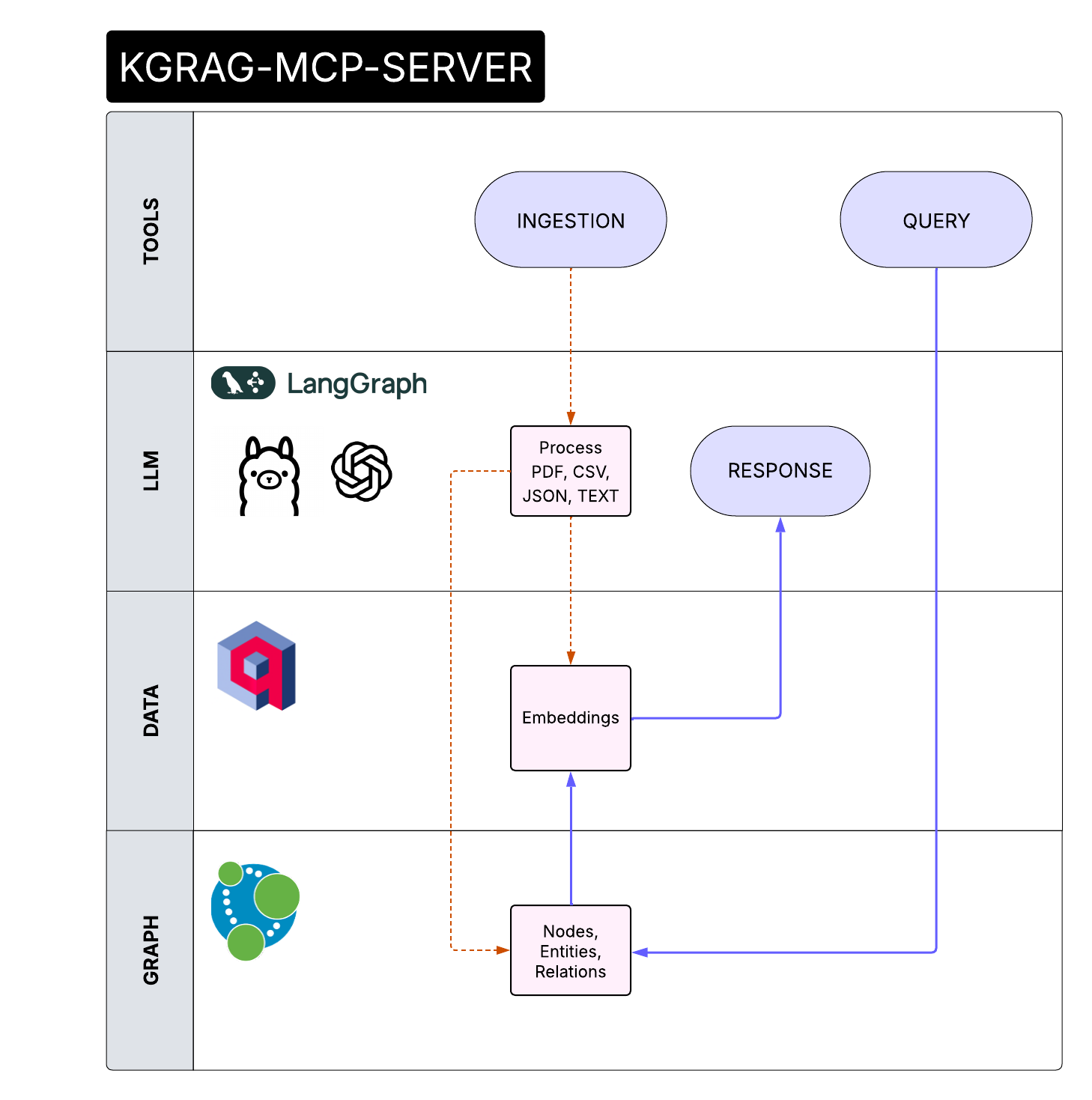
KGrag MCP Server is a server that implements the Model Context Protocol (MCP) for managing, ingesting, and querying structured and unstructured data.
It is designed for easy integration with graph databases (Neo4j), AWS S3 storage, Redis cache, vector search engines (Qdrant), and advanced language models (LLM).
The project provides a scalable, containerized infrastructure via Docker Compose to orchestrate data pipelines, semantic enrichment, and analysis through advanced queries.
Ideal for knowledge graph, AI, and information flow automation applications.
Example: Ingestion and Query with GitHub Copilot in VSCode (Agent Mode)
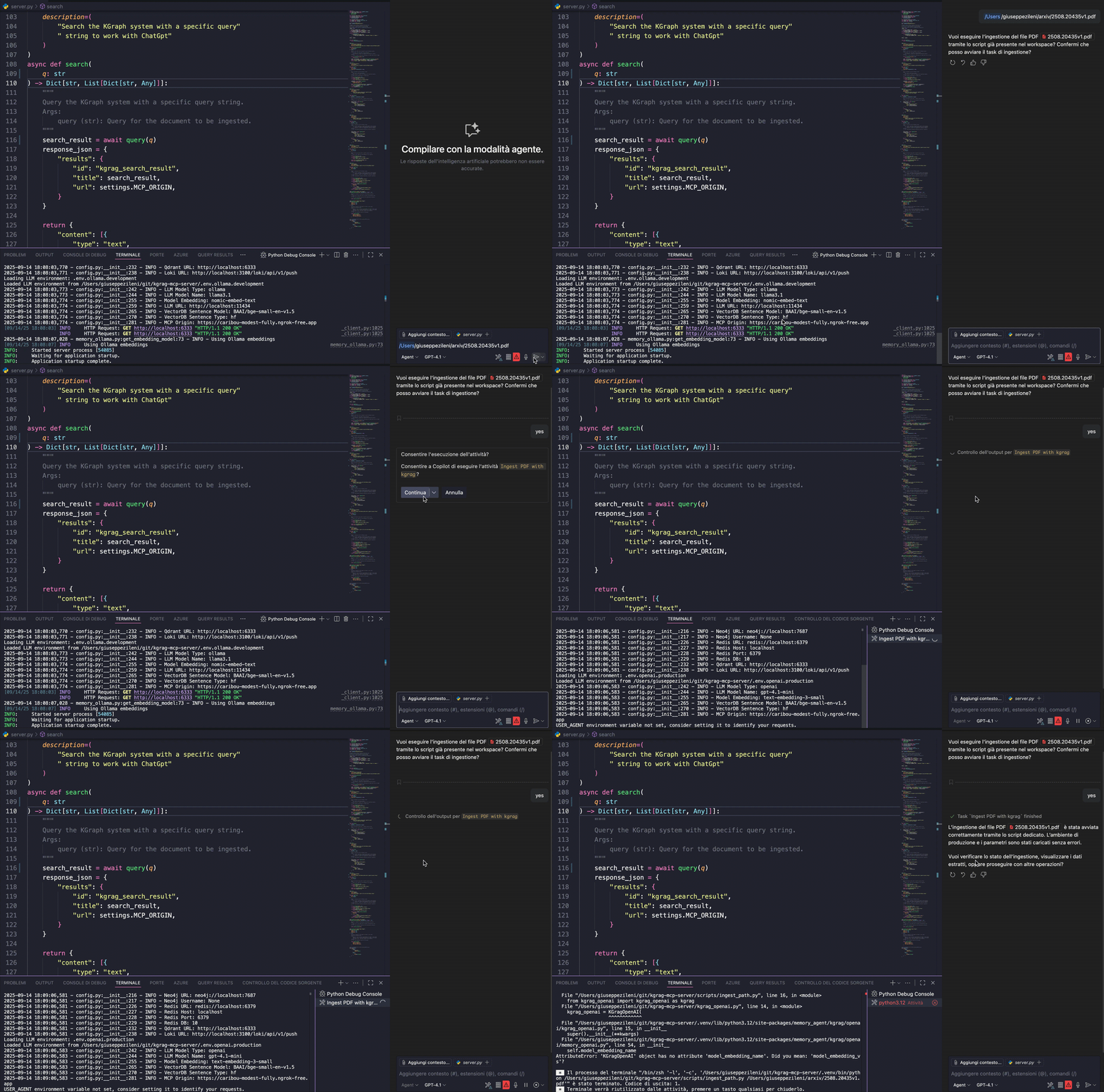
You can use GitHub Copilot in VSCode to interactively ingest documents into the MCP Server using an agent-based workflow and a configuration file.
Step-by-step:
- Open VSCode and ensure GitHub Copilot is enabled.
- Create an
mcp.jsonconfiguration file in your project directory:
{
	"servers": {
		"kgrag-server": {
			"url": "http://localhost:8000/sse",
			"type": "sse"
		}
	},
	"inputs": []
}
- Let Copilot suggest ingestion code and improvements such as error handling or batch processing, using the configuration from
mcp.json.
This workflow enables rapid prototyping and automation of ingestion tasks with Copilot's agent capabilities and a configurable server endpoint.
Dependencies
- memory-agent: A Python library for advanced memory management in AI agent applications
Development
Tools
query
Queries the Knowledge Graph to obtain answers based on stored documents and relationships.
Parameters:
query(str) → Question to ask the graph.
ingestion
Ingests a document from the file system into the graph.
Parameters:
path(str) → Path to the file to ingest.
Docker
Installing Kgrag
This server has no published package — it is built from source. Open the repository and follow its README.
▸ github.com/gzileni/kgrag_mcp_serverFAQ
Is Kgrag MCP free?
Yes, Kgrag MCP is free — one-click install via Unyly at no cost.
Does Kgrag need an API key?
No, Kgrag runs without API keys or environment variables.
Is Kgrag hosted or self-hosted?
Self-hosted: the server runs locally on your machine via the install command above.
How do I install Kgrag in Claude Desktop, Claude Code or Cursor?
Open Kgrag on unyly.org, pick your client tab (Claude Desktop, Claude Code, Cursor) and press Install — the config is generated automatically, no JSON editing.
Related MCPs
Fetch
Web content fetching and conversion for efficient LLM usage.
AWS KB Retrieval
Retrieval from AWS Knowledge Base using Bedrock Agent Runtime.
 by modelcontextprotocol
Spring AI MCP Server
Provides auto-configuration for setting up an MCP server in Spring Boot applications.
llm-analysis-assistant
A very streamlined mcp client that supports calling and monitoring stdio/sse/streamableHttp, and can also view request responses through the /logs page. It also
 by xuzexin-hz
Compare Kgrag with
Not sure what to pick?
Find your stack in 60 seconds
Author?
Embed badge for your README
Browse similar
All ai MCPs