
Lark Cli
FreeNot checkedEnables AI clients to send, read, reply, and search messages on Feishu/Lark as the user's own identity using MCP tools.

About
Enables AI clients to send, read, reply, and search messages on Feishu/Lark as the user's own identity using MCP tools.
README
One-line
npxMCP server that lets AI clients (Amazon Quick Desktop, Claude Desktop, …) operate Feishu / Lark as your own user identity — send, read, reply, and search messages.
It wraps the official lark-cli (bundled as a dependency, no separate install) and exposes 19 tools over MCP stdio — messaging, cloud docs, Wiki, Drive, and Bitable. Because every call runs with --as user, the sender/creator shown in Feishu is you, not a bot.
Quick start (for workshop attendees)
1) One-time login (in a terminal)
# Bind the shared Feishu app (scan the QR code)
npx -y @yoreland/lark-cli-mcp -- config init --new

# OAuth device-flow login as yourself
npx -y @yoreland/lark-cli-mcp auth

# Sanity check (should report logged-in)
npx -y @yoreland/lark-cli-mcp doctor
2) Add the MCP server in Amazon Quick Desktop
Go to Settings → Capabilities → MCP → + Add MCP:
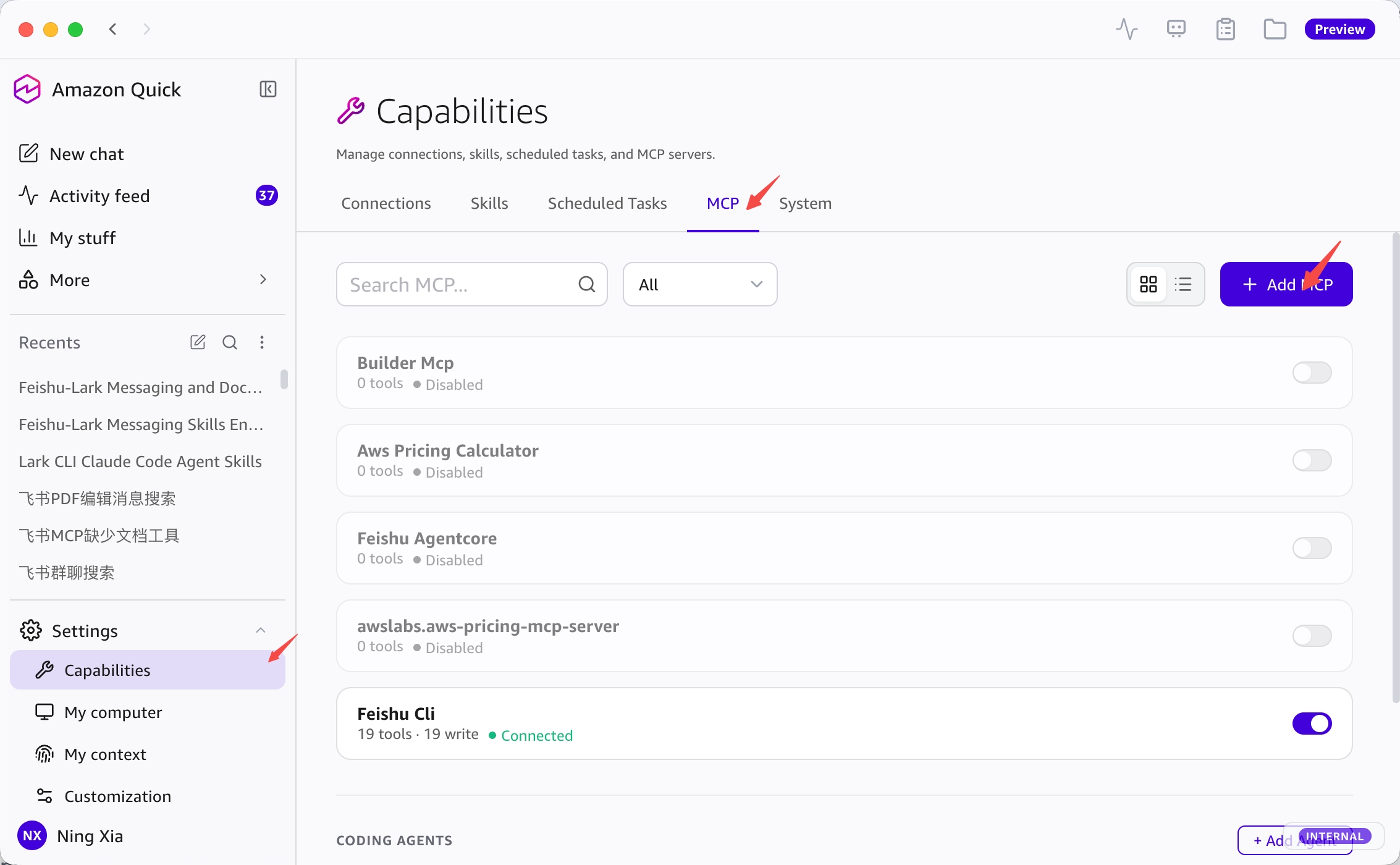
In the dialog, use Paste JSON config and paste:
{
  "command": "npx",
  "args": ["-y", "@yoreland/lark-cli-mcp"]
}
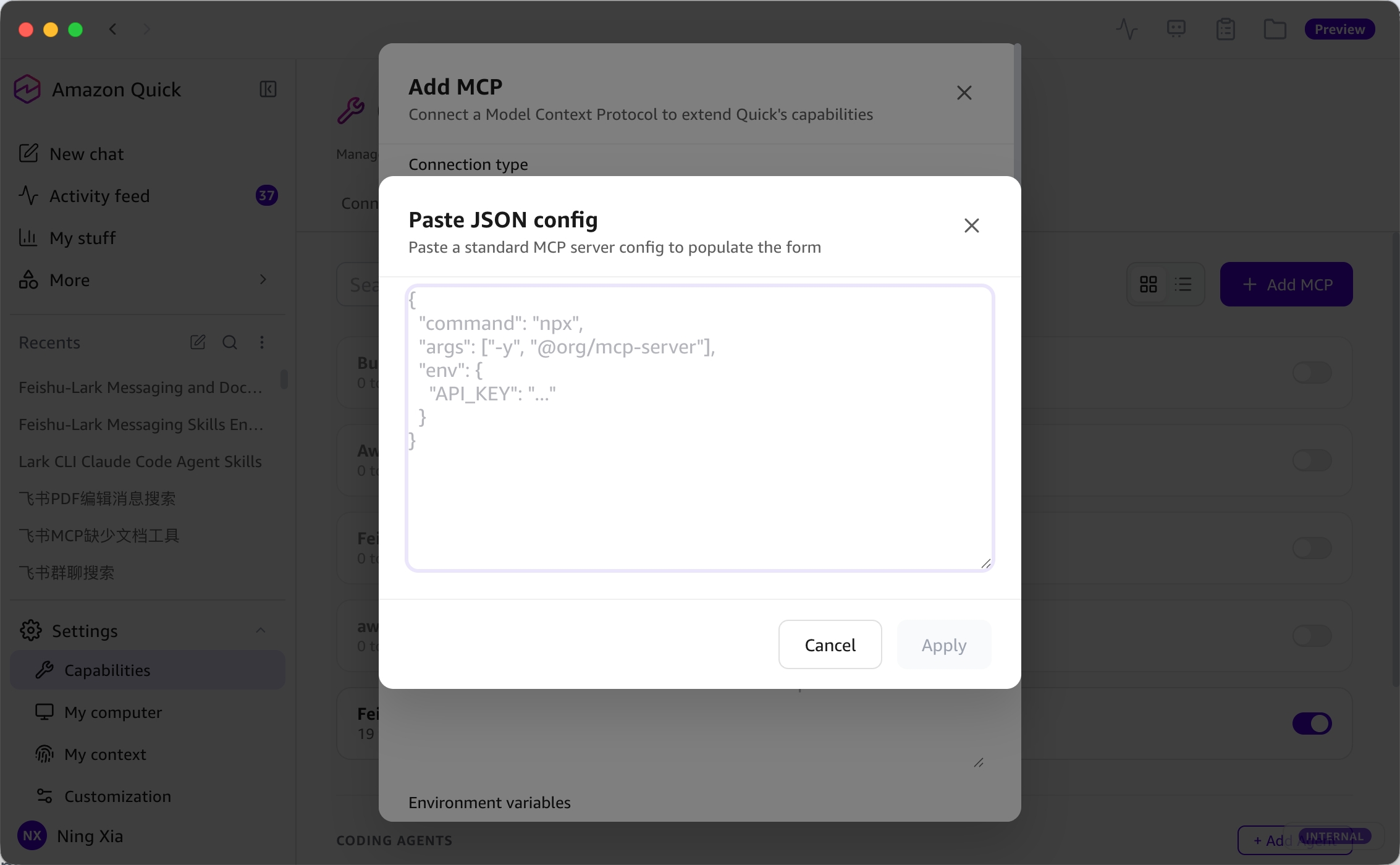
Click Apply → Save. The server should show 19 tools · Connected ✅
Manual form instead of JSON? Connection type =
Local, Command =npx, Arguments =-y @yoreland/lark-cli-mcp. Arguments are space-split (no spaces inside the package name, so this is safe).
3) (Recommended) Add the skill
Settings → Capabilities → Skills → Upload, then select skill/feishu-lark/SKILL.md. Toggle it Active.
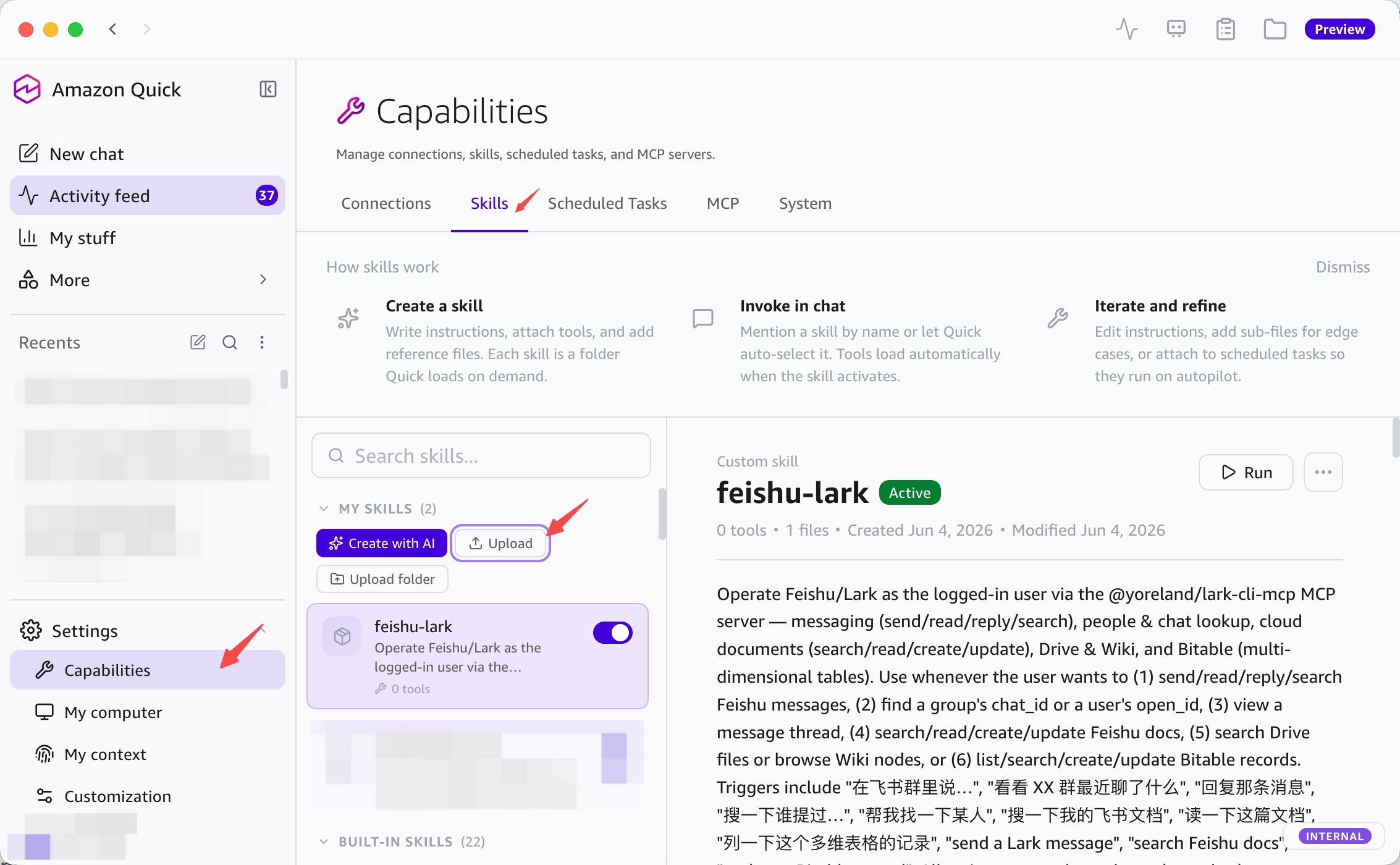
The skill teaches Quick when and how to use the 19 tools (resolve chat_id/open_id first, confirm before sending, Bitable field handling, etc.) — the MCP provides the tools, the skill makes Quick use them well.
4) Try it
- "看看 XX 群最近聊了什么"
- "帮我找一下某人"
- "搜一下我的飞书文档里有没有 …"
- "列一下这个多维表格 <URL> 的记录"
Prerequisites
- Node.js v18+ (
node -v) - An MCP client (Amazon Quick Desktop / Claude Desktop / etc.)
- A Feishu/Lark account in the org running the workshop
- Network access to npm registry and Feishu OAuth
The Feishu App ID / Secret is provided centrally by the workshop host and baked into the shared lark-cli config — attendees only do the OAuth login step. (See Host setup.)
Behind the Great Firewall? Use a mirror:
npm config set registry https://registry.npmmirror.com
Commands
npx -y @yoreland/lark-cli-mcp            # start MCP server (stdio) — what the client runs
npx -y @yoreland/lark-cli-mcp auth       # OAuth device-flow login (user identity)
npx -y @yoreland/lark-cli-mcp status     # show auth status
npx -y @yoreland/lark-cli-mcp logout     # clear token
npx -y @yoreland/lark-cli-mcp doctor     # environment + login self-check
npx -y @yoreland/lark-cli-mcp -- <args>  # passthrough to bundled lark-cli
The tools
Messaging (IM)
| Tool | What it does |
|---|---|
feishu_send_message |
Send a message |
feishu_get_messages |
Read recent messages |
feishu_reply_message |
Reply (thread optional) |
feishu_search_messages |
Search messages |
feishu_list_chats |
Find group chats |
feishu_search_user |
Find a user (→ open_id) |
feishu_get_thread |
View a thread |
Docs / Wiki / Drive
| Tool | What it does |
|---|---|
feishu_search_docs |
Search docs / wiki / sheets |
feishu_doc_fetch |
Read a document |
feishu_doc_create |
Create a document (markdown) |
feishu_doc_update |
Update a document |
feishu_drive_search |
Search Drive files (type filters) |
feishu_wiki_node_list |
List wiki nodes |
feishu_wiki_node_get |
Get a wiki node (accepts URL) |
Bitable (multi-dimensional tables)
| Tool | What it does |
|---|---|
feishu_base_table_list |
List tables in a base |
feishu_base_field_list |
List fields of a table |
feishu_base_record_list |
List records (filter/sort) |
feishu_base_record_search |
Search records |
feishu_base_record_upsert |
Create/update a record |
Talk to it naturally
| Goal | Say to your assistant |
|---|---|
| Read a group | "看看 XX 群最近聊了什么" |
| Send | "在 XX 群说:明天会议改到 3 点" |
| Reply | "回复那条消息:收到,我来跟进" |
| Search | "搜一下谁提过客户报价" |
| Find someone | "帮我找一下张三的 open_id" |
| View a thread | "看看那条消息下面的讨论" |
Host setup
The workshop host creates one Feishu custom app and configures it so attendees share the same App ID/Secret but each authorize their own account.
- Feishu Open Platform → create an internal custom app → note App ID / App Secret.
- Enable User token scopes matching the
im,contact,searchdomains (message read/write, reply, chat read, user search, message search). - Distribute the App ID/Secret to attendees via
lark-cli config(or a pre-bound config). The login step requests scopes via--domain im,contact,docs,wiki,drive,base.
auth uses OAuth Device Flow, so no redirect URL / localhost:3000 callback configuration is required.
Troubleshooting
missing required scope(s) — re-login with the needed domain:
npx -y @yoreland/lark-cli-mcp auth --domain im,contact,docs,wiki,drive,base
Client shows "No tools loaded" — run npx -y @yoreland/lark-cli-mcp doctor; confirm Node ≥18 and that auth status is OK.
Token expired — just re-run auth.
Known limitations
- No image/file attachment sending (text + markdown only)
- No interactive cards
- No group creation
- Tokens expire; re-run
authwhen they do
How it works
MCP client (Quick Desktop / Claude Desktop)
    │  stdio (MCP / JSON-RPC)
    ▼
@yoreland/lark-cli-mcp  (server.mjs)
    │  child_process.execFile (no shell → injection-safe)
    ▼
lark-cli --as user   (bundled dependency)
    │  OAuth user_access_token (device flow)
    ▼
Feishu / Lark Open API
License
MIT
Install Lark Cli in Claude Desktop, Claude Code & Cursor
unyly install lark-cli-mcpInstalls into Claude Desktop, Claude Code, Cursor & VS Code — handles npx, uvx and build-from-source repos for you.
First time? Get the CLI: curl -fsSL https://unyly.org/install | sh
Or configure manually
Run in your terminal:
claude mcp add lark-cli-mcp -- npx -y @yoreland/lark-cli-mcpFAQ
Is Lark Cli MCP free?
Yes, Lark Cli MCP is free — one-click install via Unyly at no cost.
Does Lark Cli need an API key?
No, Lark Cli runs without API keys or environment variables.
Is Lark Cli hosted or self-hosted?
Self-hosted: the server runs locally on your machine via the install command above.
How do I install Lark Cli in Claude Desktop, Claude Code or Cursor?
Open Lark Cli on unyly.org, pick your client tab (Claude Desktop, Claude Code, Cursor) and press Install — the config is generated automatically, no JSON editing.
Related MCPs
Fetch
Web content fetching and conversion for efficient LLM usage.
AWS KB Retrieval
Retrieval from AWS Knowledge Base using Bedrock Agent Runtime.
 by modelcontextprotocol
Spring AI MCP Server
Provides auto-configuration for setting up an MCP server in Spring Boot applications.
llm-analysis-assistant
A very streamlined mcp client that supports calling and monitoring stdio/sse/streamableHttp, and can also view request responses through the /logs page. It also
 by xuzexin-hz
Compare Lark Cli with
Not sure what to pick?
Find your stack in 60 seconds
Author?
Embed badge for your README
Browse similar
All ai MCPs