
Maestro Agent Sdk
FreeNot checkedEmbeddable TypeScript agent SDK for DeepSeek — built-in tools, skills, memory, and MCP.

About
Embeddable TypeScript agent SDK for DeepSeek — built-in tools, skills, memory, and MCP.
README
Embeddable agent SDK — skills, memory, MCP, and host-controlled guardrails out of the box. DeepSeek V4 provider support. No CLI, no gateway, no host lock-in.
A pure-library agent runtime — the harness ships inside the SDK, so you
importit into any host instead of shelling out to a CLI. (details)
Status: Early port (v0.1.x). Active development. API surface may change before 1.0.
A DeepSeek-backed agent runtime. Inject your own logger/MCP resolver/hooks, and embed it in any host process — no framework, no lock-in.
What's in the box
- Agent loop — provider-driven tool-calling loop with iteration cap, abort signal, LLM pre/post guardrail hooks, and event stream.
- DeepSeek provider — first-class adapter for DeepSeek V4 with a provider-neutral message schema under the loop.
- Built-in tools —
bash,Read,Write,Edit,MultiEdit,Glob,Grep,Agent(sub-agent delegation),TaskCreate/TaskUpdate/TaskList/TaskGet,WebFetch(optional SSRF policy viacreateWebFetchTool),skill_view,skill_write,View(Gemini image QA — DeepSeek only, see Image handling). Bring your own viaToolRegistry. Grep shells out to ripgrep (rg) so install it if you want the tool active; the SDK surfaces a structured error pointing to the install path when missing. Tool primitives are also importable from themaestro-agent-sdk/toolssubpath when you don't need the rest of the runtime. - MCP — built-in client pool (stdio + SSE) so any MCP server (
@modelcontextprotocol/sdk) shows up as tools. - Skills — per-workspace
.skills/<skillKey>/<name>/skill.mdpackages with FTS-style indexing, on-demand body load (skill_view), and agent-autonomous authoring (skill_write). - Memory — automatic context compression (summarization + pruning) when the token budget is hit. Reuses the agent's own model for compaction — no separate model knob.
- Session persistence — multi-turn resume via
~/.maestro/sessions/<sessionId>.jsonl, with a_metaheader capturingcwd,skillKey,userId, and host metadata for forensics. - Host integration via DI —
setLogger,setMcpResolver,setConversationReaderlet you embed without inheriting any one host's opinions. FS policy (path allowlists, owner checks) is a host concern — register aPreToolUseHookviaToolRegistry.use().
Install
npm install maestro-agent-sdk
# or
bun add maestro-agent-sdk
Requires Node.js 20+.
Quick start
DeepSeek (V4)
The unified event stream, tool registry, and runConversation() driver are
shared across direct AIAgent usage and the batteries-included
maestroProvider() entry point.
import {
  AIAgent,
  DeepseekProvider,
  bashTool,
  ToolRegistry,
  runConversation,
} from "maestro-agent-sdk";

const provider = DeepseekProvider.fromEnv();

const tools = new ToolRegistry();
tools.register(bashTool);

const agent = new AIAgent(provider, tools, {
  model: "deepseek-v4-flash",      // or "deepseek-v4-pro"
  systemPrompt: "You are a concise assistant.",
  maxIterations: 20,
  maxTokens: 2048,
  effort: "medium",                 // DeepSeek maps this to `reasoning_effort`
});

for await (const event of runConversation(agent, "Summarize today's news.")) {
  if (event.type === "text_delta") process.stdout.write(event.content);
  if (event.type === "tool_use") console.error(`\n[tool] ${event.name}`);
}
Image handling (DeepSeek)
DeepSeek models cannot inspect image pixels directly. When GEMINI_API_KEY is
set and the active model starts with deepseek-, the SDK automatically registers
a View tool backed by gemini-2.5-flash:
// No extra setup needed — GEMINI_API_KEY in env is enough.
// The View tool is registered automatically for deepseek-* models.
const provider = DeepseekProvider.fromEnv();
// Set GEMINI_API_KEY= in your environment.
The model calls View({ image_path: "/abs/path/to/file.png", question: "..." })
and receives a plain-text answer from Gemini. Supported formats: PNG, JPG, WebP,
GIF (≤ 10 MB).
You can also register the tool manually:
import { createGeminiImageQATool } from "maestro-agent-sdk";

tools.register(createGeminiImageQATool({ apiKey: process.env.GEMINI_API_KEY }));
Effort scale.
effortis the reasoning-depth knob — it is decoupled from the iteration cap (split in v0.1.16). The tool-iteration cap comes only frommaxIterations, which defaults to unbounded (Number.POSITIVE_INFINITY) since v0.1.26; the loop runs until the model emitsend_turnor the host aborts. The model still sees its remaining-iteration count in a<system-reminder>block every turn so it can self-pace. Whateffortdrives:
effort persona ( ## Working mode)DeepSeek reasoning_effortlowanswer fast — one file, no cross-check lowmediumfocused work — one area, in-file check mediumhighcareful work — multi-file + verify highxhighthorough — survey then drill down highmaxexhaustive — all files, all edge cases max
effortresolves tomediumwhen omitted.xhighintentionally maps to DeepSeekhigh;maxis reserved for the deepest DeepSeek reasoning tier.effortalso propagates to spawned sub-agents asparentEffort.
More runnable scripts live under examples/ — DeepSeek, a
custom-tool walkthrough, and a skill_write demo.
Configuration
Per-call options on AgentQueryOptions:
| Option | Required | Purpose |
|---|---|---|
cwd |
✓ | Workspace root. Drives .skills/ location, rollout _meta, and the mkdir invariant. |
skillKey |
— | Named skill profile within <cwd>/.skills/. Omit for default. |
allowedSkills |
— | Per-call name whitelist applied before curation. |
sessionMetadata |
— | Opaque host bag round-tripped via the rollout _meta header. |
The SDK resolves its data directory at module load. Override via env var before importing any SDK module (the value is captured once):
| Env var | Default | What it does |
|---|---|---|
MAESTRO_DATA_DIR |
~/.maestro |
Where session JSONLs and todo stores live. maestroSessionsDir() resolves to <DATA_DIR>/sessions. |
GEMINI_API_KEY |
— | Enables the View image-QA tool when using a DeepSeek model. See Image handling. |
Everything else is per-call: pass cwd, model, effort, etc. through
AIAgentConfig / AgentQueryOptions. The memory compressor reuses the
agent's configured model — no separate compression-model knob.
For session housekeeping there's a helper hosts can wire into their startup sweep:
import { cleanupStaleMaestroSessions, DEFAULT_MAESTRO_SESSION_TTL_MS } from "maestro-agent-sdk";

// At boot: drop JSONLs untouched for >30 days (default).
const { scanned, removed } = cleanupStaleMaestroSessions();
console.log(`maestro sweep: removed ${removed}/${scanned}`);
Tasks — granular CRUD via Claude-Code-style Task* family
v0.1.5 replaced the v0.1.x TodoWrite snapshot-replace tool with the
Task* family — TaskCreate, TaskUpdate, TaskList, TaskGet. The
trade-off: per-call payloads are smaller (one task at a time vs the whole
list every turn) and the model gets first-class dependency edges and
per-task metadata.
// Bootstrap a multi-step plan.
TaskCreate({ subject: "Read spec", activeForm: "Reading spec" });
// → { ok: true, id: "1", subject: "Read spec" }

TaskCreate({ subject: "Implement loader" });
// → { ok: true, id: "2" }

TaskCreate({ subject: "Write tests", owner: "general" });
// → { ok: true, id: "3" }

// Wire dependencies. Both sides update in sync.
TaskUpdate({ taskId: "3", addBlockedBy: ["2"] });

// Advance status. Setting in_progress demotes any other in-flight task.
TaskUpdate({ taskId: "1", status: "in_progress" });
TaskUpdate({ taskId: "1", status: "completed" });
TaskUpdate({ taskId: "2", status: "in_progress" });
// → { ok: true, task: {...}, demotedId: "1" }  // (was already completed, no-op)

// Read side — the per-turn system reminder already renders a summary;
// TaskList exists for programmatic refresh after batch updates.
TaskList();
// TaskGet({ taskId: "2" }) for the full entry with description + metadata.
Persistence: ~/.maestro/sessions/<sessionId>.tasks.json (version: 2).
Files written by SDK ≤ 0.1.4 land at .todos.json (version: 1); the
v0.1.5 store auto-migrates on first hydrate so existing sessions keep their
plan without manual conversion. The migration strips the task-N prefix
to bare numeric ids and maps content → subject.
The system reminder rendered every turn carries a compact view:
Tasks (1/3):
  [✓] #1  Read spec
  [→] #2  Implement loader
  [ ] #3  Write tests (blocked by #2)
Session rollout format (since v0.1.5)
Each session JSONL at ~/.maestro/sessions/<sessionId>.jsonl carries a
_meta header line for forensics and host-side indexing:
{"_meta":{"version":1,"cwd":"/path","skillKey":"legal","userId":"...","createdAt":"2026-05-18T...","sdkVersion":"0.1.x","skillsDir":"...","metadata":{...}}}
{"role":"user","content":"..."}
{"role":"assistant","content":[...]}
Backward-compatible: files written by SDK ≤ 0.1.4 had no header — the loader
treats their first line as a regular message. Hosts that want to inspect
session metadata without reading the full message log can call
loadMaestroSessionMeta(sessionId).
Manual compaction
Automatic compaction runs inside maestroProvider(...) when the context
budget is high. Hosts can also force a compaction pass between turns:
import {
  compactMaestroSession,
  providerForModel,
  resolveAuxModel,
} from "maestro-agent-sdk";

const model = "deepseek-v4-pro";
const result = await compactMaestroSession({
  sessionId,
  auxProvider: providerForModel(model),
  auxModel: resolveAuxModel(model),
  focusTopic: "auth refactor",
});

if (result.didCompact) {
  console.log("compacted", result.summary);
}
For custom storage, use compactMessagesNow(messages, { auxProvider, auxModel })
and persist result.canonicalMessages when result.didCompact is true.
Positioning — a building block, not a product
maestro-agent-sdk is an agent runtime, not an agent product. You pick the UI, the guardrail rules, and the storage layer.
Where it sits in the stack
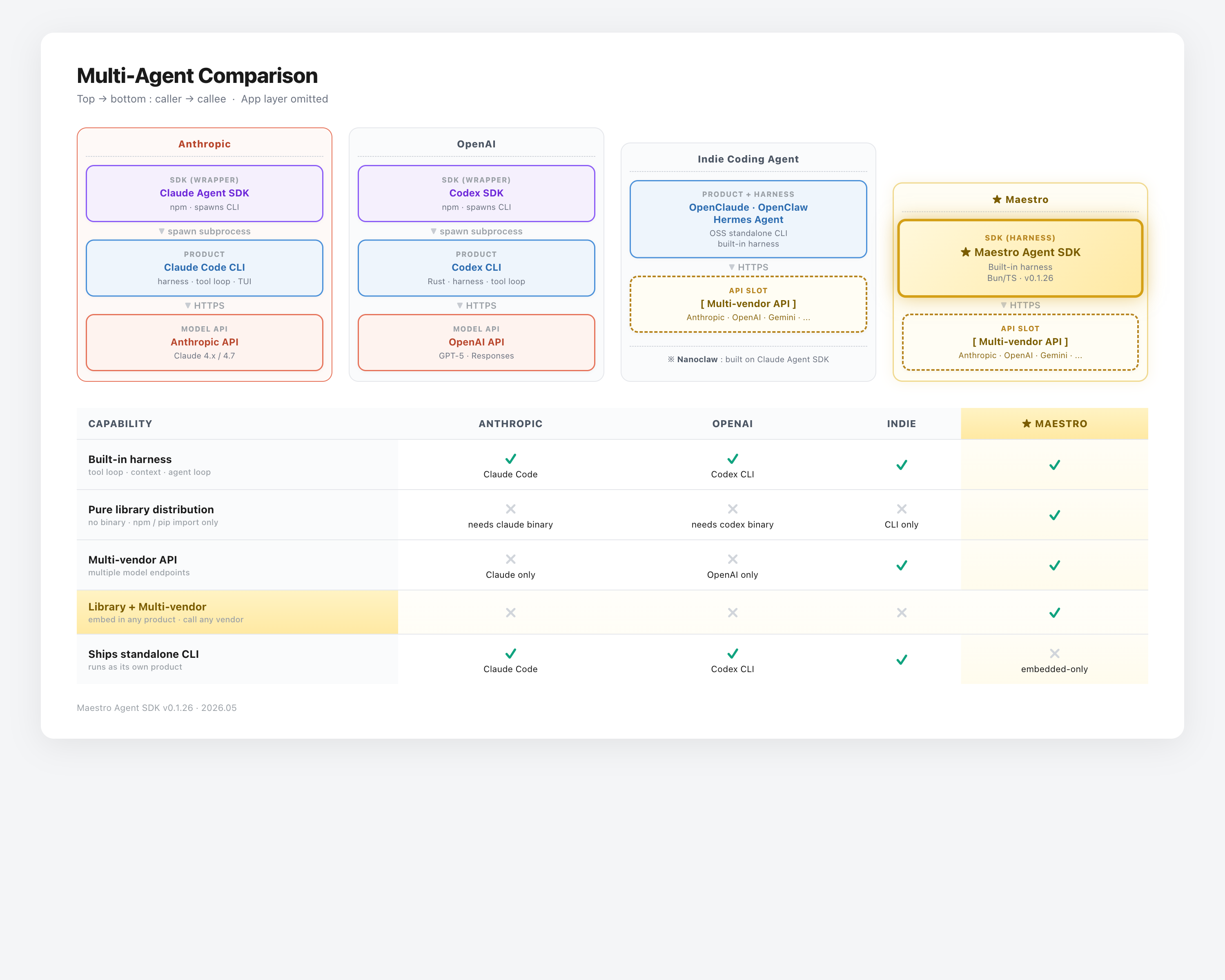
Refer to the architecture chart at the top of this README. Top → bottom is caller → callee. Anthropic and OpenAI ship SDKs that spawn their own CLIs as subprocesses — you inherit the harness, but also inherit the binary and product shape. Indie coding agents (OpenClaude, OpenClaw, Hermes, Nanoclaw) keep the harness but ship as full products or CLI-first tools. Maestro is a pure library runtime — the harness lives inside the SDK, so you import it into any host process.
| Capability | Anthropic | OpenAI | Indie | Maestro |
|---|---|---|---|---|
| Built-in harness (tool loop · context · agent loop) | ✓ Claude Code | ✓ Codex CLI | ✓ | ✓ |
| Pure library distribution (npm/pip import only) | ✗ needs claude |
✗ needs codex |
✗ CLI only | ✓ |
| Maintained provider surface | Claude | OpenAI | varies | DeepSeek V4 |
| Library runtime (embed anywhere) | ✗ | ✗ | ✗ | ✓ |
| Ships standalone CLI (runs as its own product) | ✓ Claude Code | ✓ Codex CLI | ✓ | ✗ embedded-only |
The trade-off Maestro accepts: no standalone CLI. You don't get a maestro binary to drop on a server — you get an SDK to embed inside your own host.
Adjacent projects
| Project | Layer | Key trade-off |
|---|---|---|
| maestro-agent-sdk | Embeddable SDK | Agent loop only — no CLI, no UI, no fixed product shape. Host injects logger, MCP resolver, session store, guardrails. |
| hermes-agent | Full-featured app | TUI, web dashboard, gateway, cron, Discord/Feishu. All-in-one — opinionated and coupled to its own host. |
| OpenAI Agents SDK | SDK + scaffold | Strong guardrails/tracing/handoffs, but multi-agent by design — heavier abstraction surface. |
| oh-my-claudecode | Orchestration plugin | Sits on Claude Code agent loop. Value is team mode, LSP tools, session replay. |
maestro-agent-sdk leaves product decisions to you. Same AIAgent works in a Telegram bot, cron runner, or code review pipeline.
Host integration (DI)
import {
  setLogger,
  setMcpResolver,
  setConversationReader,
} from "maestro-agent-sdk";

// 1) Replace the console logger with your structured logger (pino, winston, ...).
setLogger(myPinoLogger);

// 2) Provide MCP server specs per-query.
setMcpResolver((opts) => ({
  "playwright": { command: "playwright-mcp", args: [] },
  "fs": { command: "mcp-fs", args: ["--root", opts.cwd] },
}));

// 3) Back-fill conversation history for cross-agent forks.
setConversationReader((userId, topic, groupId) => myStore.read({ userId, topic, groupId }));
Skills — drop a directory, get indexed context
Skills are SKILL.md (or skill.md) files inside <cwd>/.skills/<skillKey>/<name>/. The SDK walks that tree on first turn, parses each file's YAML frontmatter, and appends a ## Skills (mandatory) block to the system prompt with one name + 60-char description line per skill. Bodies stay on disk — the model calls skill_view(name) to load the full markdown on demand. Index is cached per (root, mtime, TTL) so subsequent turns pay no walk cost.
import { maestroProvider } from "maestro-agent-sdk";

// `maestroProvider` is the batteries-included entry point: it builds the
// ToolRegistry, wires builtin tools + skills + MCP, and drives the loop.
for await (const event of maestroProvider({
  cwd: "/path/to/workspace",  // .skills/ resolved relative to this
  skillKey: "legal",          // → /path/to/workspace/.skills/legal/<name>/SKILL.md
  prompt: "Draft a contract clause for ...",
  userId: "alice",
  session: "thread-42",
  // skill_view + skill_write tools are auto-registered; the model picks
  // which skill body to load per turn.
})) {
  if (event.type === "text_delta") process.stdout.write(event.content);
}
Creating skills: skill_write(name, body) → writes SKILL.md into the named directory; the index hot-reloads.
Loading skills: skill_view(name) → returns the full markdown body to the model.
Security: every SKILL.md is scanned at index-time for prompt-injection, exfiltration, and destructive shell patterns. A flagged file is dropped from the catalog with a logged reason.
Hooks & Guardrails — LLM pre/post + tool hooks
LLM Pre Hook — inspect every API call
Fires right before every provider call. The host can pass through, replace the user-visible content, or tripwire the entire run. Receives the full message array (system + history + current turn).
import { AIAgent, DeepseekProvider, ToolRegistry } from "maestro-agent-sdk";

const provider = DeepseekProvider.fromEnv();
const agent = new AIAgent(provider, tools, {
  model: "deepseek-v4-flash",
  systemPrompt: "...",
  llmPreHook: async (messages, { abortSignal }) => {
    const lastUser = messages.filter((m) => m.role === "user").at(-1);
    const text = typeof lastUser?.content === "string" ? lastUser.content : "";
    if (/api[_-]?key|password/i.test(text)) {
      return {
        decision: "reject_content",
        message: "Sensitive credential detected — please rephrase without secrets.",
      };
    }
    if (/rm -rf \//.test(text)) {
      return { decision: "tripwire", message: "Destructive request blocked." };
    }
    return { decision: "allow" };
  },
});
LLM Post Hook — validate the final turn
Fires when the model produced a turn-complete response (no pending tool calls), before the result event is yielded. Use for output redaction, API-key leak detection, or final policy enforcement.
const agent = new AIAgent(provider, tools, {
  // ...
  llmPostHook: async (text, { messages }) => {
    if (/sk-[a-zA-Z0-9]{20,}/.test(text)) {
      return {
        decision: "reject_content",
        message: "[redacted: API key leak detected in assistant output]",
      };
    }
    return { decision: "allow" };
  },
});
Disallowed tools — hide and hard-block
maestroProvider({ disallowedTools }) is the Claude Code-compatible coarse
tool denylist. Matching is exact by tool name. Disallowed tools are omitted
from the provider tools schema and from the ToolSearch deferred catalog; if
a stale or hallucinated tool_use still arrives, dispatch returns an error
without running hooks or the tool handler.
for await (const event of maestroProvider({
  agent: "maestro",
  cwd: "/workspace",
  systemPrompt: "You are a coding agent.",
  prompt: "Work without asking follow-up questions.",
  disallowedTools: ["AskUserQuestion", "Bash"],
})) {
  // ...
}
Use disallowedTools when a tool should be unavailable for the whole call.
Use toolHooks for finer runtime policy, such as path allowlists or command
inspection.
Tool hooks — per-tool pre/post
ToolRegistry.use({ pre, post }) brackets every dispatch(). Pre can allow / modify / block; post sees the actual outcome via status: "ok" | "blocked" | "error" (since v0.1.14) so audit/telemetry hooks observe denied and failed calls too.
import { ToolRegistry, type PreToolUseDecision } from "maestro-agent-sdk";

const tools = new ToolRegistry();
// ... register builtin tools ...

tools.use({
  name: "fs-allowlist",
  pre: ({ toolName, input }): PreToolUseDecision => {
    if (toolName !== "Write" && toolName !== "Edit") return { decision: "allow" };
    const path = String(input.file_path ?? "");
    if (!path.startsWith("/workspace/")) {
      return { decision: "block", error: `path '${path}' outside allowlist` };
    }
    return { decision: "allow" };
  },
  post: ({ toolName, status, error, output }) => {
    metrics.increment(`tool.${toolName}.${status}`);
    if (status === "error") logger.warn({ toolName, error }, "tool failed");
    return {};  // pass output through unchanged
  },
});
Guardrail decisions
| Decision | Effect |
|---|---|
allow |
Proceed normally |
reject_content |
Replace the message/result, continue execution |
tripwire |
Abort the entire agent run immediately (LLM hooks only) |
modify |
(Tool pre hooks only) Substitute the tool's input before dispatch |
block |
(Tool pre hooks only) Skip tool execution, return the supplied error |
MCP — zero-config client pool
Wire an McpResolver and the SDK lazily spawns, caches, and reuses MCP subprocess clients across turns. Cache key includes (userId, session, groupId, agentKind, server, specHash) — two users never share a client, and same-server / same-spec calls within a session reuse the warm process.
import { setMcpResolver } from "maestro-agent-sdk";

setMcpResolver((opts) => ({
  playwright: {
    command: "playwright-mcp",
    args: ["--user-data-dir", `/tmp/pw-${opts.userId}`],
  },
  // SSE transport
  search: { type: "sse", url: "https://internal.example.com/mcp" },
}));
- Lazy spawn — servers start on first tool call, not at agent creation.
- Pool cache —
(userId, session, groupId, agentKind, server, specHash)keyed; idle TTL 5 min, LRU cap 16 (override viaMAESTRO_MCP_POOL_IDLE_TTL_MS/MAESTRO_MCP_POOL_MAX). - In-flight dedup — concurrent acquires on the same key await one
start()instead of double-spawning (v0.1.14). - Env values in cache hash —
{ TOKEN: alice }and{ TOKEN: bob }get separate processes by default; opt high-churn keys out viasetMcpCacheIgnoreEnvKeys(["DEPTH"])(v0.1.14). - stdio + SSE — both transports supported via
MaestroMcpServerSpec. - Graceful shutdown —
SIGINT/SIGTERMcloses every cached client before exit.
Development
git clone [email protected]:maestrojeong/maestro-agent-sdk.git
cd maestro-agent-sdk
bun install         # also supported
npm install         # alternative
npm run typecheck   # tsc --noEmit
npm run build       # tsc + tsc-alias → dist/
npm test            # vitest, 437 tests (+11 skipped without ripgrep)
License
MIT.
Install Maestro Agent Sdk in Claude Desktop, Claude Code & Cursor
unyly install maestro-agent-sdkInstalls into Claude Desktop, Claude Code, Cursor & VS Code — handles npx, uvx and build-from-source repos for you.
First time? Get the CLI: curl -fsSL https://unyly.org/install | sh
Or configure manually
Run in your terminal:
claude mcp add maestro-agent-sdk -- npx -y maestro-agent-sdkFAQ
Is Maestro Agent Sdk MCP free?
Yes, Maestro Agent Sdk MCP is free — one-click install via Unyly at no cost.
Does Maestro Agent Sdk need an API key?
No, Maestro Agent Sdk runs without API keys or environment variables.
Is Maestro Agent Sdk hosted or self-hosted?
Self-hosted: the server runs locally on your machine via the install command above.
How do I install Maestro Agent Sdk in Claude Desktop, Claude Code or Cursor?
Open Maestro Agent Sdk on unyly.org, pick your client tab (Claude Desktop, Claude Code, Cursor) and press Install — the config is generated automatically, no JSON editing.
Related MCPs
Fetch
Web content fetching and conversion for efficient LLM usage.
AWS KB Retrieval
Retrieval from AWS Knowledge Base using Bedrock Agent Runtime.
 by modelcontextprotocol
Spring AI MCP Server
Provides auto-configuration for setting up an MCP server in Spring Boot applications.
llm-analysis-assistant
A very streamlined mcp client that supports calling and monitoring stdio/sse/streamableHttp, and can also view request responses through the /logs page. It also
 by xuzexin-hz
Compare Maestro Agent Sdk with
Not sure what to pick?
Find your stack in 60 seconds
Author?
Embed badge for your README
Browse similar
All ai MCPs