
Map
FreeNot checkedEnables AI agents to perceive and control a live MapLibre GL map over MCP, allowing querying rendered features, reading popups, navigating, and toggling layers.

About
Enables AI agents to perceive and control a live MapLibre GL map over MCP, allowing querying rendered features, reading popups, navigating, and toggling layers.
README
Drive and perceive an existing, live MapLibre GL map from an AI agent (over MCP) or a human CLI — query the rendered features, read the viewport, click and read popups, navigate, toggle layers. The agent and the CLI act on the same map a person is looking at, with parity by construction.
It does not generate maps. Other geo-MCP servers (gis-mcp, Mapbox, CARTO) create maps or call GIS operations; map-mcp reaches into a map that's already on screen. Think of it as the agent-native counterpart to MapGrab: same live-map access, but conversational over MCP instead of written as test code.
Status: v1, MapLibre GL only. Cooperation-required (your app adds a one-line hook). A no-cooperation path and other map libraries are future work.

A LangChain agent finds the most-populous visible city and navigates to it — perceiving and driving the live map through map-mcp.
Install
uvx map-mcp --help # or: pip install map-mcp
Quickstart
- Start the bridge + MCP server. It prints a WebSocket URL and a per-session token.
map-mcp serve - Add the hook to your MapLibre page (
mapis your existingmaplibregl.Map):<script src="map-mcp-hook.js"></script> <script> mapMcp.register(map, { url: "ws://127.0.0.1:8765", token: "PASTE_TOKEN" }); </script> - Point your agent at the MCP server (stdio by default;
--transport httpfor HTTP/SSE). Or drive it yourself from the terminal:map-mcp call get_viewport map-mcp call query_rendered_features --params '{"point":[12.5,41.9]}'
There's a runnable sample app in examples/sample_app/.
Example: a LangChain agent
examples/langchain_agent.py is a real agent — a langgraph ReAct agent on any tool-capable model — that drives the live map through map-mcp's operations (it's how the GIF above was made). Give it the map-mcp tools and a task, and it perceives and navigates the map itself:
export OPENROUTER_API_KEY=sk-or-...
uvx playwright install chromium          # one-time, for the live browser
uv run --extra demo python examples/langchain_agent.py
It defaults to an OpenRouter model (set OPENROUTER_MODEL to change). The agent's tools are
thin wrappers over the same CoreOps the MCP server exposes — so anything the agent does, the
CLI does too.
Tools (the operation surface)
The agent's MCP tools and the CLI's call operations are exactly the same set:
| Operation | What it does |
|---|---|
get_viewport |
center [lng,lat], zoom, bearing, pitch, bounds |
query_rendered_features |
features currently rendered (optionally at a point or within a bbox) |
get_features_at |
features rendered at a [lng,lat] point |
click_at |
fire the map's click at a point (runs your popup handlers), return features + popup |
read_popup |
text of any open popup(s) |
set_view |
center+zoom (and bearing/pitch), or fit a bbox |
list_layers |
the style's layers + visibility |
set_layer_visibility |
show/hide a layer |
screenshot |
a PNG data URL of the current map* |
Perception returns structured feature properties (GeoJSON-shaped) — agents reason over
properties, not pixels. screenshot is optional.
* needs the map created with preserveDrawingBuffer: true (see hook/snippet.md).
How it works
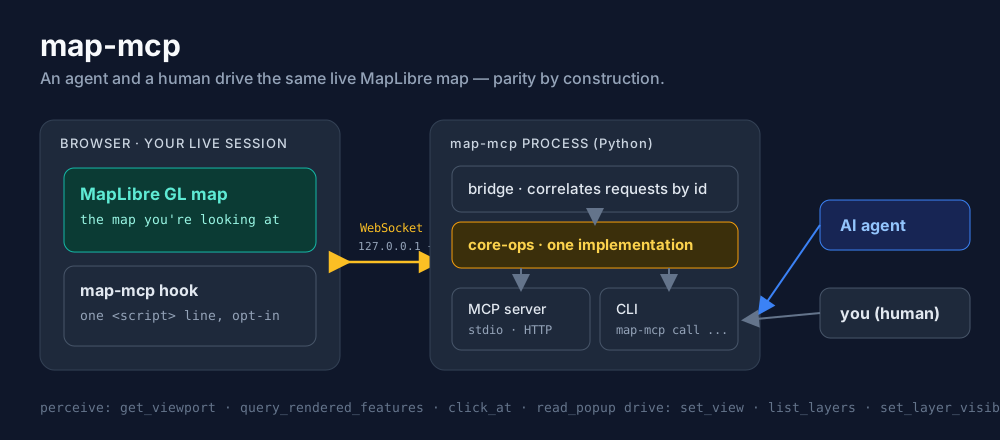
The hook connects out to a loopback WebSocket the map-mcp process runs. The MCP tools and
the CLI are thin frontends over one shared core-operations layer, so any operation one can do,
the other can too.
Security model (local-only). The bridge binds 127.0.0.1 only, so nothing off your machine
can reach it. Browsers do not apply same-origin policy to WebSocket connections, so the
per-session token is the security boundary: only a page that presents it can drive your map.
Treat the token like a secret — the convenience ?token= pattern in the example leaks it via
browser history and server logs, so for anything sensitive paste the token into the page rather
than the URL. A hardened Origin allowlist is future work.
Scope (v1)
- In: MapLibre GL; the operations above; stdio + HTTP/SSE; a human CLI with parity.
- Out: generating maps; a hosted service; non-map visualizations; other map libraries (Leaflet/deck.gl) and a no-cooperation (Playwright) path are future work.
License
MIT
Install Map in Claude Desktop, Claude Code & Cursor
unyly install map-mcpInstalls into Claude Desktop, Claude Code, Cursor & VS Code — handles npx, uvx and build-from-source repos for you.
First time? Get the CLI: curl -fsSL https://unyly.org/install | sh
Or configure manually
Run in your terminal:
claude mcp add map-mcp -- uvx map-mcpFAQ
Is Map MCP free?
Yes, Map MCP is free — one-click install via Unyly at no cost.
Does Map need an API key?
No, Map runs without API keys or environment variables.
Is Map hosted or self-hosted?
Self-hosted: the server runs locally on your machine via the install command above.
How do I install Map in Claude Desktop, Claude Code or Cursor?
Open Map on unyly.org, pick your client tab (Claude Desktop, Claude Code, Cursor) and press Install — the config is generated automatically, no JSON editing.
Related MCPs
Fetch
Web content fetching and conversion for efficient LLM usage.
AWS KB Retrieval
Retrieval from AWS Knowledge Base using Bedrock Agent Runtime.
 by modelcontextprotocol
Spring AI MCP Server
Provides auto-configuration for setting up an MCP server in Spring Boot applications.
llm-analysis-assistant
A very streamlined mcp client that supports calling and monitoring stdio/sse/streamableHttp, and can also view request responses through the /logs page. It also
 by xuzexin-hz
Compare Map with
Not sure what to pick?
Find your stack in 60 seconds
Author?
Embed badge for your README
Browse similar
All ai MCPs