
MarketScope AI Server
FreeNot checkedEnables AI-powered analysis of healthcare market segments, product comparisons, and sales data insights using natural language processing and retrieval-augmente

About
Enables AI-powered analysis of healthcare market segments, product comparisons, and sales data insights using natural language processing and retrieval-augmented generation.
README
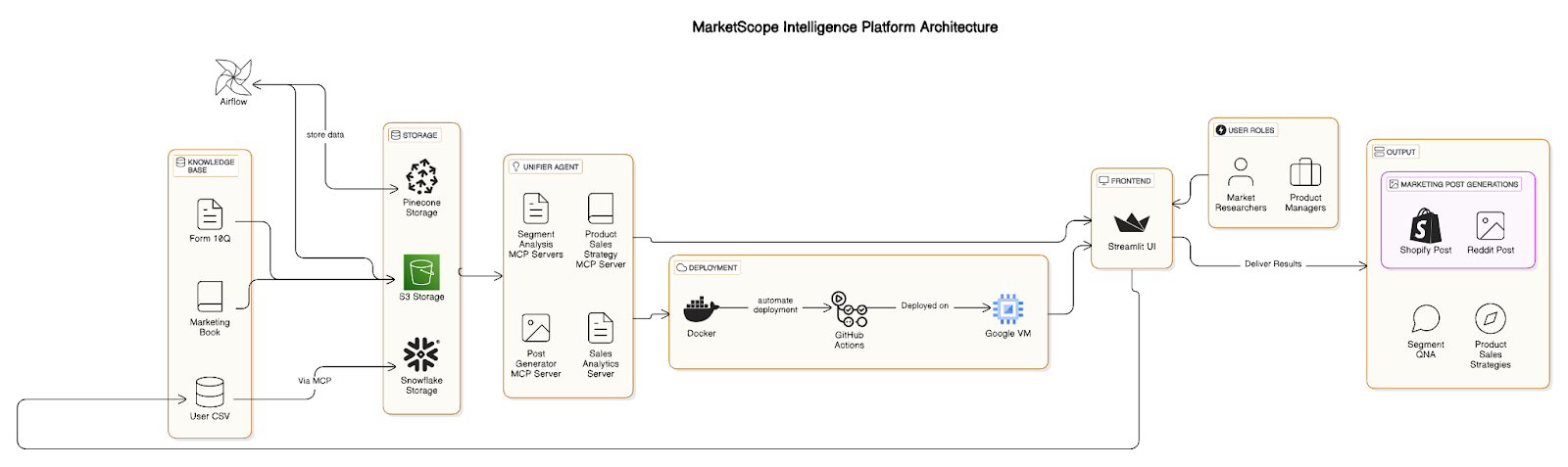
MarketScope AI is an intelligent analytics platform that helps you understand and analyze different healthcare market segments using advanced AI and natural language processing
Features
- Market Segmentation Analysis - Analyze and understand different healthcare market segments
- Strategic Query Optimization - Get optimized answers to your strategic questions
- Product Comparison - Compare products across different segments
- Sales & Marketing Analysis - Upload your sales data for AI-powered insights
Getting Started
Prerequisites
- Python 3.8 or higher
- Required packages (installed automatically when following the setup instructions)
Setup and Running
Simple Method
Run the simplified starter script:
python run_servers.py
This will:
- Check for required packages and install them if needed
- Start the API server
- Start the Streamlit frontend
- Provide you with the URL to access the application
Manual Setup
- Install dependencies:
pip install -r requirements.txt
- Start the API server:
python api/main.py
- Start the Streamlit frontend:
streamlit run frontend/app.py
Project Structure
api/- FastAPI backend serverfrontend/- Streamlit user interfacemcp_servers/- Model Context Protocol (MCP) servers for different functionalitiesagents/- AI agents for analysisconfig/- Application configuration
Healthcare Segments
The platform supports analysis across these healthcare segments:
- Diagnostic Segment
- Supplement Segment
- OTC Pharmaceutical Segment
- Fitness Wearable Segment
- Skin Care Segment
Data Analysis
To analyze your sales data:
- Select your segment from the sidebar
- Go to Sales & Marketing Analysis page
- Upload your CSV file or use the sample data
- Click "Analyze Data"
RAG for Marketing Knowledge
MarketScope includes a Retrieval Augmented Generation (RAG) system that provides access to marketing knowledge from Philip Kotler's Marketing Management book:
- Go to the Query Optimization page
- Enter your marketing question
- The system will retrieve relevant sections from the book
- Get tailored marketing strategies for your specific segment
Deployed Links:
-## MCP SERVER:
- unified server - http://34.42.74.104:8000/docs
- marketing analysis server - http://34.42.74.104:8001/docs
- snowflake mcp server - http://34.42.74.104:8004/docs
- sales data analysis server - http://34.42.74.104:8002/docs
- segment mcp server - http://34.42.74.104:8003/docs
Troubleshooting
If you encounter issues:
- Check that all required dependencies are installed
- Verify that no other applications are using the required ports (8000-8004, 8501)
- Ensure your environment variables are properly set up
- Check the application logs for specific error messages
CodeLabs
License
This is MCP server is certified by MCPHub
from github.com/BigDataTeam5/MarketScope-AI-Powered-Industry-Segment-Intelligence-Platform
Installing MarketScope AI Server
This server has no published package — it is built from source. Open the repository and follow its README.
▸ github.com/BigDataTeam5/MarketScope-AI-Powered-Industry-Segment-Intelligence-PlatformFAQ
Is MarketScope AI Server MCP free?
Yes, MarketScope AI Server MCP is free — one-click install via Unyly at no cost.
Does MarketScope AI Server need an API key?
No, MarketScope AI Server runs without API keys or environment variables.
Is MarketScope AI Server hosted or self-hosted?
A hosted option is available: Unyly runs the server in the cloud, no local setup required.
How do I install MarketScope AI Server in Claude Desktop, Claude Code or Cursor?
Open MarketScope AI Server on unyly.org, pick your client tab (Claude Desktop, Claude Code, Cursor) and press Install — the config is generated automatically, no JSON editing.
Related MCPs
Fetch
Web content fetching and conversion for efficient LLM usage.
AWS KB Retrieval
Retrieval from AWS Knowledge Base using Bedrock Agent Runtime.
 by modelcontextprotocol
Spring AI MCP Server
Provides auto-configuration for setting up an MCP server in Spring Boot applications.
llm-analysis-assistant
A very streamlined mcp client that supports calling and monitoring stdio/sse/streamableHttp, and can also view request responses through the /logs page. It also
 by xuzexin-hz
Compare MarketScope AI Server with
Not sure what to pick?
Find your stack in 60 seconds
Author?
Embed badge for your README
Browse similar
All ai MCPs