
AI Gateway
FreeNot checkedUnified local MCP AI Gateway that routes across Groq, OpenRouter, Mistral, and local Ollama providers, with OpenAI-compatible APIs, MCP tools, fallback/racing r

About
Unified local MCP AI Gateway that routes across Groq, OpenRouter, Mistral, and local Ollama providers, with OpenAI-compatible APIs, MCP tools, fallback/racing router, monitoring, and web dashboard.
README




Unified local MCP AI Gateway that routes across Groq, OpenRouter, Mistral, and local Ollama providers, with OpenAI-compatible APIs, MCP tools, fallback/racing router, monitoring, and web dashboard.
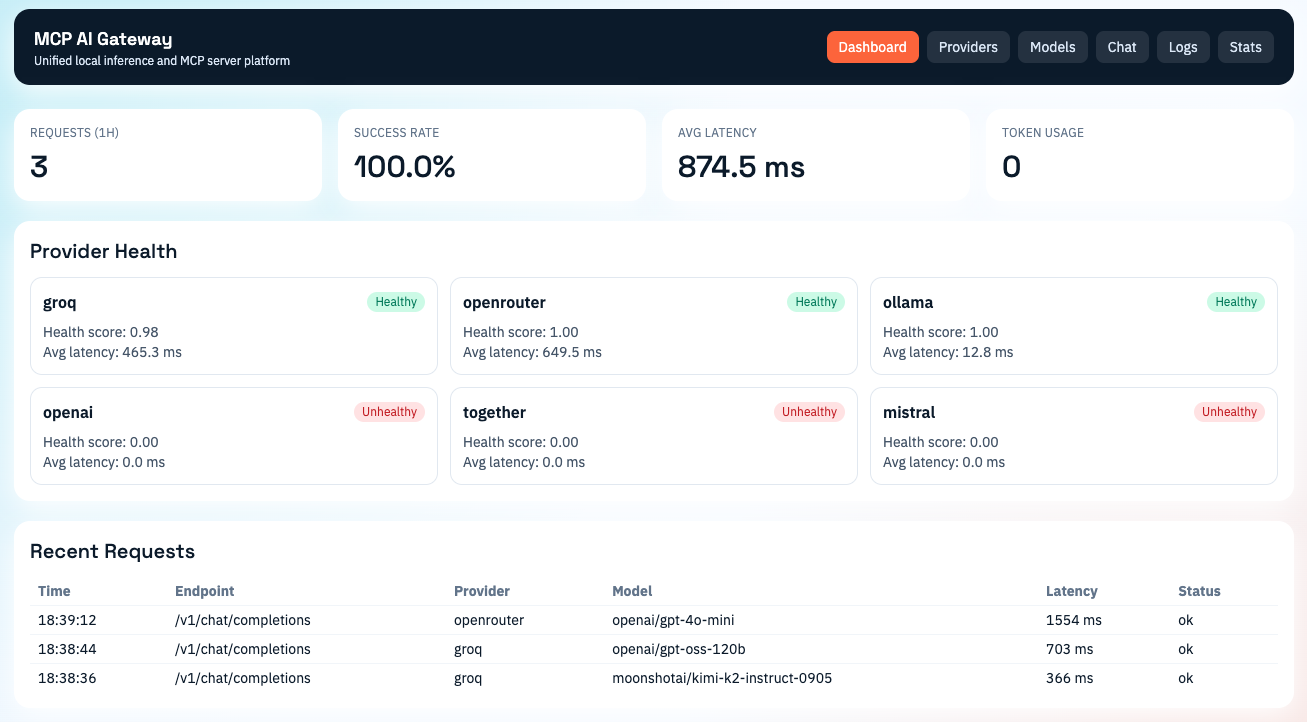
🚀 Features
- Async Python gateway with provider abstraction layer
- Built-in providers:
- Groq (
openai/gpt-oss-120bdefault, plusmoonshotai/kimi-k2-instruct-0905) - OpenRouter (
openai/gpt-4o-minidefault) - Mistral (
codestral-latestdefault, plusdevstral-medium-latest) - Ollama
- Groq (
- Intelligent router:
- priority routing
- fallback routing
- parallel racing mode
- rate-limit aware provider scoring
- MCP server capabilities:
- tool registration/discovery
- prompt template discovery/rendering
- schema validation
- SSE and HTTP transport
- OpenAI-compatible API:
POST /v1/chat/completionsPOST /v1/completionsGET /v1/models
- Web UI (React + Vite + Tailwind):
- Dashboard
- Providers
- Models
- Chat
- Logs
- Stats
- Runtime gateway API key generation
- Observability:
- Prometheus metrics (
/metrics) - structured logs
- SQLite request statistics
- Prometheus metrics (
- Extensible plugin system for additional providers
- CLI:
mcp-ai start|stop|status|providers|models - Docker + docker-compose support
- GitHub Actions CI for backend lint/tests and frontend build
🗂️ Repository Structure
mcp-ai-gateway/
  api/
  providers/
  router/
  mcp_server/
  plugins/
  database/
  web_ui/
  config/
  cli/
  tests/
  Dockerfile
  docker-compose.yml
  README.md
⚡ Quick Start (Local)
1) 📦 Prerequisites
- Python 3.11+
- Node.js 20+
- Optional: local Ollama daemon at
http://localhost:11434
2) 🐍 Install backend
python3 -m venv .venv
source .venv/bin/activate
pip install --upgrade pip
pip install -e .[dev]
3) 🔐 Configure environment
cp .env.example .env
# edit .env values
4) ⚙️ Edit config
config/config.yaml controls providers, routing, security, and default models.
5) ▶️ Start backend
uvicorn api.main:app --host 0.0.0.0 --port 8000 --reload
6) 🖥️ Start web UI
cd web_ui
npm install
VITE_API_BASE=http://localhost:8000 VITE_API_KEY=change-me npm run dev
🐳 Docker Deployment
docker compose up --build
Services:
- Gateway API: http://localhost:8000
- Web UI: http://localhost:3000
- Redis:
localhost:6379(optional cache/rate-limit backend)
🧩 API Overview
OpenAI-Compatible 🤝
POST /v1/chat/completionsPOST /v1/completionsGET /v1/models
Use header X-API-Key: <key> (or Authorization: Bearer <key>).
MCP Endpoints 🔌
- JSON-RPC MCP transport:
POST /mcp - SSE streaming output:
POST /mcp/stream
Supported MCP methods:
initializenotifications/initializedpingtools/listtools/callprompts/listprompts/get
Dashboard APIs 📊
GET /api/dashboardGET /api/providersPOST /api/providers/{name}/togglePOST /api/providers/{name}/priorityPOST /api/providers/{name}/configGET /api/modelsGET /api/settingsPOST /api/settings/default-modelPOST /api/settings/api-key/generateGET /api/logsGET /api/stats
Monitoring 📈
GET /healthGET /metrics
🛠️ CLI
mcp-ai start
mcp-ai status
mcp-ai providers
mcp-ai models
mcp-ai stop
🧭 Warp MCP Integration
Add this to Warp MCP config:
{
  "mcpServers": {
    "mcp-ai-gateway": {
      "url": "http://localhost:8000/mcp",
      "headers": {
        "Authorization": "Bearer REPLACE_WITH_MCP_GATEWAY_API_KEY"
      }
    }
  }
}
🧱 Configuration Example
providers:
  groq:
    enabled: true
    api_key: ${GROQ_API_KEY}
    priority: 1
    default_model: openai/gpt-oss-120b
  mistral:
    enabled: false
    api_key: ${MISTRAL_API_KEY}
    priority: 12
    default_model: codestral-latest
  openrouter:
    enabled: true
    priority: 2
    default_model: openai/gpt-4o-mini
  ollama:
    enabled: true
    priority: 3
routing:
  fallback_enabled: true
  racing_mode: false
🧪 Plugin Providers
New providers can be added under plugins/ by implementing ProviderPlugin and enabling provider config in config/config.yaml.
Included plugin examples:
openai_provider.pytogether_provider.pyopenrouter_provider.py
✅ Testing
pytest
CI runs on pushes and pull requests to main via .github/workflows/ci.yml:
- Backend job:
ruff check .andpytest -q - Frontend job:
npm installandnpm run buildinweb_ui/
🔄 Release Workflow
- Open PR from
dev/*branch tomain - Ensure CI is green
- Merge using GitHub CLI or GitHub UI
📚 Developer Guide
Detailed guide: docs/developer-guide.md
Installing AI Gateway
This server has no published package — it is built from source. Open the repository and follow its README.
▸ github.com/YoushaaMurhij/MCP-AI-GatewayFAQ
Is AI Gateway MCP free?
Yes, AI Gateway MCP is free — one-click install via Unyly at no cost.
Does AI Gateway need an API key?
No, AI Gateway runs without API keys or environment variables.
Is AI Gateway hosted or self-hosted?
Self-hosted: the server runs locally on your machine via the install command above.
How do I install AI Gateway in Claude Desktop, Claude Code or Cursor?
Open AI Gateway on unyly.org, pick your client tab (Claude Desktop, Claude Code, Cursor) and press Install — the config is generated automatically, no JSON editing.
Related MCPs
Fetch
Web content fetching and conversion for efficient LLM usage.
AWS KB Retrieval
Retrieval from AWS Knowledge Base using Bedrock Agent Runtime.
 by modelcontextprotocol
Spring AI MCP Server
Provides auto-configuration for setting up an MCP server in Spring Boot applications.
llm-analysis-assistant
A very streamlined mcp client that supports calling and monitoring stdio/sse/streamableHttp, and can also view request responses through the /logs page. It also
 by xuzexin-hz
Compare AI Gateway with
Not sure what to pick?
Find your stack in 60 seconds
Author?
Embed badge for your README
Browse similar
All ai MCPs