
Mobile Pilot
FreeNot checkedEnables AI assistants to control iOS simulators through WebDriverAgent, supporting taps, swipes, typing, screenshots, recording, and app actions with a real-tim

About
Enables AI assistants to control iOS simulators through WebDriverAgent, supporting taps, swipes, typing, screenshots, recording, and app actions with a real-time dashboard for visual feedback.
README
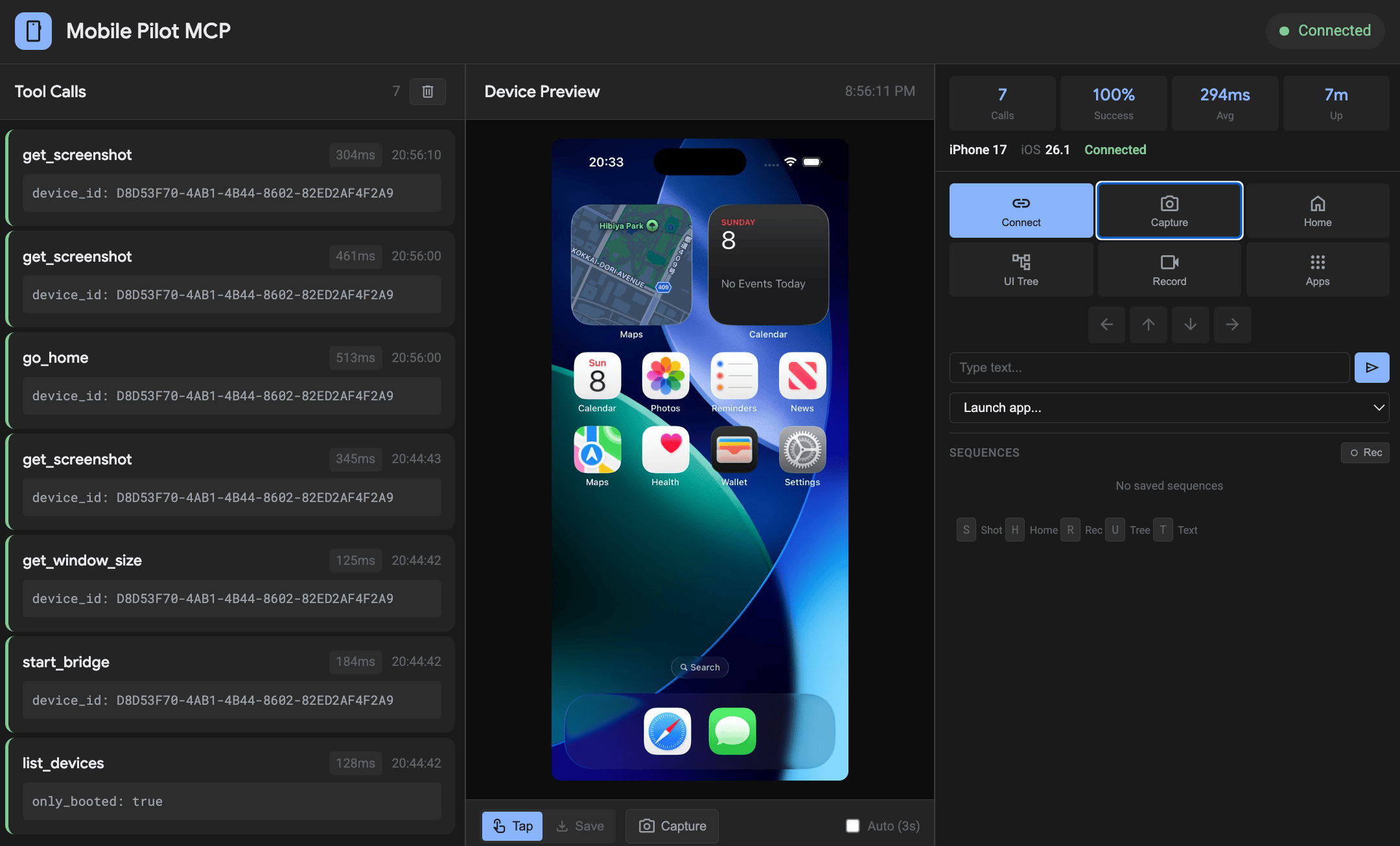
Your AI co-pilot for mobile simulators.
Other tools let you tap. We give you a cockpit.
Mobile Pilot MCP gives AI assistants a control plane for simulator automation, visual validation, and repeatable mobile workflows.
Why Mobile Pilot MCP
- Cockpit dashboard with real-time tool calls, device controls, and visual feedback
- Fast automation loops for taps, swipes, typing, screenshots, recording, and app actions
- Flutter-first workflow when paired with Dart MCP server
- Cross-platform direction: iOS today, Android coming soon
Quick Start (4 Commands)
python3 -m venv venv && source venv/bin/activate && pip install -e .
./scripts/start_wda.sh <UDID>
claude mcp add mobile-pilot -- /path/to/mobile-pilot-mcp/venv/bin/mobile-pilot-mcp
python scripts/test_install.py
Codex CLI equivalent:
codex mcp add mobile-pilot -- /path/to/mobile-pilot-mcp/venv/bin/mobile-pilot-mcp
If WDA is not on localhost:
claude mcp add mobile-pilot -e WDA_HOST=192.168.1.30 -- /path/to/mobile-pilot-mcp/venv/bin/mobile-pilot-mcp
codex mcp add mobile-pilot -e WDA_HOST=192.168.1.30 -- /path/to/mobile-pilot-mcp/venv/bin/mobile-pilot-mcp
Try This First
Once connected in your MCP client, try prompts like:
List my booted simulators and connect to the first one.Take a screenshot, then show me the UI tree and tap the Settings button.Launch Safari, open https://flutter.dev, and capture another screenshot.Start a recording, perform a swipe up, stop recording, and give me the output path.
Flutter + Dart MCP
Use both servers together for a stronger Flutter dev loop.
claude mcp add --transport stdio dart -- dart mcp-server
codex mcp add dart -- dart mcp-server
Recommended split:
mobile-pilot-mcp: simulator control, screenshots, gestures, app/system actionsdart mcp-server: runtime errors, widget/runtime introspection, hot reload, tests, pub.dev/package workflows
Reference: Supercharge Your Dart & Flutter Development Experience with the Dart and Flutter MCP Server
Comparison
| Capability | Mobile Pilot MCP | Typical simulator-only MCP |
|---|---|---|
| Dashboard cockpit | Yes | Usually no |
| Real-time tool-call timeline | Yes | Usually no |
| Visual interaction loop (live screenshot + actions) | Yes | Partial |
| Flutter pairing story (Dart MCP) | First-class | Rare |
| Cross-platform roadmap | iOS now, Android planned | Often iOS-only |
Dashboard
Available at http://localhost:8200 when the server starts.
Documentation
Contributing
- Fork and clone the repository.
- Set up local environment and install dev deps:
python3 -m venv venv
source venv/bin/activate
pip install -e "[dev]"
- Run checks before opening a PR:
ruff check .
python scripts/test_install.py
- For dashboard/UI changes, include a screenshot or short recording in the PR.
License
Apache 2.0
Install Mobile Pilot in Claude Desktop, Claude Code & Cursor
unyly install mobile-pilot-mcpInstalls into Claude Desktop, Claude Code, Cursor & VS Code — handles npx, uvx and build-from-source repos for you.
First time? Get the CLI: curl -fsSL https://unyly.org/install | sh
Or configure manually
Run in your terminal:
claude mcp add mobile-pilot-mcp -- uvx --from git+https://github.com/bidouilles/mobile-pilot-mcp mobile-pilot-mcpFAQ
Is Mobile Pilot MCP free?
Yes, Mobile Pilot MCP is free — one-click install via Unyly at no cost.
Does Mobile Pilot need an API key?
No, Mobile Pilot runs without API keys or environment variables.
Is Mobile Pilot hosted or self-hosted?
Self-hosted: the server runs locally on your machine via the install command above.
How do I install Mobile Pilot in Claude Desktop, Claude Code or Cursor?
Open Mobile Pilot on unyly.org, pick your client tab (Claude Desktop, Claude Code, Cursor) and press Install — the config is generated automatically, no JSON editing.
Related MCPs
Fetch
Web content fetching and conversion for efficient LLM usage.
AWS KB Retrieval
Retrieval from AWS Knowledge Base using Bedrock Agent Runtime.
 by modelcontextprotocol
Spring AI MCP Server
Provides auto-configuration for setting up an MCP server in Spring Boot applications.
llm-analysis-assistant
A very streamlined mcp client that supports calling and monitoring stdio/sse/streamableHttp, and can also view request responses through the /logs page. It also
 by xuzexin-hz
Compare Mobile Pilot with
Not sure what to pick?
Find your stack in 60 seconds
Author?
Embed badge for your README
Browse similar
All ai MCPs