
Nifipilot
FreeNot checkedAI Copilot for Apache NiFi — MCP server with 17 tools to inspect, build and control NiFi flows via AI agents

About
AI Copilot for Apache NiFi — MCP server with 17 tools to inspect, build and control NiFi flows via AI agents
README
.png)
NiFiPilot — AI Copilot for Apache NiFi
MCP (Model Context Protocol) server for Apache NiFi 2.2.0. Lets AI agents inspect, build, and control NiFi flows safely and auditably via 17 ready-to-use tools.
Tests Python License NiFi PyPI VS Code
What it does
NiFiPilot exposes Apache NiFi's REST API as MCP tools so any compatible AI agent can:
- Inspect running flows, processor states, queue depths, and system health
- Build process groups, processors, and connections from natural language
- Control start/stop individual processors or entire process groups
- Audit every action — every tool call is written to a structured JSON log
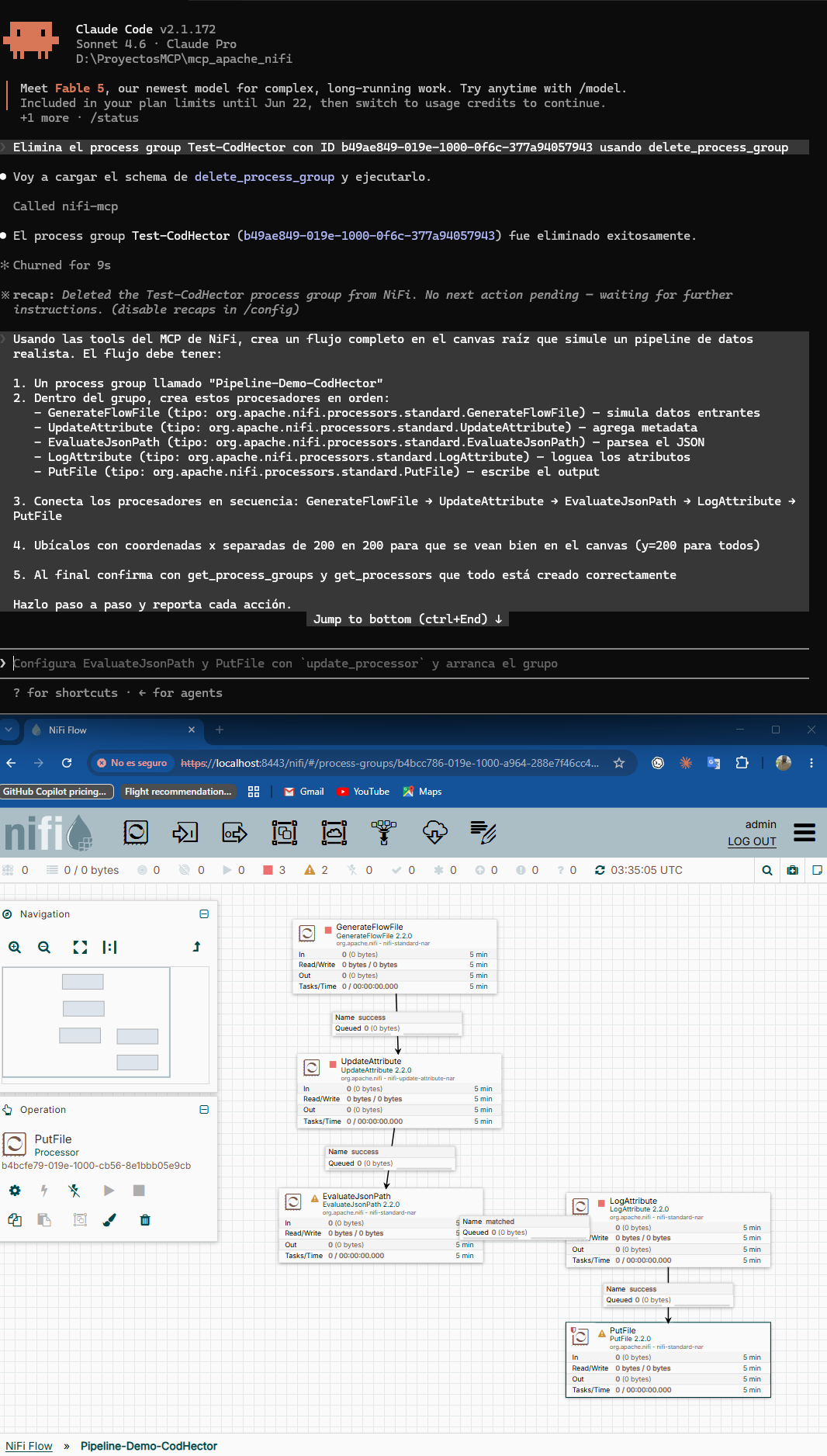 Full pipeline created by AI: GenerateFlowFile → UpdateAttribute → EvaluateJsonPath → LogAttribute → PutFile
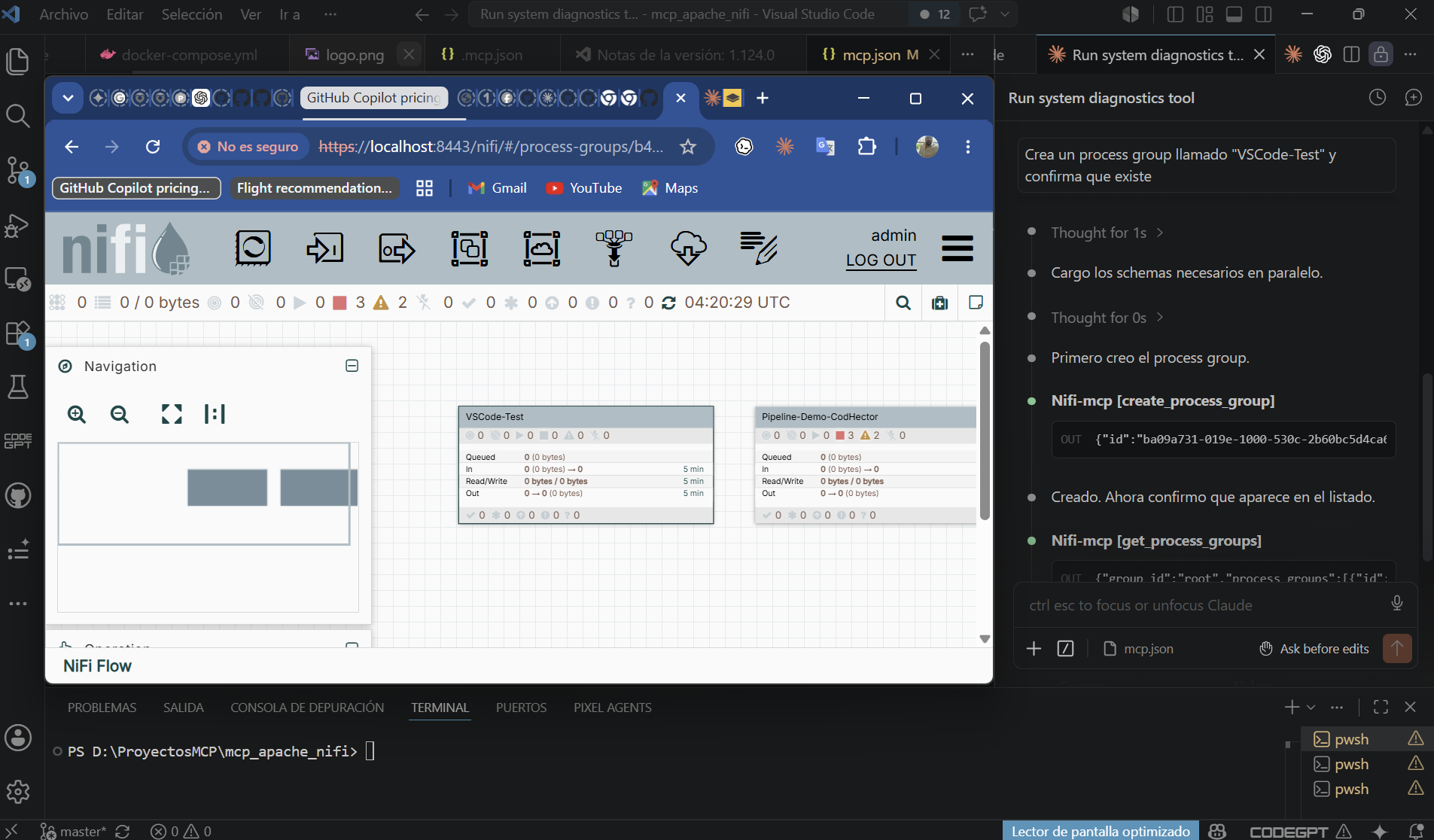 NiFiPilot in VS Code — Claude executing MCP tools with NiFi canvas visible in real time
Features
- 17 tools across three categories: read (5), write (6), control (6)
- Readonly mode — write and control tools are blocked; safe for production monitoring
- Dry-run mode — preview write/control actions without executing them
- Structured audit log — every tool call logged with params, result, and timestamp
- Lazy authentication — JWT token acquired on first call, refreshed automatically on 401
- Transports — stdio (local clients) and SSE (Docker/remote)
- 37 unit tests — no live NiFi required
Quick start with Docker Compose
The bundled compose file starts NiFi 2.2.0 and the MCP server together.
# 1. Copy and edit the env file
cp .env.example .env
# Edit NIFI_PASSWORD (min 12 chars) and set MCP_MODE=full to allow write/control

# 2. Start both services
docker compose up --build

# 3. NiFi UI:  https://localhost:8443  (first start takes ~2 min)
#    MCP SSE:  http://localhost:8000/sse
Connect any MCP-compatible client to the SSE endpoint:
{
  "mcpServers": {
    "nifi-mcp": { "url": "http://localhost:8000/sse" }
  }
}
Manual installation
Requirements: Python 3.11+
# From source
git clone https://github.com/Giojacke/mcp-nifipilot
cd mcp-nifipilot
pip install .
Run in stdio mode (used by Claude Code, VS Code, Cursor):
NIFI_URL=https://localhost:8443 \
NIFI_USERNAME=admin \
NIFI_PASSWORD=your-password \
NIFI_VERIFY_SSL=false \
MCP_MODE=readonly \
nifi-mcp
Configuration
All settings come from environment variables (or a .env file in the working directory).
| Variable | Default | Description |
|---|---|---|
NIFI_URL |
https://localhost:8443 |
NiFi base URL |
NIFI_USERNAME |
admin |
NiFi username |
NIFI_PASSWORD |
(required) | NiFi password (min 12 chars for single-user auth) |
NIFI_VERIFY_SSL |
false |
Verify TLS certificate (true in production) |
MCP_MODE |
readonly |
readonly — read tools only; full — all tools |
MCP_AUDIT_LOG |
true |
Write JSON audit log |
MCP_AUDIT_LOG_PATH |
./logs/audit.log |
Path for the audit log file |
MCP_RATE_LIMIT |
60 |
Max tool calls per minute |
MCP_DRY_RUN |
false |
Describe write/control actions without executing |
MCP_TRANSPORT |
stdio |
stdio for local clients; sse for Docker |
MCP_HOST |
0.0.0.0 |
Bind host when MCP_TRANSPORT=sse |
MCP_PORT |
8000 |
Port when MCP_TRANSPORT=sse |
Tool reference
Read tools (always available)
| Tool | Description |
|---|---|
get_process_groups(group_id) |
List direct child process groups |
get_processors(group_id) |
List processors in a group with run status |
get_connections(group_id) |
List connections with queue depth |
get_flow_status(group_id) |
Running/stopped/invalid counts and throughput |
get_system_diagnostics() |
NiFi version, heap, CPU, uptime |
Write tools (require MCP_MODE=full)
| Tool | Description |
|---|---|
create_process_group(name, parent_group_id, x, y) |
Create a new process group |
create_processor(name, processor_type, group_id, x, y) |
Add a processor (full Java class name) |
update_processor(processor_id, name?, properties?, scheduling_period?) |
Update processor config |
create_connection(source_id, destination_id, group_id, relationships?, ...) |
Connect two components |
delete_processor(processor_id) |
Delete a stopped processor |
delete_process_group(group_id) |
Delete a stopped process group |
Control tools (require MCP_MODE=full)
| Tool | Description |
|---|---|
start_processor(processor_id) |
Start a processor |
stop_processor(processor_id) |
Stop a processor |
start_process_group(group_id) |
Start all processors in a group |
stop_process_group(group_id) |
Stop all processors in a group |
get_queue_status(connection_id) |
Queue depth and throughput |
purge_queue(connection_id) |
Drop all flowfiles from a queue |
Client setup
Claude Code (stdio)
The .mcp.json at the project root is pre-configured. Fill in your password:
{
  "mcpServers": {
    "nifi-mcp": {
      "command": "nifi-mcp",
      "env": {
        "NIFI_URL": "https://localhost:8443",
        "NIFI_USERNAME": "admin",
        "NIFI_PASSWORD": "YOUR_PASSWORD",
        "NIFI_VERIFY_SSL": "false",
        "MCP_MODE": "readonly"
      }
    }
  }
}
Claude Code (SSE — Docker stack running)
{
  "mcpServers": {
    "nifi-mcp": { "url": "http://localhost:8000/sse" }
  }
}
VS Code
Install from VS Code Marketplace: NiFiPilot — AI Copilot for Apache NiFi
Copy .vscode/mcp.json (included) and fill in your password.
Cursor / Windsurf
Place the stdio config at ~/.cursor/mcp.json (global) or .cursor/mcp.json (project).
Security model
| Concern | Mitigation |
|---|---|
| Credential exposure | All secrets via env vars — never hardcoded |
| Accidental writes | MCP_MODE=readonly blocks all write and control tools |
| Runaway changes | MCP_DRY_RUN=true describes actions without executing |
| Auditability | Every tool call writes a JSON entry to the audit log |
| Token expiry | ensure_authenticated() re-logins on 401 automatically |
| SSL in production | Set NIFI_VERIFY_SSL=true with a valid certificate |
Development
# Install with dev dependencies
pip install -e ".[dev]"

# Run tests (no live NiFi needed)
pytest

# Lint and format
ruff check src tests
ruff format src tests
Tests mock nipyapi at the API class level — 37 tests, no live NiFi required. Integration tests can be added in tests/integration/ (excluded from the default test run).
Agent Skill
NiFiPilot includes an agent skill — a structured instruction set that teaches AI agents how to use the MCP tools safely and effectively.
Located at skills/nifipilot-agent.md, it covers:
- Standard workflows (create, modify, control, debug)
- Golden rules for safe operation
- Common processor types reference
- Production mode guidelines
- Example prompts to get started
Quick start with the skill
Claude Code:
Add to your CLAUDE.md.
VS Code:
Pin skills/nifipilot-agent.md to the chat context before
starting a NiFi session.
Architecture
See ARCHITECTURE.md for design decisions and the C4 diagrams.
Roadmap
- Rate limiting enforcement (config exists, middleware pending)
-
NiFiClientas real façade (tools currently call nipyapi directly) - Integration tests against live NiFi
- Azure DevOps MCP bridge for CI/CD of NiFi flows
-
get_processor_details— expose full processor config with exact property names for NiFi 2.x compatibility
License
MIT
Installing Nifipilot
This server has no published package — it is built from source. Open the repository and follow its README.
▸ github.com/Giojacke/mcp-nifipilotFAQ
Is Nifipilot MCP free?
Yes, Nifipilot MCP is free — one-click install via Unyly at no cost.
Does Nifipilot need an API key?
No, Nifipilot runs without API keys or environment variables.
Is Nifipilot hosted or self-hosted?
Self-hosted: the server runs locally on your machine via the install command above.
How do I install Nifipilot in Claude Desktop, Claude Code or Cursor?
Open Nifipilot on unyly.org, pick your client tab (Claude Desktop, Claude Code, Cursor) and press Install — the config is generated automatically, no JSON editing.
Related MCPs
Fetch
Web content fetching and conversion for efficient LLM usage.
AWS KB Retrieval
Retrieval from AWS Knowledge Base using Bedrock Agent Runtime.
 by modelcontextprotocol
Spring AI MCP Server
Provides auto-configuration for setting up an MCP server in Spring Boot applications.
llm-analysis-assistant
A very streamlined mcp client that supports calling and monitoring stdio/sse/streamableHttp, and can also view request responses through the /logs page. It also
 by xuzexin-hz
Compare Nifipilot with
Not sure what to pick?
Find your stack in 60 seconds
Author?
Embed badge for your README
Browse similar
All ai MCPs