
NotePilot
FreeNot checkedA Python MCP server that exposes note management tools (create, search, update, delete notes) over stdio, enabling Claude AI to manage notes through natural lan

About
A Python MCP server that exposes note management tools (create, search, update, delete notes) over stdio, enabling Claude AI to manage notes through natural language conversation.
README
Turn thoughts into structured knowledge..!
A minimal Notes application built on the Model-Context-Protocol (MCP). A Python MCP server exposes note management tools over stdio; an async client connects Claude AI to those tools so you can create, search, and manage notes through a natural-language chat interface.
Overview
You ──► Claude AI (Anthropic) ──► MCP Client ──► MCP Server ──► SQLite
              (tool calls)          (stdio)       (FastMCP)     (notes.db)
Claude receives a set of note-management tools from the MCP server. When you ask it to "create a note about X" or "find notes mentioning Y", it invokes the appropriate tool, gets the result, and responds conversationally.
Tech Stack
| Layer | Technology |
|---|---|
| Language | Python 3.12+ |
| Package manager | uv |
| MCP framework | mcp[cli] (FastMCP) |
| AI / LLM | Anthropic SDK (AsyncAnthropic) |
| Database | SQLite via sqlite-utils |
| CLI formatting | colorama |
| Config | python-dotenv |
Prerequisites
- Python 3.12+
- uv installed
- An Anthropic API key
Configuration
Create a .env file in the project root:
ANTHROPIC_API_KEY="sk-ant-..."
CLAUDE_MODEL="claude-haiku-4-5-20251001"
Installation
# Clone the repo
git clone https://github.com/chaitanya-jadhav11/notes-mcp
cd notes-mcp

# Install dependencies
uv sync
Usage
# Start the interactive chat client
uv run -m client.client
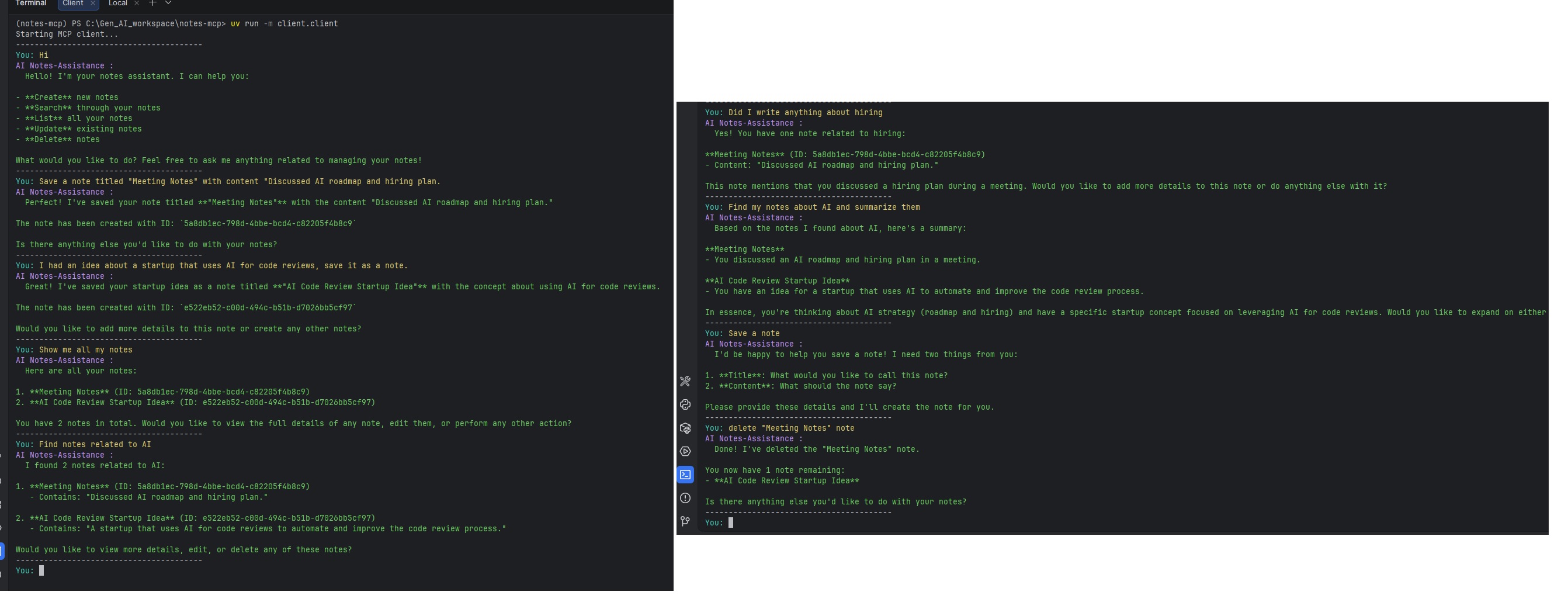
You can then chat naturally with Claude. Examples:
You: Create a note titled "Shopping list" with milk, eggs, and bread.
You: Show me all my notes.
You: Search for notes about bread.
You: Update the shopping list to add butter.
You: Delete the shopping list note.
To inspect or develop the MCP server interactively:
uv run mcp dev server/server.py
Project Structure
notes-mcp/
├── .env                    # API key and model config (create this)
├── pyproject.toml          # Project metadata and dependencies
├── uv.lock                 # Pinned dependency lock file
├── notes.db                # SQLite database (auto-created on first run)
│
├── server/
│   ├── server.py           # FastMCP server — defines the 8 note tools
│   └── db.py               # SQLite CRUD layer (UUID keys, ISO timestamps)
│
└── client/
    ├── client.py           # MCPClient class + interactive REPL loop
    └── claude_client.py    # Anthropic API wrapper — manages conversation
                            # history, tool-call loops, and prompt caching
Available MCP Tools
The server exposes the following tools to Claude:
| Tool | Description |
|---|---|
list_notes |
List all notes (id + title) |
create_note |
Create a note with a title and body |
get_note_by_id |
Fetch a single note by UUID |
get_notes_by_title |
Find notes by exact or partial title match |
search_notes |
Full-text search across note bodies |
update_note |
Update a note's title and/or body |
delete_note_by_id |
Delete a note by UUID |
delete_notes_by_title |
Delete all notes matching a title |
App Screenshot
Anthropic course certificate
Installing NotePilot
This server has no published package — it is built from source. Open the repository and follow its README.
▸ github.com/chaitanya-jadhav11/notes-mcpFAQ
Is NotePilot MCP free?
Yes, NotePilot MCP is free — one-click install via Unyly at no cost.
Does NotePilot need an API key?
No, NotePilot runs without API keys or environment variables.
Is NotePilot hosted or self-hosted?
Self-hosted: the server runs locally on your machine via the install command above.
How do I install NotePilot in Claude Desktop, Claude Code or Cursor?
Open NotePilot on unyly.org, pick your client tab (Claude Desktop, Claude Code, Cursor) and press Install — the config is generated automatically, no JSON editing.
Related MCPs
Fetch
Web content fetching and conversion for efficient LLM usage.
AWS KB Retrieval
Retrieval from AWS Knowledge Base using Bedrock Agent Runtime.
 by modelcontextprotocol
Spring AI MCP Server
Provides auto-configuration for setting up an MCP server in Spring Boot applications.
llm-analysis-assistant
A very streamlined mcp client that supports calling and monitoring stdio/sse/streamableHttp, and can also view request responses through the /logs page. It also
 by xuzexin-hz
Compare NotePilot with
Not sure what to pick?
Find your stack in 60 seconds
Author?
Embed badge for your README
Browse similar
All ai MCPs