
Office Word
FreeNot checkedA Model Context Protocol server for enterprise-grade document automation, enabling AI assistants to create, read, manipulate, and analyze Microsoft Word documen

About
A Model Context Protocol server for enterprise-grade document automation, enabling AI assistants to create, read, manipulate, and analyze Microsoft Word documents programmatically.
README


Enterprise-Grade Document Automation Protocol for Amazon Q & Kiro
Overview
Office-Word-MCP is a robust Model Context Protocol (MCP) server designed to enable advanced document processing capabilities for AI assistants like Amazon Q Developer, Kiro, and other MCP-compliant clients.
It provides a standardized interface for AI agents to programmatic create, read, manipulate, and analyze Microsoft Word documents (.docx). By abstracting complex document object models into clean API tools, it empowers AI assistants to generate professional reports, contracts, and documentation workflows autonomously.
Key Benefits
- Seamless Integration: Optimized for Amazon Q and Kiro environments.
- Rich Formatting: Support for complex tables, styling, and layout controls.
- Enterprise Ready: Includes document protection, comment analysis, and structured data handling.
- Secure: Runs locally with explicit permission controls.
Architecture
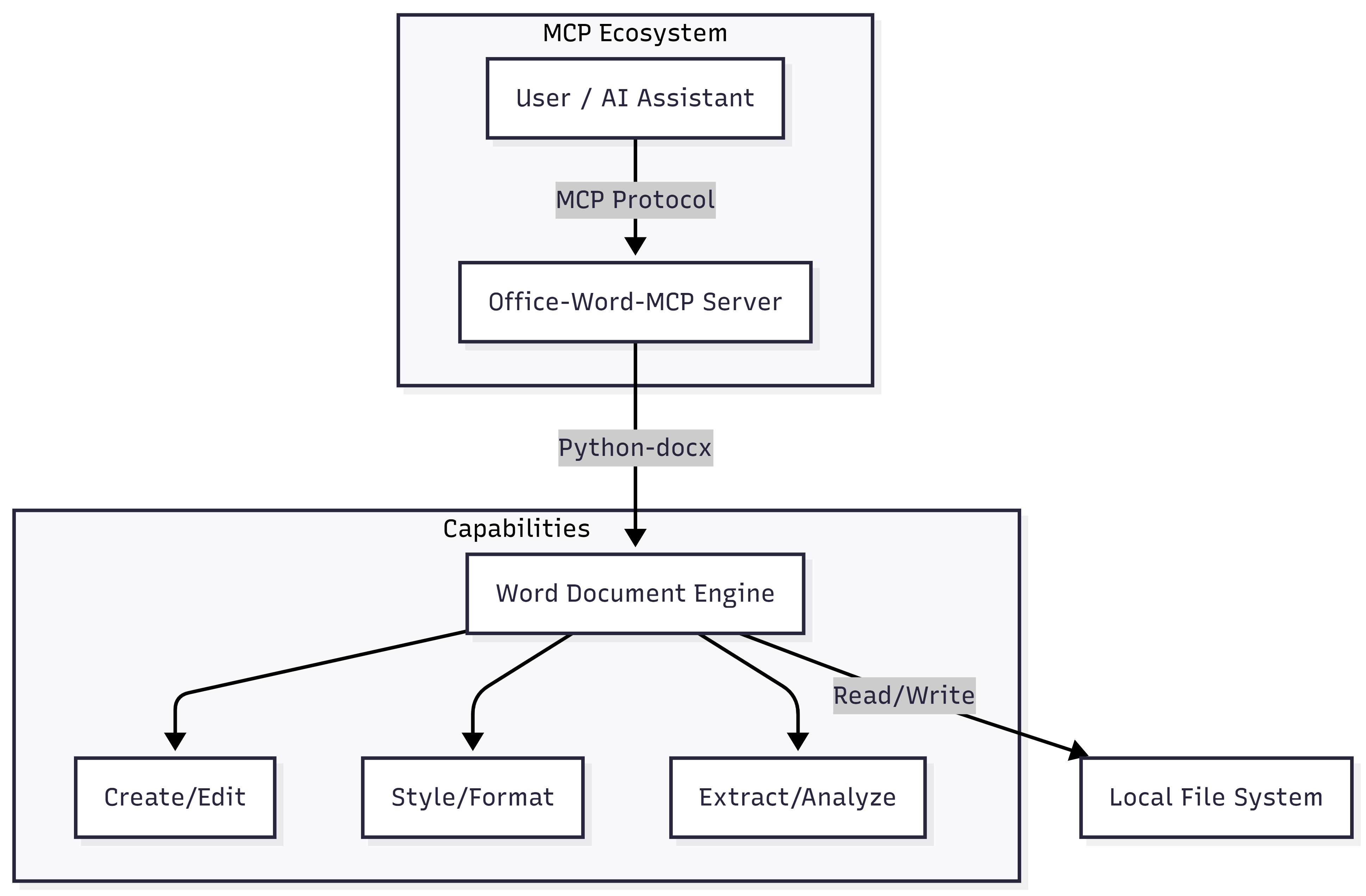
Features
1. Document Management
- Lifecycle Control: Create, copy, merge, and convert documents (to PDF).
- Structure Analysis: Extract outlines, metadata, and statistics.
- Security: Apply password protection and manage restricted editing.
2. Content Engineering
- Advanced Tables: Create complex layouts with merges, shading, and custom borders.
- Rich Text: precision control over fonts, colors, and paragraph styles.
- Media: Insert images with proportional scaling.
- Dynamic Lists: XML-compliant bulleted and numbered lists.
3. Review & Collaboration
- Comment Mining: Extract and filter comments by author or content.
- Track Changes: (Future roadmap) Support for revision tracking.
Getting Started
Prerequisites
- Python 3.10 or higher
uv(recommended) orpippackage manager
Installation
Option 1: Using uvx (Recommended for ephemeral use)
No installation required. You can run the server directly using uvx.
uvx --from office-word-mcp-server word_mcp_server
Option 2: Local Installation
Clone the repository and install dependencies:
git clone https://github.com/GongRzhe/Office-Word-MCP-Server.git
cd Office-Word-MCP-Server
pip install -r requirements.txt
Integration Guide
Amazon Q Developer (VS Code / JetBrains)
To integrate Office-Word-MCP with Amazon Q Developer:
- Open your IDE settings and navigate to Amazon Q > MCP Servers.
- Add a new server configuration:
- Name:
word-automation - Command:
uvx - Args:
--from,office-word-mcp-server,word_mcp_server
- Name:
- Restart your IDE. Amazon Q will now have access to Word tools.
Kiro
Configure the server in your Kiro settings or configuration file:
{
  "mcpServers": {
    "office-word": {
      "command": "uvx",
      "args": ["--from", "office-word-mcp-server", "word_mcp_server"]
    }
  }
}
Other MCP Clients (Claude Desktop, etc.)
Add the following to your MCP configuration file (e.g., claude_desktop_config.json):
{
  "mcpServers": {
    "word-server": {
      "command": "uvx",
      "args": ["--from", "office-word-mcp-server", "word_mcp_server"]
    }
  }
}
API Reference
The server exposes the following tools to the AI assistant.
Core Operations
| Tool Name | Description |
|---|---|
create_document |
Create a new blank or template-based document. |
get_document_text |
Extract all text content from a file. |
list_available_documents |
Scan directory for valid Word files. |
convert_to_pdf |
Export .docx to PDF format. |
Content & Formatting
| Tool Name | Description |
|---|---|
add_heading |
Insert structured headings (Levels 1-9). |
add_paragraph |
Add text blocks with style support. |
add_table |
Create a new table structure. |
format_text |
Apply bold, italic, color, etc., to text ranges. |
Table Management
| Tool Name | Description |
|---|---|
format_table |
Apply styles, borders, and shading to tables. |
merge_table_cells |
Merge cells horizontally or vertically. |
set_table_column_width |
Precise control over column dimensions. |
(See full tool list in word_mcp_server.py source)
Troubleshooting
Common Issues
Permission Denied
- Cause: The server cannot access the file system.
- Fix: Ensure the running process has R/W access to the target directory. On Windows, ensure the file isn't open in Microsoft Word.
Styling Not Applied
- Cause: Using a style name that doesn't exist in the base template.
- Fix: Use
create_custom_styleto define the style before using it, or use standard Word styles (e.g., "Normal", "Heading 1").
Image Insertion Failures
- Cause: Relative paths may be ambiguous.
- Fix: Always use absolute paths for images.
Debugging
Set the MCP_DEBUG environment variable to 1 to enable verbose logging:
# Windows (PowerShell)
$env:MCP_DEBUG = "1"
License
This project is licensed under the MIT License. See LICENSE for details.
Built for the Agentic Era.
Install Office Word in Claude Desktop, Claude Code & Cursor
unyly install office-word-mcpInstalls into Claude Desktop, Claude Code, Cursor & VS Code — handles npx, uvx and build-from-source repos for you.
First time? Get the CLI: curl -fsSL https://unyly.org/install | sh
Or configure manually
Run in your terminal:
claude mcp add office-word-mcp -- uvx office-word-mcp-serverFAQ
Is Office Word MCP free?
Yes, Office Word MCP is free — one-click install via Unyly at no cost.
Does Office Word need an API key?
No, Office Word runs without API keys or environment variables.
Is Office Word hosted or self-hosted?
Self-hosted: the server runs locally on your machine via the install command above.
How do I install Office Word in Claude Desktop, Claude Code or Cursor?
Open Office Word on unyly.org, pick your client tab (Claude Desktop, Claude Code, Cursor) and press Install — the config is generated automatically, no JSON editing.
Related MCPs
Fetch
Web content fetching and conversion for efficient LLM usage.
AWS KB Retrieval
Retrieval from AWS Knowledge Base using Bedrock Agent Runtime.
 by modelcontextprotocol
Spring AI MCP Server
Provides auto-configuration for setting up an MCP server in Spring Boot applications.
llm-analysis-assistant
A very streamlined mcp client that supports calling and monitoring stdio/sse/streamableHttp, and can also view request responses through the /logs page. It also
 by xuzexin-hz
Compare Office Word with
Not sure what to pick?
Find your stack in 60 seconds
Author?
Embed badge for your README
Browse similar
All ai MCPs