
Patient Engagement MCP Server And Client
FreeNot checkedA sample healthcare-focused AI application demonstrating the Model Context Protocol (MCP) architecture.

About
A sample healthcare-focused AI application demonstrating the Model Context Protocol (MCP) architecture.
README
A sample healthcare-focused AI application demonstrating the Model Context Protocol (MCP) architecture.
The project includes:
- MCP Servers exposing healthcare-related tools
- MCP Client for communicating with MCP servers
- AI Agent (MCP Host)
- Flask-based web interface
- SQLite database for persistence
Architecture
User
  │
  ▼
Flask Web UI
  │
  ▼
AI Agent (MCP Host)
  │
  ▼
MCP Client
  │
  ├───────────────┐
  ▼               ▼
Patient MCP     Scheduling MCP
Server          Server
  │               │
  └───────┬───────┘
          ▼
      SQLite DB
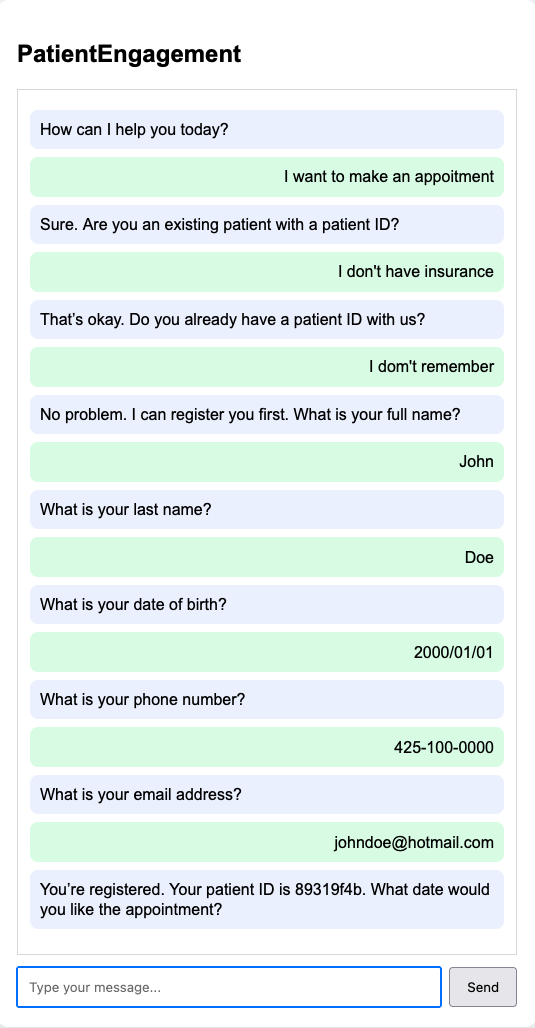
Demo Screenshot
Project Structure
Patient-Engagement-MCP-Server-and-Client/
│
├── README.md
├── requirements.txt
├── .env.example
│
├── app/
│   ├── __init__.py
│   │
│   ├── web/
│   │   ├── __init__.py
│   │   ├── app.py
│   │   ├── templates/
│   │   └── static/
│   │
│   ├── agent/
│   │   ├── __init__.py
│   │   ├── agent.py
│   │   └── prompts.py
│   │
│   ├── client/
│   │   ├── __init__.py
│   │   └── mcp_client.py
│   │
│   ├── servers/
│   │   ├── __init__.py
│   │   ├── mcp_patient_data_server.py
│   │   └── mcp_scheduling_server.py
│   │
│   ├── db/
│   │   ├── __init__.py
│   │   ├── database.py
│   │   └── schema.sql
│   │
│   └── config.py
│
├── data/
│   └── patient_engagement.db
│
└── tests/
    ├── test_patient_server.py
    └── test_scheduling_server.py
Components
Web UI
Location:
app/web/app.py
Responsibilities:
- Accept user questions
- Display AI responses
- Communicate with AI Agent
AI Agent (MCP Host)
Location:
app/agent/agent.py
Responsibilities:
- Interpret user requests
- Select appropriate MCP tools
- Call MCP servers through MCP client
- Generate final responses
MCP Client
Location:
app/client/mcp_client.py
Responsibilities:
- Connect to MCP servers
- Discover tools
- Execute MCP tool calls
- Read MCP context resources
MCP Context Resources
The MCP servers expose reusable context through resources:
context://patient-data/overviewpolicy://registration/washington-onlypolicy://registration/adult-onlypatient://{patient_id}/contextcontext://scheduling/overviewappointments://{patient_id}/context
The AI Agent loads the static context and policy resources during startup so tool selection and final responses can use server-provided context.
Patient Data MCP Server
Location:
app/servers/mcp_patient_data_server.py
Example tools:
- get_patient
- search_patients
- update_patient
Scheduling MCP Server
Location:
app/servers/mcp_scheduling_server.py
Example tools:
- get_appointments
- create_appointment
- cancel_appointment
Database Layer
Location:
app/db/database.py
Responsibilities:
- SQLite connection management
- CRUD operations
- Data persistence
Installation
Clone repository:
git clone https://github.com/nguyener/Patient-Engagement-MCP-Server-and-Client.git
cd Patient-Engagement-MCP-Server-and-Client
Create virtual environment:
python -m venv venv
source venv/bin/activate
Install dependencies:
pip install -r requirements.txt
Running the Application
Start Patient Data MCP Server
From project root:
python -m app.servers.mcp_patient_data_server
Start Scheduling MCP Server
From project root:
python -m app.servers.mcp_scheduling_server
Start Web Application
From project root:
python -m app.web.app
Open browser:
http://localhost:5000
Example Questions
Patient Queries:
- Show patient 1001
- Find patient John Smith
- Update patient email
Appointment Queries:
- Show appointments for patient 1001
- Schedule appointment for next Monday
- Cancel appointment 2005
Technologies
- Python
- Flask
- SQLite
- Model Context Protocol (MCP)
- OpenAI SDK
- HTML/CSS/JavaScript
Future Enhancements
- Authentication and authorization
- Notification MCP Server
- Email and SMS integration
- FHIR integration
- Oracle Health EHR integration
- Vector search and semantic patient lookup
- Multi-agent orchestration
- LangGraph workflow support
from github.com/nguyener/Patient-Engagement-MCP-Server-and-Client
Installing Patient Engagement MCP Server And Client
This server has no published package — it is built from source. Open the repository and follow its README.
▸ github.com/nguyener/Patient-Engagement-MCP-Server-and-ClientFAQ
Is Patient Engagement MCP Server And Client MCP free?
Yes, Patient Engagement MCP Server And Client MCP is free — one-click install via Unyly at no cost.
Does Patient Engagement MCP Server And Client need an API key?
No, Patient Engagement MCP Server And Client runs without API keys or environment variables.
Is Patient Engagement MCP Server And Client hosted or self-hosted?
Self-hosted: the server runs locally on your machine via the install command above.
How do I install Patient Engagement MCP Server And Client in Claude Desktop, Claude Code or Cursor?
Open Patient Engagement MCP Server And Client on unyly.org, pick your client tab (Claude Desktop, Claude Code, Cursor) and press Install — the config is generated automatically, no JSON editing.
Related MCPs
Fetch
Web content fetching and conversion for efficient LLM usage.
AWS KB Retrieval
Retrieval from AWS Knowledge Base using Bedrock Agent Runtime.
 by modelcontextprotocol
Spring AI MCP Server
Provides auto-configuration for setting up an MCP server in Spring Boot applications.
llm-analysis-assistant
A very streamlined mcp client that supports calling and monitoring stdio/sse/streamableHttp, and can also view request responses through the /logs page. It also
 by xuzexin-hz
MCP-Agent
A simple, composable framework to build agents using Model Context Protocol by [LastMile AI](https://www.lastmileai.dev)
 by lastmile-ai
Spring AI MCP Client
Provides auto-configuration for MCP client functionality in Spring Boot applications.
mcp.natoma.ai
A Hosted MCP Platform to discover, install, manage and deploy MCP servers by [Natoma Labs](https://www.natoma.ai)
MCPHub
Website to list high quality MCP servers and reviews by real users. Also provide online chatbot for popular LLM models with MCP server support.
MCP Servers Rating and User Reviews
Website to rate MCP servers, write authentic user reviews, and [search engine for agent & mcp](http://www.deepnlp.org/search/agent)
mkinf
An Open Source registry of hosted MCP Servers to accelerate AI agent workflows.
Compare Patient Engagement MCP Server And Client with
Not sure what to pick?
Find your stack in 60 seconds
Author?
Embed badge for your README
Browse similar
All ai MCPs