
PostgreSQL SSH Server
FreeNot checkedA secure PostgreSQL MCP server with built-in SSH tunneling that enables AI assistants to connect to databases through bastion hosts automatically, supporting bo

About
A secure PostgreSQL MCP server with built-in SSH tunneling that enables AI assistants to connect to databases through bastion hosts automatically, supporting both STDIO and Streamable HTTP transports.
README
npm version npm downloads license
A secure PostgreSQL MCP server with built-in SSH tunneling. Connect to databases through bastion hosts automatically — no manual ssh -L required.
Features
- Dual Transport — STDIO for Claude Desktop, Streamable HTTP for ChatGPT
- SSH Tunneling — Built-in tunnel with auto-reconnect and TOFU (trust on first use)
- Read-Only by Default — Safe for production; enable writes explicitly
- OAuth Support — Auth0 integration for secure ChatGPT connections
- Connection Pooling — Efficient resource management with configurable limits
Architecture
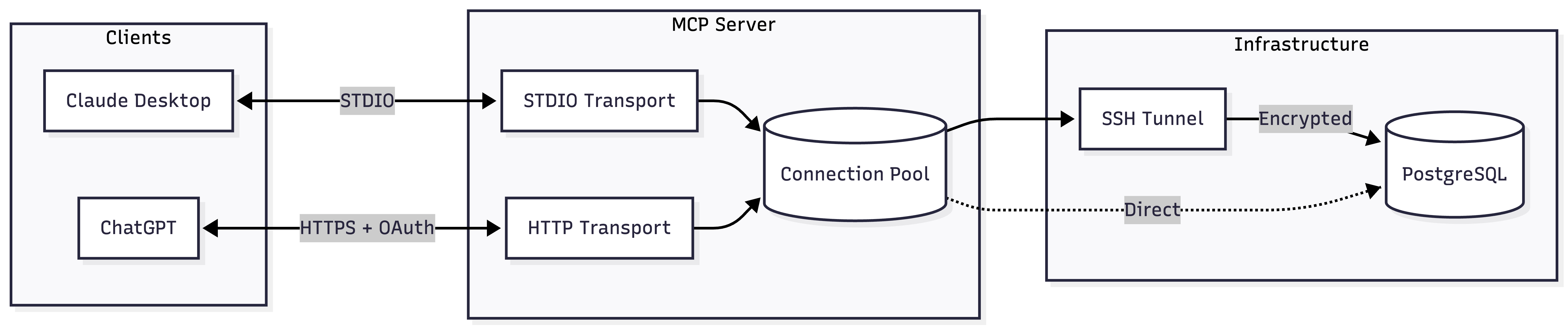
Quick Start
Claude Desktop (STDIO)
Add to your Claude Desktop config:
| Platform | Config Location |
|---|---|
| macOS | ~/Library/Application Support/Claude/claude_desktop_config.json |
| Windows | %APPDATA%/Claude/claude_desktop_config.json |
{
  "mcpServers": {
    "postgres": {
      "command": "npx",
      "args": ["-y", "@zlash65/postgresql-ssh-mcp"],
      "env": {
        "DATABASE_URI": "postgresql://user:password@localhost:5432/mydb"
      }
    }
  }
}
ChatGPT (Streamable HTTP)
DATABASE_URI="postgresql://user:pass@localhost:5432/mydb" npx @zlash65/postgresql-ssh-mcp-http
Then configure ChatGPT to connect to https://your-subdomain.example.com/mcp.
Note: ChatGPT requires HTTPS. Use a tunnel (ngrok, Cloudflare Tunnel) for local testing.
Available Tools
Query Tools
| Tool | Description |
|---|---|
execute_query |
Execute SQL with parameterized queries. Results capped by MAX_ROWS. |
explain_query |
Get EXPLAIN plans in text, JSON, YAML, or XML format. Supports ANALYZE. |
Schema Tools
| Tool | Description |
|---|---|
list_schemas |
List database schemas. Excludes system schemas by default. |
list_tables |
List tables with row counts and sizes. Optionally include views. |
describe_table |
Get columns, constraints, and indexes for a table. |
list_databases |
List all databases with owner, encoding, and size. |
Admin Tools
| Tool | Description |
|---|---|
get_connection_status |
Get pool stats, tunnel state, and connection info. |
list_active_connections |
Show active connections from pg_stat_activity. |
list_long_running_queries |
Find queries running longer than a threshold. |
get_database_version |
Get PostgreSQL server version. |
get_database_size |
Get database size and largest tables. |
get_table_stats |
Get vacuum/analyze stats and scan counts for a table. |
Environment Variables
Database Connection
| Variable | Required | Default | Description |
|---|---|---|---|
DATABASE_URI |
Yes* | — | Full connection string (e.g., postgresql://user:pass@host:5432/db) |
DATABASE_HOST |
Yes* | — | Database hostname |
DATABASE_PORT |
No | 5432 |
Database port |
DATABASE_NAME |
Yes* | — | Database name |
DATABASE_USER |
Yes* | — | Database username |
DATABASE_PASSWORD |
Yes* | — | Database password |
*Either DATABASE_URI or all individual connection variables are required.
SSL Configuration
| Variable | Default | Description |
|---|---|---|
DATABASE_SSL |
Auto | true or false. Auto-enabled for non-localhost. |
DATABASE_SSL_CA |
— | Path to CA certificate bundle |
DATABASE_SSL_REJECT_UNAUTHORIZED |
true |
Set false to allow self-signed certificates |
SSH Tunnel
| Variable | Required | Default | Description |
|---|---|---|---|
SSH_ENABLED |
No | false |
Set true to enable SSH tunneling |
SSH_HOST |
Yes* | — | SSH server hostname |
SSH_PORT |
No | 22 |
SSH server port |
SSH_USER |
Yes* | — | SSH username |
SSH_PRIVATE_KEY_PATH |
Yes** | — | Path to private key file |
SSH_PRIVATE_KEY_PASSPHRASE |
No | — | Passphrase for encrypted keys |
SSH_PASSWORD |
Yes** | — | SSH password (alternative to key) |
SSH_STRICT_HOST_KEY |
No | true |
Verify host key against known_hosts |
SSH_TRUST_ON_FIRST_USE |
No | true |
Auto-add unknown hosts (when strict is enabled) |
SSH_KNOWN_HOSTS_PATH |
No | ~/.ssh/known_hosts |
Custom known_hosts file |
SSH_KEEPALIVE_INTERVAL |
No | 10000 |
Keepalive interval in milliseconds |
SSH_MAX_RECONNECT_ATTEMPTS |
No | 5 |
Max reconnect attempts (-1 for unlimited) |
*Required when SSH_ENABLED=true
**Either SSH_PRIVATE_KEY_PATH or SSH_PASSWORD is required
Query Behavior
| Variable | Default | Description |
|---|---|---|
READ_ONLY |
true |
Block data modifications. Set false to allow writes. |
MAX_ROWS |
1000 |
Maximum rows returned per query |
QUERY_TIMEOUT |
30000 |
Query timeout in milliseconds |
MAX_CONCURRENT_QUERIES |
10 |
Maximum concurrent queries |
POOL_DRAIN_TIMEOUT_MS |
5000 |
Timeout for draining pool during reconnect |
HTTP Server (Streamable HTTP only)
| Variable | Default | Description |
|---|---|---|
PORT |
3000 |
HTTP server port |
MCP_HOST |
0.0.0.0 |
HTTP server bind address |
MCP_AUTH_MODE |
none |
Authentication mode: none or oauth |
MCP_STATELESS |
true |
Stateless mode (each request re-initializes) |
MCP_SERVER_POOL_SIZE |
4 |
Server instances for stateless mode |
MCP_SESSION_TTL_MINUTES |
30 |
Session TTL for stateful mode |
MCP_SESSION_CLEANUP_INTERVAL_MS |
300000 |
Session cleanup interval |
MCP_ALLOWED_ORIGINS |
— | Comma-separated allowed CORS origins (* for any) |
MCP_ALLOWED_HOSTS |
— | Comma-separated allowed Host headers |
OAuth (Auth0)
| Variable | Required | Description |
|---|---|---|
AUTH0_DOMAIN |
Yes* | Auth0 tenant domain (e.g., tenant.us.auth0.com) |
AUTH0_AUDIENCE |
Yes* | Auth0 API identifier / audience |
MCP_RESOURCE_DOCUMENTATION |
No | URL to API documentation (RFC 9728) |
*Required when MCP_AUTH_MODE=oauth
Documentation
| Guide | Description |
|---|---|
| STDIO Setup | Claude Desktop and local development |
| Streamable HTTP | HTTP server setup and configuration |
| Server Setup | Deploy to production with nginx and SSL |
| ChatGPT Setup | Complete Auth0 OAuth setup for ChatGPT |
Docker
STDIO Server
docker build --target runtime -t postgresql-mcp .
docker run -e DATABASE_URI="postgresql://..." postgresql-mcp
HTTP Server
docker build --target runtime-http -t postgresql-mcp-http .
docker run -p 3000:3000 -e DATABASE_URI="postgresql://..." postgresql-mcp-http
Development
# Install dependencies
npm install

# Build
npm run build

# Run tests
npm test

# Type check
npm run typecheck

# Lint
npm run lint
Installing PostgreSQL SSH Server
This server has no published package — it is built from source. Open the repository and follow its README.
▸ github.com/Zlash65/postgresql-ssh-mcpFAQ
Is PostgreSQL SSH Server MCP free?
Yes, PostgreSQL SSH Server MCP is free — one-click install via Unyly at no cost.
Does PostgreSQL SSH Server need an API key?
No, PostgreSQL SSH Server runs without API keys or environment variables.
Is PostgreSQL SSH Server hosted or self-hosted?
A hosted option is available: Unyly runs the server in the cloud, no local setup required.
How do I install PostgreSQL SSH Server in Claude Desktop, Claude Code or Cursor?
Open PostgreSQL SSH Server on unyly.org, pick your client tab (Claude Desktop, Claude Code, Cursor) and press Install — the config is generated automatically, no JSON editing.
Related MCPs
Fetch
Web content fetching and conversion for efficient LLM usage.
Roblox Studio
Enables AI coding tools to control Roblox Studio for workspace exploration, instance manipulation, and script management. It provides tools for playtesting, sce
 by paralov
Opencode Omniroute Plugin
OpenCode plugin for the OmniRoute AI Gateway. Drives dynamic model discovery, /connect auth flow, and multi-instance OmniRoute providers via the official @openc
 by GitHub Actions
AWS KB Retrieval
Retrieval from AWS Knowledge Base using Bedrock Agent Runtime.
 by modelcontextprotocol
Spring AI MCP Server
Provides auto-configuration for setting up an MCP server in Spring Boot applications.
llm-analysis-assistant
A very streamlined mcp client that supports calling and monitoring stdio/sse/streamableHttp, and can also view request responses through the /logs page. It also
 by xuzexin-hz
MCP-Agent
A simple, composable framework to build agents using Model Context Protocol by [LastMile AI](https://www.lastmileai.dev)
 by lastmile-ai
Spring AI MCP Client
Provides auto-configuration for MCP client functionality in Spring Boot applications.
mcp.natoma.ai
A Hosted MCP Platform to discover, install, manage and deploy MCP servers by [Natoma Labs](https://www.natoma.ai)
MCPHub
Website to list high quality MCP servers and reviews by real users. Also provide online chatbot for popular LLM models with MCP server support.
Compare PostgreSQL SSH Server with
Not sure what to pick?
Find your stack in 60 seconds
Author?
Embed badge for your README
Browse similar
All ai MCPs