
PowerGPT
FreeNot checkedA remote MCP server deployed on Cloudflare Workers that provides deterministic arithmetic tools and URL fetching capabilities to enhance LLM accuracy and enable

About
A remote MCP server deployed on Cloudflare Workers that provides deterministic arithmetic tools and URL fetching capabilities to enhance LLM accuracy and enable web access for offline models.
README
Kingsley Leung (Zihong Liang)
A small, focused remote MCP (Model Context Protocol) server deployed on Cloudflare Workers that exposes customised tools to remote MCP clients.
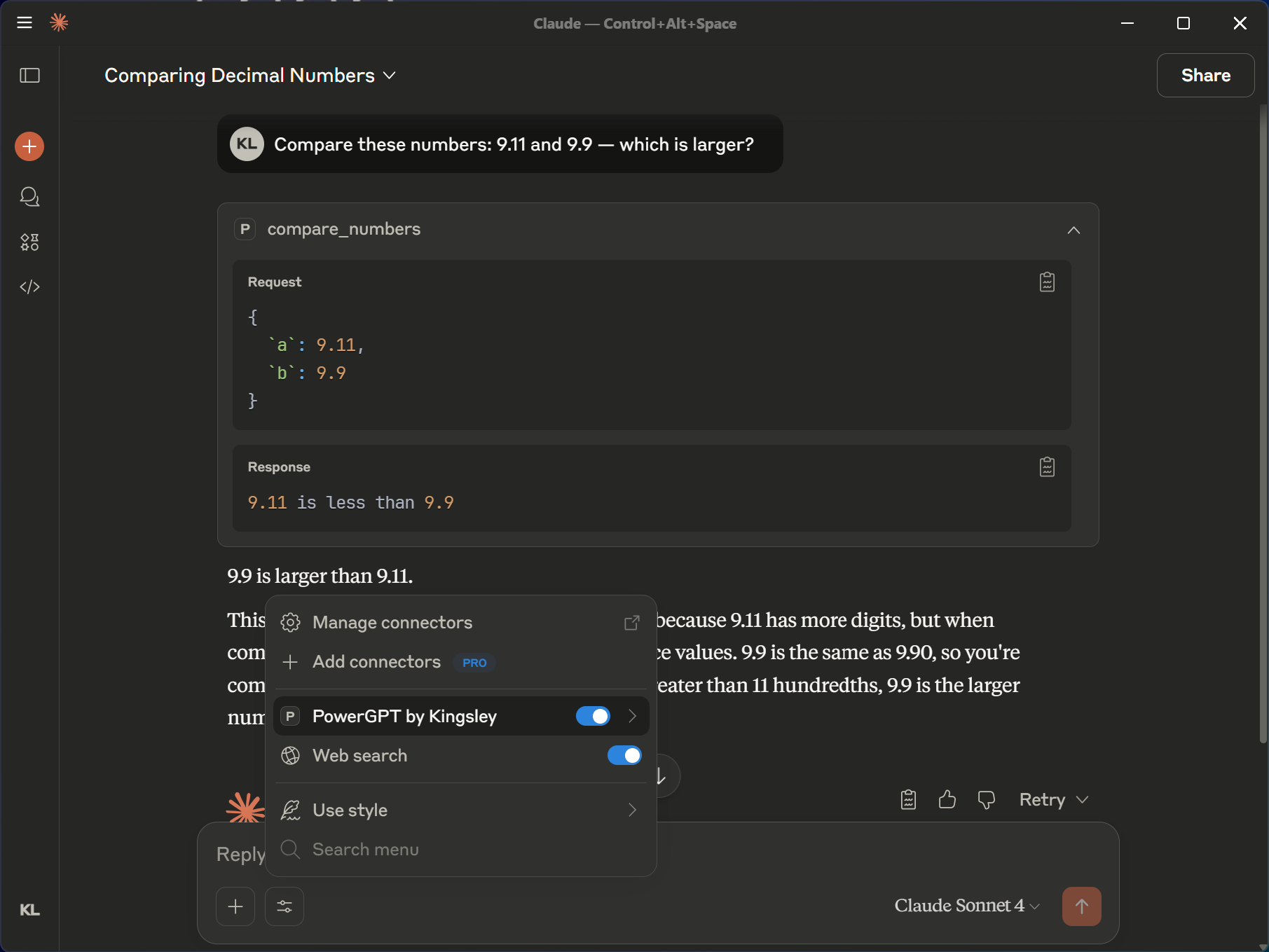
Why this project exists 💡
- Large language models still struggle with basic arithmetic and numeric reasoning. Short, viral examples like the "9.11 vs 9.9, which is bigger" question highlighted how easily models can make simple mistakes (see this article for one viral example: https://towardsdatascience.com/9-11-or-9-9-which-one-is-higher-6efbdbd6a025/). This project provides reliable, auditable tools (for example, calculators) that can be plugged into LLM workflows via MCP so clients can delegate numeric tasks to a deterministic service.
- I also noticed some locally hosted LLMs may not have internet access. To address this, the server includes an MCP tool that extracts and returns text from a URL. That lets offline or restricted models access web content via the MCP while centralising fetching and sanitisation, which improves security and auditability.
Live deployment 🚀
- Example deployed URL:
https://power-gpt.kingsleyleung2003.workers.dev/mcp
Available tools 🧰
Below are the MCP tools currently exposed by this server. Each tool lists its purpose and the input parameters it expects.
- 🔢 calculate_add — Simple addition
- Inputs:
a: number,b: number
- Inputs:
- ➖ calculate_subtract — Simple subtraction
- Inputs:
a: number,b: number
- Inputs:
- ✖️ calculate_multiply — Simple multiplication
- Inputs:
a: number,b: number
- Inputs:
- ➗ calculate_divide — Simple division (returns an error if dividing by zero)
- Inputs:
a: number,b: number
- Inputs:
- ^ calculate_exponent — Exponentiation (base ** exponent)
- Inputs:
base: number,exponent: number
- Inputs:
- √ calculate_root — Extract the n-th root of a number (error if
root === 0)- Inputs:
number: number,root: number
- Inputs:
- % calculate_modulus — Modulus (a % b; error if divisor is zero)
- Inputs:
a: number,b: number
- Inputs:
- ! calculate_factorial — Factorial of a non-negative integer (errors on negative/non-integer)
- Inputs:
n: number
- Inputs:
- 🔁 calculate_fibonacci — Fibonacci number at a 0-indexed position (errors on negative/non-integer)
- Inputs:
position: number
- Inputs:
- 🔎 check_prime — Primality check (errors for <= 1 or non-integer)
- Inputs:
n: number
- Inputs:
- 🧮 calculate_gcd — Greatest common divisor (integers required)
- Inputs:
a: number,b: number
- Inputs:
- 🔗 calculate_lcm — Least common multiple (integers required)
- Inputs:
a: number,b: number
- Inputs:
- ⚖️ compare_numbers — Compare two numbers (less than / greater than / equal)
- Inputs:
a: number,b: number
- Inputs:
- 🎲 random_number — Generate a random number within a range (uses drand with Math.random fallback)
- Inputs:
startRange: number,endRange: number
- Inputs:
- 🌐 fetch_url — Fetch a URL and extract readable content (returns title + markdown). Handles HTTP errors and parsing failures.
- Inputs:
url: string(must be a valid URL)
- Inputs:
Get started ▶️
Connect from Cloudflare AI Playground
- Open https://playground.ai.cloudflare.com/
- Enter the MCP server SSE/endpoint URL:
https://power-gpt.kingsleyleung2003.workers.dev/mcp - Use the tools from the playground UI.
Connect Claude Desktop (or other local MCP clients)
Prerequisites
Follow Anthropic's Quickstart
In Claude Desktop go to Settings > Developer > Edit Config
Update with this configuration:
{
  "mcpServers": {
    "PowerGPT by Kingsley": {
      "command": "bun x",
      "args": [
        "mcp-remote",
        "https://power-gpt.kingsleyleung2003.workers.dev/mcp"
      ]
    }
  }
}
Tech stack 🛠️
- TypeScript
- Bun
- Cloudflare Workers (serverless runtime)
- Wrangler (Cloudflare CLI) / Cloudflare dashboard for deployment
- Model Context Protocol (MCP) for tooling integration
- mcp-remote (local proxy for MCP servers)
- Cloudflare AI Playground and Claude Desktop for testing and clients
- GitHub Actions for auto deployment
- Docker
Project layout 📁
src/— Worker entry and tool definitions (src/index.ts)wrangler.jsonc,package.json,tsconfig.json— project config and build setup
Deploy to your Cloudflare Workers 🚀
This will deploy your MCP server to a URL like: power-gpt.<your-account>.workers.dev/sse
Local deployment 🖥️
- Prerequisites
- Bun - Download
bun install
bun start
Local deployment — Docker
You can run the project inside Docker for a reproducible local environment.
Build the image and run a container:
# Build the image (run from repo root)
docker build -t power-gpt .

# Run the container and publish the app port to the host
docker run -p 8787:8787 power-gpt:latest
Installing PowerGPT
This server has no published package — it is built from source. Open the repository and follow its README.
▸ github.com/KingsleyLeung03/power-gptFAQ
Is PowerGPT MCP free?
Yes, PowerGPT MCP is free — one-click install via Unyly at no cost.
Does PowerGPT need an API key?
No, PowerGPT runs without API keys or environment variables.
Is PowerGPT hosted or self-hosted?
A hosted option is available: Unyly runs the server in the cloud, no local setup required.
How do I install PowerGPT in Claude Desktop, Claude Code or Cursor?
Open PowerGPT on unyly.org, pick your client tab (Claude Desktop, Claude Code, Cursor) and press Install — the config is generated automatically, no JSON editing.
Related MCPs
Fetch
Web content fetching and conversion for efficient LLM usage.
AWS KB Retrieval
Retrieval from AWS Knowledge Base using Bedrock Agent Runtime.
 by modelcontextprotocol
Spring AI MCP Server
Provides auto-configuration for setting up an MCP server in Spring Boot applications.
llm-analysis-assistant
A very streamlined mcp client that supports calling and monitoring stdio/sse/streamableHttp, and can also view request responses through the /logs page. It also
 by xuzexin-hz
Compare PowerGPT with
Not sure what to pick?
Find your stack in 60 seconds
Author?
Embed badge for your README
Browse similar
All ai MCPs