
Proxy302
FreeNot checkedOfficial Proxy302 MCP server: residential proxies, usage and IP checks as tools for Claude, Cursor and other AI agents. Local (npx) or hosted at proxy302.com/v1

About
Official Proxy302 MCP server: residential proxies, usage and IP checks as tools for Claude, Cursor and other AI agents. Local (npx) or hosted at proxy302.com/v1/mcp.
README
proxy302-mcp
Official Proxy302 MCP server, built and maintained by the Proxy302 team. For account, billing or connection questions contact Proxy302 support; for bugs in this server, open a GitHub issue.
Give your AI assistant a real residential-proxy toolbox. proxy302-mcp is a Model Context Protocol server for Proxy302: check your traffic and usage, browse countries and plans, get a rotating residential proxy URL for any country, list your proxies and static IPs, and fetch a web page through a proxy, all from Claude Code, Claude Desktop, Cursor or any MCP client.
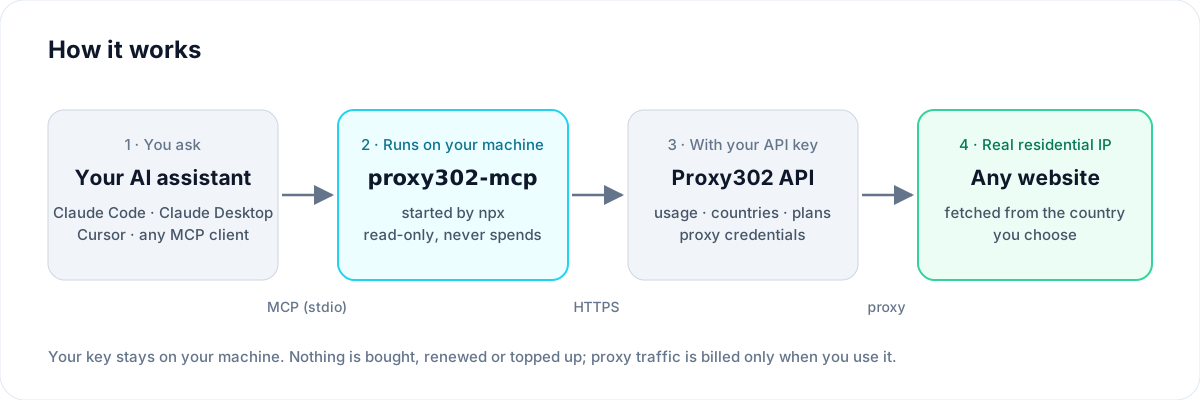
v1 is deliberately read-only and spend-free: it never buys, renews or tops up anything. The one write it can do (creating a dynamic proxy credential) is free, off by default, and only bills traffic when you actually use it.
Hosted server (no install)
Proxy302 also runs this server for you. Create an API key in the Proxy302 console first.
Add to Cursor Install in VS Code Install in VS Code Insiders
One click adds https://mcp.proxy302.com/mcp; the app then opens the Proxy302 sign-in window, where you paste your API key once (key id:secret). Deleting the key in the console disconnects it.
- Claude (claude.ai, Claude Desktop): Settings → Connectors → Add custom connector, URL
https://mcp.proxy302.com/mcp. - ChatGPT (developer mode): create a connector with the same URL and OAuth.
- Cursor, VS Code, Windsurf and other MCP clients: the same URL, no headers needed.
Sign in with OAuth: add https://mcp.proxy302.com/mcp as a custom connector in Claude, ChatGPT or any client that supports MCP sign-in, and paste your API key once in the sign-in window. In Claude Code:
claude mcp add --transport http proxy302 https://mcp.proxy302.com/mcp
Then run /mcp in Claude Code to sign in.
Or send the key as a header: use https://proxy302.com/v1/mcp with Authorization: Bearer <key id>:<secret>.
claude mcp add --transport http proxy302 https://proxy302.com/v1/mcp --header "Authorization: Bearer <key id>:<secret>"
Cursor (~/.cursor/mcp.json):
{
  "mcpServers": {
    "proxy302": {
      "url": "https://proxy302.com/v1/mcp",
      "headers": { "Authorization": "Bearer <key id>:<secret>" }
    }
  }
}
The hosted server has the same tools except fetch_url, plus rotate_ip (fresh exit IP for sticky proxies), check_ip_purity (blocklist score of your static IPs, or of the IPs a location would hand out next) and estimate_cost (quote a plan against your wallet). It never spends money either.
Run it locally
- Create an API key in the Proxy302 console and note its key id and secret.
- Install:
claude mcp add proxy302 -e PROXY302_API_KEY="<key id>:<secret>" -- npx -y github:proxy302/proxy302-mcp
Requires Node.js 20+.
Bonus: Proxy302 credits 1 PTC to paid accounts the first time a call through proxy302-mcp succeeds (once per account).
Claude Desktop
claude_desktop_config.json:
{
  "mcpServers": {
    "proxy302": {
      "command": "npx",
      "args": ["-y", "github:proxy302/proxy302-mcp"],
      "env": { "PROXY302_API_KEY": "<key id>:<secret>" }
    }
  }
}
Cursor
~/.cursor/mcp.json (or .cursor/mcp.json in a project):
{
  "mcpServers": {
    "proxy302": {
      "command": "npx",
      "args": ["-y", "github:proxy302/proxy302-mcp"],
      "env": { "PROXY302_API_KEY": "<key id>:<secret>" }
    }
  }
}
Tools
| Tool | What it does |
|---|---|
get_account_usage |
Account, wallet (PTC) balance, remaining prepaid traffic, per-pool balance and daily usage for the last N days |
list_countries |
Countries you can target, with ids and ISO codes (name filter) |
list_regions |
States of a country, or cities of a state |
list_products |
Product lines and static IP plans (data center and residential) |
get_dynamic_proxy |
A ready http://user:pass@host:port rotating residential URL for a country (state/city where supported). Reuses an existing proxy; create_if_missing=true creates one |
list_my_proxies |
Your dynamic proxies and static IPs, passwords masked unless asked |
fetch_url |
Request a URL through your proxy (optionally from a given country) and return Markdown, text or raw |
Not in v1, on purpose: purchases, renewals, top-ups.
Examples
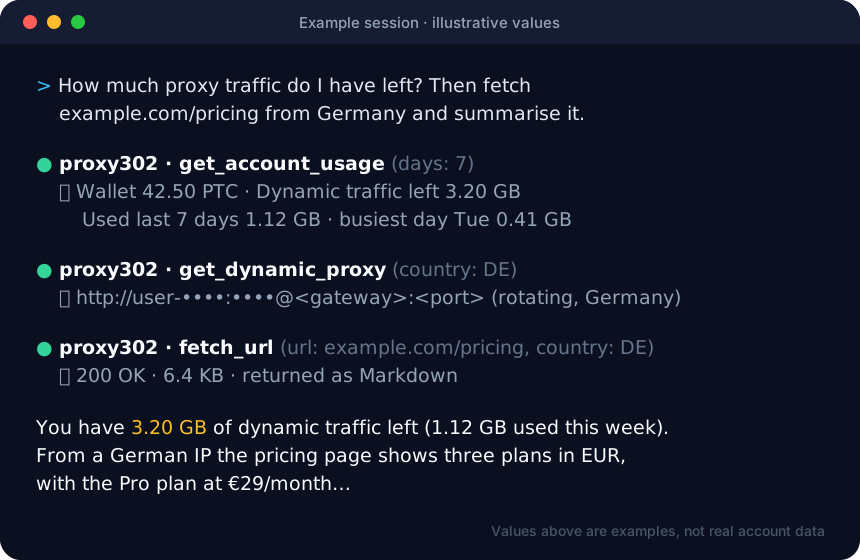
Ask your assistant:
- "How much proxy traffic do I have left, and what did I use this week?"
- "Which countries can I use? Get me a Germany proxy."
- "Fetch https://example.com/pricing from a US exit and summarise it."
- "List my static IPs that expire in the next 7 days."
Use the proxy in Playwright
get_dynamic_proxy returns host, port, username and password:
import { chromium } from 'playwright';

const browser = await chromium.launch({
  proxy: { server: 'http://HOST:PORT', username: 'USERNAME', password: 'PASSWORD' },
});
const page = await browser.newPage();
await page.goto('https://ipinfo.io/json');
console.log(await page.textContent('body'));
Use the proxy in browser-use
from browser_use import Agent, Browser, BrowserConfig

browser = Browser(config=BrowserConfig(
    proxy={"server": "http://HOST:PORT", "username": "USERNAME", "password": "PASSWORD"},
))
agent = Agent(task="Open ipinfo.io and tell me the country", llm=llm, browser=browser)
fetch_url is a plain HTTP request without JavaScript rendering. For JavaScript-heavy sites, hand the proxy URL to a browser as above.
Configuration
| Variable | Meaning |
|---|---|
PROXY302_API_KEY |
Required. <key id>:<secret>, or a Basic ... token |
PROXY302_API_SECRET |
Optional; use with PROXY302_API_KEY holding only the key id |
PROXY302_BASE_URL |
Optional; default https://proxy302.com |
Credentials are read from the environment only. Never commit them. Requests identify themselves with User-Agent: proxy302-mcp/<version> and X-Proxy302-Client.
Development
npm install
npm run build
npm test
PROXY302_API_KEY="<id>:<secret>" npm run smoke   # read-only checks against the live API
License
MIT
Installing Proxy302
This server has no published package — it is built from source. Open the repository and follow its README.
▸ github.com/proxy302/proxy302-mcpFAQ
Is Proxy302 MCP free?
Yes, Proxy302 MCP is free — one-click install via Unyly at no cost.
Does Proxy302 need an API key?
No, Proxy302 runs without API keys or environment variables.
Is Proxy302 hosted or self-hosted?
Self-hosted: the server runs locally on your machine via the install command above.
How do I install Proxy302 in Claude Desktop, Claude Code or Cursor?
Open Proxy302 on unyly.org, pick your client tab (Claude Desktop, Claude Code, Cursor) and press Install — the config is generated automatically, no JSON editing.
Related MCPs
Opencode Omniroute Plugin
OpenCode plugin for the OmniRoute AI Gateway. Drives dynamic model discovery, /connect auth flow, and multi-instance OmniRoute providers via the official @openc
 by GitHub Actions
Roblox Studio
Enables AI coding tools to control Roblox Studio for workspace exploration, instance manipulation, and script management. It provides tools for playtesting, sce
 by paralov
Antigravity Drawio
MCP server that enables AI assistants to create, parse, render, and validate Draw.io diagrams programmatically.
 by S-SUJAN-S
Fetch
Web content fetching and conversion for efficient LLM usage.
AWS KB Retrieval
Retrieval from AWS Knowledge Base using Bedrock Agent Runtime.
 by modelcontextprotocol
Spring AI MCP Server
Provides auto-configuration for setting up an MCP server in Spring Boot applications.
llm-analysis-assistant
A very streamlined mcp client that supports calling and monitoring stdio/sse/streamableHttp, and can also view request responses through the /logs page. It also
 by xuzexin-hz
MCP-Agent
A simple, composable framework to build agents using Model Context Protocol by [LastMile AI](https://www.lastmileai.dev)
 by lastmile-ai
Spring AI MCP Client
Provides auto-configuration for MCP client functionality in Spring Boot applications.
mcp.natoma.ai
A Hosted MCP Platform to discover, install, manage and deploy MCP servers by [Natoma Labs](https://www.natoma.ai)
Compare Proxy302 with
Not sure what to pick?
Find your stack in 60 seconds
Author?
Embed badge for your README
Browse similar
All ai MCPs