
Rackhands
FreeNot checkedOut-of-band server management for humans and AI agents: Redfish (iDRAC, iLO, XCC, Supermicro) with IPMI fallback. Read-only by default; dangerous ops need two k

About
Out-of-band server management for humans and AI agents: Redfish (iDRAC, iLO, XCC, Supermicro) with IPMI fallback. Read-only by default; dangerous ops need two keys + confirmation. CLI + MCP server, single Go binary.
README

rackhands
Remote hands for your racks, for you and your AI agent. One binary that reads and operates server BMCs across vendors. Redfish on Dell iDRAC, HPE iLO, Lenovo XCC, Supermicro and any DMTF-conformant BMC, with IPMI as the fallback. Nothing that can take a machine down runs until you allow it and confirm it.
Every vendor speaks its own Redfish dialect. The hardware log is Sel on iDRAC, IML on iLO, PlatformLog on XCC and Log1 on Supermicro. The health rollup hides in a different OEM block on each, and each one accepts a different set of reset types. Older and cheaper boxes speak only IPMI. The existing Redfish MCP servers either cover one vendor, or give an agent set_power_state with nothing in between. rackhands normalises the reads and puts every dangerous operation behind two keys, a plan and a confirmation.
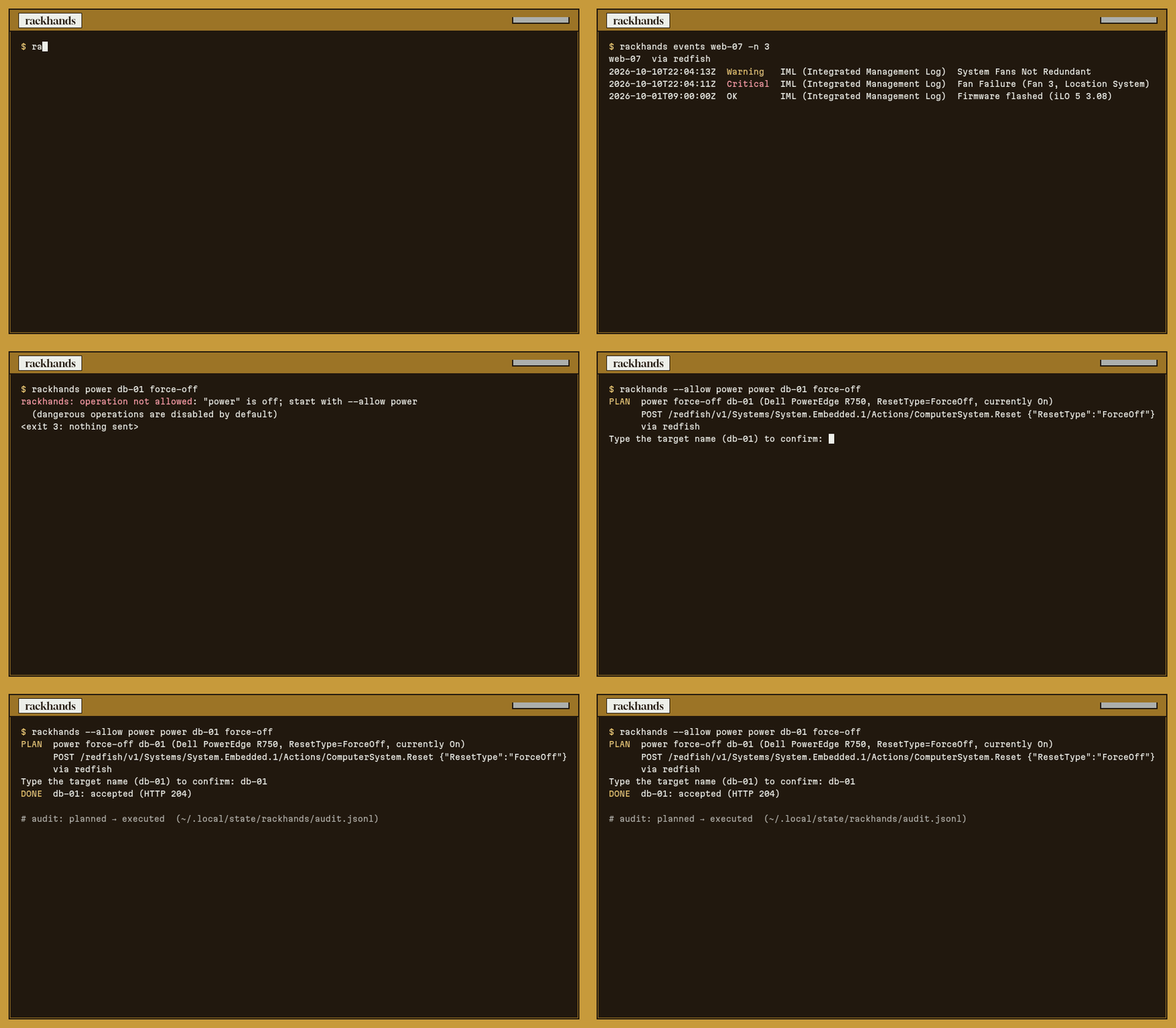
Landing page: https://blackman99.github.io/rackhands/ · Docs: https://blackman99.github.io/rackhands/docs/
Install
go install github.com/Blackman99/rackhands/cmd/rackhands@latest
Or download a single static binary for linux / macOS / windows from Releases.
Usage
$ rackhands health
CRITICAL  db-01  (Dell, via redfish)
   Critical  subsystem power supplies  — iDRAC rollup
   Critical  subsystem storage  — iDRAC rollup
   Critical  psu PS2 Status  — reading 0 W
   Critical  drive Physical Disk 0:1:2  — failed · HDD 2.4 TB ST2400MM0129 · Bay 2 · S/N WBN0K2L7 · on PERC H755 Front
   Warning   volume pgdata  — degraded · RAID5 4.8 TB · on PERC H755 Front
   storage   1 controller · 5 drives (1 Critical) · 2 volumes (1 Warning)
CRITICAL  web-07  (HPE, via redfish)
   Critical  fan Fan 3  — reading 0 %
   Warning   drive Drive 0  — 6% media life left · SSD 1.6 TB MO001600JWTBT · Slot=12:Port=1I:Box=1:Bay=1 · S/N S5H0NA0R301442 · on HPE MR416i-a Gen10+
   Warning   drive Drive 2  — failure predicted · HDD 4 TB MB004000JWJTT · Slot=12:Port=1I:Box=1:Bay=3 · S/N ZC1A7K2Q · on HPE MR416i-a Gen10+
   storage   1 controller · 4 drives (2 Warning) · 2 volumes
OK        k8s-12  (Lenovo, via redfish)
   storage   1 controller · 2 drives · 1 volume
WARNING   lab-x10  (Supermicro, via ipmi (fallback))
   Warning   temperature PSU2 Temp  — reading 117 C
   storage   not checked: IPMI has no controller, drive or RAID volume data (needs Redfish)
$ rackhands events web-07 --min critical      # iLO IML, same shape as the iDRAC SEL
$ rackhands power db-01 force-off
rackhands: operation not allowed: "power" is off; start with --allow power (dangerous operations are disabled by default)
Targets live in ~/.config/rackhands/targets.yaml (example). Use --host https://bmc --user root for a one-off.
Storage: health reads RAID controllers, drives and volumes too, and a failed drive or a degraded volume is enough to make it exit 1. rackhands storage [TARGET...] prints the full tables (add --problems for only what is not OK, --json for scripts). A drive also counts as a Warning when the BMC still says OK but predicts a failure, or reports less than 10% media life left. rackhands handles the PERC RAID.SL.* / RAID.Integrated.* ids and RaidStatus on Dell, the iLO 4 Smart Array OEM tree (SmartStorage) on HPE, drives that Supermicro links from /Chassis, and BMCs that only have SimpleStorage. It is a read: it needs no --allow, writes nothing and is not audited. IPMI has no storage data, so an IPMI-only target says "needs Redfish" and rackhands does not guess.
$ rackhands storage db-01 --problems
CRITICAL  db-01  (Dell, via redfish, Storage)  1 controller · 5 drives (1 Critical) · 2 volumes (1 Warning)
  DRIVE                MEDIA    SIZE    HEALTH    LOCATION  NOTE
  Physical Disk 0:1:2  SAS HDD  2.4 TB  Critical  Bay 2     Failed
  VOLUME  RAID   SIZE    HEALTH   DRIVES  STATE
  pgdata  RAID5  4.8 TB  Warning  3       Degraded
TLS: BMCs usually ship a self-signed certificate. insecure: true is the lazy default; prefer pinning the leaf SHA-256 with tls_fingerprint: (print it with rackhands tls-fingerprint TARGET) or a real ca_file with insecure: false. When tls_fingerprint is set it is the trust model for that target — a mismatch fails closed and does not fall through to insecure.
Dangerous operations (power, boot, bmc-reset, firmware, virtual-media) need all of the following:
--allow CLASSwhen you start rackhands.allow: [CLASS]on that target in the config.- Exactly one named target.
- A confirmation: you type the target name, or pass
--yes <name>. Over MCP it is a single-use token, bound to the exact request, that the agent only gets back after it shows you the plan.
Every plan and execution is appended to an audit log. --dry-run shows the exact request and stops.
Watching a firmware update: add --wait and rackhands follows the task the BMC returns until it ends. It reads the Redfish Task or task monitor, the iDRAC job on Dell, and the UpdateService flash state on HPE iLO 5. It keeps polling while the BMC restarts to apply its own firmware and stops at wait_timeout (default 30m). Ctrl-C stops the watching, not the update. The outcome (state, BMC-side duration) goes into the audit log next to the execution. --wait opens no gate: the update still needs --allow firmware, allow: and the confirmation.
$ rackhands --allow firmware firmware-update db-01 https://repo/iDRAC.EXE --yes db-01 --wait
SENT  db-01: accepted (HTTP 202), task /redfish/v1/TaskService/Tasks/JID_001
      watching JID_001 until it ends (at most 30m; Ctrl-C stops watching, not the update)
WAIT  db-01 JID_001  Running      40% ████░░░░░░  Installing the iDRAC firmware package.  12s
DONE  db-01: JID_001 completed in 3m02s — Job completed successfully.
rackhands task TARGET lists tasks and jobs, and rackhands task TARGET ID --wait watches one. Both are read-only and need no --allow. A Dell job scheduled for the next reboot ends as STAGED (exit 0). A failed, cancelled or timed-out task exits 4, and the last line says why and what to run next.
For agents: rackhands mcp is an MCP server on stdio. It is read-only by default; get_health carries the storage section and get_storage returns the full controller / drive / volume lists. Dangerous tools are not even listed unless their class is allowed.
Defence in depth: give the agent a read-only BMC account. rackhands' gate lives in rackhands. The strongest guarantee lives in the BMC: an account with the Redfish
ReadOnlyrole (iLO: no Virtual Power and Reset / iLO Config privileges) or IPMIUserprivilege cannot power anything off, whatever runs with it. Every read command works with such an account. Keep a separate, privileged config for humans.rackhands inventory(and the MCPget_inventorytool) shows the effective privilege of the account each target logs in with, read-only, and warns when a target with no dangerousallow:classes logs in as Operator or Administrator:$ rackhands inventory TARGET VIA VENDOR … POWER ACCOUNT db-01 redfish Dell … On rackhands-ro (ReadOnly) x11 redfish Supermicro … On ADMIN (Administrator, can power off) WARN x11: logs in as Administrator, which can power off or reconfigure this machine, but no dangerous class is allowed for it; use a read-only BMC account (Redfish ReadOnly role, IPMI User privilege)
{"mcpServers": {"rackhands": {"command": "rackhands", "args": ["mcp"], "env": {"BMC_PASSWORD": "…"}}}}
CI runs the binary against the DMTF Redfish-Mockup-Server, serving the DMTF mockup plus Dell, HPE (iLO 5 and iLO 4), Lenovo and Supermicro mockups, and against OpenIPMI ipmi_sim (test/integration.sh).
See GOAL.md, ROADMAP.md, CONTRIBUTING.md. MIT licensed.
Installing Rackhands
This server has no published package — it is built from source. Open the repository and follow its README.
▸ github.com/Blackman99/rackhandsFAQ
Is Rackhands MCP free?
Yes, Rackhands MCP is free — one-click install via Unyly at no cost.
Does Rackhands need an API key?
No, Rackhands runs without API keys or environment variables.
Is Rackhands hosted or self-hosted?
Self-hosted: the server runs locally on your machine via the install command above.
How do I install Rackhands in Claude Desktop, Claude Code or Cursor?
Open Rackhands on unyly.org, pick your client tab (Claude Desktop, Claude Code, Cursor) and press Install — the config is generated automatically, no JSON editing.
Related MCPs
Opencode Omniroute Plugin
OpenCode plugin for the OmniRoute AI Gateway. Drives dynamic model discovery, /connect auth flow, and multi-instance OmniRoute providers via the official @openc
 by GitHub Actions
Roblox Studio
Enables AI coding tools to control Roblox Studio for workspace exploration, instance manipulation, and script management. It provides tools for playtesting, sce
 by paralov
Antigravity Drawio
MCP server that enables AI assistants to create, parse, render, and validate Draw.io diagrams programmatically.
 by S-SUJAN-S
Fetch
Web content fetching and conversion for efficient LLM usage.
AWS KB Retrieval
Retrieval from AWS Knowledge Base using Bedrock Agent Runtime.
 by modelcontextprotocol
Spring AI MCP Server
Provides auto-configuration for setting up an MCP server in Spring Boot applications.
llm-analysis-assistant
A very streamlined mcp client that supports calling and monitoring stdio/sse/streamableHttp, and can also view request responses through the /logs page. It also
 by xuzexin-hz
MCP-Agent
A simple, composable framework to build agents using Model Context Protocol by [LastMile AI](https://www.lastmileai.dev)
 by lastmile-ai
Spring AI MCP Client
Provides auto-configuration for MCP client functionality in Spring Boot applications.
mcp.natoma.ai
A Hosted MCP Platform to discover, install, manage and deploy MCP servers by [Natoma Labs](https://www.natoma.ai)
Compare Rackhands with
Not sure what to pick?
Find your stack in 60 seconds
Author?
Embed badge for your README
Browse similar
All ai MCPs