
RateMyProfessors Server
FreeNot checkedAn unofficial MCP server for RateMyProfessors.com that enables fetching professor ratings, reviews, and comments. Integrates with MCP clients like Claude Deskto

About
An unofficial MCP server for RateMyProfessors.com that enables fetching professor ratings, reviews, and comments. Integrates with MCP clients like Claude Desktop.
README

An unofficial MCP Server implementation for RateMyProfessors.com.
It allows you to fetch a professor's ratings, reviews and comments with an MCP client.
Features
- Search for professors by name and school.
- Get ratings, reviews, and comments.
- Easy integration with MCP clients like (Claude Desktop, VSCode, etc.).
Requirements
- Node.js 16 or newer (install node if you haven't)
- Claude Desktop or any other MCP client
Installation
Clone the repository and install dependencies:
git clone https://github.com/tohmze/ratemyprofessors-mcp.git
cd ratemyprofessors-mcp
npm install
Build the server
npm run build
Testing the MCP Server with Claude Desktop
Setup Claude Desktop Config file
To use the ratemyprofessors MCP server, you’ll need to set it up in Claude for Desktop. Open the configuration file located at ~/Library/Application Support/Claude/claude_desktop_config.json with a text editor. If the file isn’t there yet, go ahead and create it.
If you have VSCode, Open with:
- Mac:
code ~/Library/Application\ Support/Claude/claude_desktop_config.json - Windows:
code $env:AppData\Claude\claude_desktop_config.json
Copy the appropriate configuration snippet for your OS below and replace the placeholder path with the absolute path to your build folder.
macOS / Linux
{
  "mcpServers": {
    "rate-my-prof": {
      "command": "node",
      "args": ["/ABSOLUTE/PATH/TO/PARENT/FOLDER/ratemyprofessors-mcp/build/index.js"]
    }
  }
}
Windows
{
  "mcpServers": {
    "rate-my-prof": {
      "command": "node",
      "args": ["C:\\PATH\\TO\\PARENT\\FOLDER\\ratemyprofessors-mcp\\build\\index.js"]
    }
  }
}
Open Claude for Desktop
Click The Tool
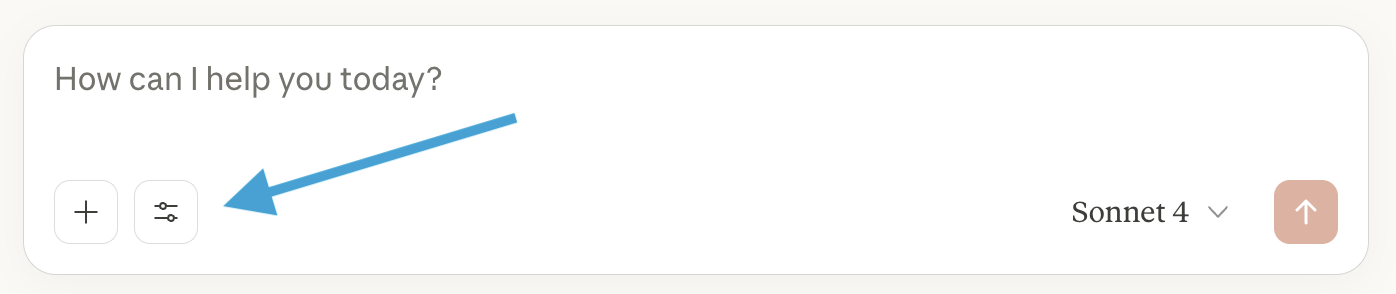
You should see the rate-my-prof tool listed
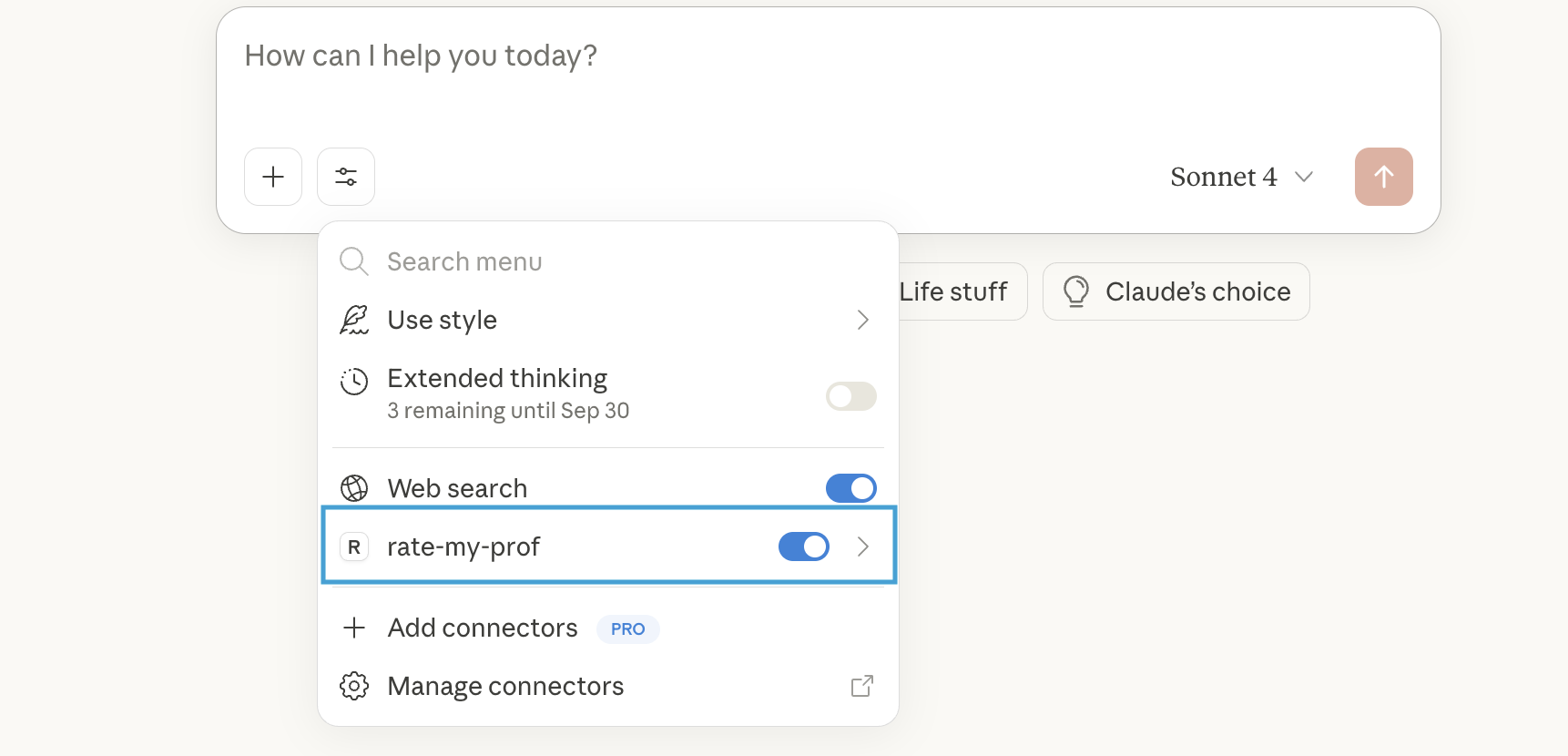
Congrats 🥳 the server is ready to use!
Demo
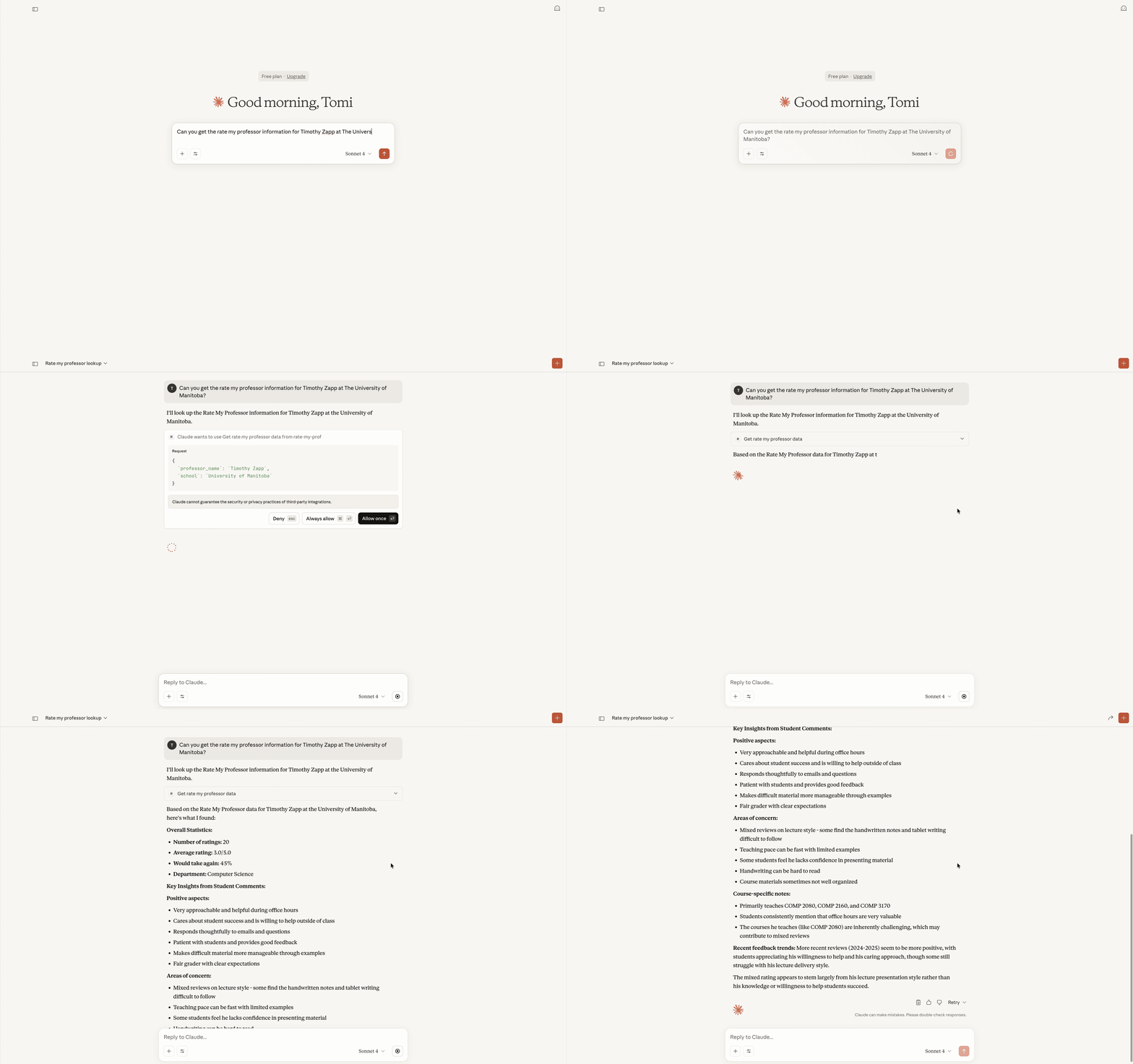
Demo of using the RateMyProf MCP server in Claude Desktop:
Acknowledgements
This project uses the rmp-ts-api Typescript Wrapper API by @DeveloperMindset123. Big thanks for making it!
Install RateMyProfessors Server in Claude Desktop, Claude Code & Cursor
unyly install ratemyprofessors-mcp-serverInstalls into Claude Desktop, Claude Code, Cursor & VS Code — handles npx, uvx and build-from-source repos for you.
First time? Get the CLI: curl -fsSL https://unyly.org/install | sh
Or configure manually
Run in your terminal:
claude mcp add ratemyprofessors-mcp-server -- npx -y github:tohmze/ratemyprofessors-mcpFAQ
Is RateMyProfessors Server MCP free?
Yes, RateMyProfessors Server MCP is free — one-click install via Unyly at no cost.
Does RateMyProfessors Server need an API key?
No, RateMyProfessors Server runs without API keys or environment variables.
Is RateMyProfessors Server hosted or self-hosted?
Self-hosted: the server runs locally on your machine via the install command above.
How do I install RateMyProfessors Server in Claude Desktop, Claude Code or Cursor?
Open RateMyProfessors Server on unyly.org, pick your client tab (Claude Desktop, Claude Code, Cursor) and press Install — the config is generated automatically, no JSON editing.
Related MCPs
Fetch
Web content fetching and conversion for efficient LLM usage.
AWS KB Retrieval
Retrieval from AWS Knowledge Base using Bedrock Agent Runtime.
 by modelcontextprotocol
Spring AI MCP Server
Provides auto-configuration for setting up an MCP server in Spring Boot applications.
llm-analysis-assistant
A very streamlined mcp client that supports calling and monitoring stdio/sse/streamableHttp, and can also view request responses through the /logs page. It also
 by xuzexin-hz
Compare RateMyProfessors Server with
Not sure what to pick?
Find your stack in 60 seconds
Author?
Embed badge for your README
Browse similar
All ai MCPs