
Salesforce Mcp Lib
FreeNot checkedSalesforce MCP Library is a local stdio bridge for Salesforce MCP endpoints using OAuth client credentials, featuring a reusable Apex MCP library and JSON-RPC 2

About
Salesforce MCP Library is a local stdio bridge for Salesforce MCP endpoints using OAuth client credentials, featuring a reusable Apex MCP library and JSON-RPC 2.0 core.
README
Open-source bridge connecting AI agents to Salesforce via Model Context Protocol.
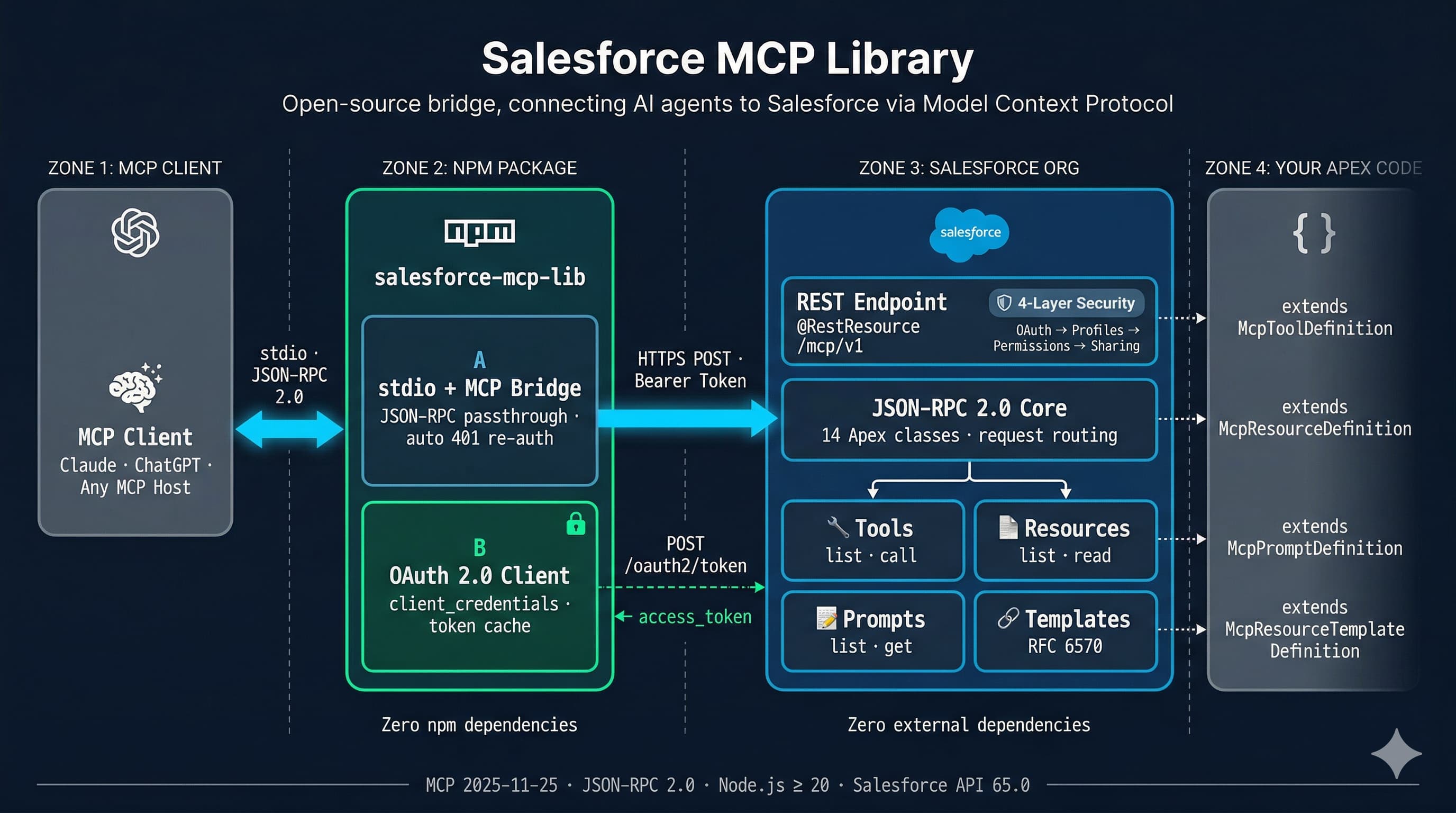
Two packages, zero external dependencies:
| Package | What it does | Install |
|---|---|---|
| Apex framework (2GP unlocked) | JSON-RPC 2.0 core + MCP server running natively in your Salesforce org | sf package install |
| npm stdio proxy | OAuth 2.0 lifecycle + stdio-to-HTTPS bridge — configure once, run forever. Optional when the consumer already handles Salesforce tokens. | npx salesforce-mcp-lib |
How it works
- MCP Client (Claude, ChatGPT, any MCP host) sends JSON-RPC 2.0 messages over stdio
- npm proxy authenticates via OAuth 2.0 (client credentials or per-user login), forwards requests over HTTPS, and handles token refresh automatically
- Apex MCP Server dispatches requests to your registered tools, resources, and prompts — all running inside Salesforce with full platform security
Steps 1–2 apply when using the npm proxy. If your MCP host can reach the Apex endpoint directly over HTTPS with a valid Bearer token, only step 3 is required.
The Apex server is stateless — it rebuilds its handler chain on every request. No session cleanup, no state bugs, no cross-request data leakage.
When you need the proxy (and when you don't)
The Apex @RestResource endpoint is the MCP server — it implements JSON-RPC 2.0, capability negotiation, and all tool/resource/prompt dispatch. The TypeScript proxy is an authentication and transport bridge, not protocol logic. Most MCP clients support both stdio and HTTP, so the proxy's main value is not the transport — it is OAuth token lifecycle management: acquire a token, cache it, refresh it on expiry, and re-authenticate on 401. Configure once, run forever.
You need the proxy when your MCP host does not manage Salesforce OAuth tokens on its own. This covers most desktop clients (Claude Desktop, Cursor, VS Code extensions) and any integration without a built-in Salesforce credential store.
You can skip the proxy when the consumer already handles Salesforce OAuth — for example, a cloud platform with native Salesforce connectors, an automation service like n8n, or a custom agent orchestration layer that acquires tokens, fires an agent with MCP, routes the response back, and repeats. The Apex endpoint is stateless, so there is no session to maintain between calls.
If you remove the proxy, you are not removing complexity. You are taking ownership of it in another place — specifically, OAuth token acquisition, refresh logic, and session management move into your consumer.
For a deeper discussion of both paths and the direct-connection requirements, see docs/architecture.md.
Security — 4 layers, 3 of them automatic
| Layer | Enforced by |
|---|---|
| OAuth 2.0 scopes | External Client App configuration |
| Profile permissions | Salesforce platform |
| Permission Sets | Salesforce platform |
| Sharing rules | Salesforce platform |
Why External Client Apps
This library uses the OAuth 2.0 client_credentials flow and is runtime-agnostic about which Salesforce app container issued the credentials. The project documentation intentionally standardizes on External Client Apps (ECA) so setup guidance stays ahead of Salesforce's platform direction.
Quick start
1. Install the Apex framework
sf package install --package 04tdL000000So9xQAC --target-org YOUR_ORG --wait 10
2. Create your MCP endpoint (2 Apex classes)
Endpoint — a @RestResource that wires up your capabilities. In this unlocked package, the framework API stays public; the endpoint itself is global because Apex REST entry points require it:
@RestResource(urlMapping='/mcp/minimal')
global inherited sharing class MinimalMcpEndpoint {
    @HttpPost
    global static void handlePost() {
        McpServer server = new McpServer();
        server.registerTool(new MinimalTool());
        server.handleRequest(RestContext.request, RestContext.response);
    }
}
Tool — extend the package's public McpToolDefinition base class and implement inputSchema(), validate(), execute():
public inherited sharing class MinimalTool extends McpToolDefinition {
    public MinimalTool() {
        this.name = 'echo';
        this.description = 'Echoes the provided message back to the caller';
    }
    public override Map<String, Object> inputSchema() {
        return new Map<String, Object>{
            'type' => 'object',
            'properties' => new Map<String, Object>{
                'message' => new Map<String, Object>{
                    'type' => 'string',
                    'description' => 'The message to echo'
                }
            },
            'required' => new List<String>{ 'message' }
        };
    }
    public override void validate(Map<String, Object> arguments) {
        if (!arguments.containsKey('message')) {
            throw new McpInvalidParamsException('message is required');
        }
    }
    public override McpToolResult execute(Map<String, Object> arguments) {
        String msg = (String) arguments.get('message');
        McpToolResult result = new McpToolResult();
        result.content = new List<McpTextContent>{ new McpTextContent(msg) };
        return result;
    }
}
3. Configure an External Client App
Option A — Client Credentials (service account, no user interaction):
Create an External Client App with OAuth 2.0 Client Credentials flow. Note the client_id and client_secret.
Option B — Per-User Auth (individual identity, recommended):
Create an External Client App with Authorization Code + PKCE flow. Callback URL: http://localhost:13338/oauth/callback. Scopes: api, refresh_token. See Per-User Auth Setup Guide for detailed steps.
4. Connect an AI agent
Per-User Auth (individual identity — recommended for Claude Code):
# One-time login in your terminal:
npx salesforce-mcp-lib login \
  --instance-url https://your-org.my.salesforce.com \
  --client-id YOUR_CLIENT_ID
Then add to Claude Code via /mcp → Add Server, or edit ~/.claude.json:
{
  "mcpServers": {
    "salesforce": {
      "command": "npx",
      "args": [
        "-y", "salesforce-mcp-lib",
        "--instance-url", "https://your-org.my.salesforce.com",
        "--client-id", "YOUR_CLIENT_ID",
        "--endpoint", "/services/apexrest/mcp/minimal"
      ]
    }
  }
}
Client Credentials (service account — existing behavior):
{
  "mcpServers": {
    "salesforce": {
      "command": "npx",
      "args": [
        "-y", "salesforce-mcp-lib",
        "--instance-url", "https://your-org.my.salesforce.com",
        "--client-id", "YOUR_CLIENT_ID",
        "--client-secret", "YOUR_CLIENT_SECRET",
        "--endpoint", "/services/apexrest/mcp/minimal"
      ]
    }
  }
}
The auth mode is auto-detected: --client-secret present → client credentials, absent → per-user auth.
That's it. The agent can now discover and invoke your Salesforce tools.
inherited sharing and with sharing help enforce record-level access defaults, but they don't enforce CRUD/FLS by themselves. Use explicit security checks when your tool reads or writes protected fields or objects.
All three MCP capabilities
Register tools, resources, and prompts in a single endpoint:
@RestResource(urlMapping='/mcp/e2e')
global inherited sharing class E2eHttpEndpoint {
    @HttpPost
    global static void handlePost() {
        McpServer server = new McpServer();
        server.registerTool(new ExampleQueryTool());
        server.registerResource(new ExampleOrgResource());
        server.registerPrompt(new ExampleSummarizePrompt());
        server.handleRequest(RestContext.request, RestContext.response);
    }
}
| Capability | Extend | Override |
|---|---|---|
| Tool | McpToolDefinition |
inputSchema(), validate(), execute() |
| Resource | McpResourceDefinition |
read() |
| Resource Template | McpResourceTemplateDefinition |
read(arguments) |
| Prompt | McpPromptDefinition |
get(arguments) |
See examples/ for complete working code.
CLI reference
MCP Server Mode
salesforce-mcp-lib [options]
| Option | Env variable | Required | Description |
|---|---|---|---|
--instance-url |
SF_INSTANCE_URL |
Yes | Salesforce org URL |
--client-id |
SF_CLIENT_ID |
Yes | External Client App consumer key |
--client-secret |
SF_CLIENT_SECRET |
No* | External Client App consumer secret |
--endpoint |
SF_ENDPOINT |
Yes | Apex REST endpoint path |
--callback-port |
SF_CALLBACK_PORT |
No | Local OAuth callback port (default: 13338) |
--log-level |
SF_LOG_LEVEL |
No | debug / info / warn / error (default: info) |
* When --client-secret is provided → client credentials flow. When omitted → per-user auth (requires prior login).
Login Subcommand (per-user auth)
salesforce-mcp-lib login [options]
| Option | Env variable | Required | Description |
|---|---|---|---|
--instance-url |
SF_INSTANCE_URL |
Yes | Salesforce org URL |
--client-id |
SF_CLIENT_ID |
Yes | External Client App consumer key |
--headless |
SF_HEADLESS |
No | Print auth URL instead of opening browser |
--callback-port |
SF_CALLBACK_PORT |
No | Local OAuth callback port (default: 13338) |
Tech stack
- Apex: Salesforce API 65.0 — 54 classes, zero external dependencies
- TypeScript: ES2022, Node.js >= 20 — 10 modules, zero npm production dependencies
- Protocol: MCP
2025-11-25, JSON-RPC 2.0 — all 11 MCP methods implemented - Packaging: Salesforce 2GP unlocked package (no namespace)
Project structure
force-app/main/
  json-rpc/classes/    # JSON-RPC 2.0 core (14 classes)
  mcp/classes/         # MCP server framework (40 classes)
packages/salesforce-mcp-lib/
  src/                 # TypeScript stdio proxy (10 modules)
  tests/               # Unit tests
examples/
  minimal/             # Single-tool echo example
  e2e-http-endpoint/   # Tools + resources + prompts
scripts/               # Build, deploy, and release scripts
Contributing
Contributions are welcome. Validate Apex changes in a fresh scratch org before submitting:
./scripts/org-create.sh your-alias
./scripts/org-test.sh
org-create.sh provisions a new scratch org, sets it as default, and deploys force-app. org-test.sh then runs the Apex test suite in that org. Run the existing TypeScript test suite as well before submitting:
cd packages/salesforce-mcp-lib && npm test && npm run lint
License
Installing Salesforce Mcp Lib
This server has no published package — it is built from source. Open the repository and follow its README.
▸ github.com/Damecek/salesforce-mcp-libFAQ
Is Salesforce Mcp Lib MCP free?
Yes, Salesforce Mcp Lib MCP is free — one-click install via Unyly at no cost.
Does Salesforce Mcp Lib need an API key?
No, Salesforce Mcp Lib runs without API keys or environment variables.
Is Salesforce Mcp Lib hosted or self-hosted?
Self-hosted: the server runs locally on your machine via the install command above.
How do I install Salesforce Mcp Lib in Claude Desktop, Claude Code or Cursor?
Open Salesforce Mcp Lib on unyly.org, pick your client tab (Claude Desktop, Claude Code, Cursor) and press Install — the config is generated automatically, no JSON editing.
Related MCPs
Fetch
Web content fetching and conversion for efficient LLM usage.
AWS KB Retrieval
Retrieval from AWS Knowledge Base using Bedrock Agent Runtime.
 by modelcontextprotocol
Spring AI MCP Server
Provides auto-configuration for setting up an MCP server in Spring Boot applications.
llm-analysis-assistant
A very streamlined mcp client that supports calling and monitoring stdio/sse/streamableHttp, and can also view request responses through the /logs page. It also
 by xuzexin-hz
Compare Salesforce Mcp Lib with
Not sure what to pick?
Find your stack in 60 seconds
Author?
Embed badge for your README
Browse similar
All ai MCPs