
Sample Crm Agent Eval
FreeNot checkedA serverless CRM on AWS, a multi-agent assistant built on Strands Agents, and two MCP patterns on Amazon Bedrock AgentCore Gateway. Together they form a measure

About
A serverless CRM on AWS, a multi-agent assistant built on Strands Agents, and two MCP patterns on Amazon Bedrock AgentCore Gateway. Together they form a measurement instrument. The same agentic tasks run against Anthropic and OpenAI models on Amazon Bedrock. The harness records correctness, write safety, tool use and token counts for each.
README
A serverless CRM on AWS, a multi-agent assistant built on Strands Agents, and two MCP patterns on Amazon Bedrock AgentCore Gateway: one Gateway exposes the CRM tools, one per action Lambda behind an identity interceptor, and a second exposes the assistant itself as a single chat tool. Together they form a measurement instrument: the same agentic CRM tasks run against Anthropic and OpenAI model families on Amazon Bedrock, and the harness records correctness, write safety, tool use and token counts for each. It measures. It does not declare a winner.
This is a demo and a research instrument, not a production CRM.
Contents
- Architecture
- Prerequisites
- Install
- Configure
- Deploy
- Use
- Teardown
- Limitations
- Development
- Repository layout
- Documentation
- License
Architecture
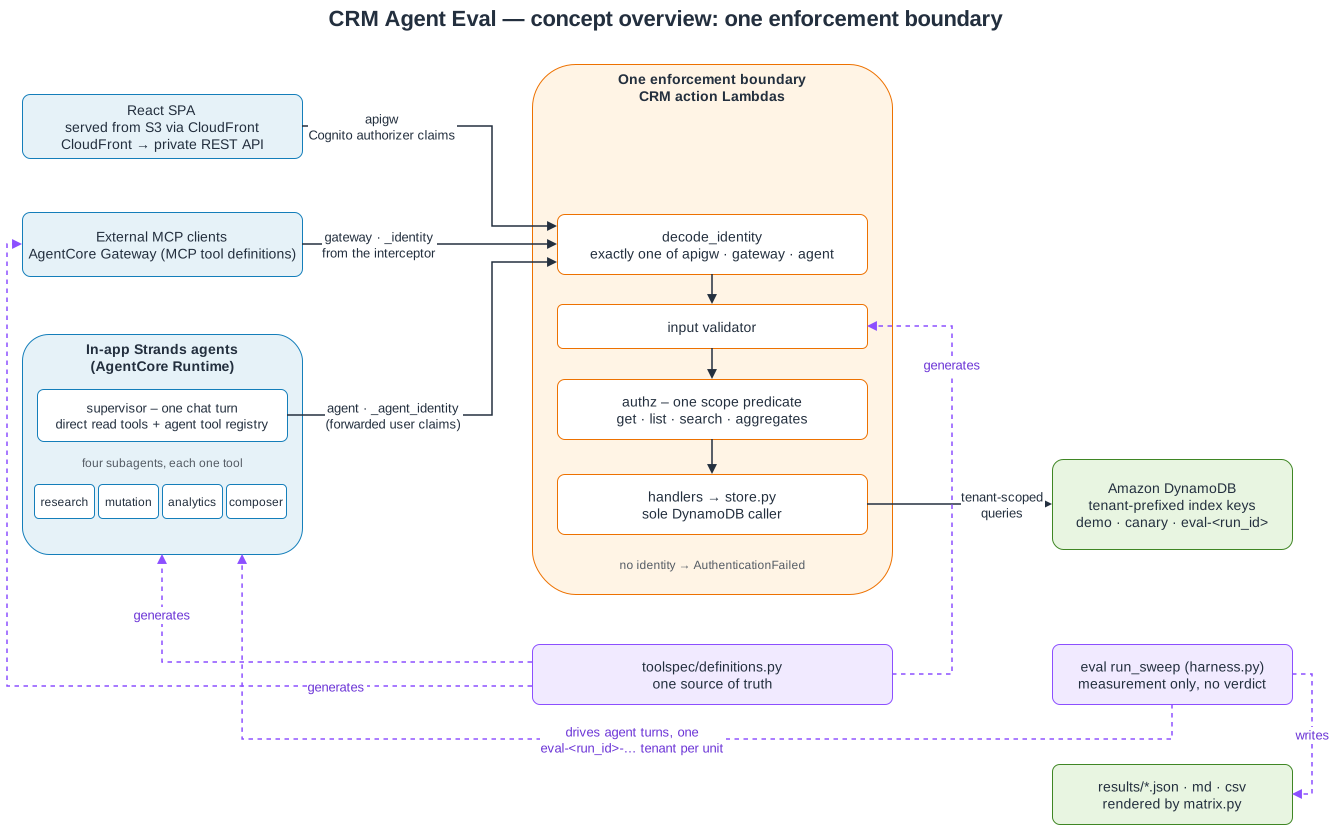
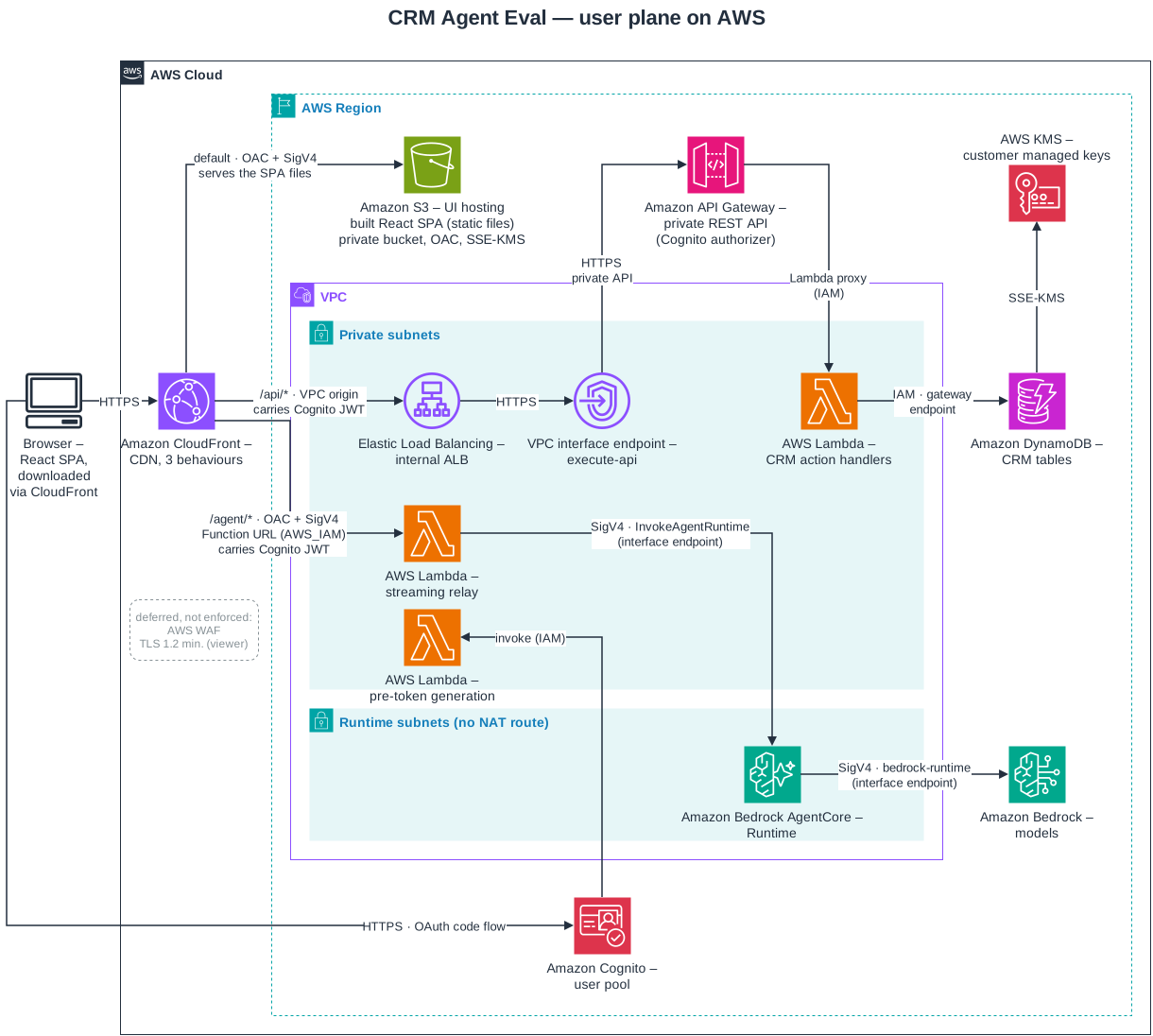
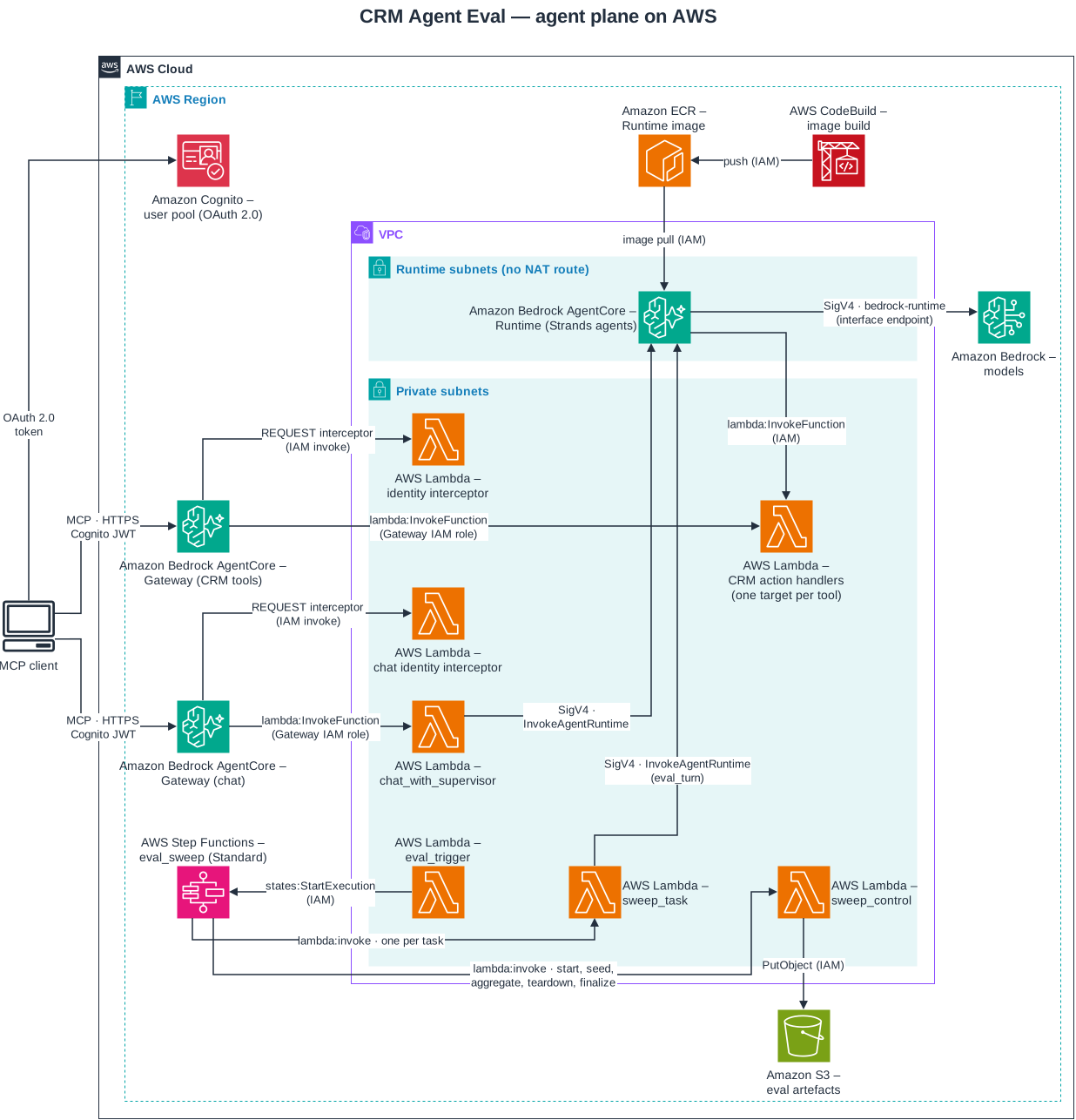
- One enforcement boundary. All three entry paths reach the same CRM action Lambdas, and authorization is enforced in those handlers only. Each handler decodes the caller's identity from exactly one channel: Cognito authorizer claims, the identity the Gateway interceptor injects, or the user claims the agent forwards. A request with no identity is refused.
- One tool definition.
src/crm/toolspec/definitions.pygenerates the handler input validators, the Gateway's MCP tool definitions and the agents' tool registry. A gate fails the build if any copy diverges. - Agents.
src/agents/supervisor.pyhandles each chat turn with direct read tools and four subagents: research, mutation, analytics and composer. High-risk changes go through a proposal that a user approves or rejects. No tool lets an agent commit one directly. - Relay.
src/relay/is a small Node.js Lambda. It verifies the Cognito token, calls the AgentCore Runtime with SigV4 and streams its server-sent events back unchanged. - Models. Every model call goes through Amazon Bedrock, signed with IAM credentials. The project reads and accepts no vendor or Bedrock API key.
- Tenants. Data is partitioned by tenant, and every index partition key includes the tenant.
- Hardening. Every Lambda and the API stage run active X-Ray tracing. Every CloudFront behaviour
carries the AWS-managed security-headers policy (HSTS,
X-Content-Type-Options,X-Frame-Options,Referrer-Policy,X-XSS-Protection). Every versioned bucket underinfra/expires noncurrent versions (the state-backend buckets thatinfra/bootstrap_state_backend.shcreates have no lifecycle rule), and the CloudTrail buckets have ACLs disabled. The smoke checks send their HTTP requests through one opener that refuses any URL scheme buthttps; the JWKS fetch inscripts/smoke/cognito_claims.pygoes through PyJWT instead.docs/security-baseline.mdlists the controls the plan-time gate enforces;docs/development.mdcovers the static-analysis configuration.
| Tenant | Contents |
|---|---|
demo |
the seeded data you use in the UI |
canary |
never seeded; checks assert that it stays empty, which shows that eval sweeps stay inside their own tenant |
eval-<run_id> and eval-<run_id>-a<arm>r<repeat> |
created for one eval sweep, one per (arm, repeat) so no unit sees another's writes, and deleted when the sweep ends |
Prerequisites
| Tool | Version |
|---|---|
| Python | exactly the version in .python-version (3.13.18); a newer host python3 makes pip install -e . fail |
| Node.js | 26.13.0 for frontend/ (frontend/.nvmrc); 24 or later for src/relay/ (deployed on the nodejs24.x Lambda runtime) |
| Terraform | 1.17.0 or later (licensed under BUSL-1.1); the AWS provider is pinned to 6.71.0 |
| Docker | for DynamoDB Local (amazon/dynamodb-local:3.3.2, pinned by digest in scripts/run_local_dynamodb.sh) |
| ShellCheck | 0.11.0 (pinned in CI); make verify runs it |
| gitleaks | 8.30.1 (pinned in CI); optional locally, where check_secret_scan skips without it |
AWS CLI v2, jq, git, zip, unzip, npm |
for packaging and deployment |
To deploy, you also need:
- An AWS account with access to the Bedrock models listed under Configure.
- An existing VPC with at least two private subnets in different Availability Zones, their route tables, and one internet-routed public subnet for the NAT gateway.
- One or more private subnets for the AgentCore Runtime, in AgentCore-supported Availability Zones.
- An API Gateway CloudWatch Logs role, set once per account and region. The REST API stage writes
access logs, and API Gateway accepts that only when the account's
cloudwatchRoleArnsetting names an IAM role thatapigateway.amazonaws.comcan assume, with theAmazonAPIGatewayPushToCloudWatchLogsmanaged policy. The stack itself does not create it. Check withaws apigateway get-account --profile default --region <region> --no-cli-pager. - A region in
infra/regions.json. You choose the region; it must be one the map lists (scripts/region_map.py regionslists them). The bootstrap root, the pre-deploy network check and the Runtime smoke check all read their AgentCore-supported zones from the map. The first two refuse a region it does not list, and the smoke check fails on one. See Deploying to another region.
In an account that has none of these, scripts/bootstrap_account.sh creates the VPC, its subnets
and route tables, and the API Gateway logging role and setting. See
Deploying into a new account.
Install
python3.13 -m venv .venv                   # the interpreter whose version matches .python-version
# On a version mismatch this prints "wrong interpreter" and installs no Python packages.
{ [ "$(.venv/bin/python --version)" = "Python $(cat .python-version)" ] || { echo "wrong interpreter" >&2; false; }; } &&
  .venv/bin/pip install --no-input --no-deps -r requirements.txt &&
  .venv/bin/pip install --no-input --no-deps -e .
(cd src/relay && npm ci)
(cd frontend && npm ci)
scripts/run_local_dynamodb.sh start        # DynamoDB Local on http://localhost:8000
requirements.txt is a fully pinned lock file, so install it with --no-deps.
Try it offline
These commands need no AWS credentials and cost nothing:
terraform -chdir=infra init -backend=false   # providers for the plan-time tests
make verify                                  # lint, types, unit, stub, integration and all offline gates
.venv/bin/python3 -m src.eval.harness                         # a stub eval sweep into results/stub/; no model call
Configure
AWS profile and region. scripts/deploy.sh, scripts/teardown.sh and
infra/bootstrap_state_backend.sh resolve the profile and region in this order: the --profile
and --region flags, then AWS_PROFILE and AWS_REGION, then default and us-east-1. Each
script passes the resolved pair to every aws and terraform call. The deploy and teardown scripts
refuse to run when AWS_ACCESS_KEY_ID or AWS_SESSION_TOKEN is set. Use a named profile.
Application code resolves the same way and then falls back to config/app.yaml (copy it from
config/app.yaml.example). The commands in this README write --region <region>: use any region
in infra/regions.json, for example us-east-1, and the same one in every command.
State backend (once per account). This script creates an encrypted S3 state bucket, an access
log bucket, a KMS key and a DynamoDB lock table, and writes the gitignored infra/backend.hcl:
CRM_EXPECTED_ACCOUNT_ID=<account-id> \
CRM_OPERATOR_PRINCIPAL_ARNS=arn:aws:iam::<account-id>:role/<operator-role> \
  infra/bootstrap_state_backend.sh --profile default --region <region>
The script refuses to run without CRM_EXPECTED_ACCOUNT_ID (or --expected-account-id), and when the
profile resolves to a different account. It also requires the operator list, from
CRM_OPERATOR_PRINCIPAL_ARNS (comma-separated) or a repeatable --operator-principal-arn. Use the
same ARNs as crm_operator_principal_arns below. Every run applies key, bucket and lock-table policies
that deny the backend to every other principal, and it refuses unless the caller is in the list. The access-log bucket uses SSE-S3, because S3 server access
logging does not deliver to an SSE-KMS bucket; the state bucket and lock table use the KMS key.
Terraform variables. Copy the example and replace every placeholder:
cp infra/terraform.tfvars.example infra/terraform.tfvars
After scripts/bootstrap_account.sh, you don't fill in the six network keys yourself.
scripts/render_vpc_tfvars.py writes vpc_id, vpc_private_subnet_ids,
vpc_private_route_table_ids, vpc_nat_public_subnet_id, vpc_runtime_subnet_ids and
vpc_runtime_route_table_ids from the bootstrap root's outputs, and leaves every other line as it
was.
| Variable | Required | Meaning |
|---|---|---|
vpc_id |
yes | the existing VPC to deploy into |
vpc_private_subnet_ids |
yes | at least two private subnets, in different Availability Zones, for Lambda and endpoint interfaces |
vpc_private_route_table_ids |
yes | those subnets' route tables, which get a NAT route and gateway endpoints |
vpc_nat_gateway_enabled |
yes | create a NAT gateway; with false the relay cannot fetch Cognito's signing keys and rejects every request |
vpc_nat_public_subnet_id |
when vpc_nat_gateway_enabled is true |
an internet-routed subnet for the NAT gateway, not in the private list; the plan fails when NAT is enabled and this is unset |
api_origin_ingress_security_group_ids |
yes | the CloudFront VPC origin security group (see Deploy) |
vpc_runtime_subnet_ids |
yes | private subnets for the AgentCore Runtime; the Runtime runs in VPC mode and the plan fails when this list is empty |
vpc_runtime_route_table_ids |
yes, for every Runtime subnet route table not already in vpc_private_route_table_ids (defaults to []) |
the Runtime subnets' route tables; each gets the S3 and DynamoDB gateway-endpoint associations and no NAT route. The Runtime pulls its ECR image layers from S3, and its security group allows egress only to the S3/DynamoDB prefix lists and the interface endpoints, so a Runtime subnet whose route table is in neither list has no S3 path and the image pull fails |
crm_operator_principal_arns |
yes | the IAM role or user ARNs of the operators who deploy, seed and test the stack, for example ["arn:aws:iam::<account-id>:role/<operator-role>"] (the role ARN, not an assumed-role session ARN). Only these principals and the project's Lambda roles can use the DynamoDB tables and their KMS key, and the other stores listed under Limitations; a plan run by anyone else fails. See "DynamoDB principal boundary" and "Store principal boundary" in docs/runbook.md for changing operators and recovery |
vpc_cidr_block |
no | the VPC's CIDR; defaults to 10.20.0.0/20 and must match the VPC |
service, environment, owner, cost_center, data_classification |
no | resource tags |
infra/variables.tf documents every variable. The deploy script refuses to apply while any
REPLACE_ME placeholder remains, including in api_origin_ingress_security_group_ids and the
Runtime and NAT keys.
Bedrock model access. Enable these inference profiles in the region you deploy to:
global.anthropic.claude-opus-5-5, global.anthropic.claude-sonnet-5-5,
global.anthropic.claude-haiku-5-5, global.openai.gpt-6-astra, global.openai.gpt-6.1-sol,
global.openai.gpt-6.1-terra and global.openai.gpt-6-luna. Each model's capabilities (effort scale, prompt-cache minimum, inference
profile) are in config/model_capabilities.yaml; they were measured in us-east-1. The global.
profiles are cross-region, so Bedrock can serve these models from other regions. The Runtime's
Bedrock grant is derived from that file, so the Runtime may invoke exactly the models it lists. Each family's model and effort
per tier are in config/models.yaml:
| Tier | Anthropic | OpenAI |
|---|---|---|
| supervisor | Claude Sonnet 5.5, effort medium |
GPT-6.1 Sol, effort medium |
| subagent | Claude Sonnet 5.5, effort low |
GPT-6.1 Terra, effort low |
| tool | Claude Haiku 5.5, effort low |
GPT-6 Luna, effort low |
These are the defaults. OpenAI is the in-product default family (default_family in
config/models.yaml): a user with no saved settings gets the OpenAI column at every tier, in the
tuning controls, in GET /api/capabilities and in each chat turn whose tuning names no family, from
the web app or the MCP chat Gateway. A saved setting takes precedence over the default. Eval sweeps
are not affected: every sweep runs both families, whatever default_family says.
Claude Opus 5.5 and GPT-6 Astra stay in config/model_capabilities.yaml
and remain selectable in the tuning controls, but neither is a default. Claude Sonnet 5.5 is the
default at two tiers: its assignable_tiers entry in that file lists the tiers config/models.yaml
may assign it to.
Tuning. A saved setting and a chat turn from the web app can set each tier's family, model and effort, and nothing else: there is no temperature parameter. An eval arm sets its family and the supervisor's effort. The tuning wire format is schema 3.
- API: a tuning that still carries
temperatureis refused with HTTP 400validation_failed. - Streaming relay: such a tuning is refused with an SSE
errorframe whoseerror_kindisinvalid_request. - MCP: a chat turn takes no tuning and uses the caller's saved settings. A call carrying any
argument besides
messageandconversation_id,temperatureincluded, returns aninvalid_requesterror result. - Effort fallback: a tier whose effort is left unset uses the effort
config/models.yamlgives that tier, when the tier uses its configured model, and otherwise the model's own default. - Stored-row migration: saved settings are stored as version-2 rows; an older row is still read, with any recorded temperature ignored, and is rewritten at the next save. A saved setting that names a model no longer configured falls back to the defaults and says so.
Data retention. A live sweep with the OpenAI models needs the account's Bedrock data-retention
mode to allow them. Check it read-only with
aws bedrock get-account-data-retention --region <region>. The setting applies to the whole
account, so the account owner decides whether to change it. This project never changes it.
Deploy
Deploying creates billable resources: a NAT gateway, an AgentCore Runtime and Gateway, CloudFront, Lambda, API Gateway, DynamoDB, KMS keys, logs and Bedrock usage.
scripts/package_lambdas.sh        # Python Lambda zips; clears infra/build/lambda except relay.zip
scripts/package_relay.sh          # relay zip; the two can run in either order
CRM_EXPECTED_ACCOUNT_ID=<account-id> scripts/deploy.sh --profile default --region <region>
CRM_EXPECTED_ACCOUNT_ID is required. scripts/deploy.sh refuses before rendering, initialising
or applying anything when it is unset, is not 12 digits, differs from the account named in
infra/backend.hcl, or differs from the account the profile resolves to.
scripts/deploy.sh runs the pre-deploy checks, applies Terraform, publishes the SPA and its
config.json, and writes results/tf-outputs.json. Its other flags are --template PATH,
--no-auto-approve (needs a terminal) and --skip-frontend. It applies without prompting by
default.
First deployment. This takes two applies, because AWS creates the CloudFront VPC origin security group only when the VPC origin is first created:
Set
api_origin_ingress_security_group_idsto a security group that already exists in the VPC. The groups this stack creates do not exist yet, so create an empty placeholder group. A group with no members admits nothing to the load balancer:aws ec2 create-security-group --profile default --region <region> --no-cli-pager --vpc-id <vpc-id> \ --group-name crm-agent-eval-bootstrap --description "Placeholder for the first apply" \ --query GroupId --output textRun
scripts/deploy.sh./api/*fails until step 2 is done.Read the id of the group AWS created, set it in
infra/terraform.tfvarsand runscripts/deploy.shagain. After that apply you can delete the placeholder group:aws ec2 describe-security-groups --profile default --region <region> --no-cli-pager \ --filters Name=vpc-id,Values=<vpc-id> Name=group-name,Values=CloudFront-VPCOrigins-Service-SG \ --query 'SecurityGroups[].GroupId' --output text
After deploying, an unauthenticated request to https://<cloudfront_domain_name>/api/...
should return 401 or 403. A 502 or 504 means the API origin is unreachable. To run the full
deployed-resource checks:
make verify-deploy VERIFY_DEPLOY_ARGS="--i-understand-this-is-billable"
docs/runbook.md covers each step, its common failures and the per-layer checks.
Deploying into a new account
docs/runbook.md ("Deploying into a new account") is the full procedure. In order, it uses these
scripts:
| Script | What it does |
|---|---|
scripts/session_profile.sh |
write copies the current temporary session into a private directory holding one profile. exec runs a command with every other credential source removed, so no other profile can resolve. status shows the minutes left; delete removes it |
infra/bootstrap_state_backend.sh |
the state backend, as under Configure |
scripts/bootstrap_account.sh |
applies infra/bootstrap_account/: a VPC with one public, two private and two Runtime subnets, route-less private and Runtime route tables, the emptied default security group, and the API Gateway CloudWatch Logs role and setting. Then it runs scripts/render_vpc_tfvars.py and the adopted-VPC preflight. --destroy refuses while the main stack's state lists resources |
scripts/render_vpc_tfvars.py |
writes the six network keys of infra/terraform.tfvars from the bootstrap outputs; --check reports drift without writing |
scripts/deploy.sh |
the two applies under First deployment |
scripts/provision_gateway_principal.py |
writes the reps row of the MCP Gateway's service principal svc-mcp-gateway, so MCP calls can read the demo accounts |
scripts/migrate_supervisor_effort.py |
on a stack with saved user settings, moves every saved supervisor effort of low to medium, leaving every other value as saved. Dry run by default; --apply writes. See "Migrate saved supervisor effort" in docs/runbook.md |
scripts/bootstrap_account.sh, infra/bootstrap_state_backend.sh and scripts/deploy.sh all require
CRM_EXPECTED_ACCOUNT_ID, and each refuses when the profile resolves to another account.
Deploying to another region
infra/regions.json is the one list of supported regions and their AgentCore VPC zones. Read it with
.venv/bin/python3 scripts/region_map.py regions, or az-ids --region R for one region's zones. Pass
the region as --region R to every script. The bootstrap state backend puts the region in its bucket
names and in infra/backend.hcl. A second region therefore gets its own backend, and the single
gitignored infra/backend.hcl names one region at a time.
To add a US region:
- Read the "Supported Availability Zones" table on the AgentCore VPC page, and check on the regions page that Runtime and Gateway are available there.
- Add an entry to
infra/regions.json:agentcore_az_ids(at least 2), andbootstrapids taken from them. Updatesource.checked. - Run
.venv/bin/python3 scripts/region_map.py check, thenmake verify.
Only US commercial regions (us-east-N, us-west-N) are accepted. GovCloud is another partition and
is refused. If you add an ACM certificate or a CloudFront-scope WAF, it must be created in us-east-1
whatever the stack's region. Neither exists today.
Use
terraform -chdir=infra output lists the endpoints, including cloudfront_domain_name,
api_endpoint, agentcore_gateway_url, agentcore_runtime_arn, cognito_user_pool_id,
cognito_spa_client_id, cognito_mcp_client_id, cognito_token_endpoint and
dynamodb_table_names.
Seed data and a demo user. Self sign-up is disabled, so users are created by an administrator.
Seed the demo tenant with scripts/seed_demo_tenant.py, which writes the full demo data set and
checks that seeding is idempotent. Then create a user who can sign in:
.venv/bin/python3 scripts/seed_demo_tenant.py --table-prefix crm-agent-eval \
  --outputs results/tf-outputs.json --profile default --region <region>

export CRM_DEMO_USER_PASSWORD='<a password that meets the pool policy>'
terraform -chdir=infra output -json | .venv/bin/python3 scripts/provision_demo_user.py \
  --email [email protected] --profile default --region <region> --skip-seed
unset CRM_DEMO_USER_PASSWORD

terraform -chdir=infra output -json | .venv/bin/python3 scripts/provision_gateway_principal.py \
  --outputs-json - --profile default --region <region>
The last command writes the reps row the MCP Gateway's service principal reads its book from.
Without it, every MCP tool call fails with authentication_failed.
Web app. Open https://<cloudfront_domain_name> and sign in with that email and password:
echo "https://$(terraform -chdir=infra output -raw cloudfront_domain_name)"
What a user can see. Every channel (web app, MCP, the in-app agents) gets the same answers,
because the action Lambdas enforce scope. A user with no accounts in their book is refused the
book-wide listings (search_opportunities, search_accounts, pipeline_aggregate) with
scope_denied and missing scope account:*; the web app shows that as an error banner, not an empty
list. Naming an account outside the book in a listing filter (search_opportunities with
account_id) is refused with account:<id>, whether or not the account exists. Changing a field on
a contact whose status is departed is refused with contact_departed (HTTP 409, missing scope
status:active); an update that sets status is allowed.
MCP clients. There are two AgentCore Gateways. The CRM tools Gateway serves every CRM tool over
MCP at agentcore_gateway_mcp_url, and accepts machine tokens only. A client gets one with the
OAuth client_credentials grant, using scope gateway/invoke, from cognito_token_endpoint with
cognito_mcp_client_id and the cognito_mcp_client_secret output (after a secret rotation, the
file the rotation wrote), and sends Authorization: Bearer <token>. Each call runs as one
configured service principal and can reach only that principal's records. The chat Gateway, at
mcp_chat_gateway_url, exposes the assistant as one tool, chat_with_supervisor. It accepts a
token with scope supervisor/chat: a signed-in user's token (interactive OAuth login is supported),
which runs as that user, or a client_credentials token, which runs as the service principal.
Machine tokens last five minutes and user tokens one hour. A token is valid only on the Gateway its
scope names. docs/mcp-client-guide.md has the full setup and client configuration examples.
Eval harness. By default the harness runs {Anthropic, OpenAI} x {effort medium} x 24 golden tasks, which is 48 runs per repeat (--repeats N, default 1). effort medium is the supervisor
tier's; the subagent and tool tiers use their config/models.yaml efforts. Each (arm, repeat) unit
runs in its own freshly seeded tenant. It writes matrix.json, matrix.md and matrix.csv to the
output directory: results/stub/ (gitignored) for a stub sweep, results/ for a live one. Under
results/, matrix.json and matrix.csv are gitignored, and the tracked results/matrix.md is the
published live sweep. It reflects its recorded run: each arm's Provenance table gives the run's
timestamp, and the tier comparison summary gives each tier's models and efforts, which can differ
from the current defaults if those changed after the run. A stub sweep refuses to write into results/, so it cannot overwrite it.
matrix.md opens with a tier comparison summary: one table per tier (Supervisor, Subagent,
ToolCall) with one column per arm, in run order. It gives each arm's models, effort, task
completion, task completion over repeats (a task counts when it passed in a strict majority of its
repeats), accuracy, cost and latency per completed task, invocations, tokens and self-corrected
retries at that tier. It is measurement only: columns are not sorted by any result, and no
difference or ratio between them is computed. matrix.json (tier_comparison) and matrix.csv
(summary_* columns) carry the same figures. docs/eval-methodology.md defines every row.
Every model family is sent the same prompts: config/agent_prompts/ (supervisor and subagent) and
config/answer_style.yaml. Each arm's provenance records prompt_bundle_sha256, a digest over the
prompts, tool definitions and prompt-caching requests. Sweeps with different digests used different
instruments. docs/eval-methodology.md describes the bundle and the prompt-caching policy.
# Stub mode: free, against DynamoDB Local, no model call. Writes to results/stub/.
.venv/bin/python3 -m src.eval.harness

# Live mode: billable. Real models, the deployed tables and action Lambdas, a disposable tenant.
EVAL_SUBSTRATE=live-aws CRM_TABLE_PREFIX=crm-agent-eval ACTION_LAMBDA_PREFIX=crm-agent-eval \
  .venv/bin/python3 -m src.eval.harness --live --assert-artifacts
--live without EVAL_SUBSTRATE=live-aws (or --substrate live-aws) exits 2. Other flags include
--dataset-seed, --repeats and --archive-raw. docs/eval-methodology.md defines each metric.
Teardown
scripts/teardown.sh --profile default --region <region>
Teardown asks for confirmation. Without a terminal it exits unless you pass --auto-approve or set
TEARDOWN_AUTO_APPROVE=true. Pass that flag only after you have checked the account and region,
because terraform destroy cannot be undone. The adopted VPC is not destroyed.
A full teardown, in order:
- Delete any
crm-agent-eval-eniprobe-*Lambda function left by an interrupted smoke run. It is not in state and can block destroy. - Run
scripts/teardown.sh. The AgentCore Runtime's network interfaces can outlive the Runtime for up to 8 hours and hold its security group. The script waits up to 5 minutes for them. If they are still held it exits 1 with everything else destroyed; re-run it later. - Run the read-only residue scan,
.venv/bin/python3 scripts/scan_residue.py --profile default --region <region>. It lists the state backend, which teardown leaves by design. - Only when no redeploy is planned, remove the state backend with
.venv/bin/python3 scripts/remove_state_backend.py --profile default --region <region> --yes. - Run the scan again. Exit 0 means no project resource is left. The KMS keys stay pending deletion for 7 or 30 days, and they are not billed in that time.
docs/runbook.md ("Teardown") covers each step, what destroy leaves behind, and what to do when
the backend must go before the Runtime's network interfaces are released.
Limitations
Not production-ready.
No AWS WAF is attached.
CloudFront's minimum TLS version takes effect only with a custom ACM certificate, which this deployment does not configure.
Lambda packaging is not byte-for-byte reproducible, so every apply shows Lambda updates.
terraform plancannot check per-region features that AWS checks only when it creates the resource: CloudFront VPC origins, the Cognito feature plan, AgentCore VPC ENI placement,global.inference-profile reachability from the source region, and account quotas.us-west-1 has only two AgentCore zones, so the bootstrap uses both and has no spare zone to move to. AgentCore there lacks the harness, Memory and Runtime Instances. The stack uses none of these today.
CloudTrail delivers to S3 only. Nothing sends it to CloudWatch Logs, and no metric filter or alarm exists, so there is no automated detection on API activity.
API Gateway execution logging and method metrics are off; only access logging is on.
There is no X-Ray VPC endpoint, so trace segments leave through the NAT gateway, or are dropped when
vpc_nat_gateway_enabledisfalse.No CI job runs bandit, checkov, detect-secrets,
pip-auditornpm audit. Their clean results are local, point-in-time measurements.The browser journeys under
tests/e2e/browser/run only against a deployed stack, in the Playwright container (seedocs/runbook.md). The two live-sweep journeys skip unless opted in.Most
violation_*.jsonplan fixtures still record AWS provider 6.62.0, the version of the plan they were derived from. The compliant plan fixtures and the two violation fixtures derived from them are built at test time byscripts/plan_fixtures.py, fromtests/fixtures/plans/compliant.base.ndjson, which was captured from a plan under the then-pinned 6.68.0 provider.The last grype scan covered the previous AWS provider pin,
hashicorp/aws6.70.0 (go1.26.10,golang.org/x/netv0.61.0): no matches against its DB built 2026-10-25, measured 2026-10-25. The pinned 6.71.0 has not been scanned. The binary is local Terraform tooling and is never deployed.The JWKS fetch in
scripts/smoke/cognito_claims.pyuses PyJWT's own HTTP client, not the smoke harness's https-only opener.Principal boundary. Resource policies deny the data and administration of these stores to every principal outside the project roles that use them, the operators in
crm_operator_principal_arnsand, for administration, the account root:- the DynamoDB tables and their KMS key;
- the Terraform state bucket, its access-log bucket, the lock table and the state KMS key;
- the eval-artefacts bucket and key;
- the CloudWatch Logs key, the CloudTrail key and bucket, and the frontend key and origin bucket.
Expect the following to remain outside it:
- The CloudFront and CloudTrail access-log buckets (SSE-S3, request metadata only) have no principal Deny.
- The frontend origin's objects stay readable through the CloudFront distribution by design; only writes and administration are denied there.
- On the S3-backed stores, the bucket policy is the per-request boundary. With S3 Bucket Keys, S3 does not consult KMS on every request, so the key Deny is defence in depth.
- Metadata reads stay open on every store (
Describe*,GetKeyPolicy, bucket and key configuration reads,ListGrants), for AWS Config and account security tooling. - ECR image content is encrypted with the logs key through ECR's own service grants, so a principal with ECR pull rights on the repository can still read the image.
- Nothing in the repository ties the state backend's operator list to the stack's;
scripts/smoke/store_principal_deny.pycompares them in the deployed account. - Anyone who can assume an operator role, or change a project role's code or trust policy, passes the boundary.
- The CRM log groups stay readable by any principal in the account with CloudWatch Logs read permissions. CloudWatch Logs decrypts under its own service identity, so the logs key Deny refuses direct key use but not log reads. Log redaction applies to what they can read.
Until the first secret rotation, the MCP app client's secret stays readable through
cognito-idp:DescribeUserPoolClientby any principal allowed that action; Cognito user pools have no resource policy. After a rotation (scripts/rotate_mcp_client_secret.py, seedocs/mcp-client-guide.md), no Cognito API and no Terraform state holds the secret: the file the script wrote is the only copy.
Development
make verify runs every offline check. docs/development.md lists the make targets, the gate
inventory, the test tiers and the contributor rules.
Repository layout
src/crm/        CRM domain, authorization, action Lambda handlers, tool definitions
src/agents/     Strands supervisor and subagents
src/providers/  Bedrock model adapters and the zero-cost stub provider
src/gateway/    AgentCore Gateway request interceptor
src/eval/       eval harness, scoring and matrix rendering
src/relay/      streaming relay Lambda (TypeScript, its own npm project)
fixtures/       deterministic synthetic CRM data set
frontend/       React + TypeScript SPA
infra/          Terraform root and modules
scripts/        gates, packaging, deploy, teardown and deployed-stack smoke checks
tests/          unit, stub, integration and browser (tests/e2e/browser) suites
docs/           guides
Documentation
Operate
- docs/runbook.md: build, deploy, verify, seed, troubleshoot and tear down
- docs/security-baseline.md: the security controls the deployed stack must satisfy
- docs/relay-artefact.md: building and staleness-checking the relay zip
Develop
- docs/development.md: environment, test tiers, gates and contributor rules
- .github/workflows/README.md: the CI workflows and their parity with GitLab CI
- docs/figures/README.md: the draw.io figure sources and their SVG exports
- frontend/README.md: the React SPA
- frontend/src/pages/evals/README.md: the eval dashboard page
- tests/e2e/browser/journeys/README.md: the T4 browser journeys against a deployed dev stack
Evaluate
- docs/eval-methodology.md: what the eval measures, how, and where each figure's boundaries are
- config/agent_prompts/README.md: the supervisor and subagent system prompts and their file format
- docs/planted-defects.md: the planted defects in the synthetic fixture data set
- results/matrix.md: the published matrix from one live sweep of the default matrix, both families
Infrastructure
- infra/bootstrap_account/README.md: the per-account bootstrap root (VPC and API Gateway logging role)
- infra/modules/agent_relay/README.md: the streaming relay Lambda and its Function URL
- infra/modules/agentcore/README.md: the AgentCore Runtime, CRM tools Gateway and image build
- infra/modules/api/README.md: the private REST API
- infra/modules/cognito/README.md: the Cognito user pool and app clients
- infra/modules/eni_function_code_deny/README.md: the shared ENI-action deny policy
- infra/modules/eval_artifacts/README.md: the eval artefacts bucket
- infra/modules/frontend_cdn/README.md: the CloudFront distribution and private S3 origin
- infra/modules/lambda_action/README.md: one CRM action Lambda
- infra/modules/mcp_chat_gateway/README.md: the chat Gateway
- infra/modules/observability/README.md: the logs KMS key and CloudTrail
- infra/modules/vpc/README.md: what the stack creates inside the adopted VPC
The api_origin and dynamodb modules have no README.
Clients
- docs/mcp-client-guide.md: connecting an MCP client to the two AgentCore Gateways
Contributing
See CONTRIBUTING.md for how to report issues and submit changes, and CODE_OF_CONDUCT.md for the code of conduct.
License
MIT. See LICENSE.
Installing Sample Crm Agent Eval
This server has no published package — it is built from source. Open the repository and follow its README.
▸ github.com/aws-samples/sample-crm-agent-evalFAQ
Is Sample Crm Agent Eval MCP free?
Yes, Sample Crm Agent Eval MCP is free — one-click install via Unyly at no cost.
Does Sample Crm Agent Eval need an API key?
No, Sample Crm Agent Eval runs without API keys or environment variables.
Is Sample Crm Agent Eval hosted or self-hosted?
Self-hosted: the server runs locally on your machine via the install command above.
How do I install Sample Crm Agent Eval in Claude Desktop, Claude Code or Cursor?
Open Sample Crm Agent Eval on unyly.org, pick your client tab (Claude Desktop, Claude Code, Cursor) and press Install — the config is generated automatically, no JSON editing.
Related MCPs
Opencode Omniroute Plugin
OpenCode plugin for the OmniRoute AI Gateway. Drives dynamic model discovery, /connect auth flow, and multi-instance OmniRoute providers via the official @openc
 by GitHub Actions
Roblox Studio
Enables AI coding tools to control Roblox Studio for workspace exploration, instance manipulation, and script management. It provides tools for playtesting, sce
 by paralov
Antigravity Drawio
MCP server that enables AI assistants to create, parse, render, and validate Draw.io diagrams programmatically.
 by S-SUJAN-S
Fetch
Web content fetching and conversion for efficient LLM usage.
AWS KB Retrieval
Retrieval from AWS Knowledge Base using Bedrock Agent Runtime.
 by modelcontextprotocol
Spring AI MCP Server
Provides auto-configuration for setting up an MCP server in Spring Boot applications.
llm-analysis-assistant
A very streamlined mcp client that supports calling and monitoring stdio/sse/streamableHttp, and can also view request responses through the /logs page. It also
 by xuzexin-hz
MCP-Agent
A simple, composable framework to build agents using Model Context Protocol by [LastMile AI](https://www.lastmileai.dev)
 by lastmile-ai
Spring AI MCP Client
Provides auto-configuration for MCP client functionality in Spring Boot applications.
mcp.natoma.ai
A Hosted MCP Platform to discover, install, manage and deploy MCP servers by [Natoma Labs](https://www.natoma.ai)
Compare Sample Crm Agent Eval with
Not sure what to pick?
Find your stack in 60 seconds
Author?
Embed badge for your README
Browse similar
All ai MCPs