
Siyuan Ai Bridge
FreeNot checkedProvides a local MCP stdio server that enables AI clients to read, search, create, update, and delete notes in SiYuan through its Kernel HTTP API, with configur

About
Provides a local MCP stdio server that enables AI clients to read, search, create, update, and delete notes in SiYuan through its Kernel HTTP API, with configurable notebook and tool permissions.
README
让支持 MCP 的 AI 工具在授权范围内读取、搜索和整理你的思源笔记。
思源MCP 把思源变成一个可控的本地知识库。你可以把笔记本、文档和搜索能力交给外部 AI 使用,同时保留清晰的权限边界:默认只读,需要写入或删除时再手动开启。
可以怎么用
- 在 AI 工具里问:“帮我搜索最近关于 Android 面试题的笔记,并总结重点。”
- 让 AI 根据你的思源文档回答问题,而不是只依赖模型记忆。
- 让 AI 读取某个笔记本里的资料,整理成会议纪要、学习清单或待办事项。
- 在确认权限后,让 AI 把整理结果追加到指定文档。
- 对敏感笔记本设置
none,让 AI 完全看不到这些内容。
推荐使用流程
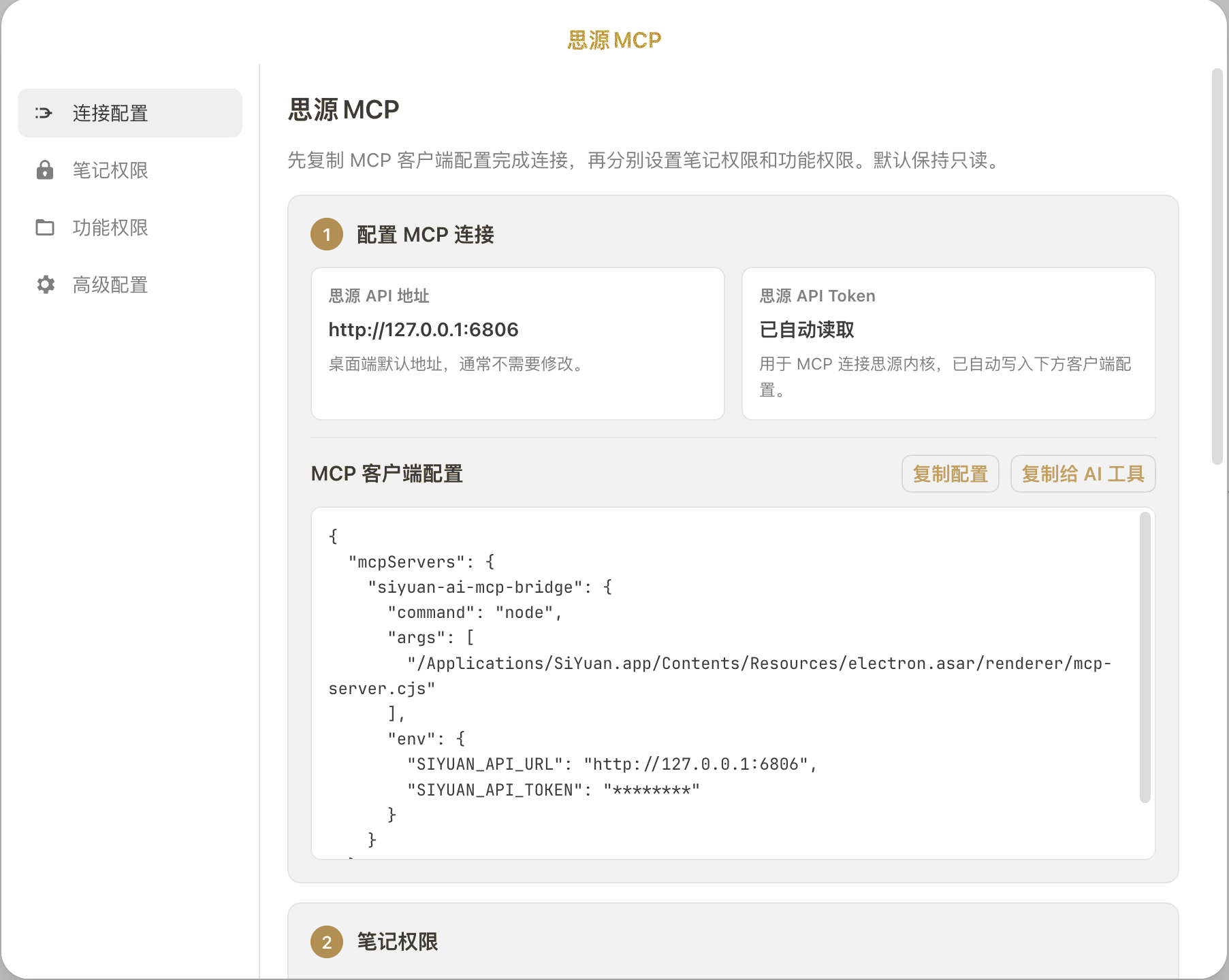
- 在思源集市安装并启用插件。
- 打开
设置 -> 集市 -> 已下载 -> 插件。 - 点击“思源MCP”插件卡片上的齿轮按钮进入配置界面。
- 在“连接配置”里复制 MCP 客户端配置。
- 粘贴到 Claude、Codex、Cursor 等支持 MCP 的 AI 工具中。
- 回到插件设置,按需要调整“笔记权限”和“功能权限”。
插件不会常驻顶栏图标,避免打扰日常写作。需要修改配置时,从集市插件卡片或命令面板打开设置即可。
权限怎么理解
思源MCP 有两层权限:笔记权限和功能权限。
笔记权限决定 AI 能接触哪些笔记本:
none:隐藏,AI 看不到这个笔记本。r:只读,AI 可以搜索和读取。rw:读写,AI 可以创建和编辑。rwd:读写删除,AI 可以删除内容。
功能权限决定 AI 能调用哪些动作。即使打开了写入或删除工具,也仍然需要目标笔记本具备对应权限。
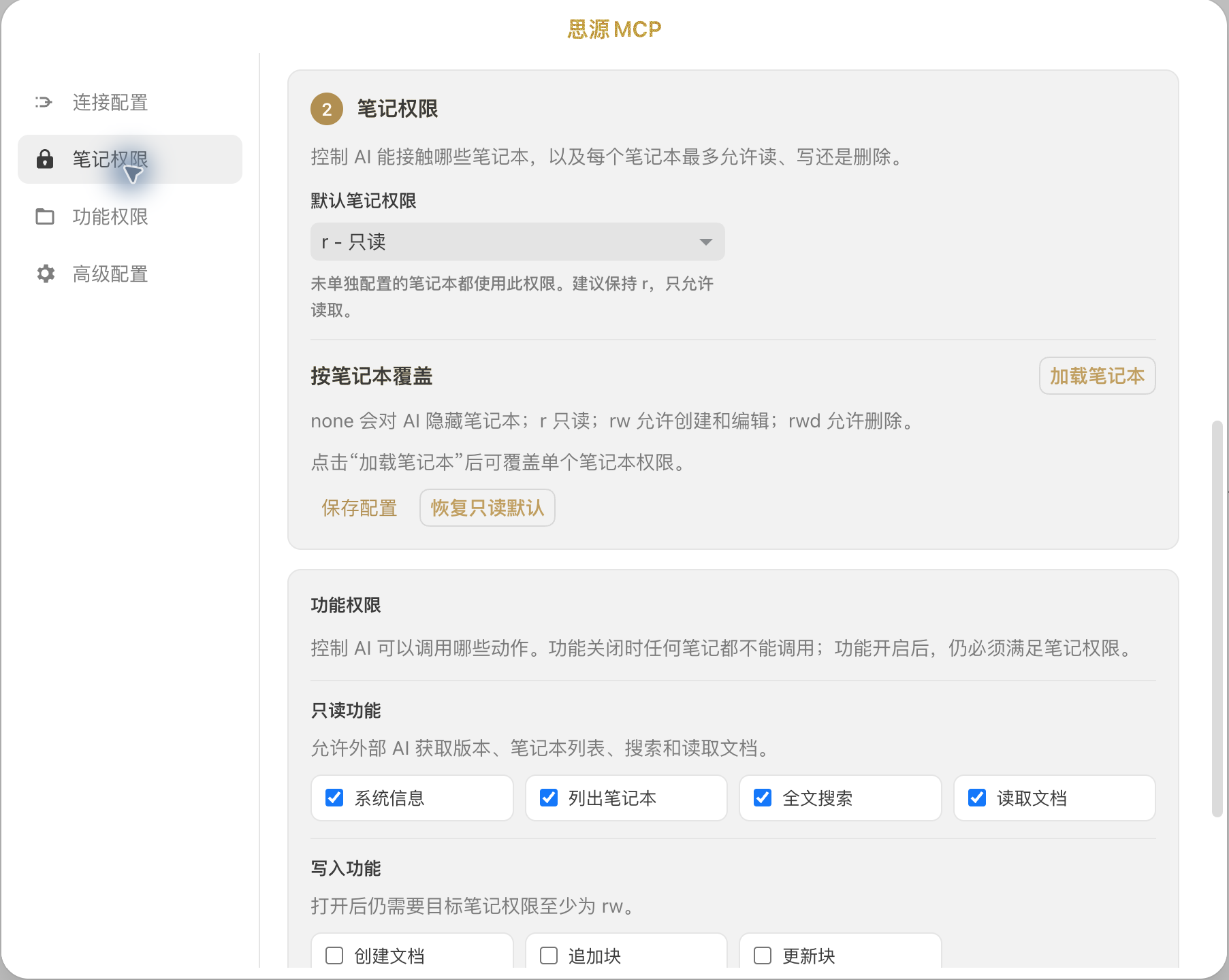
建议先保持默认只读:AI 可以读取和搜索,但不能创建、修改或删除内容。确认工作流稳定后,再只给少数可信笔记本开启写入权限。
关于 Token
插件会自动读取本机思源 API Token,并写入复制出来的 MCP 配置。这个 Token 只用于 MCP 客户端连接本机思源内核,不是 OpenAI、Claude 或其他 AI 平台的 Key。
配置界面会隐藏 Token 展示,但复制配置时会包含真实值。请不要把复制出来的配置发布到仓库、截图或公共对话中。
English
SiYuan MCP lets MCP-compatible AI tools search, read, and organize your SiYuan notes within permissions you control.
Typical usage:
- Ask an AI tool to search your SiYuan notes and summarize the useful parts.
- Let AI answer from your own notes instead of relying only on model memory.
- Keep private notebooks hidden from AI.
- Enable write access only for trusted notebooks when you want AI to append or create notes.
Open settings from Settings -> Bazaar -> Downloaded -> Plugins, then click the gear button on the SiYuan MCP plugin card. The plugin does not keep a permanent top-bar icon.
Start with the default read-only mode, then enable write or delete access only for notebooks you trust.
Installing Siyuan Ai Bridge
This server has no published package — it is built from source. Open the repository and follow its README.
▸ github.com/appdev/siyuan-ai-mcp-bridgeFAQ
Is Siyuan Ai Bridge MCP free?
Yes, Siyuan Ai Bridge MCP is free — one-click install via Unyly at no cost.
Does Siyuan Ai Bridge need an API key?
No, Siyuan Ai Bridge runs without API keys or environment variables.
Is Siyuan Ai Bridge hosted or self-hosted?
Self-hosted: the server runs locally on your machine via the install command above.
How do I install Siyuan Ai Bridge in Claude Desktop, Claude Code or Cursor?
Open Siyuan Ai Bridge on unyly.org, pick your client tab (Claude Desktop, Claude Code, Cursor) and press Install — the config is generated automatically, no JSON editing.
Related MCPs
Fetch
Web content fetching and conversion for efficient LLM usage.
AWS KB Retrieval
Retrieval from AWS Knowledge Base using Bedrock Agent Runtime.
 by modelcontextprotocol
Spring AI MCP Server
Provides auto-configuration for setting up an MCP server in Spring Boot applications.
llm-analysis-assistant
A very streamlined mcp client that supports calling and monitoring stdio/sse/streamableHttp, and can also view request responses through the /logs page. It also
 by xuzexin-hz
Compare Siyuan Ai Bridge with
Not sure what to pick?
Find your stack in 60 seconds
Author?
Embed badge for your README
Browse similar
All ai MCPs