
Smart Onboarding Assistant
FreeNot checkedAgentic AI HR Assistant using Model Context Protocol (MCP) & Claude.

About
Agentic AI HR Assistant using Model Context Protocol (MCP) & Claude.
README




An Agentic AI system that automates end-to-end HR workflows, from onboarding to scheduling, using the Model Context Protocol (MCP).
Overview
HR-ASSIST is an intelligent automation system built as part of the Codebasics Gen AI Bootcamp.
It transforms the Claude Desktop App into a powerful HR assistant capable of interacting with local databases, sending real emails, and managing calendars.
Unlike standard chatbots, HR-ASSIST uses Agentic Workflows to execute complex, multi-step tasks autonomously.
The Problem
HR managers spend hours toggling between HRMS software, email clients, and ticketing systems to onboard a single employee.
The Solution
A unified interface where natural language turns into action.
- Input: "Onboard Ruchitha as a Data Analyst."
- Output: Employee record created + Welcome email sent + IT ticket raised + Orientation meeting scheduled.
See it in Action
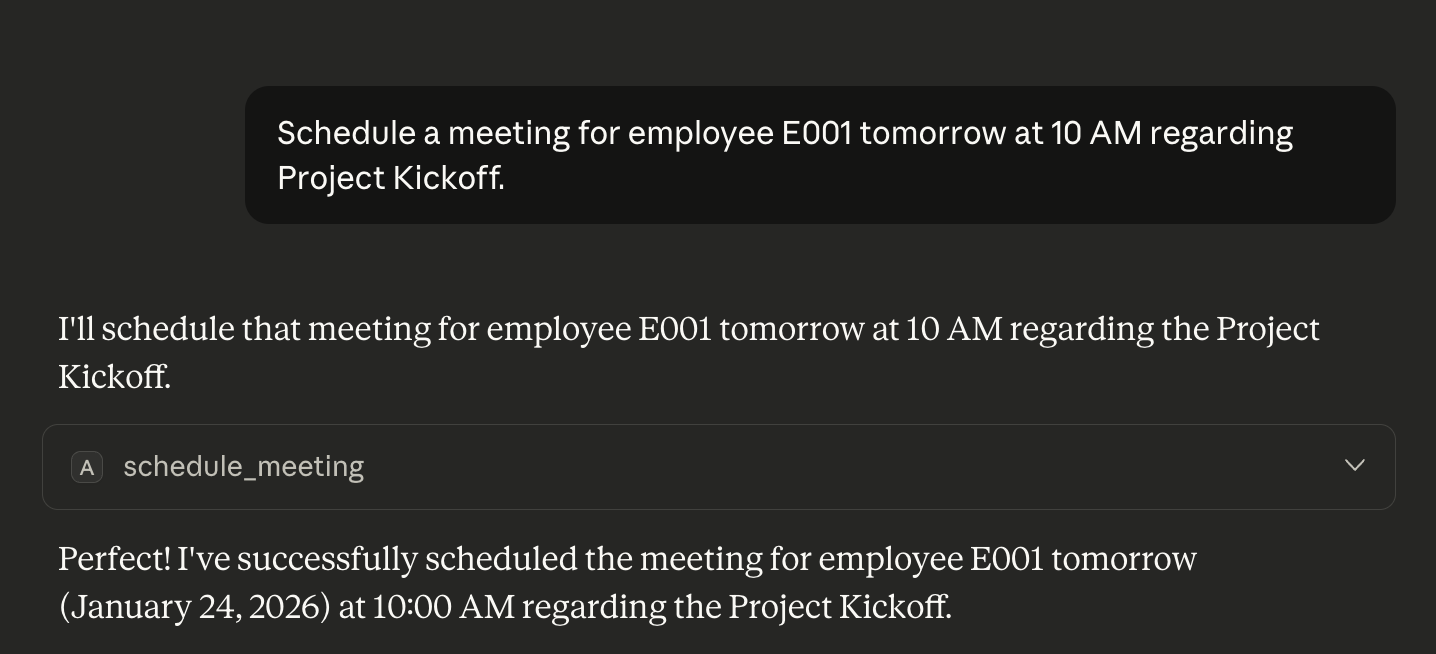
| 1. Agentic Scheduling | 2. Pre-built Prompt Templates |
|---|---|
 |
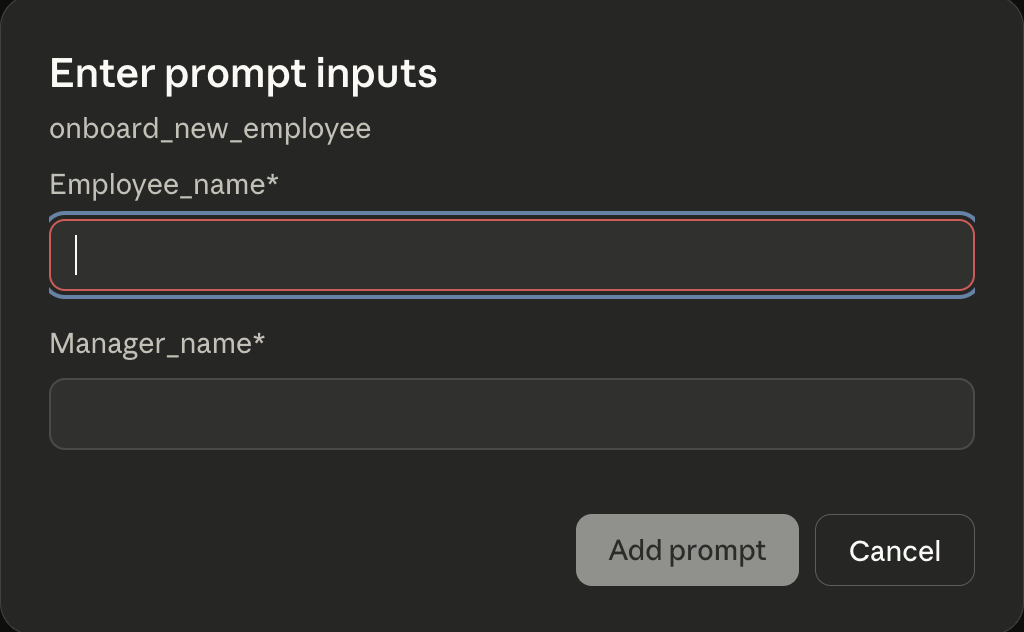 |
| The Agent intelligently parses dates to schedule meetings. | Custom UI forms for structured data entry. |
Key Features
| Feature | Description |
|---|---|
| MCP Prompts | Pre-configured templates (UI forms) for complex tasks like onboarding. |
| HRMS Integration | Custom Tool execution to search, add, and update employee records. |
| Email Automation | automated SMTP integration to send secure credentials via Gmail. |
| Ticket Management | Auto-generation of support tickets for IT equipment. |
| Intelligent Calendar | Natural language date parsing for meeting management. |
Technical Architecture
graph TD
    User[HR Manager] -->|Selects Template| UI[Claude Desktop UI]
    UI -->|MCP Protocol| Server[HR-Assist Python Server]
    Server -->|Write| DB[(Local HR Database)]
    Server -->|Send| SMTP[Gmail API]
    Server -->|Create| Ticket[Ticket System]
Tech Stack
- Language: Python 3.10+
- Protocol: Model Context Protocol (MCP) by Anthropic
- Dependency Management:
uv - Libraries:
fastmcp,pydantic,python-dotenv
Repository Structure
atliq-hr-assist/
├── hrms/                   # Core Business Logic Package
│   ├── __init__.py         # Package initialization
│   ├── employee_manager.py # Employee CRUD operations
│   ├── leave_manager.py    # Leave balance logic
│   ├── meeting_manager.py  # Calendar scheduling
│   ├── ticket_manager.py   # IT support ticketing
│   └── schemas.py          # Pydantic data models
├── images/                 # Documentation screenshots
│   ├── demo_onboard.png
│   └── demo_schedule.png
├── server.py               # Main MCP Server Entry Point
├── emails.py               # SMTP Email Handler
├── utils.py                # Helper functions (Data seeding)
├── .env                    # Email and Passwords (Excluded from repo)
├── .gitignore              # Git ignore rules
├── pyproject.toml          # Project dependencies configuration
└── uv.lock                 # Dependency lock file (ensures reproducibility)
Setup & Installation
- Clone the Repository
git clone [https://github.com/YOUR_USERNAME/hr-assist-mcp-agent.git](https://github.com/YOUR_USERNAME/hr-assist-mcp-agent.git)
cd hr-assist-mcp-agent
- Install Dependencies
uv init
uv add "mcp[cli]" python-dotenv
- Configure Environment
Create a
.envfile for your credentials:
[email protected]
CB_EMAIL_PWD=your_app_password
- Connect to Claude
Add the server path to your
claude_desktop_config.json:
{
  "mcpServers": {
    "hr-assist": {
      "command": "uv",
      "args": ["--directory", "ABSOLUTE_PATH", "run", "server.py"],
      "env": { "CB_EMAIL": "...", "CB_EMAIL_PWD": "..." }
    }
  }
}
Usage Guide
Method 1: Natural Language
Simply type in the chat bar:
"Schedule a meeting for employee E001 tomorrow at 10 AM regarding Project Kickoff."
Method 2: MCP Prompt Templates (Recommended)
- Click the Attach button or type
/in Claude. - Select
onboard_new_employee. - Fill in the form fields:
- Employee Name:
Ruchitha - Manager Name:
Dhaval
- Hit Run. The Agent will execute the entire workflow automatically.
Future Improvements
- Database: Migrate from in-memory storage to SQLite/PostgreSQL.
- Frontend: Build a Streamlit dashboard to view the generated tickets.
- Auth: Add Role-Based Access Control (RBAC) for manager approvals.
📄 License
- Developed as part of the Codebasics Gen AI Bootcamp.
- Copyright © Codebasics Inc.
from github.com/ruchitha-meenakshi/smart-onboarding-assistant
Installing Smart Onboarding Assistant
This server has no published package — it is built from source. Open the repository and follow its README.
▸ github.com/ruchitha-meenakshi/smart-onboarding-assistantFAQ
Is Smart Onboarding Assistant MCP free?
Yes, Smart Onboarding Assistant MCP is free — one-click install via Unyly at no cost.
Does Smart Onboarding Assistant need an API key?
No, Smart Onboarding Assistant runs without API keys or environment variables.
Is Smart Onboarding Assistant hosted or self-hosted?
Self-hosted: the server runs locally on your machine via the install command above.
How do I install Smart Onboarding Assistant in Claude Desktop, Claude Code or Cursor?
Open Smart Onboarding Assistant on unyly.org, pick your client tab (Claude Desktop, Claude Code, Cursor) and press Install — the config is generated automatically, no JSON editing.
Related MCPs
Fetch
Web content fetching and conversion for efficient LLM usage.
AWS KB Retrieval
Retrieval from AWS Knowledge Base using Bedrock Agent Runtime.
 by modelcontextprotocol
Spring AI MCP Server
Provides auto-configuration for setting up an MCP server in Spring Boot applications.
llm-analysis-assistant
A very streamlined mcp client that supports calling and monitoring stdio/sse/streamableHttp, and can also view request responses through the /logs page. It also
 by xuzexin-hz
Compare Smart Onboarding Assistant with
Not sure what to pick?
Find your stack in 60 seconds
Author?
Embed badge for your README
Browse similar
All ai MCPs