
Storybloq
FreeNot checkedEnables AI coding assistants to persist and manage project context across sessions, including tickets, roadmap, handovers, and lessons learned, via a structured

About
Enables AI coding assistants to persist and manage project context across sessions, including tickets, roadmap, handovers, and lessons learned, via a structured .story/ directory.
README

storybloq
Cross-session context persistence for AI coding.
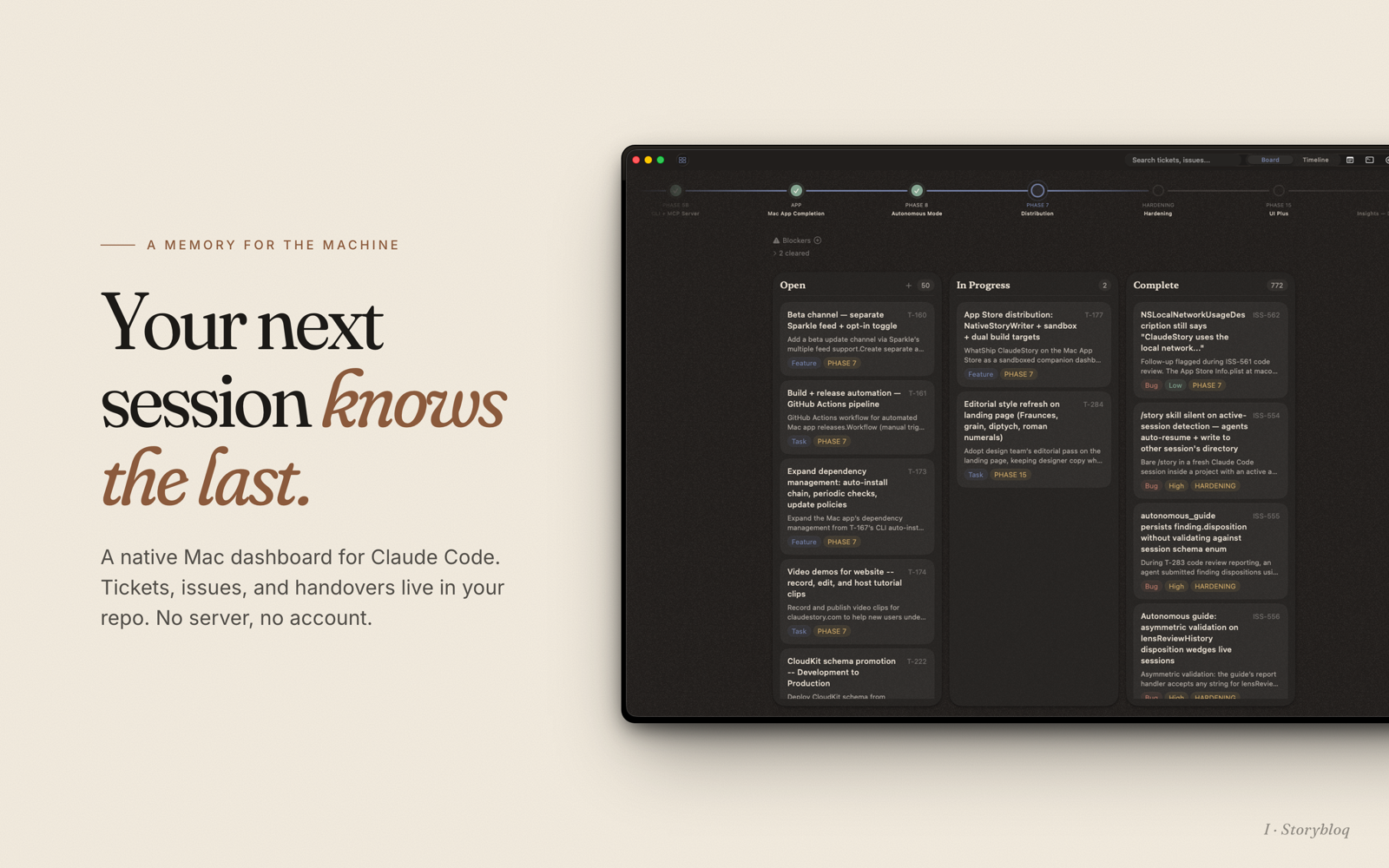
A file convention, a CLI, an MCP server, and Claude Code/Codex skills that together turn every coding session into a building block instead of a reset.





storybloq.com · Mac app · Review lenses · Privacy
The problem
AI coding assistants are stateless. Every new session starts from zero. The model doesn't know what was built yesterday, what's broken, what decisions were made, or what to work on next. Developers compensate with CLAUDE.md files and scattered notes, but there's no standard structure, no session continuity, and no tooling.
The real cost isn't wasted setup time. It's repeated mistakes, relitigated design decisions, hallucinated context, and linear instead of compounding work.
The idea
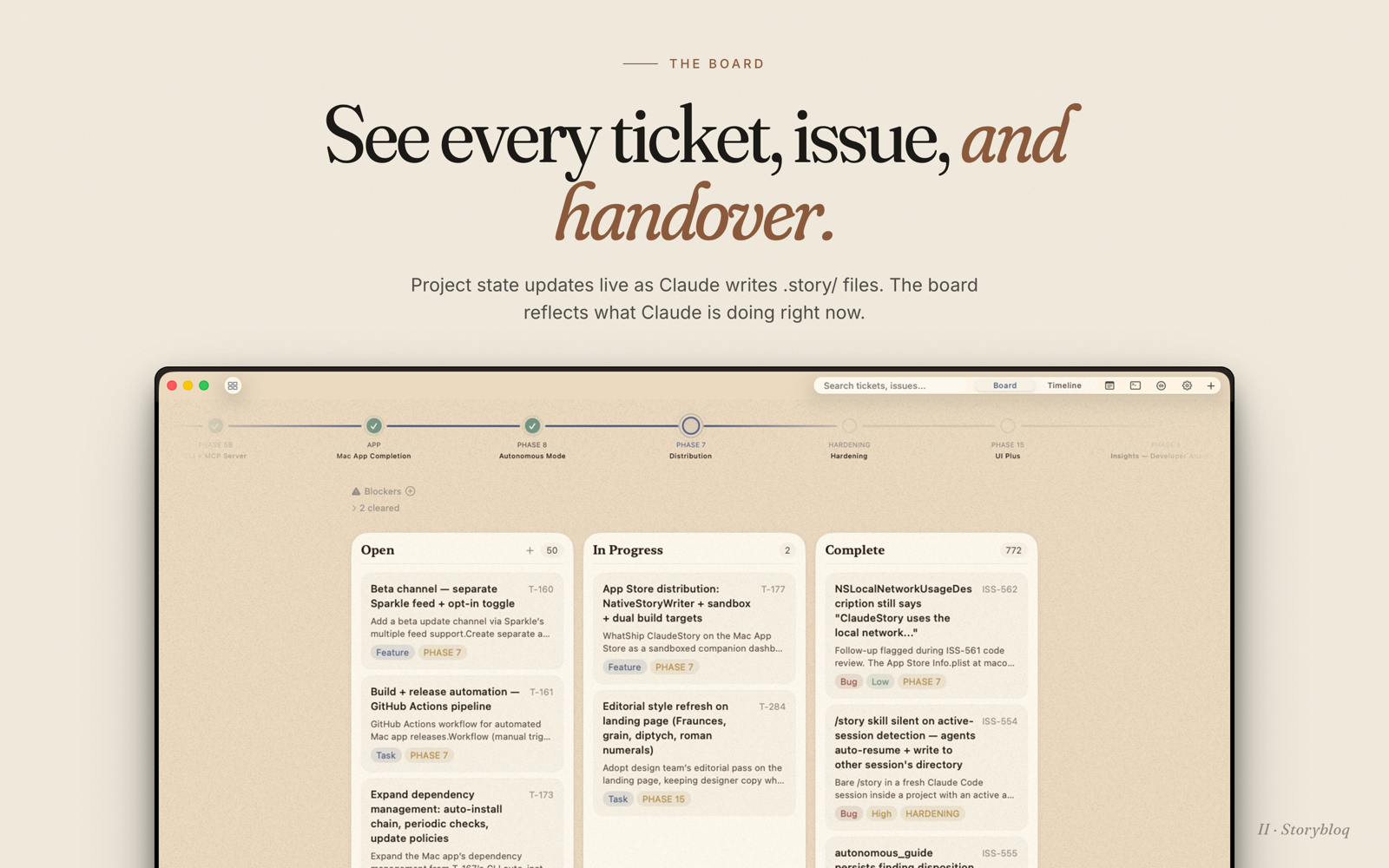
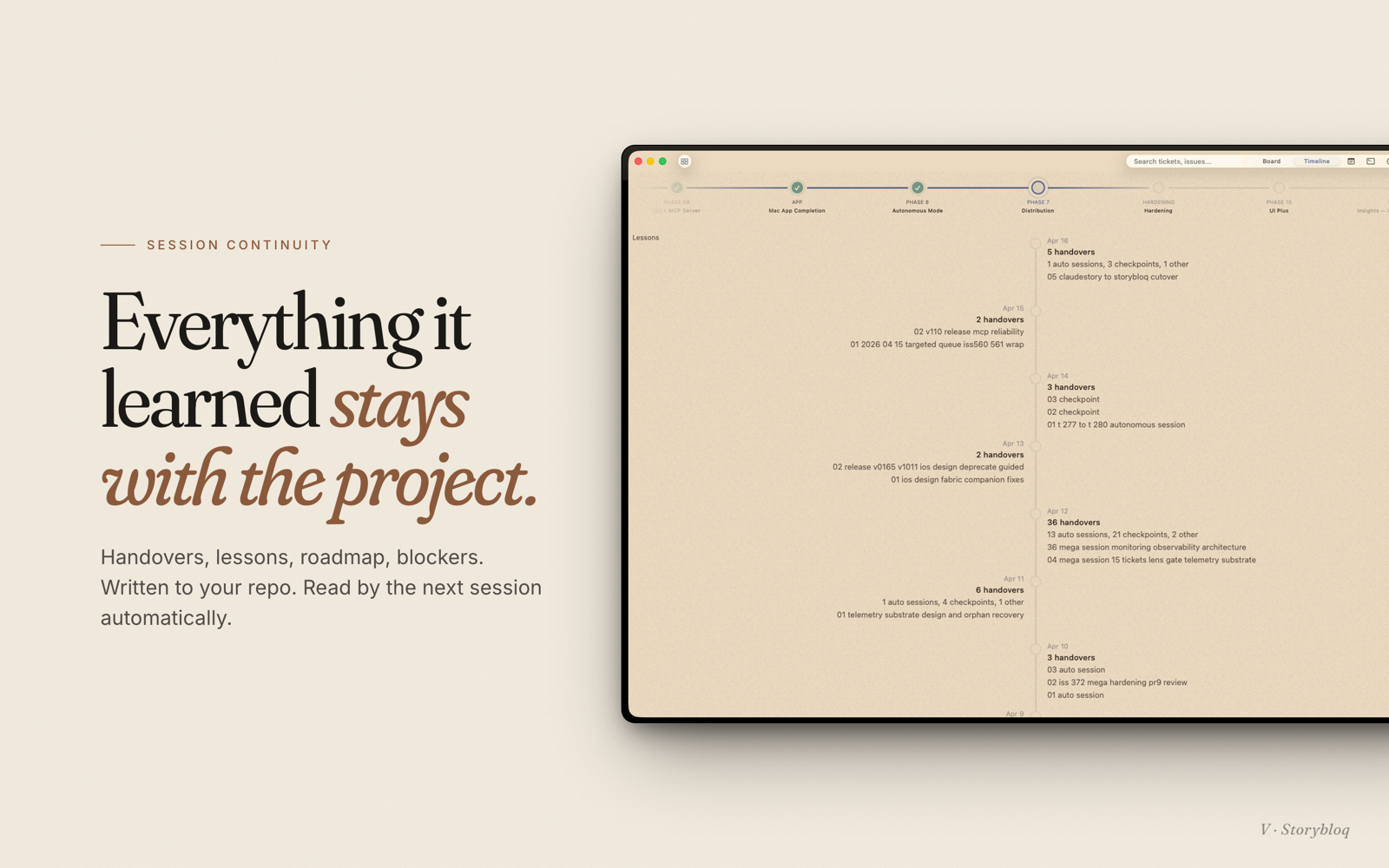
Every project gets a .story/ directory of JSON and markdown files. Tickets, issues, roadmap phases, session handovers, and lessons learned all live there, tracked by git, readable by any AI.
- CLI:
storybloq- inspect and mutate.story/from the terminal. - MCP server: structured tools Claude Code and Codex can call directly, with five additional tools when the local Bus is enabled. No subprocess spawning.
- Skill:
/storyin Claude Code or$storyin Codex loads project state at the start of every session. - Mac app: native sidebar that watches
.story/and updates live while your AI client works (separate product, free on the App Store).
Install
npm install -g @storybloq/storybloq@latest
storybloq setup --client all
Requires Node.js 20+ and at least one AI client: Claude Code or Codex CLI 0.130.0+. Package lives on npm at @storybloq/storybloq; releases are tagged on this repo at github.com/Storybloq/storybloq/releases.
setup --client all installs the Storybloq skill for Claude and Codex, registers this package as an MCP server, and configures available client hooks. Re-running it is safe. Codex reports installed hooks with trust unknown; open /hooks in Codex to review and trust them. setup-skill remains as a compatibility alias for Claude-only setup.
Upgrading
npm install -g @storybloq/storybloq@latest
storybloq setup --client all
Same two commands as a fresh install: @latest pulls the newest version, and re-running setup refreshes the Storybloq skill files, re-registers the MCP server, and sweeps any stale hook entries from prior installs.
You'll usually see a one-line banner on the next storybloq invocation whenever a newer version is on npm:
storybloq v1.2.0 is available (you have v1.1.6).
Update: npm install -g @storybloq/storybloq@latest
The CLI also silently refreshes the skill dir and migrates any legacy hook entries (for example, from the pre-rename @anthropologies/claudestory package) on the first run after an upgrade — no manual cleanup needed.
Alternative install via the Claude Code plugin system: see Storybloq/plugin-archive (legacy path; storybloq setup --client all is the recommended install).
Bootstrap a project
cd your-project
storybloq init --name "your-project"
For multi-repo projects, see Federation below.
That scaffolds:
.story/
├── config.json         project config + recipe overrides
├── roadmap.json        phase ordering + metadata
├── tickets/            T-001.json, T-002.json, ...
├── issues/             ISS-001.json, ISS-002.json, ...
├── notes/              N-001.json, N-002.json, ...
├── lessons/            L-001.json, ...
├── handovers/          YYYY-MM-DD-<slug>.md
└── snapshots/          state snapshots (gitignored)
Commit everything except .story/snapshots/.
Daily use
Inside Claude Code or Codex:
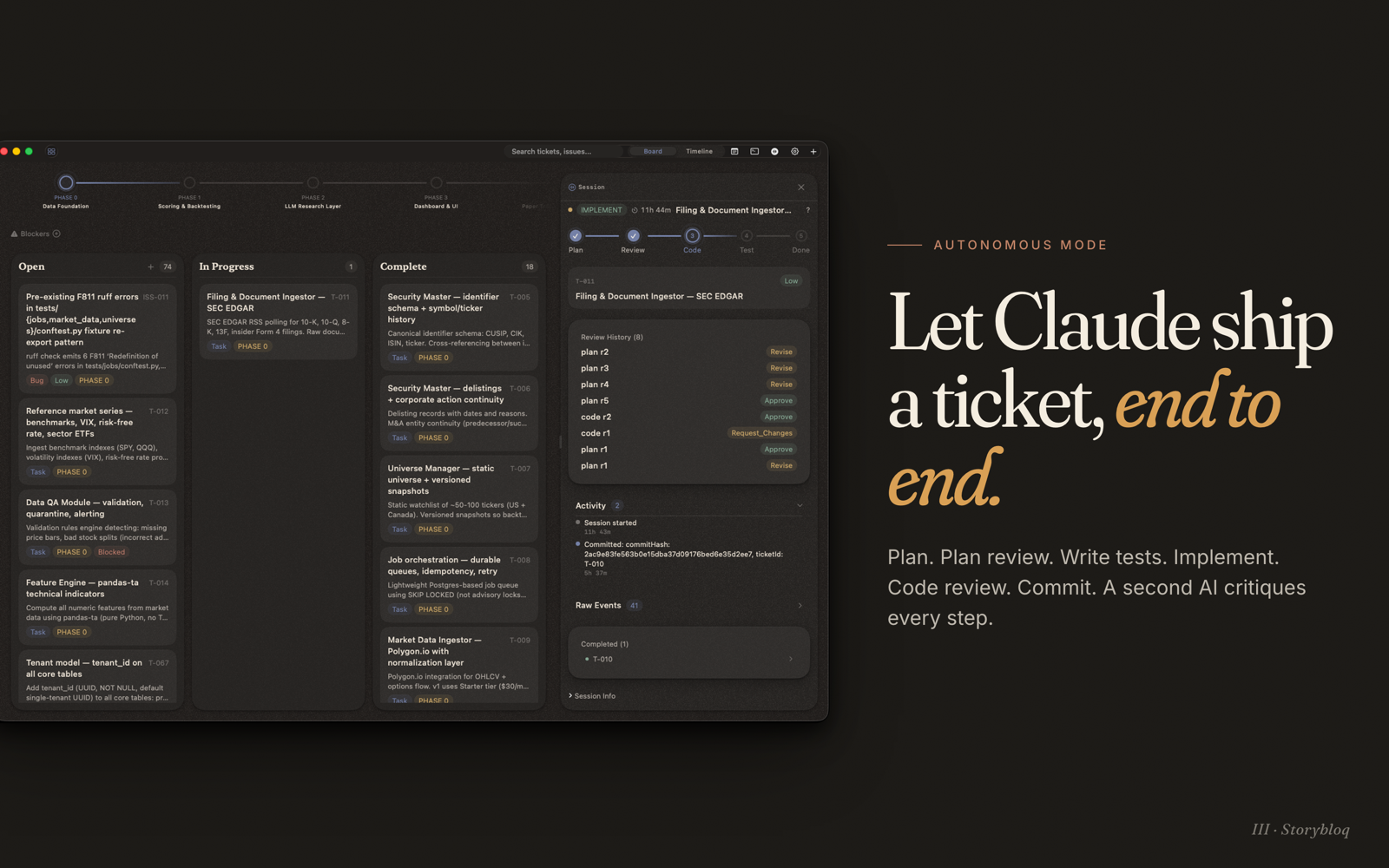
/storyin Claude Code or$storyin Codex - loads project status, reads the latest handover, surfaces open tickets and issues, lists blocked work, summarizes recent changes. When the client can run background agents and the actionable backlog is large, it also surfaces the orchestrate working style proactively (a recommendation, still gated by explicit opt-in)./story auto T-001 T-002 ISS-013/$story auto T-001 T-002 ISS-013- autonomous mode scoped to those items. Drives a ticket through plan -> plan review -> implement -> tests -> code review -> commit with handovers at each checkpoint./story review T-001/$story review T-001- runs the multi-lens review (see Storybloq/lenses) against a ticket's diff./story orchestrate/$story orchestrate- drives a multi-repo (or large single-repo) backlog when the client exposes exact callable workflow/subagent tools. Codex usesmulti_agent_v1.spawn_agent, its normalizedmulti_agent_v1__spawn_agentidentifier, or an exactspawn_agenttool. The Claude Agent View-backedstorybloq dispatchcommand is shipped; a product-managed Codex dispatch backend is not./story bus/$story bus- polls a task-bound local Bus endpoint so an implementer and an independent reviewer can exchange advisory findings without copy and paste./story handover/$story handover- writes a session handover capturing decisions, blockers, and next steps.
Both clients support context loading, autonomous mode, MCP, and compaction/status hooks. Codex Desktop can open an autonomous session's owning task and relay an exact owner response to it; Codex CLI safely falls back to a manual task switch. Autonomous code review defaults to a 12-round landing cap (clamped upward by ticket risk): unresolved critical findings and rejects still block, while non-blocking findings become follow-up issues at the cap. Set recipeOverrides.stages.CODE_REVIEW.maxReviewRounds to 0 to disable the cap explicitly.
recipeOverrides.compactThreshold accepts medium, high (default), or critical. The value selects both the pressure limits and the rotation trigger: medium uses lower limits and rotates at medium pressure, while critical uses higher limits and waits for critical pressure. At a clean COMPLETE boundary, threshold pressure ends the bounded session through HANDOVER because Storybloq cannot invoke a client compaction command. When the client itself compacts, the PreCompact and SessionStart hooks preserve the same session; pressure resets only after SessionStart confirms source: compact.
Outside the AI client, the same state is one storybloq invocation away.
Usage-limit auto-resume
Claude Code sessions stop at usage limits ("You've hit your usage limit"), and overnight autonomous work silently dies with them. Storybloq detects the stop through Claude Code's StopFailure hook, parses the reset time from the session transcript, records the stop in a global ledger (~/.claude/storybloq/limit-ledger.json), and resumes the session when the limit resets. On by default once hooks are installed.
- Autonomous sessions are parked on the same recovery lane as compaction and woken headlessly through the full state machine -- ownership rebind, git-HEAD validation, and recovery mapping all apply, so a wake after the workspace changed is validated, not blindly replayed. Sessions stopped mid-FINALIZE are never auto-resumed (commit replay is not proven safe); you get a notification with manual recovery steps instead.
- Plain sessions get a desktop notification at reset with the exact
claude --resumecommand. Per-project opt-in (limitResume.plainMode: "headless") wakes them headlessly instead. - Permission posture is never escalated. A session that ran with
--dangerously-skip-permissionsis only woken with that flag if the project explicitly opts in (limitResume.inheritBypass: true); otherwise it notifies.
The wake is driven by a transient detached waker process, not a daemon: it polls the ledger every 30 seconds, resumes what is due (attempt-capped, staggered, concurrency-bounded), and exits when nothing is pending. It survives laptop sleep but not reboot or logout -- after a reboot, the next storybloq invocation or hook fire in any project respawns it, so weekly-scale waits recover on your next activity. That trade is the cost of "no daemon."
Inspect and manage the queue with storybloq limit-status (--cancel <key> destroys a pending auto-resume, --requeue <key> retries a stood-down record). Disable globally with {"limitResume": {"enabled": false}} in ~/.claude/storybloq/config.json, or per project via limitResume in .story/config.json (also maxAttempts, staggerMs, maxConcurrent, notify, and more).
Prior art: the detection-and-reparse approach is modeled on unsnooze (MIT), which pioneered transcript-based limit detection and reset-time parsing for tmux-hosted sessions. Storybloq's version drops the tmux layer in favor of the documented hook surface and resumes autonomous sessions through its own state machine instead of a keystroke.
Storybloq Bus
Storybloq Bus is an optional local coordination protocol for one implementer task and one reviewer task. Runtime state lives under gitignored .story/bus/; confirmed findings still become canonical Storybloq issues with durable source provenance before they are sent as issue notices.
storybloq bus init
storybloq bus join implementer --client codex
storybloq bus join reviewer --client claude
storybloq bus hooks enable --client codex
storybloq bus hooks enable --client claude
Bus runtime is local and gitignored, so run storybloq bus init once in each checkout that will participate. Status and doctor report a fresh checkout as enabled but not initialized; that healthy inactive state does not block commits or autonomous FINALIZE. Other Bus commands and MCP tools never initialize the runtime implicitly. Initialization rejects symlinked ignore files and negation patterns because it cannot safely prove that Git will exclude the complete runtime otherwise.
The foreground protocol includes send, poll, acknowledge, thread state, status, doctor, export, and ship checks. Messages are hash-chained, idempotent, bounded, task-bound, secret-screened, and delivered through crash-recoverable recipient mailboxes. Critical messages require a matching unresolved critical issue by default. Bus text is always peer-agent advice: it never grants owner approval or authorizes merge, push, signing, deployment, credentials, spending, or destructive actions.
V1 does not include a daemon, process spawning, headless resume, or automatic offline wake as Bus delivery paths. Natural SessionStart/Stop hooks and explicit polling are the delivery paths. Codex Desktop remains non-wakeable. (Usage-limit auto-resume, above, is a scoped exception outside the Bus: its transient waker recovers limit-stopped sessions and is not a message delivery path.)
Federation
Federation coordinates AI agent work across multiple repos. One project becomes the orchestrator. It declares which repos (nodes) are part of the system, how they depend on each other, and how they communicate at runtime. Each node keeps its own .story/ with its own tickets, issues, and handovers. The orchestrator reads across all of them.
# Create an orchestrator
storybloq init --type orchestrator --name "my-platform"

# Register nodes
storybloq node add api --path ../api --stack typescript --role "REST backend"
storybloq node add web --path ../web --stack nextjs --depends-on api
storybloq node add sdk --path ../sdk --stack typescript
Three relationship types connect nodes:
dependsOnon node config: build-order edges. The web app depends on the API.linkson node config: runtime integration. The web app calls the API over HTTP.crossNodeBlockedByon tickets: a ticket in one repo is blocked until a ticket in another repo is complete. Example:"crossNodeBlockedBy": ["api:T-012"].
From the orchestrator directory:
storybloq status              # aggregated view across all nodes
storybloq recommend           # federation-aware suggestions (bottlenecks, stale nodes, blockers)
storybloq ticket list --node api   # list tickets in the api node without cd-ing
The recommendation engine generates federation-specific suggestions: nodes blocking downstream work, bottleneck nodes depended on by many others, nodes with no handover in two weeks. Tickets with crossNodeBlockedBy refs never surface in recommendations until the blocking ticket is complete.
CLI reference
All commands accept --format json|md (default md). Pipe JSON through jq for scripting, read the markdown variant directly.
Project
| Command | Description |
|---|---|
storybloq init [--name] [--type orchestrator] [--force] |
Scaffold .story/ (add --type orchestrator for multi-repo) |
storybloq status |
Project summary with phase statuses, counts, and risks |
storybloq validate [--integrity-only] |
Reference, schema, source-provenance, and loader-independent JSON checks |
storybloq setup --client claude|codex|all [--skip-hooks] |
Install Storybloq skills, register MCP, and configure client hooks |
storybloq setup-skill [--skip-hooks] |
Compatibility alias for storybloq setup --client claude |
storybloq recommend --count N |
Context-aware work suggestions |
Phases
| Command | Description |
|---|---|
storybloq phase list |
All phases with derived status (status is computed from tickets, never stored) |
storybloq phase current |
First non-complete phase |
storybloq phase tickets --phase <id> |
Leaf tickets for a phase |
storybloq phase create --id --name --label --description [--summary] --after/--at-start |
Create a phase |
storybloq phase rename <id> [--name] [--label] [--description] [--summary] |
Update phase metadata |
storybloq phase move <id> --after/--at-start |
Reorder |
storybloq phase delete <id> [--reassign <target>] |
Delete (reassign contained tickets) |
Tickets
| Command | Description |
|---|---|
storybloq ticket list [--status] [--phase] [--type] |
List leaf tickets (umbrellas excluded) |
storybloq ticket get <id> |
Full ticket detail |
storybloq ticket next |
Highest-priority unblocked ticket |
storybloq ticket blocked |
All currently blocked tickets |
storybloq ticket create --title --type --phase [--description] [--blocked-by] [--parent-ticket] [--node <name>] |
Create (use --node from orchestrator) |
storybloq ticket update <id> [--status] [--title] [--phase] [--cross-node-blocked-by] [--node <name>] ... |
Update |
storybloq ticket meta get|set|unset <id> [path] [value] |
Manage custom passthrough metadata |
storybloq ticket delete <id> [--force] |
Delete |
Issues
| Command | Description |
|---|---|
storybloq issue list [--status] [--severity] [--component] [--phase] |
List issues |
storybloq issue get <id> |
Issue detail |
storybloq issue create --title --severity --impact [--components] [--related-tickets] [--location] [--source-ref <json>] [--dedupe-key] [--created-by] |
Create, with optional durable review evidence and retry identity |
storybloq issue update <id> [--status] [--title] [--severity] [--source-ref <json>] ... |
Update |
storybloq issue meta get|set|unset <id> [path] [value] |
Manage custom passthrough metadata |
storybloq issue delete <id> |
Delete |
Notes and lessons
| Command | Description |
|---|---|
storybloq note list · note get · note create · note update |
Brainstorming and idea capture |
storybloq lesson list · lesson get · lesson create · lesson update · lesson reinforce |
Reusable patterns and anti-patterns |
storybloq lesson digest |
Compact summary of all active lessons for skill injection |
Handovers, blockers, snapshots
| Command | Description |
|---|---|
storybloq handover list · handover latest · handover get <file> |
Session continuity documents |
storybloq handover create --title --tldr ... |
Write a new handover |
storybloq blocker list · blocker add · blocker clear |
External dependencies blocking progress |
storybloq snapshot · storybloq recap |
Capture state and diff against the last snapshot |
storybloq export [--phase <id>] [--all] [--format json|md] |
Self-contained project document |
storybloq limit-status [--cancel <key>] [--requeue <key>] |
Pending usage-limit auto-resumes (global across projects) |
Storybloq Bus (opt-in)
| Command | Description |
|---|---|
storybloq bus init |
Enable the local Bus and create gitignored runtime state |
storybloq bus join implementer|reviewer [--client] [--replace] |
Bind the current client task to one exclusive role |
storybloq bus send ... |
Create a thread or send a reply with a required idempotency key |
storybloq bus poll |
Read unacknowledged messages for the task-bound endpoint |
storybloq bus ack <message-id> --disposition ... |
Record accepted, rejected, or deferred delivery state |
storybloq bus thread show|update ... |
Inspect or transition a participant thread |
storybloq bus hooks enable|disable [--client] |
Control guarded live delivery for this project |
storybloq bus status|doctor |
Inspect state and validate integrity |
storybloq bus check --ship |
Fail when critical Bus work blocks release |
storybloq bus export <thread-id> |
Explicitly export one runtime transcript |
Federation (orchestrator projects)
| Command | Description |
|---|---|
storybloq init --type orchestrator |
Scaffold an orchestrator .story/ with a nodes map |
storybloq node add <name> --path <dir> [--stack] [--role] [--depends-on] [--link] |
Register a node repo |
storybloq node remove <name> [--force | --prune] |
Unregister a node (checks for dependents first) |
storybloq node update <name> [--stack] [--role] [--depends-on] [--health] |
Update node metadata |
storybloq node list |
Table of all configured nodes |
storybloq config set-federation --allow-node-writes |
Allow orchestrator to write into node repos |
Team (team-mode projects)
See Team mode for the merge model these commands operate on.
| Command | Description |
|---|---|
storybloq team init [--id-allocator local|git-refs] [--claim-staleness-hours N] |
Enable team mode on this project |
storybloq team setup |
Install the git merge driver in this clone (each teammate, once per checkout) |
storybloq team doctor [--ci] |
Team health checks; --ci exits non-zero on error findings |
storybloq team config show · team config set <key> <value> |
Inspect or change team configuration |
storybloq team reserve <type> --count N |
Reserve display ids via remote refs (git-refs allocator only) |
storybloq reconcile [--dry-run] [--ci] |
Detect and renumber duplicate display ids |
storybloq conflicts list · conflicts show <id> |
Inspect unresolved merge conflicts |
storybloq resolve <id> [--field <f>] [--use ours|theirs] [--value <json>] |
Resolve conflicts (also resolve config, resolve roadmap) |
storybloq gc [--apply] [--retention-days N] |
Purge deleted-item tombstones past retention; dry-run without --apply (default 30-day retention) |
MCP server reference
Register with Claude Code or Codex (done automatically by setup):
claude mcp add storybloq -s user -- storybloq --mcp
codex mcp add storybloq --env STORYBLOQ_CLIENT=codex -- storybloq --mcp
The server imports the same TypeScript modules as the CLI directly, so there's no subprocess overhead. It auto-discovers the project root by walking up from the working directory to the nearest .story/ parent.
The base tools are grouped by responsibility. Bus-enabled projects register five additional tools at MCP process start; restart connected clients after storybloq bus init.
Read (no side effects)
storybloq_status · storybloq_phase_list · storybloq_phase_current · storybloq_phase_tickets · storybloq_ticket_list · storybloq_ticket_get · storybloq_ticket_meta_get · storybloq_ticket_next · storybloq_ticket_blocked · storybloq_issue_list · storybloq_issue_get · storybloq_issue_meta_get · storybloq_note_list · storybloq_note_get · storybloq_lesson_list · storybloq_lesson_get · storybloq_lesson_digest · storybloq_handover_list · storybloq_handover_latest · storybloq_handover_get · storybloq_blocker_list · storybloq_validate · storybloq_recap · storybloq_recommend · storybloq_export · storybloq_selftest
Write (mutate .story/)
storybloq_snapshot · storybloq_handover_create · storybloq_ticket_create · storybloq_ticket_update · storybloq_ticket_meta_set · storybloq_ticket_meta_unset · storybloq_issue_create · storybloq_issue_update · storybloq_issue_meta_set · storybloq_issue_meta_unset · storybloq_note_create · storybloq_note_update · storybloq_lesson_create · storybloq_lesson_update · storybloq_lesson_reinforce · storybloq_phase_create
Autonomous mode + review + observability
storybloq_autonomous_guide drives the autonomous state machine (PICK_TICKET -> PLAN -> PLAN_REVIEW -> WRITE_TESTS -> IMPLEMENT -> TEST -> CODE_REVIEW -> FINALIZE -> COMPLETE).
storybloq_review_lenses_prepare · storybloq_review_lenses_judge · storybloq_review_lenses_synthesize orchestrate the multi-lens review loop (requires @storybloq/lenses).
storybloq_session_report · storybloq_register_subprocess · storybloq_unregister_subprocess surface session health to the Mac app.
Storybloq Bus (feature-gated)
storybloq_bus_send · storybloq_bus_poll · storybloq_bus_ack · storybloq_bus_thread_get · storybloq_bus_thread_update
Every call requires a stable endpoint id and the current validated client task id. Poll and thread outputs mark peer content as advisory authority. storybloq_bus_poll and storybloq_bus_thread_get are read-only with respect to canonical tracked project state; poll may reconcile gitignored .story/bus/ runtime metadata. The other three retain normal MCP write approvals.
Federation (orchestrator projects)
storybloq_node_init bootstraps .story/ in a node repo from the orchestrator context.
storybloq_node_add · storybloq_node_list · storybloq_node_update manage the orchestrator's node registry.
Hooks
PreCompact (compaction preparation, set up by setup)
Runs storybloq session compact-prepare before context compaction so snapshots and resume breadcrumbs stay current where the client supports PreCompact hooks. Codex setup uses storybloq session compact-prepare --client codex with a manual|auto matcher so a Codex hook cannot compact a Claude-owned session; Claude Code setup leaves the matcher empty.
{
  "hooks": {
    "PreCompact": [{
      "matcher": "manual|auto",
      "hooks": [{ "type": "command", "command": "storybloq session compact-prepare" }]
    }]
  }
}
Skip with storybloq setup --client all --skip-hooks.
SessionStart (resume prompt injection)
Injects a compact-aware resume prompt. Codex setup uses the same command with --codex-hook-json and matcher startup|resume|clear|compact; its hook JSON also carries the current task id so same-task COMPACT recovery can continue without a copy/pasted Resume token. Hook trust cannot be verified by setup, so check /hooks in Codex after installation.
{
  "hooks": {
    "SessionStart": [{
      "matcher": "compact",
      "hooks": [{ "type": "command", "command": "storybloq session resume-prompt" }]
    }]
  }
}
storybloq bus hooks enable is a separate project opt-in. It adds endpoint metadata and pending counts to SessionStart, and permits the synchronous Stop hook to block once for each new mailbox cursor. Peer payload bytes never appear in hook output. Claude's shared hook structure is upgraded once and remains guarded by project-local policy; Codex uses storybloq hook-status --client codex.
StopFailure (usage-limit detection)
Runs storybloq session limit-stop when a Claude Code session stops on a rate limit, recording the stop for auto-resume (see Usage-limit auto-resume above). Setup also adds a second SessionStart matcher group ("resume") carrying the same session resume-prompt command so a manual reopen of a limit-stopped session gets limit-aware guidance. Both entries are Claude-only, reconciled on every upgrade, and removed automatically when the global kill switch is set.
{
  "hooks": {
    "StopFailure": [{
      "matcher": "rate_limit",
      "hooks": [{ "type": "command", "command": "storybloq session limit-stop" }]
    }]
  }
}
Library usage
import { loadProject } from "@storybloq/storybloq";

const { state, warnings } = await loadProject("/path/to/project");
console.log(state.tickets.length);           // all tickets
console.log(state.phaseTickets("p1"));       // leaf tickets in phase p1
console.log(state.umbrellaChildren("T-014")); // children of an umbrella
Full type definitions ship with the package (exports.types).
File format examples
Ticket (.story/tickets/T-001.json):
{
  "id": "T-001",
  "title": "Add search to sidebar",
  "type": "task",
  "status": "inprogress",
  "phase": "p2",
  "order": 10,
  "description": "Fuzzy match over ticket title + description.",
  "createdDate": "2026-04-12",
  "completedDate": null,
  "blockedBy": [],
  "parentTicket": null,
  "crossNodeBlockedBy": []
}
Issue (.story/issues/ISS-001.json):
{
  "id": "ISS-001",
  "title": "Drag handle hit target too small on trackpad",
  "status": "open",
  "severity": "medium",
  "components": ["mac-app"],
  "impact": "Dragging tickets on trackpad requires multiple tries.",
  "location": ["macos/Views/KanbanCard.swift:42"],
  "sourceRefs": [{
    "path": "macos/Views/KanbanCard.swift",
    "startLine": 42,
    "revision": "5ac37f94f7023b18f72d8e3fcf43dd64f54c11d7",
    "contentHash": "f5b1b1b65dca3d9d86adf7c5d49082aa4dc09e7903ab46ce50e8cc6b4812e4cf",
    "reviewId": "review-2026-04-15"
  }],
  "dedupeKey": "review-2026-04-15:finding-3",
  "createdBy": "external-reviewer",
  "discoveredDate": "2026-04-15",
  "resolvedDate": null,
  "relatedTickets": []
}
Each record is its own file. IDs are sequential within type (T-001, T-002, ...). Relationships are single-canonical-owner: a ticket's blockedBy field points at blocker tickets, and the reverse (who-blocks-me) is derived by scanning.
Create operations are safe to run in parallel. ID assignment and the create write happen together under a project lock, so concurrent creators are serialized and each receives a distinct sequential ID. A create can never silently overwrite an existing record; under heavy simultaneous contention a creator fails loudly with an error rather than colliding.
Issue sourceRefs preserve review evidence independently of mutable path:line display strings. Storybloq hashes only the normalized referenced line range and never stores source excerpts. A supplied revision is resolved to a Git commit; otherwise Storybloq captures the working-tree range and records HEAD only when those bytes match. storybloq validate reports an error when original evidence cannot be resolved, a warning when valid historical evidence moved or changed at HEAD, and no finding when it still matches.
Use storybloq validate --integrity-only when damaged config.json or roadmap.json prevents normal loading. This read-only preflight scans every .story/**/*.json file in one pass, reports parser positions where available, and separates critical singleton failures from skippable item and auxiliary-file failures. It never rewrites damaged files.
Confirmed manual or external review findings should be filed directly as open issues. Search first, pass reviewer attribution in createdBy, attach the review ID and revision through sourceRefs, and use a stable dedupeKey such as <review-id>:<finding-id> so retries are idempotent. Keep uncertain design questions as notes or owner questions; the implementing agent owns issue status and resolution.
Ticket and issue records preserve unknown JSON fields. Use storybloq ticket meta and storybloq issue meta to read or mutate those custom passthrough fields without touching core Storybloq fields. Values are JSON, and dot paths address nested objects, for example storybloq ticket meta set T-001 integration.linear '"ABC-123"'.
Autonomous plan-review depth can be seeded per ticket with reviewRisk metadata (low, medium, or high). For example, storybloq ticket meta set T-001 reviewRisk '"high"' requires at least three plan-review rounds. Legacy risk metadata is also recognized, but reviewRisk is the canonical key. This setting changes review depth only; it never skips a review stage.
Example workflow
# Initialize
storybloq init --name "my-app"

# Add the first phase
storybloq phase create --id bootstrap --name "Bootstrap" --label "PHASE 1" \
  --description "Get the app running end-to-end"

# Add a ticket
storybloq ticket create --title "Scaffold Next.js" --type task --phase bootstrap

# Start Claude Code and type /story, or invoke $story in Codex, then work on it
# (or go autonomous: /story auto T-001 / $story auto T-001)

# At the end of a session, commit your changes including .story/
git add .
git commit -m "T-001: scaffold Next.js"

# Session ends. Next session starts with /story or $story and picks up with full context.
Team mode
.story/ is plain JSON tracked by git, so a team sharing it hits the same two problems any shared state hits: concurrent edits to the same record, and concurrent creation of new records. Team mode addresses both.
storybloq team init     # once per project; commit the result
storybloq team setup    # once per clone, by every teammate
team init configures the project for team work (schema version, claim staleness, id allocator, required client features) and runs setup for your own clone. team setup installs the storybloq-json git merge driver into the clone's local git config and writes .story/.gitattributes so .story/ JSON files route through it. Git config is per-clone, so each teammate runs setup once in each checkout. storybloq team doctor checks the whole arrangement (duplicate display ids, unresolved conflicts, stale claims, merge driver installed) and exits non-zero on errors with --ci; see Team CI below for the merge-gate workflow.
Concurrent edits: the merge model
When git merges two branches that both touched the same .story/ record, the merge driver runs a structured three-way merge per record instead of a line-based text merge. Fields merge independently: if one teammate changes a ticket's status while another edits its description, both changes land. When the same field diverges on both sides, the driver picks neither. It records the divergence as a structured _conflicts block inside the record, so the file stays valid JSON with no conflict markers; git still reports the path as conflicted, so git add the file and commit to conclude the merge, then resolve the recorded conflicts at your own pace (they carry forward across later merges until resolved). A project with unresolved _conflicts is write-blocked until every conflict is resolved:
storybloq conflicts list                     # every item with unresolved conflicts
storybloq conflicts show T-042               # field-level detail: base, ours, theirs
storybloq resolve T-042 --field status --use theirs
storybloq resolve T-042 --field title --value '"Merged title"'
storybloq resolve config                     # config.json merges the same way
storybloq resolve roadmap                    # so does roadmap.json
Concurrent creates: display id collisions
Two teammates creating items on parallel branches is a different failure mode. New records are stored under a random canonical-id filename (for example t-8f2kq0v3n1xw9d4e.json), so independently created items never collide at the file level; only legacy sequential filenames (ISS-041.json, from projects that predate canonical ids) can still path-collide. What can collide is the human-facing display id: both branches compute "next free number" locally and both mint T-042. That is not a merge conflict, it is a duplicate, and it has its own tool:
storybloq reconcile          # renumber duplicates; the copy already on the protected ref, else the earlier one, keeps the number
storybloq reconcile --ci     # detect only: exit non-zero if duplicates exist, mutate nothing
Renumbered items keep their old display id in previousDisplayIds, so existing references to the old number still resolve.
Choosing an id allocator
team init --id-allocator local|git-refs picks how display ids are allocated. The tradeoff:
local (default) |
git-refs |
|
|---|---|---|
| Allocation | next free number, computed from the local checkout | ids reserved as refs on the shared git remote before use |
| Collisions | divergent branches can mint duplicate display ids | prevented at the source |
| Recovery | storybloq reconcile after merges; gate merges with reconcile --ci |
not needed for ids |
| Requirements | none; works offline | a reachable shared remote with ref-push permission |
| Older clients | any client can create items | clients that do not declare the reservation capability fail closed (see caveat below) |
With git-refs, team init also adds remote-ref-reservations to team.requiredFeatures, so clients that do not declare that capability refuse to create items instead of allocating locally against a git-refs team and colliding. One caveat: current Mac app releases predate reservations while still declaring the capability, so until the Mac-side update ships, avoid creating items from the Mac app on git-refs teams. storybloq team reserve tickets --count 5 reserves a batch of ids up front.
Schema version and older clients
team init stamps schemaVersion: 3 in .story/config.json. CLI releases before 1.5.0 refuse a schemaVersion-3 project cleanly, for both reads and writes, with an upgrade message (Config schemaVersion 3 exceeds max supported 2. Run: npm update -g @storybloq/storybloq). The hard failure is deliberate: those clients do not understand team-mode data, and in mixed-version teams they previously produced silent partial reads instead of an error.
Team repos created before the fence carry schemaVersion: 2. To upgrade an existing team repo: wait until every teammate runs a 1.5.0+ CLI, then set schemaVersion to 3 manually (or re-run storybloq team init, which performs the same upgrade). Older Mac app builds show a schemaVersion-3 project as read-only until updated; no data is lost.
Upgrading a repo that predates .story/.gitignore
team init and team setup write .story/.gitignore covering the machine-local files (sessions/, snapshots/, status.json, federation-cache.json, channel-inbox/). A gitignore does not untrack files that are already tracked, so a project that adopted storybloq before the gitignore existed may already have ephemeral files in git history. Check once and untrack them:
git ls-files .story/ | grep -E 'sessions/|snapshots/|status\.json|federation-cache\.json|channel-inbox/'
git rm -r --cached --ignore-unmatch .story/sessions .story/snapshots .story/status.json .story/federation-cache.json .story/channel-inbox
Commit the removal. Session state records absolute paths (including your username), so this is worth doing before the first shared push.
Deletes leave tombstones
Deleting a ticket, issue, note, or lesson in team mode does not remove it from the shared repo. The file stays, keeping its full original content, plus a lifecycle marker: lifecycle: "deleted", a deletedAt timestamp, and deletedBy set to the deleter's git user.email. Resolving a delete-versus-edit conflict can likewise stamp the resolver's email as deletedBy on a synthesized tombstone. Tombstones stay in the repo until someone runs storybloq gc --apply (default 30-day retention).
The takeaway: deleting an item hides it from normal views, but it does not remove the content or your identity stamp from teammates' clones. Run storybloq gc to preview eligible tombstones, then storybloq gc --apply to purge them once they pass retention.
What your team sees
Team mode shares state through the repo, so everything committed under .story/ is visible to everyone with repo access:
- Tickets, issues, notes, and lessons, including all free-text fields.
- Handovers: narrative session documents, often the most detailed record of what happened and why.
- Claim blocks on in-progress items: the claiming teammate's git identity (
user.email), branch name, and claim timestamp, plus aclaimedBySessionUUID while an autonomous session works the item. - Unresolved merge conflicts: after a divergent merge, the affected record carries the conflicting values from both sides (base, ours, and theirs) inside its
_conflictsblock until someone resolves it. Text a teammate wrote but later lost in arbitration stays visible in the file until resolution.
The machine-local files stay out of the repo once the gitignore is in place: sessions/ (autonomous session state, including each session's events.log), snapshots/, status.json, federation-cache.json, and channel-inbox/. Treat committed .story/ content with the same care as commit messages and code comments; it travels with the repo.
Team CI
For team-mode projects, add CI validation to catch duplicate displayIds and stale references before merge. See TEAM_CI.md for a ready-to-use GitHub Actions workflow.
Related projects
- @storybloq/lenses - multi-lens code review MCP server and library. 9 specialized reviewers run in parallel and return structured verdicts; the storybloq autonomous lens backend consumes it directly.
- Storybloq for Mac - native macOS app that watches
.story/and updates live while your AI client works. Free on the Mac App Store.
Contributing
Issues and PRs welcome. For non-trivial changes, open an issue first so we can align on direction.
Development setup:
git clone https://github.com/Storybloq/storybloq.git
cd storybloq
npm install
npm test
npm run build
License
PolyForm Shield 1.0.0 - a source-available, non-compete license (not OSI open source).
You may use storybloq for any purpose, including:
- personal and hobby projects
- open-source projects
- internal company use
- commercial software you are building
You may not, without a separate license, use storybloq to build a product that competes with it: repackaging, reselling, hosting it as a managed service, or white-labeling it. For that, contact [email protected].
See LICENSE for the full text and NOTICE for the required copyright notice you must propagate if you redistribute.
Install Storybloq in Claude Desktop, Claude Code & Cursor
unyly install storybloqInstalls into Claude Desktop, Claude Code, Cursor & VS Code — handles npx, uvx and build-from-source repos for you.
First time? Get the CLI: curl -fsSL https://unyly.org/install | sh
Or configure manually
Run in your terminal:
claude mcp add storybloq -- npx -y @storybloq/storybloqFAQ
Is Storybloq MCP free?
Yes, Storybloq MCP is free — one-click install via Unyly at no cost.
Does Storybloq need an API key?
No, Storybloq runs without API keys or environment variables.
Is Storybloq hosted or self-hosted?
Self-hosted: the server runs locally on your machine via the install command above.
How do I install Storybloq in Claude Desktop, Claude Code or Cursor?
Open Storybloq on unyly.org, pick your client tab (Claude Desktop, Claude Code, Cursor) and press Install — the config is generated automatically, no JSON editing.
Related MCPs
Fetch
Web content fetching and conversion for efficient LLM usage.
AWS KB Retrieval
Retrieval from AWS Knowledge Base using Bedrock Agent Runtime.
 by modelcontextprotocol
Spring AI MCP Server
Provides auto-configuration for setting up an MCP server in Spring Boot applications.
llm-analysis-assistant
A very streamlined mcp client that supports calling and monitoring stdio/sse/streamableHttp, and can also view request responses through the /logs page. It also
 by xuzexin-hz
Compare Storybloq with
Not sure what to pick?
Find your stack in 60 seconds
Author?
Embed badge for your README
Browse similar
All ai MCPs