
Straightedge
FreeNot checkedEnables AI agents to deterministically control Mermaid diagram layout through semantic operations like alignment, distribution, resizing, and history management

About
Enables AI agents to deterministically control Mermaid diagram layout through semantic operations like alignment, distribution, resizing, and history management via MCP.
README
Tell your agent how the diagram should look. Straightedge gives an AI agent deterministic, editable layout controls for Mermaid while keeping the Mermaid source ordinary and portable.
Prompt → picture → persistent intent
Start with ordinary Mermaid. There is no Straightedge metadata yet, so Mermaid chooses the default left-to-right layout.

Tell the agent:
“Give the three processing stages equal-width boxes. Keep them in a row with 64 pixels between them, then put Database 72 pixels below Model.”
The source stays unchanged; the layout changes:
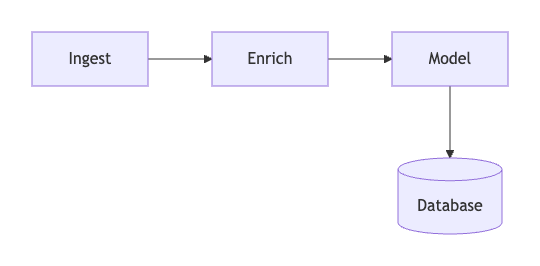
The new sidecar records semantic intent rather than generated coordinates:
- no pipeline.layout.json
+ {
+   "version": 3,
+   "ops": [
+     { "op": "equalize_size", "nodes": ["ingest", "enrich", "model"],
+       "dimension": "width", "value": 116 },
+     { "op": "resize_node", "node": "db", "width": 104, "height": 76 },
+     { "op": "row_nodes", "nodes": ["ingest", "enrich", "model"],
+       "gap": 64, "align": "center" },
+     { "op": "place_relative", "node": "db", "reference": "model",
+       "side": "below", "gap": 72 }
+   ]
+ }
Then tell the agent:
“Apply the executive-light theme and fit it to a wide README frame.”
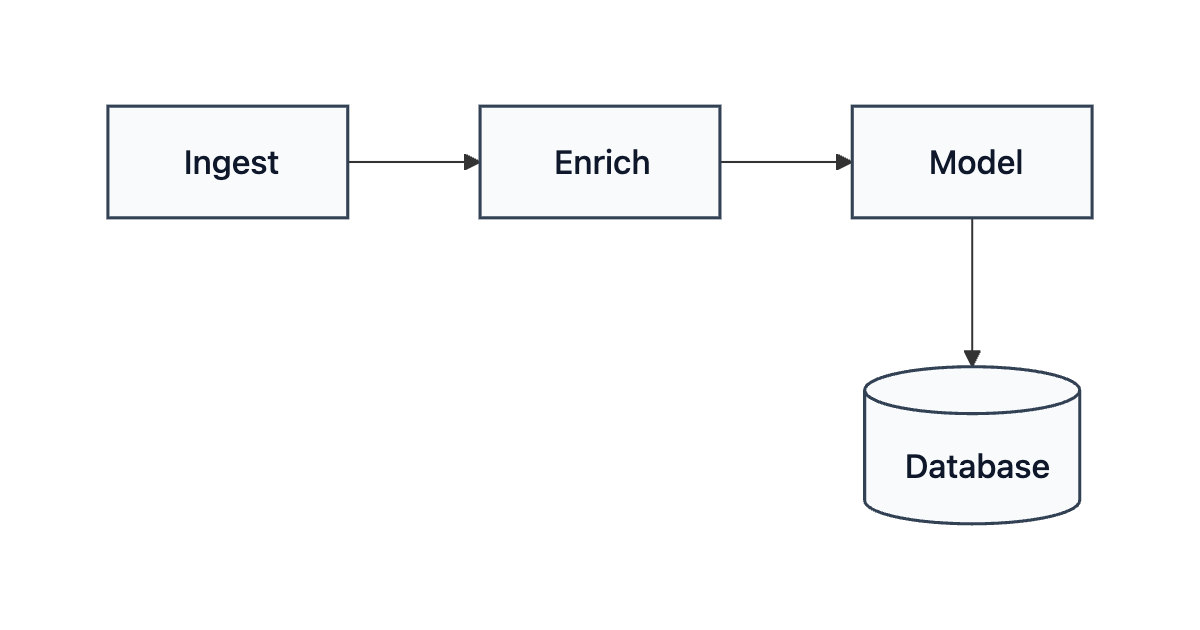
That prompt appends two operations; it does not flatten the earlier intent:
  "ops": [
    ... layout operations above,
+   { "op": "apply_theme", "theme": "executive-light" },
+   { "op": "set_presentation",
+     "presentation": { "preset": "readme-wide", "minFontSize": 12 } }
  ]
Shape-aware instructions use the same loop. For example:
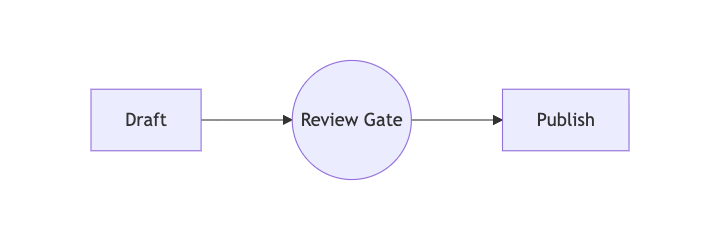
“Make Review Gate about 10% smaller.”
| Before resize | After shape-aware resize |
|---|---|
 |
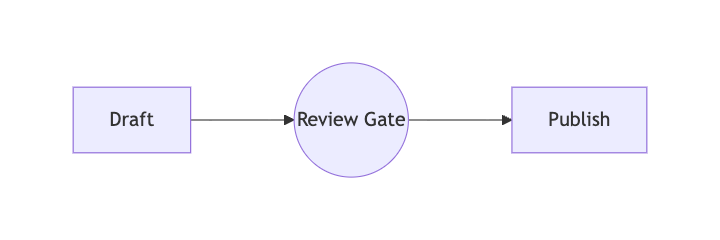 |
The agent resolves “10% smaller” from inspected geometry and persists one deterministic operation. Both dimensions are equal, so the circle stays circular:
  "ops": [
    { "op": "set_presentation",
      "presentation": { "width": 720, "height": 240, "padding": 24 } },
+   { "op": "resize_node", "node": "review_gate",
+     "width": 94.0921875, "height": 94.0921875 }
  ]
The smaller circle is valid but intentionally demonstrates honest diagnostics: the active checks
flag its tighter label padding for review instead of claiming the result is aesthetically perfect.
The pipeline presentation has no blocking problems. Regenerate every image and copied sidecar with
npm run docs:assets; the exact inputs live in examples.
Straightedge records visual instructions next to each source:
pipeline.mmd            Mermaid source; Straightedge reads it
pipeline.layout.json    ordered visual intent; safe to remove or reset
pipeline.png            generated render; ignored by Git in examples
Coordinates are deliberately not stored. On every render, Straightedge obtains a fresh ELK
baseline, replays semantic operations such as row_nodes, align_nodes, and resize_node, paints
the result in Chromium, and checks the resulting DOM geometry. Stable Mermaid node IDs preserve
intent as labels and structure evolve.
Project status
0.2.0-alpha.1 is the initial OSS preview. Its supported scope is Mermaid flowcharts without
subgraphs. Other Mermaid diagram families, org-chart routing, semantic tree layout, multi-user
editing, and remote editor hosting are not supported yet. See SPEC.md,
ADR-0001, and the implemented initial-release plan in
ADR-0007. A future, complete Conda/Pixi
distribution is designed in ADR-0008; no Conda
package or channel exists yet.
Requirements:
- Node.js 22.12 or newer;
- a Chromium browser usable by Puppeteer (
straightedge doctor --jsonreports the resolved one); - macOS or Linux for the current local/CI evidence. CI runs Ubuntu with Node 22.
Chromium's sandbox stays enabled by default. The repository's disposable GitHub-hosted jobs opt
out with STRAIGHTEDGE_CHROMIUM_NO_SANDBOX=1; do not use that escape hatch for untrusted diagrams
or on a shared host. See SECURITY.md.
The npm package name is reserved in metadata but this preview has not been published. Do not use an
npm install --global straightedge command until a release exists.
Run from source
This is the initial-release golden path:
git clone https://github.com/gmjen/straightedge.git
cd straightedge
npm ci
npm run build
node dist/cli.js doctor
node dist/cli.js render examples/pipeline.mmd
node dist/cli.js edit examples/pipeline.mmd
render writes PNG beside the source by default. --svg writes SVG and --output <path> chooses a
different destination. Structured commands accept --json. Exit code 0 means no warning or
error was found, 1 means reviewable warnings, and 2 means a blocking diagnostic or runtime/input
failure.
Conversational edit loop
Inspect first, submit a coherent operation or transaction, then read the returned image and scoped checks:
node dist/cli.js inspect chart.mmd
node dist/cli.js align chart.mmd box_a box_b --edge top
node dist/cli.js distribute chart.mmd ingest enrich model database \
  --axis horizontal --order given --gap 24
node dist/cli.js row chart.mmd ingest enrich model database --gap 24
node dist/cli.js stack chart.mmd ceo chief lead --gap 32
node dist/cli.js resize chart.mmd circle_y --scale 0.9
node dist/cli.js history chart.mmd
node dist/cli.js explain chart.mmd
Given-order distribution, row, and stack use the listed node order and persist it in sidecar v3.
Old v1/v2 distribute operations with no order retain legacy current-position ordering. Preview a
v3 migration with migrate; add --yes to write it.
Circle resizing is shape-aware: a scale changes both axes, and specifying only width or height resolves a single diameter. Rectangle dimensions remain independently editable. All resizing is center-preserving and labels are not scaled.
Use apply for one atomic batch:
node dist/cli.js apply chart.mmd '[
  {"op":"row_nodes","nodes":["a","b","c"],"gap":32},
  {"op":"resize_node","node":"c","width":120}
]' --json
The candidate is rendered and checked before one compare-and-swap sidecar write. A skipped ID, blocking geometry problem, parse failure, or runtime failure leaves the prior bytes unchanged.
Checks and honest claims
Every JSON and MCP result contains check.profile, check.completed, named check stages, and a
bounded check.claim. A successful result says:
No blocking problems were detected by the active checks.
geometry checks replay, labels/shapes, overlap/gaps, edges, arrowheads, stale operations, and the
required browser runtime. presentation includes those checks plus target-frame readability and
advisories for unusually long connectors, doglegs, edited-direction contradictions, and excessive
frame whitespace. A persisted frame activates presentation automatically:
node dist/cli.js check chart.mmd --profile presentation --json
node dist/cli.js check chart.mmd --profile presentation --suppress <stable-problem-id>
Suppression is request-scoped and never hides errors. A clean status means the active checks
reported nothing, review means warnings require judgment, and failed means a blocking issue or
required-stage failure.
Safe history, undo, and reset
history reports whether every operation is effective, overridden, partially overridden, or
skipped. explain summarizes source direction, effective ordering, presentation policy, redundant
intent, and edits that oppose or later adjust earlier intent.
Undo replays and renders the candidate before atomically removing the final operation. Reset is preview-only unless explicitly confirmed:
node dist/cli.js undo chart.mmd
node dist/cli.js reset chart.mmd                 # preview; no write
node dist/cli.js reset chart.mmd --yes           # move sidecar into .straightedge/backups/
node dist/cli.js restore chart.mmd <backup-path> # preview
node dist/cli.js restore chart.mmd <backup-path> --yes
reset --yes --no-backup is intentionally explicit and unrecoverable. Local backup state is
ignored by Git.
Local editor
node dist/cli.js edit chart.mmd starts a token-protected server bound only to 127.0.0.1. The
editor and agent surfaces share the same transaction engine. It supports drag, partial and
shape-aware resize, numbered selection order, align/distribute/row/stack, safe repair, transactional
undo, session redo, recoverable reset, viewport-only zoom/fit, and inline errors.
Unsaved Mermaid source is visibly marked. Any layout action or refresh offers Save and apply, Discard and apply, or Cancel; render responses cannot overwrite a dirty draft. Textarea undo remains native, while Cmd/Ctrl+Z and Cmd/Ctrl+Shift+Z operate on layout history when focus is outside text entry.
Connect an AI agent with MCP
Build from source, then configure an MCP client with the absolute CLI path:
{
  "mcpServers": {
    "straightedge": {
      "command": "node",
      "args": ["/absolute/path/to/straightedge/dist/cli.js", "mcp"]
    }
  }
}
The intended journey is inspect → describe visual intent → submit one semantic transaction → examine the rendered image and structured result → refine or undo. The MCP server exposes the same row, stack, distribute, resize, history, explain, undo, reset-preview, and restore behavior as the CLI.
Development and security
npm test              # fast domain tests
npm run test:coverage # baseline Node coverage report
npm run test:e2e      # real Chromium, CLI, transaction, and editor flows
npm run test:docs     # links, policy files, and visual dimensions
npm run test:package  # pack, clean install, CLI/API/types consumer smoke
npm run test:all      # complete local release gate
Straightedge has no telemetry and sends no diagram or other data to a any service. The editor is not safe to expose remotely. Mermaid uses strict security mode with HTML labels disabled; callers should still avoid untrusted source. See SECURITY.md for the private reporting channel and CONTRIBUTING.md for fixture and pull-request guidance.
License
Licensed under the BSD 3-Clause License.
Installing Straightedge
This server has no published package — it is built from source. Open the repository and follow its README.
▸ github.com/gmjen/straightedgeFAQ
Is Straightedge MCP free?
Yes, Straightedge MCP is free — one-click install via Unyly at no cost.
Does Straightedge need an API key?
No, Straightedge runs without API keys or environment variables.
Is Straightedge hosted or self-hosted?
Self-hosted: the server runs locally on your machine via the install command above.
How do I install Straightedge in Claude Desktop, Claude Code or Cursor?
Open Straightedge on unyly.org, pick your client tab (Claude Desktop, Claude Code, Cursor) and press Install — the config is generated automatically, no JSON editing.
Related MCPs
Fetch
Web content fetching and conversion for efficient LLM usage.
AWS KB Retrieval
Retrieval from AWS Knowledge Base using Bedrock Agent Runtime.
 by modelcontextprotocol
Spring AI MCP Server
Provides auto-configuration for setting up an MCP server in Spring Boot applications.
llm-analysis-assistant
A very streamlined mcp client that supports calling and monitoring stdio/sse/streamableHttp, and can also view request responses through the /logs page. It also
 by xuzexin-hz
MCP-Agent
A simple, composable framework to build agents using Model Context Protocol by [LastMile AI](https://www.lastmileai.dev)
 by lastmile-ai
Spring AI MCP Client
Provides auto-configuration for MCP client functionality in Spring Boot applications.
mcp.natoma.ai
A Hosted MCP Platform to discover, install, manage and deploy MCP servers by [Natoma Labs](https://www.natoma.ai)
MCPHub
Website to list high quality MCP servers and reviews by real users. Also provide online chatbot for popular LLM models with MCP server support.
MCP Servers Rating and User Reviews
Website to rate MCP servers, write authentic user reviews, and [search engine for agent & mcp](http://www.deepnlp.org/search/agent)
mkinf
An Open Source registry of hosted MCP Servers to accelerate AI agent workflows.
Compare Straightedge with
Not sure what to pick?
Find your stack in 60 seconds
Author?
Embed badge for your README
Browse similar
All ai MCPs